1. การตั้งค่าเริ่มต้น
This section guides you through the initial setup of your DOOGEE Tab A9 Pro tablet.
1.1 เนื้อหาบรรจุภัณฑ์
ตรวจสอบว่ามีรายการทั้งหมดอยู่ในแพ็คเกจ:
- 1x DOOGEE Tab A9 Pro Tablet
- สาย USB Type-C 1x
- เครื่องชาร์จ 1x
- 1x Stylus (VIP Edition)
- 1x Tempered Film (VIP Edition)
- 1x Bluetooth Mouse (VIP Edition)
- 1x Leather Protective Cover (VIP Edition)
- 1x Bluetooth Keyboard (VIP Edition)
- 1x กล่องบรรจุภัณฑ์
- 1x คู่มือผู้ใช้

Image: DOOGEE Tab A9 Pro tablet shown with its complete set of accessories, including a stylus, tempered film, Bluetooth mouse, leather protective cover, and Bluetooth keyboard.
1.2 การชาร์จแท็บเล็ต
Before first use, fully charge the tablet. Connect the Type-C USB cable to the tablet's USB port and the charger to a power outlet. The tablet supports a maximum charging current of 10W.
1.3 การเปิด/ปิดเครื่อง
- การเปิดเครื่อง: Press and hold the power button until the DOOGEE logo appears.
- วิธีปิดเครื่อง: Press and hold the power button, then select "Power off" from the options on the screen.
1.4 การกำหนดค่าเริ่มต้น
Upon first power-on, follow the on-screen prompts to configure your tablet. This includes selecting your language, connecting to a Wi-Fi network, setting up your Google account, and configuring security options.

ภาพ: ด้านหน้าและด้านหลัง view of the DOOGEE Tab A9 Pro tablet, highlighting its sleek design and camera placement.
2. คู่มือการใช้งาน
This section provides guidance on using the core features of your DOOGEE Tab A9 Pro tablet.
2.1 การใช้งานส่วนติดต่อผู้ใช้ของ Android 15
The tablet runs on Android 15. Familiarize yourself with gestures and navigation:
- ปัดขึ้น: เข้าถึงลิ้นชักแอป
- เลื่อนลง: เข้าถึงการตั้งค่าด่วนและการแจ้งเตือน
- แตะ: เลือกรายการ
- กดแบบยาว: เข้าถึงเมนูบริบทหรือย้ายไอคอน
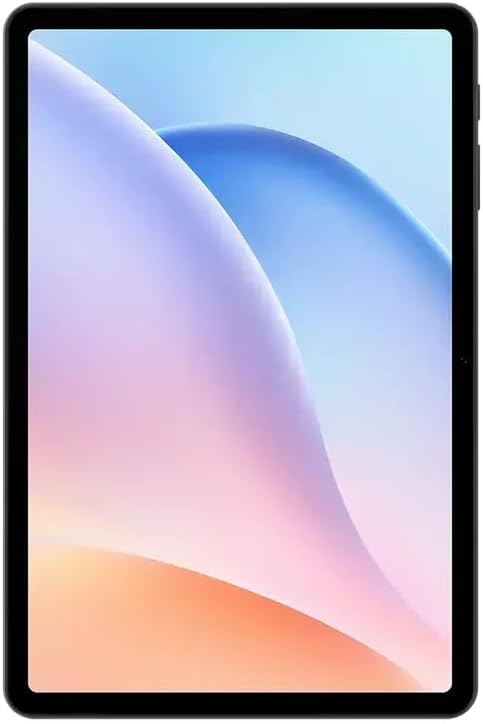
ภาพ: ด้านหน้า view of the DOOGEE Tab A9 Pro tablet, showcasing its 10.1-inch IPS HD display.
2.2 การเชื่อมต่อ Wi-Fi และ Bluetooth
เพื่อเชื่อมต่อกับอุปกรณ์ Wi-Fi หรือ Bluetooth:
- ไปที่ การตั้งค่า.
- เลือก เครือข่ายและอินเตอร์เน็ต สำหรับ Wi-Fi หรือ อุปกรณ์ที่เชื่อมต่อ สำหรับบลูทูธ
- Toggle Wi-Fi or Bluetooth on and select the desired network or device to connect.
The tablet supports Wi-Fi 802.11 a/b/g/n/ac (2.4GHz/5GHz) and Bluetooth 5.0.
2.3 การใช้กล้อง
The tablet features a 5MP front camera and an 8MP rear camera with flash. Open the Camera app to capture photos and videos. Video recording supports FHD 30fps.
2.4 External Storage (TF Card)
The tablet includes a TF card slot, supporting up to 2TB of external storage. Insert a compatible TF card to expand your device's memory for photos, videos, and documents.
2.5 การเชื่อมต่ออุปกรณ์ต่อพ่วง
The VIP Edition includes a Bluetooth keyboard and mouse. Pair these devices via Bluetooth settings for enhanced productivity. The tablet also supports OTG (On-The-Go) functionality via its Type-C USB port for connecting other USB devices, and has a 3.5mm earphone jack.
3. การบำรุงรักษา
Proper maintenance ensures the longevity and optimal performance of your DOOGEE Tab A9 Pro.
3.1 การทำความสะอาดแท็บเล็ต
- ใช้ผ้านุ่มไม่เป็นขุยทำความสะอาดหน้าจอและตัวเครื่อง
- หลีกเลี่ยงการใช้สารเคมีที่รุนแรง น้ำยาทำความสะอาดที่มีฤทธิ์กัดกร่อน หรือสเปรย์แอโรซอล
- สำหรับรอยเปื้อนฝังแน่น ให้เช็ดออกเล็กน้อยampเทน้ำลงบนผ้า
3.2 การดูแลแบตเตอรี่
The tablet is equipped with a 6580mAh battery. To maximize battery life:
- หลีกเลี่ยงอุณหภูมิที่สูงหรือต่ำเกินไป
- อย่าปล่อยให้แบตเตอรี่หมดจนหมดบ่อยๆ
- โปรดใช้ที่ชาร์จที่ให้มาเพื่อการชาร์จที่ดีที่สุด

Image: Visual representation of the DOOGEE Tab A9 Pro's 6580mAh battery, highlighting its capacity and 10W fast charging capability.
3.3 การอัปเดตซอฟต์แวร์
ตรวจสอบและติดตั้งการอัปเดตซอฟต์แวร์เป็นประจำเพื่อให้แน่ใจว่าแท็บเล็ตของคุณมีฟีเจอร์ แพตช์ความปลอดภัย และการปรับปรุงประสิทธิภาพล่าสุด ไปที่ การตั้งค่า > ระบบ > อัปเดตระบบ.
4 การแก้ไขปัญหา
This section addresses common issues you might encounter with your DOOGEE Tab A9 Pro.
แท็บเล็ต 4.1 ไม่สามารถเปิดเครื่องได้
- ตรวจสอบให้แน่ใจว่าแท็บเล็ตมีแบตเตอรี่เพียงพอ เสียบแท็บเล็ตเข้ากับที่ชาร์จอย่างน้อย 30 นาที
- Try a forced restart by holding the power button for 10-15 seconds.
4.2 ปัญหาการเชื่อมต่อ Wi-Fi
- ตรวจสอบว่าได้เปิดใช้งาน Wi-Fi ในการตั้งค่าหรือไม่
- รีสตาร์ทเราเตอร์ Wi-Fi ของคุณ
- ลืมเครือข่ายในการตั้งค่าแท็บเล็ตและเชื่อมต่อใหม่อีกครั้ง
- ตรวจสอบให้แน่ใจว่าคุณอยู่ในระยะสัญญาณ Wi-Fi
4.3 ประสิทธิภาพช้า
- ปิดแอพพลิเคชันพื้นหลังที่ไม่จำเป็น
- Clear cache data for apps.
- ให้แน่ใจว่ามีพื้นที่เก็บข้อมูลเพียงพอ
- รีสตาร์ทแท็บเล็ต
4.4 หน้าจอไม่ตอบสนอง
- Perform a forced restart.
- If the issue persists, consider a factory reset (คำเตือน: การดำเนินการนี้จะลบข้อมูลทั้งหมด)
5. ข้อมูลจำเพาะทางเทคนิค
Detailed specifications for the DOOGEE Tab A9 Pro tablet.

Image: Infographic detailing the 10.1-inch IPS HD display features, including 1280x800 resolution, 80.2% screen-to-body ratio, and 16.7 million screen colors.
| คุณสมบัติ | ข้อมูลจำเพาะ |
|---|---|
| แบบอย่าง | DOOGEE Tab A9 Pro |
| ระบบปฏิบัติการ | แอนดรอยด์ 15 |
| ขนาด | 242.5 x 160.9 x 9.7 มม. |
| น้ำหนัก | 512กรัม |
| ขนาดหน้าจอ | 10.1 นิ้ว |
| ประเภทจอภาพ | IPS LCD HD Display |
| ปณิธาน | 1280 x 800 พิกเซล |
| พีพีไอ | 149 |
| อัตราส่วนหน้าจอต่อตัวเครื่อง | 80.2% |
| หน่วยประมวลผล (CPU) | Unisoc T310 Octa-core (1x Arm Cortex-A75 @2.0GHz, 3x Arm Cortex-A55 @1.8GHz) |
| กราฟิก (GPU) | อาร์ม มะลิ-G52 |
| แรม | 4GB LPDDR4 (with 16GB virtual RAM expansion, total 20GB) |
| หน่วยความจำภายใน (ROM) | 128GB อีเอ็มซี |
| พื้นที่เก็บข้อมูลแบบขยายได้ | TF Card Slot, up to 2TB |
| ไวไฟ | 802.11 a/b/g/n/เอซี (2.4GHz/5GHz) |
| บลูทูธ | บลูทูธ 5.0 |
| กล้องหน้า | 5MP |
| กล้องหลัง | 8MP พร้อมแฟลช |
| ความจุของแบตเตอรี่ | 6580mAh |
| การชาร์จไฟ | 10W Max Charging Current, Type-C USB |
| แจ็คเสียง | 3.5มม. |
| เซ็นเซอร์ | จีเซ็นเซอร์ |
| คุณสมบัติอื่น ๆ | OTG support, Bluetooth keyboard connection support |
6. การรับประกันและการสนับสนุน
Your DOOGEE Tab A9 Pro comes with a warranty and access to customer support.
6.1 ข้อมูลการรับประกัน
The DOOGEE Tab A9 Pro includes a รับประกัน 12 เดือน นับจากวันที่ซื้อสินค้า การรับประกันนี้ครอบคลุมถึงข้อบกพร่องจากการผลิตและการทำงานผิดปกติภายใต้การใช้งานปกติ ไม่ครอบคลุมถึงความเสียหายที่เกิดจากการใช้งานผิดวิธี อุบัติเหตุ การซ่อมแซมโดยไม่ได้รับอนุญาต หรือการสึกหรอตามปกติ โปรดเก็บหลักฐานการซื้อไว้เพื่อใช้ในการเรียกร้องการรับประกัน
6.2 การสนับสนุนลูกค้า
For technical assistance, warranty claims, or further inquiries, please contact DOOGEE customer support through their official website or the retailer where the product was purchased. Have your product model and purchase details ready when contacting support.


