1. บทนำ
Thank you for choosing the Oilsky M1 MP3 Player. This device is designed to provide a portable and versatile music experience. It features Bluetooth 5.4 for wireless audio, a 2.4-inch full touch screen for easy navigation, and 128GB of internal storage, expandable via MicroSD card. Beyond music playback, it includes functions such as FM radio, voice recording, e-book reading, and picture viewing. Please read this manual thoroughly to understand the player's features and ensure optimal performance.
2. อะไรอยู่ในกล่อง
Carefully unpack your Oilsky M1 MP3 Player and check for the following items:
- 1x Oilsky M1 Music Player
- 1x หูฟัง
- 1x USB Cable (for charging and data transfer)
- 1x เคสป้องกัน
- 1x คู่มือผู้ใช้

Image: All items included in the Oilsky M1 MP3 Player package.
3. สินค้าหมดview
The Oilsky M1 MP3 Player features a compact design with a full touch screen interface. Familiarize yourself with the device's physical components:
- หน้าจอสัมผัสเต็มรูปแบบขนาด 2.4 นิ้ว: Main interface for navigation and control.
- ปุ่มเปิด/ปิด: ตั้งอยู่ด้านข้าง ใช้สำหรับเปิด/ปิดเครื่อง และล็อค/ปลดล็อคหน้าจอ
- ปุ่มปรับระดับเสียง: ปรับระดับเอาท์พุตเสียง
- พอร์ต USB-C: For charging and connecting to a computer for data transfer.
- แจ็คหูฟัง 3.5 มม.: สำหรับการเชื่อมต่อหูฟังแบบมีสาย
- ช่องเสียบการ์ด MicroSD: สำหรับเพิ่มความจุในการจัดเก็บข้อมูล (ไม่รวมการ์ด)
- ลำโพงในตัว: ช่วยให้สามารถเล่นเสียงได้โดยไม่ต้องใช้หูฟัง
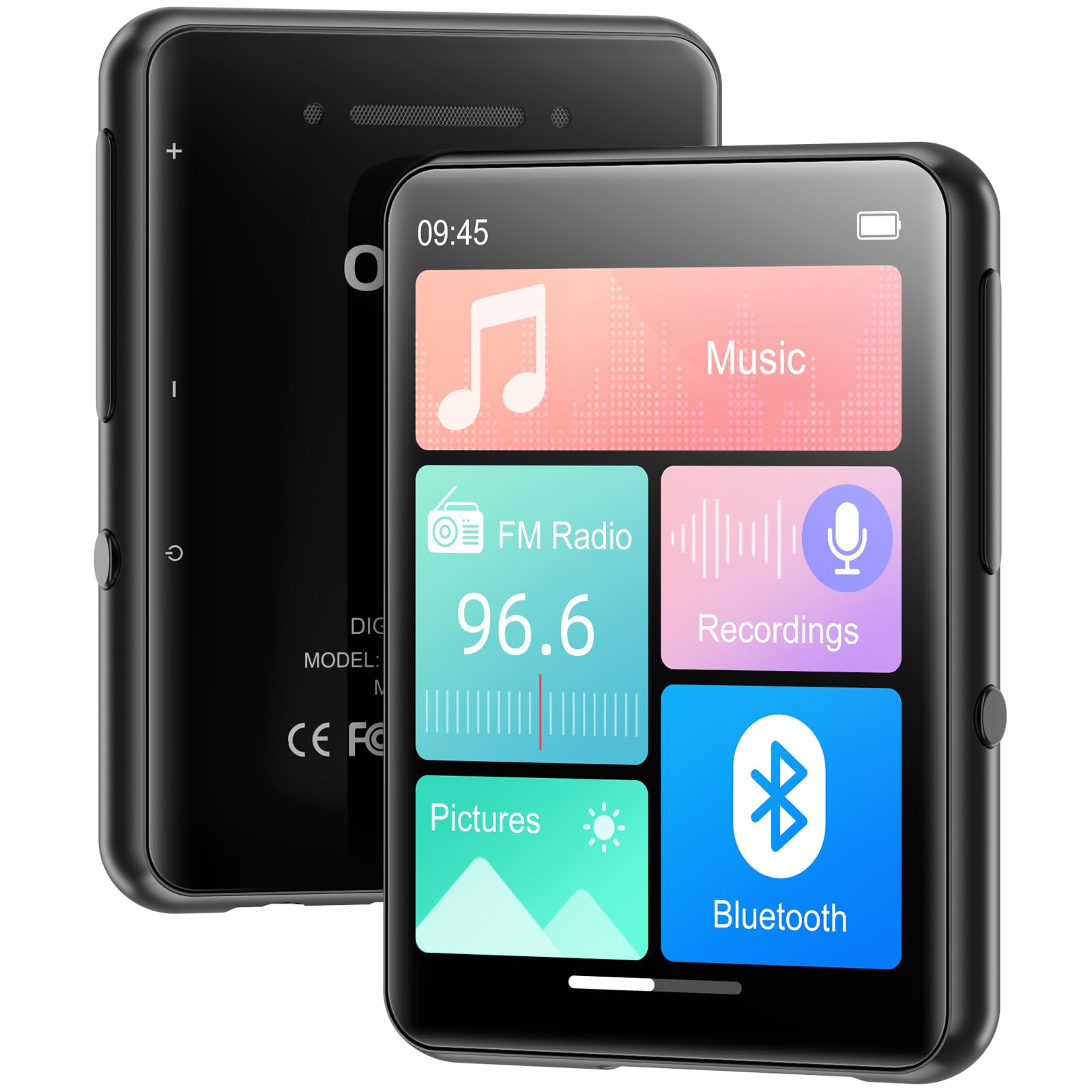
ภาพ: ด้านหน้า view of the MP3 player displaying its main screen.
4. การตั้งค่า
4.1 การชาร์จอุปกรณ์
Before first use, fully charge the MP3 player. Connect the provided USB cable to the device's USB-C port and the other end to a USB power adapter (not included) or a computer's USB port. The battery indicator on the screen will show charging status.
4.2 เปิด/ปิดเครื่อง
- การเปิดเครื่อง: กดปุ่มเปิด/ปิดค้างไว้จนกว่าหน้าจอจะสว่างขึ้น
- วิธีปิดเครื่อง: กดปุ่มเปิด/ปิดค้างไว้ จากนั้นเลือก 'ปิดเครื่อง' บนหน้าจอ
- ล็อค/ปลดล็อคหน้าจอ: Briefly press the Power button to lock or unlock the screen during use.
4.3 การตั้งค่าภาษา
เมื่อเปิดเครื่องครั้งแรก คุณอาจได้รับแจ้งให้เลือกภาษาที่ต้องการ หากไม่เป็นเช่นนั้น ให้ไปที่ การตั้งค่า > ภาษา to choose from the available options.
4.4 การถ่ายโอนเพลงและ Files
The Oilsky M1 MP3 Player has 128GB of internal storage and supports MicroSD cards up to 128GB (not included).
- เชื่อมต่อเครื่องเล่น MP3 เข้ากับคอมพิวเตอร์ของคุณโดยใช้สาย USB
- เครื่องเล่นจะปรากฏเป็นไดรฟ์ดิสก์แบบถอดได้บนคอมพิวเตอร์ของคุณ
- ลากและวางเพลงของคุณ files (MP3, WMA, APE, FLAC, WAV, AAC), pictures (JPEG, BMP), or e-books (TXT) into the appropriate folders on the player or MicroSD card.
- ถอดอุปกรณ์ออกจากคอมพิวเตอร์ของคุณอย่างปลอดภัยก่อนถอดสาย USB

Image: Visual representation of the 128GB internal storage and MicroSD card expansion capability.
5. คู่มือการใช้งาน
5.1 การเล่นเพลง
From the main menu, tap the 'Music' icon to access your music library. You can browse by artist, album, genre, or all songs. Tap a song to begin playback. Use the on-screen controls for play/pause, skip tracks, and adjust volume. The player supports MP3, WMA, APE, FLAC, WAV, and AAC audio formats.

Image: User interacting with the touch screen for music playback.
5.2 การจับคู่บลูทูธ
The Oilsky M1 features Bluetooth 5.4 for connecting to wireless headphones or speakers. บันทึก: This device cannot pair with mobile phones or personal computers via Bluetooth.
- ไปที่ การตั้งค่า > บลูทูธ or tap the 'Bluetooth' icon from the main menu.
- เปิดบลูทูธ
- ตรวจสอบให้แน่ใจว่าหูฟังหรือลำโพง Bluetooth ของคุณอยู่ในโหมดจับคู่
- เครื่องเล่น MP3 จะสแกนหาอุปกรณ์ที่ใช้งานได้ เลือกอุปกรณ์ของคุณจากรายการเพื่อทำการจับคู่
- Once paired, audio will be routed to your Bluetooth device.

Image: MP3 player demonstrating Bluetooth connectivity with headphones.
5.3 วิทยุ FM
To use the FM Radio, connect wired earphones to the 3.5mm jack, as they act as the antenna. Tap the 'FM Radio' icon from the main menu. You can manually tune to stations or use the auto-scan feature to find available frequencies.
5.4 เครื่องบันทึกเสียง
Tap the 'Recordings' icon to access the voice recorder. The built-in microphone allows you to capture audio. Start, pause, and save recordings using the on-screen controls. Recorded files are saved in the 'Recordings' folder.
5.5 ฟังก์ชั่นอื่น ๆ
The Oilsky M1 MP3 Player includes several other useful applications:
- รูปภาพ: View stored image files (JPEG, BMP).
- หนังสืออิเล็กทรอนิกส์: อ่านข้อความ file(รูปแบบไฟล์ TXT)
- นาฬิกาปลุก: Set alarms with your favorite music.
- ปฏิทิน: View วันที่ปัจจุบัน

Image: Main menu showing various functions of the MP3 player.
วิดีโอ: จบแล้วview of the Oilsky MP3 Player's features and interface, demonstrating its functionality.
6. การบำรุงรักษา
- เก็บอุปกรณ์ให้แห้ง หลีกเลี่ยงการสัมผัสกับความชื้นหรือของเหลว
- ทำความสะอาดหน้าจอและตัวเครื่องด้วยผ้านุ่มและแห้ง ห้ามใช้น้ำยาทำความสะอาดที่มีฤทธิ์กัดกร่อน
- หลีกเลี่ยงอุณหภูมิที่สูงหรือต่ำเกินไป
- อย่าทำอุปกรณ์หล่นหรือกระแทกอย่างรุนแรง
- Store the device in the provided protective case when not in use.
7 การแก้ไขปัญหา
| ปัญหา | วิธีแก้ปัญหาที่เป็นไปได้ |
|---|---|
| อุปกรณ์ไม่เปิดเครื่อง | ตรวจสอบให้แน่ใจว่าแบตเตอรี่ชาร์จเต็มแล้ว เสียบปลั๊กเข้ากับแหล่งจ่ายไฟแล้วลองอีกครั้ง |
| ไม่สามารถเชื่อมต่อกับอุปกรณ์บลูทูธได้ | Ensure the Bluetooth device is in pairing mode and within range. Confirm the MP3 player's Bluetooth is enabled. Remember, it cannot pair with phones or PCs. |
| ไม่มีเสียงจากหูฟัง | ตรวจสอบการเชื่อมต่อหูฟัง ตรวจสอบให้แน่ใจว่าไม่ได้ปิดเสียงหรือตั้งเสียงเบาเกินไป ลองทดสอบกับหูฟังอื่นดู |
| ดนตรี files not appearing. | ตรวจสอบ files are in supported formats (MP3, WMA, APE, FLAC, WAV, AAC). Ensure files are transferred to the correct folders. Refresh the music library if available in settings. |
| หน้าจอไม่ตอบสนอง | Restart the device by holding the power button. If unresponsive, allow the battery to drain completely and then recharge. |
8. ข้อมูลจำเพาะ
| คุณสมบัติ | รายละเอียด |
|---|---|
| ชื่อรุ่น | M1 |
| ยี่ห้อ | ออยล์สกี้ |
| เทคโนโลยีการเชื่อมต่อ | บลูทูธ 5.4, ยูเอสบี |
| ความจุของหน่วยความจำ | 128 GB (Internal), supports up to 128 GB Micro SD |
| ขนาดหน้าจอ | 2.4 นิ้ว |
| คุณสมบัติพิเศษ | FM Radio, Touch Screen, Built-in Speaker, Voice Recorder, E-book, Picture Viewer, Alarm Clock, Calendar |
| อุปกรณ์ที่รองรับ | หูฟัง, ลำโพงบลูทูธ |
| ประเภทสื่อที่รองรับ | ไมโคร SD |
| รูปแบบเสียงที่รองรับ | MP3, WMA, APE, FLAC, WAV, AAC |
| น้ำหนักสินค้า | 5.9 ออนซ์ (ประมาณ 167 กรัม) |
| ขนาดแพ็คเกจ | 5.87 x 5.83 x 0.75 นิ้ว |
| แบตเตอรี่ | แบตเตอรี่ลิเธียมไอออน 1 ก้อน (รวมอยู่ด้วย) |
9. การรับประกันและการสนับสนุน
The Oilsky M1 MP3 Player comes with a standard manufacturer's warranty. Please refer to the warranty card included in your package for specific terms and conditions. For technical support, troubleshooting assistance, or warranty claims, please contact Oilsky customer service through the retailer where the product was purchased.