การแนะนำ
Thank you for choosing the LogiLink BT0070 BT 6.0 Gaming Headset. This manual provides essential information for the proper setup, operation, and maintenance of your headset. Please read these instructions carefully before using the product to ensure optimal performance and longevity.
The LogiLink BT0070 is a versatile wireless gaming headset designed for clear communication and immersive audio experiences. It features a 360° microphone, comfortable ear pads, an adjustable headband, and a long-lasting battery.
ข้อมูลด้านความปลอดภัย
- ห้ามให้ชุดหูฟังสัมผัสกับอุณหภูมิที่สูงหรือความชื้นสูง หรือสัมผัสกับสารกัดกร่อน
- หลีกเลี่ยงการทำหูฟังตกหรือได้รับแรงกระแทกรุนแรง
- ห้ามถอดประกอบหรือดัดแปลงชุดหูฟัง การกระทำดังกล่าวจะทำให้การรับประกันเป็นโมฆะและอาจทำให้เกิดความเสียหายได้
- เก็บชุดหูฟังให้ห่างจากน้ำและของเหลวอื่นๆ
- ใช้เฉพาะปริมาณการชาร์จที่ระบุเท่านั้นtagอีและปัจจุบัน
- การฟังเสียงดังเป็นเวลานานอาจทำให้เกิดความเสียหายต่อการได้ยิน โปรดปรับระดับเสียงให้อยู่ในระดับที่ปลอดภัย
เนื้อหาแพ็คเกจ
กรุณาตรวจสอบแพ็คเกจสำหรับรายการต่อไปนี้:
- LogiLink BT0070 Gaming Headset
- สายชาร์จ USB
- สายสัญญาณเสียง AUX 3.5 มม.
- คู่มือการใช้งาน (เอกสารนี้)
สินค้าเกินview
Familiarize yourself with the components of your LogiLink BT0070 Gaming Headset.

ภาพ: เกินview of the LogiLink BT0070 headset highlighting its adjustable headband, adjustable microphone, soft memory earmuffs, and flexible design for various head shapes.
- แถบคาดศีรษะปรับได้: Allows for a customized and comfortable fit.
- ไมโครโฟนปรับระดับได้: A 360° noise-isolating microphone for clear voice communication.
- Soft Memory Ear Pads: Designed for extended comfort during long gaming sessions.
- ปุ่มควบคุม: (Specific button functions will be detailed in the Operating section).
- พอร์ต AUX 3.5 มม.: สำหรับเชื่อมต่อกับอุปกรณ์แบบใช้สาย
- พอร์ตชาร์จ: สำหรับชาร์จแบตเตอรี่ภายใน
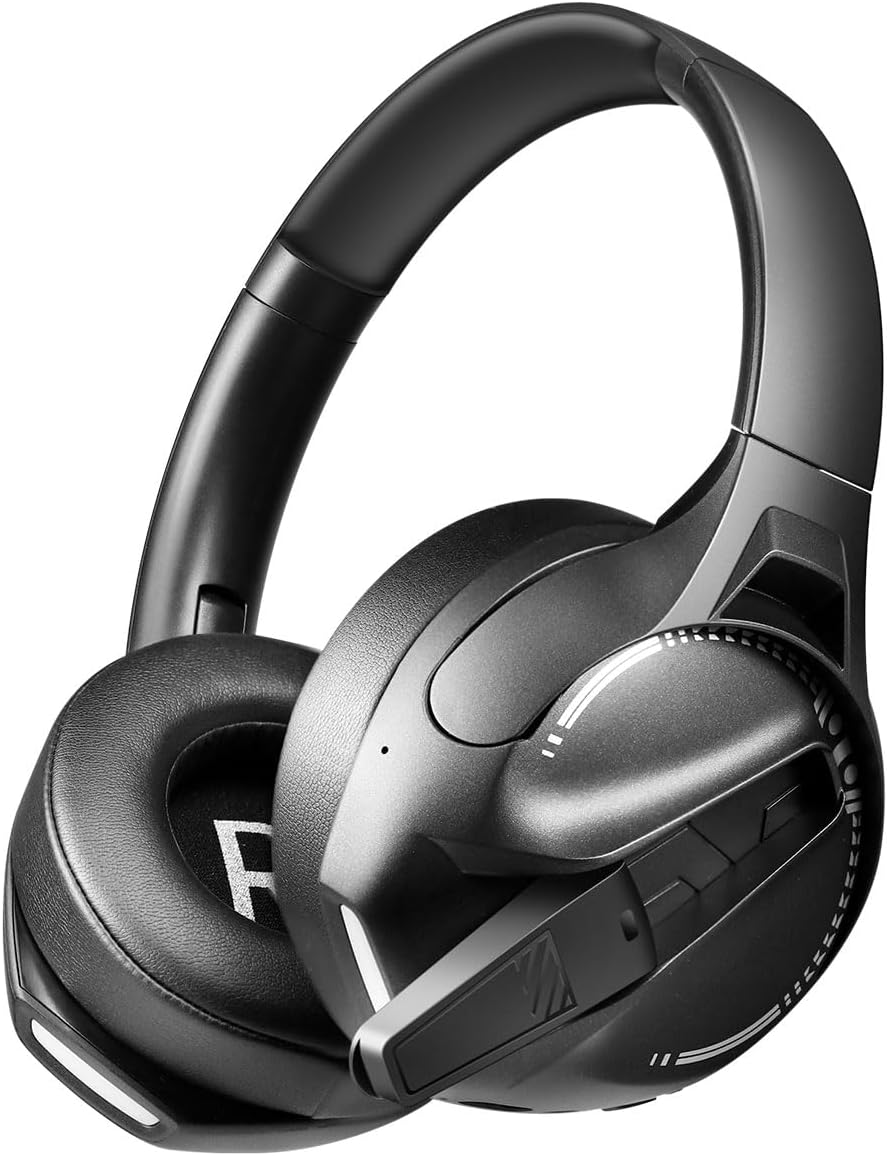
ภาพ: ด้านข้าง view of the LogiLink BT0070 headset, showing the extended microphone arm and ear cup design.

ภาพ: ด้านหน้า view of the LogiLink BT0070 headset, showcasing การออกแบบโดยรวม
การตั้งค่า
1. การชาร์จชุดหูฟัง
Before first use, fully charge the headset. Connect the USB charging cable to the headset's charging port and the other end to a compatible USB power source (e.g., computer USB port, USB wall adapter).

ภาพ: Illustration of power adapter requirements. Use a 3.0-3.0W power adapter. Note that a power adapter is not included with the headset.
- A full charge typically takes approximately [X] hours (specific time not provided, refer to product packaging or LED indicator).
- The LED indicator on the headset will change color or turn off once charging is complete.
- Ensure the power source provides 3.0-3.0W for optimal charging.
2. การเปิด/ปิดเครื่อง
- การเปิดเครื่อง: กดปุ่มเปิด/ปิดค้างไว้ประมาณ 3 วินาที จนกว่าไฟแสดงสถานะ LED จะสว่างขึ้น
- วิธีปิดเครื่อง: กดปุ่มเปิด/ปิดค้างไว้ประมาณ 5 วินาที จนกระทั่งไฟแสดงสถานะ LED ดับลง
3. การจับคู่บลูทู ธ
To connect your headset wirelessly to a device:
- ตรวจสอบว่าชุดหูฟังปิดอยู่
- กดปุ่มเปิด/ปิดค้างไว้ประมาณ 5-7 วินาที จนกระทั่งไฟ LED แสดงสถานะกะพริบเร็ว (โดยปกติจะเป็นสีน้ำเงินและสีแดง) ซึ่งแสดงว่าเข้าสู่โหมดจับคู่แล้ว
- บนอุปกรณ์ของคุณ (สมาร์ทโฟน แล็ปท็อป ฯลฯ) เปิดใช้งานบลูทูธ แล้วค้นหาอุปกรณ์ใหม่
- Select "LogiLink BT0070" from the list of available devices.
- Once paired, the LED indicator on the headset will typically flash slowly or turn solid blue.
4. Wired Connection (3.5mm AUX)
For a wired connection, use the included 3.5mm AUX audio cable:
- Plug one end of the 3.5mm audio cable into the AUX port on the headset.
- เสียบปลายอีกด้านเข้ากับแจ็คเสียงขนาด 3.5 มม. ของอุปกรณ์ของคุณ
- The headset will operate in passive mode, drawing no power from its battery.
5. การปรับความพอดี
For optimal comfort and sound quality, adjust the headset to fit your head:
- Extend or retract the adjustable headband until the ear cups comfortably cover your ears.
- Ensure the soft memory ear pads create a good seal around your ears.
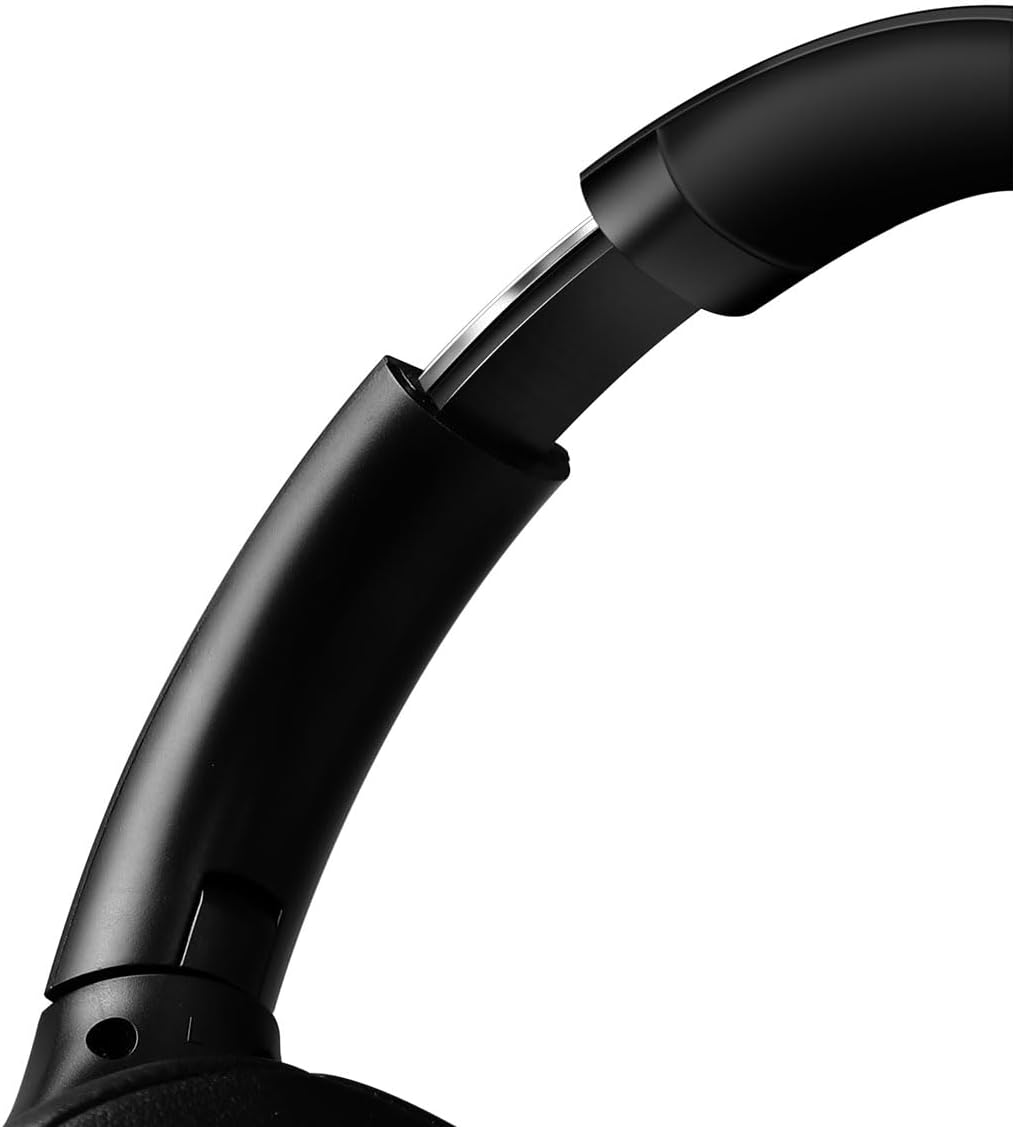
ภาพ: ภาพระยะใกล้ view of the adjustable headband mechanism, demonstrating how to customize the fit.
การใช้งานชุดหูฟัง
1. การควบคุมพื้นฐาน
The headset features intuitive controls, typically located on the ear cups:
- ปุ่มเปิด/ปิด: Press and hold to power on/off. Short press for [X function, e.g., play/pause, answer call - specifics not provided, common functions listed].
- เพิ่มระดับเสียง/เพลงถัดไป: กดสั้นๆ เพื่อเพิ่มระดับเสียง กดยาวเพื่อเล่นเพลงถัดไป
- ลดระดับเสียง/เพลงก่อนหน้า: กดสั้นเพื่อลดระดับเสียง กดยาวเพื่อเล่นเพลงก่อนหน้า
- ปุ่มมัลติฟังก์ชัน (MFB): (Often combined with Power button) Single press to Play/Pause music or Answer/End calls. Double press to Redial last number.
2. การใช้ไมโครโฟน
The integrated 360° noise-isolating microphone is designed for clear communication.
- การปรับไมโครโฟน: วางไมโครโฟนให้ใกล้ปากมากที่สุดเพื่อการรับเสียงที่ดีที่สุด
- ปิดเสียง/เปิดเสียง: (Specific button for mute not provided, common methods listed) Look for a dedicated mute button on the headset or use your device's software controls.
3. ระบบตัดเสียงรบกวนแบบแอคทีฟ (ANC)
ชุดหูฟังนี้มีระบบตัดเสียงรบกวนแบบแอคทีฟเพื่อลดเสียงรบกวนรอบข้าง
- การเปิดใช้งาน ANC: (Specific button for ANC not provided, common methods listed) Look for a dedicated ANC button or a combination press on existing buttons.
- When ANC is active, you may notice a slight change in audio characteristics.

ภาพ: Users experiencing immersive audio with the LogiLink BT0070 headset, emphasizing its 3D surround sound capabilities for gaming.
การซ่อมบำรุง
1. การทำความสะอาด
- เช็ดชุดหูฟังด้วยผ้าแห้งนุ่มที่ไม่เป็นขุย
- ห้ามใช้สารทำความสะอาดที่มีฤทธิ์กัดกร่อน แอลกอฮอล์ หรือตัวทำละลายเคมี
- Clean the ear pads gently to remove any buildup.
2. การจัดเก็บ
- เก็บหูฟังไว้ในที่แห้งและเย็น หลีกเลี่ยงแสงแดดโดยตรงและอุณหภูมิที่สูงหรือต่ำเกินไป
- หากเก็บรักษาเป็นเวลานาน ควรตรวจสอบให้แน่ใจว่าแบตเตอรี่มีประจุอยู่บ้าง (ประมาณ 50%) เพื่อรักษาอายุการใช้งานของแบตเตอรี่

ภาพ: The LogiLink BT0070 headset shown in a folded configuration, suitable for compact storage or transport.
3. การดูแลแบตเตอรี่
- หลีกเลี่ยงการปล่อยแบตเตอรี่จนหมดบ่อยครั้ง
- ควรชาร์จหูฟังเป็นประจำ แม้ว่าจะไม่ได้ใช้งาน เพื่อรักษาอายุการใช้งานของแบตเตอรี่
การแก้ไขปัญหา
หากคุณพบปัญหาเกี่ยวกับชุดหูฟัง โปรดดูปัญหาทั่วไปและวิธีแก้ไขต่อไปนี้:
| ปัญหา | วิธีแก้ปัญหาที่เป็นไปได้ |
|---|---|
| หูฟังไม่สามารถเปิดเครื่องได้ | Ensure the headset is fully charged. Press and hold the Power button for the required duration. |
| ไม่สามารถจับคู่ผ่านบลูทูธได้ | Ensure the headset is in pairing mode (rapidly flashing LED). Turn off and on your device's Bluetooth. Move closer to the device. Clear previous Bluetooth connections on your device. |
| ไม่มีเสียงหรือเสียงเบา | Check headset and device volume levels. Ensure the headset is properly connected (Bluetooth or AUX). For Bluetooth, check audio output settings on your device. |
| ไมโครโฟนไม่ทำงาน | Ensure the microphone is not muted. Check microphone input settings on your device. Ensure the microphone is positioned correctly. |
| คุณภาพเสียงไม่ดี | Ensure the headset is within Bluetooth range. Check for interference from other wireless devices. For wired connection, ensure the 3.5mm cable is fully inserted. |
ข้อมูลจำเพาะ
Key technical specifications for the LogiLink BT0070 Gaming Headset:
| คุณสมบัติ | รายละเอียด |
|---|---|
| แบบอย่าง | BT0070 |
| เทคโนโลยีการเชื่อมต่อ | บลูทูธ 6.0, AUX 3.5 มม. |
| การสื่อสารแบบไร้สาย | บลูทูธ |
| ประเภทชุดหูฟัง | ครอบหู |
| เส้นผ่านศูนย์กลางไดรเวอร์ | 40 มม. |
| อิมพีแดนซ์ | 32 โอห์ม |
| ไมโครโฟน | 360° Noise-isolating, Omnidirectional |
| การควบคุมเสียงรบกวน | ระบบตัดเสียงรบกวนแบบแอคทีฟ |
| อายุการใช้งานแบตเตอรี่ | นานถึง 50 ชั่วโมง |
| สี | สีดำ |
| น้ำหนักสินค้า | 500 กรัม |
| ขนาดสินค้า | 16.8 x 17.8 x 7.5 ซม. |
| เข้ากันได้กับ | Smartphone & Laptop |
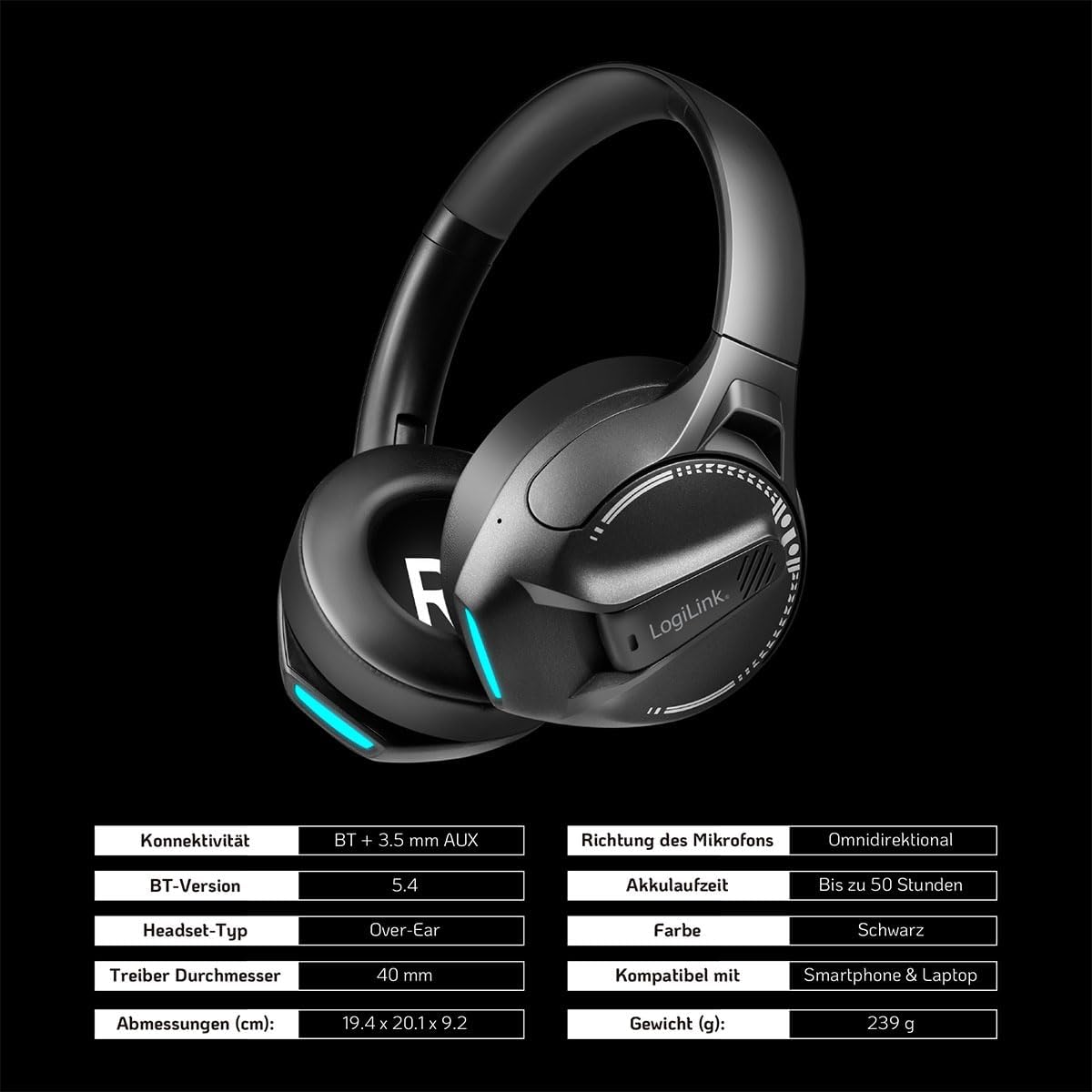
ภาพ: Visual representation of key specifications for the LogiLink BT0070 headset, including connectivity, battery life, and dimensions. Note: The image lists Bluetooth version 5.4, while the product title specifies 6.0.
การรับประกันและการสนับสนุน
LogiLink products are designed and manufactured to the highest quality standards. For warranty information and technical support, please refer to the warranty card included with your product or visit the official LogiLink webเว็บไซต์.
โปรดเก็บหลักฐานการซื้อของคุณไว้เพื่อเรียกร้องการรับประกัน


