1. บทนำ
This manual provides detailed instructions for the installation, operation, and maintenance of your darkFlash TH285 ATX Mid-Tower PC Gaming Case. The TH285 is designed for optimal airflow and component compatibility, featuring a full-view tempered glass design and pre-installed ARGB PWM fans.
Please read this manual thoroughly before beginning assembly to ensure correct installation and safe operation.

Image 1.1: The darkFlash TH285 case showcasing its internal layout and RGB fans.
2. ข้อมูลด้านความปลอดภัย
Observe the following safety precautions during installation and use:
- ควรตัดการเชื่อมต่อแหล่งจ่ายไฟออกจากเต้ารับที่ผนังทุกครั้งก่อนติดตั้งหรือถอดส่วนประกอบใดๆ
- Handle tempered glass panels with care to prevent breakage. Avoid impacts or dropping the panels.
- สวมสายรัดข้อมือป้องกันไฟฟ้าสถิตย์หรือสัมผัสวัตถุโลหะที่ต่อสายดินบ่อยๆ เพื่อป้องกันความเสียหายจากการคายประจุไฟฟ้าสถิตย์ (ESD) ต่อส่วนประกอบต่างๆ
- เก็บชิ้นส่วนเล็กๆ และสกรูให้ห่างจากเด็ก
- ตรวจสอบให้แน่ใจว่ามีการระบายอากาศที่เหมาะสมรอบเคสเพื่อป้องกันความร้อนสูงเกินไป
3. เนื้อหาบรรจุภัณฑ์
ตรวจสอบว่ามีรายการทั้งหมดอยู่ในแพ็คเกจ:
- darkFlash TH285 ATX Mid-Tower PC Gaming Case
- 4x darkFlash Air12X 120mm ARGB PWM Fans (pre-installed)
- กล่องอุปกรณ์เสริม (บรรจุสกรู สายรัด และชิ้นส่วนเล็กๆ อื่นๆ)
- คู่มือการใช้งาน (เอกสารนี้)
4. ข้อมูลจำเพาะ
| คุณสมบัติ | ข้อมูลจำเพาะ |
|---|---|
| ยี่ห้อ | ดาร์กแฟลช |
| หมายเลขรุ่น | ทีเอช285 |
| ประเภทเคส | ATX มิดทาวเวอร์ |
| ความเข้ากันได้ของเมนบอร์ด | ATX, Micro-ATX (M-ATX), Mini-ITX (ITX) |
| วัสดุ | โลหะ พลาสติก กระจกนิรภัย |
| สี | สีดำ |
| น้ำหนักสินค้า | 21.3 ปอนด์ |
| ขนาดแพ็คเกจ | 20.27 x 17.79 x 14.09 นิ้ว |
| GPU Clearance (Max) | 415มม. |
| ความสูงของพัดลมระบายความร้อน CPU (สูงสุด) | 160มม. |
| ประเภทการติดตั้งแหล่งจ่ายไฟ | การติดตั้งด้านล่าง |
| ช่องเสียบขยาย | 7 |
| ช่องไดรฟ์ | 2x 3.5" HDD (Max), 3x 2.5" SSD (Max) |
| พอร์ต I/O | 1x USB 3.0, 2x USB 2.0, HD Audio |
| พัดลมรวม | 4x darkFlash Air12X 120mm ARGB PWM Fans |
| การสนับสนุนแฟนๆ | Side: 3x 120mm or 2x 140mm; Bottom: 3x 120mm; Rear: 1x 120mm |
| ฐานรองหม้อน้ำ | Side: 240mm/280mm; Bottom: 240mm/360mm |

Image 4.1: Detailed specifications for the darkFlash TH285 case.
5. การตั้งค่าและการติดตั้งส่วนประกอบ
Follow these steps to install your PC components into the darkFlash TH285 case.
5.1. การเตรียมคดี
- วางกล่องบนพื้นผิวเรียบและมั่นคง
- Carefully remove the tempered glass side panels. The TH285 features a full-view tempered glass design on the front, top, and side panels. Handle them gently to avoid damage.

Image 5.1: Removing the tempered glass side panel for component access.
5.2. การติดตั้งเมนบอร์ด
- ติดตั้งแผ่นปิดพอร์ต I/O (ถ้ามี) เข้ากับช่องเปิดด้านหลังของเคส
- จัดตำแหน่งเมนบอร์ด ATX, Micro-ATX หรือ Mini-ITX ของคุณให้ตรงกับสแตนด์ออฟภายในเคส
- Secure the motherboard with the appropriate screws from the accessory box.
5.3. การติดตั้งชุดจ่ายไฟ (PSU)
The TH285 features an innovative dual-chamber design, separating the PSU and cable management area from the main hardware compartment.
- ค้นหาพื้นที่ติดตั้ง PSU ที่ด้านหลังล่างของเคส
- เลื่อนพาวเวอร์ซัพพลายเข้าไปในตำแหน่งที่กำหนด แล้วขันสกรูจากด้านหลังเคสให้แน่น
5.4. การติดตั้งไดรฟ์จัดเก็บข้อมูล
The case supports up to 2x 3.5" HDDs and 3x 2.5" SSDs.
- Locate the drive bays for 3.5" HDDs and 2.5" SSDs. These are typically found in the rear chamber or dedicated mounting points.
- Mount your drives using the provided screws.

Image 5.2: Internal layout highlighting storage drive bay locations.
5.5. การติดตั้งการ์ดจอ (GPU)
The TH285 supports flagship GPUs up to 415mm in length and features 7 PCI expansion slots.
- Remove the necessary PCI slot covers from the rear of the case.
- ใส่การ์ดกราฟิกของคุณเข้าไปในสล็อต PCIe ที่เหมาะสมบนเมนบอร์ด
- ยึดการ์ดจอด้วยสกรูให้แน่น

ภาพที่ 5.3: ด้านหลัง view illustrating the 7 GPU PCI slots.
5.6. Cooling System Installation (Fans & Radiators)
The case comes with 4x darkFlash Air12X ARGB PWM fans pre-installed for high airflow performance. It also supports various fan and radiator configurations.
- การสนับสนุนแฟนๆ: Side: 3x 120mm or 2x 140mm; Bottom: 3x 120mm; Rear: 1x 120mm.
- รองรับหม้อน้ำ: Side: 240mm/280mm; Bottom: 240mm/360mm.
Ensure fans are oriented correctly for optimal airflow (intake/exhaust).

Image 5.4: Fan installation suggestions for superior heat dissipation.

Image 5.5: Radiator support and component clearance diagram.
5.7. การจัดการสายเคเบิล
การใช้ประโยชน์จาก ample cable routing options and the dual-chamber layout to maintain a clean interior and improve airflow.
- Route power cables and data cables through the designated cutouts.
- Use cable ties (provided in the accessory box) to bundle and secure cables in the rear chamber.
5.8. Connecting Front I/O Ports
The convenient top-mounted I/O panel includes USB ports and audio jacks.
- Connect the front panel cables (USB 3.0, USB 2.0, HD Audio, Power Switch, Reset Switch, Power LED, HDD LED) to the corresponding headers on your motherboard. Refer to your motherboard manual for header locations.
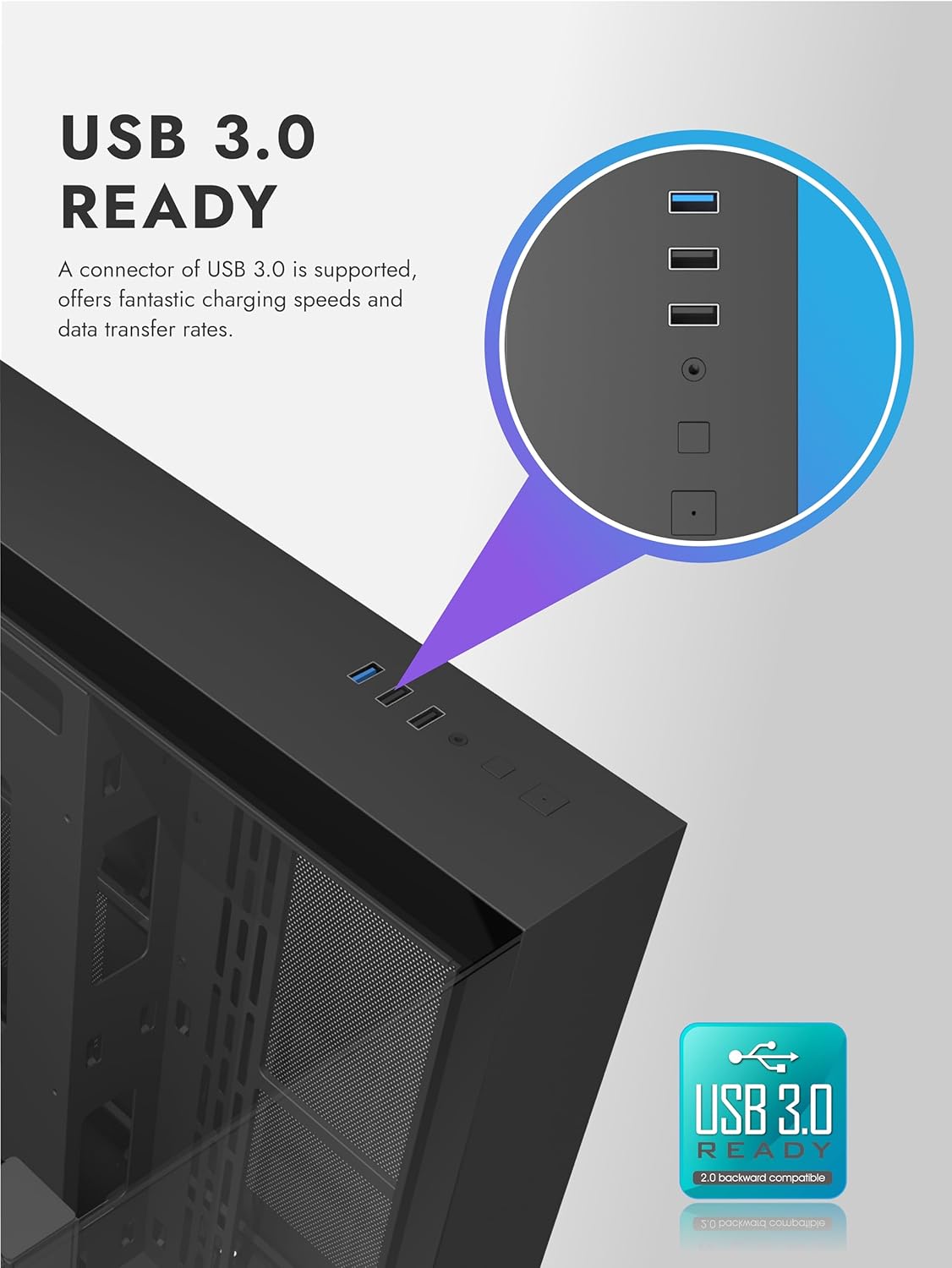
Image 5.6: Top I/O panel featuring USB 3.0 and other ports.
6. คู่มือการใช้งาน
6.1. การเปิดเครื่องของคุณ
Once all components are installed and cables are connected, replace the side panels and connect the power cable to your PSU and a wall outlet. Press the power button on the top I/O panel to start your system.
6.2. การควบคุมพัดลม ARGB
The pre-installed darkFlash Air12X ARGB PWM fans offer brilliant lighting effects and precise speed control. Connect the ARGB and PWM cables from the fans to your motherboard's compatible headers. Use your motherboard's software or BIOS settings to customize fan speed and RGB lighting effects.
7. การบำรุงรักษา
การบำรุงรักษาตามปกติจะช่วยให้มั่นใจได้ถึงประสิทธิภาพสูงสุดและอายุการใช้งานที่ยาวนานของส่วนประกอบพีซีของคุณ
7.1. การทำความสะอาดแผ่นกรองฝุ่น
The TH285 includes removable dust filters for practical maintenance. Periodically remove and clean these filters to prevent dust buildup, which can restrict airflow and increase component temperatures.
- Locate the dust filters (typically on the top, front, or bottom of the case).
- Gently remove the filters.
- Clean them using compressed air or by rinsing with water (ensure they are completely dry before reinstallation).
- Reinstall the dust filters.
7.2. การทำความสะอาดทั่วไป
- Use a soft, dry cloth to wipe down the exterior of the case, including the tempered glass panels.
- For stubborn smudges on glass, use a glass cleaner applied to a cloth, not directly to the panel.
- Use compressed air to clear dust from internal components and fan blades.
8 การแก้ไขปัญหา
หากคุณพบปัญหาในระหว่างหรือหลังการประกอบ โปรดพิจารณาขั้นตอนการแก้ไขปัญหาทั่วไปต่อไปนี้:
- ระบบไม่เปิดเครื่อง: Ensure all power cables (24-pin ATX, 8-pin CPU, GPU power) are securely connected. Verify the PSU switch is in the 'ON' position. Check front panel power button connections to the motherboard.
- ไม่มีเอาต์พุตแสดงผล: Confirm the graphics card is fully seated in its PCIe slot and power cables are connected. Ensure the monitor cable is connected to the graphics card, not the motherboard's integrated graphics port (unless using integrated graphics).
- Fans not spinning or RGB not working: Check fan PWM and ARGB headers are correctly connected to the motherboard. Verify fan control software or BIOS settings.
- ความร้อนสูงเกินไป: Ensure all fans are oriented correctly for optimal airflow. Clean dust filters and internal components. Verify CPU cooler installation.
- ชิ้นส่วนที่หลวม: Double-check all screws and connections for components like the motherboard, GPU, and storage drives.
9. ข้อมูลการรับประกัน
Warranty information for the darkFlash TH285 PC Gaming Case is not provided within this manual. Please refer to the official darkFlash website or your point of purchase for detailed warranty terms and conditions.
10. การสนับสนุนลูกค้า
For further assistance or technical support, please visit the official darkFlash webเยี่ยมชมเว็บไซต์หรือติดต่อฝ่ายบริการลูกค้าของพวกเขา โดยปกติแล้วรายละเอียดการติดต่อจะอยู่ในเว็บไซต์ของผู้ผลิต webเว็บไซต์.
Official darkFlash Webเว็บไซต์: www.darkflash.com


