1. บทนำ
The Gustard R30 is a fully-discrete R2R network streamer and Digital-to-Analog Converter (DAC) designed for high-fidelity audio reproduction. It features a true 1-bit DSD decoding capability, FPGA-based clock management, a self-developed network bridge, and a discrete Class-A analog output stage. This manual provides comprehensive instructions for setting up, operating, and maintaining your R30 unit to ensure optimal performance and longevity.

รูปที่ 1.1 : ด้านหน้า view of the Gustard R30 Network Streamer DAC. This image shows the sleek silver chassis with the display area and touch interface controls.
2. คุณสมบัติหลัก
- Discrete R2R Ladder: Utilizes a discrete R2R module for direct digital signal conversion through a resistor ladder network, providing an organic sound.
- True 1-bit DSD Decoding: Native support for DSD1024, with a DIRECT DSD mode that bypasses PCM conversion for preserving micro-details and timing integrity.
- Smart Digital Filtering: Offers three filter modes (Linear Sharp, Minimum Slow, Super Slow) based on adaptive multi-order algorithms to reduce aliasing noise and enhance resolution.
- FPGA-Powered Control: A programmable FPGA manages clocking, PLL shaping, and signal routing for low jitter and stable synchronization.
- Precision OCXO Clocking: Features an SC-cut crystal OCXO clock for imperceptible jitter and accepts an external 10MHz clock input.
- Self-Developed Network Bridge: CelWare-based system optimized for audio playback, supporting Roon Bridge, AirPlay, HQPlayer NAA, UPnP/DLNA, Spotify Connect, MConnect, BubbleUPnP, and QQMusic.
- Class-A Analog Stage: Discrete Class-A low-pass filter stage for precise control of frequency response, harmonic character, and transient handling.
- Passive Relay Preampเครื่องฟอก: R2R relay-based volume control, allowing direct connection to powered monitors or power amplifiers, with a pure bypass mode.
- XMOS USB with Isolation: XMOS XU216 interface supporting PCM768k and DSD512, with independent voltage regulation and isolated channels for minimal interference.

รูปที่ 2.1: เกินview of the Gustard R30's core features, including R2R architecture, 1-bit DSD support, digital filtering, FPGA, OCXO, network streaming, and analog output stage.

รูปที่ 2.2: รายละเอียด view of the R30's all-new 27-Bit Architecture and True 1-Bit DSD Decoding capabilities, highlighting the internal components.

รูปที่ 2.3: ระเบิด view illustrating the Digital Filter technology, OCXO Clock, GCLK-02 Clock Module, and FPGA Programmable Logic Chip within the R30.

Figure 2.4: Close-up of the R30's Analog LPF Circuit and the Passive Analog Preamplifier, detailing the discrete components.
3. การตั้งค่า
3.1. แกะกล่องและเนื้อหา
Carefully unpack your Gustard R30 unit from its packaging. Ensure all components are present and undamaged. The package should contain:
- 1 x GUSTARD R30 Unit
- สายไฟ (ไม่ได้ระบุไว้ชัดเจน แต่โดยนัยแล้วหมายถึงสายไฟ)
- Remote Control (implied by "Controller Support")
- คู่มือการใช้งาน (เอกสารนี้)
3.2. การเชื่อมต่อ
Before connecting any cables, ensure the R30 unit is powered off. Refer to the back panel diagram for connection points.
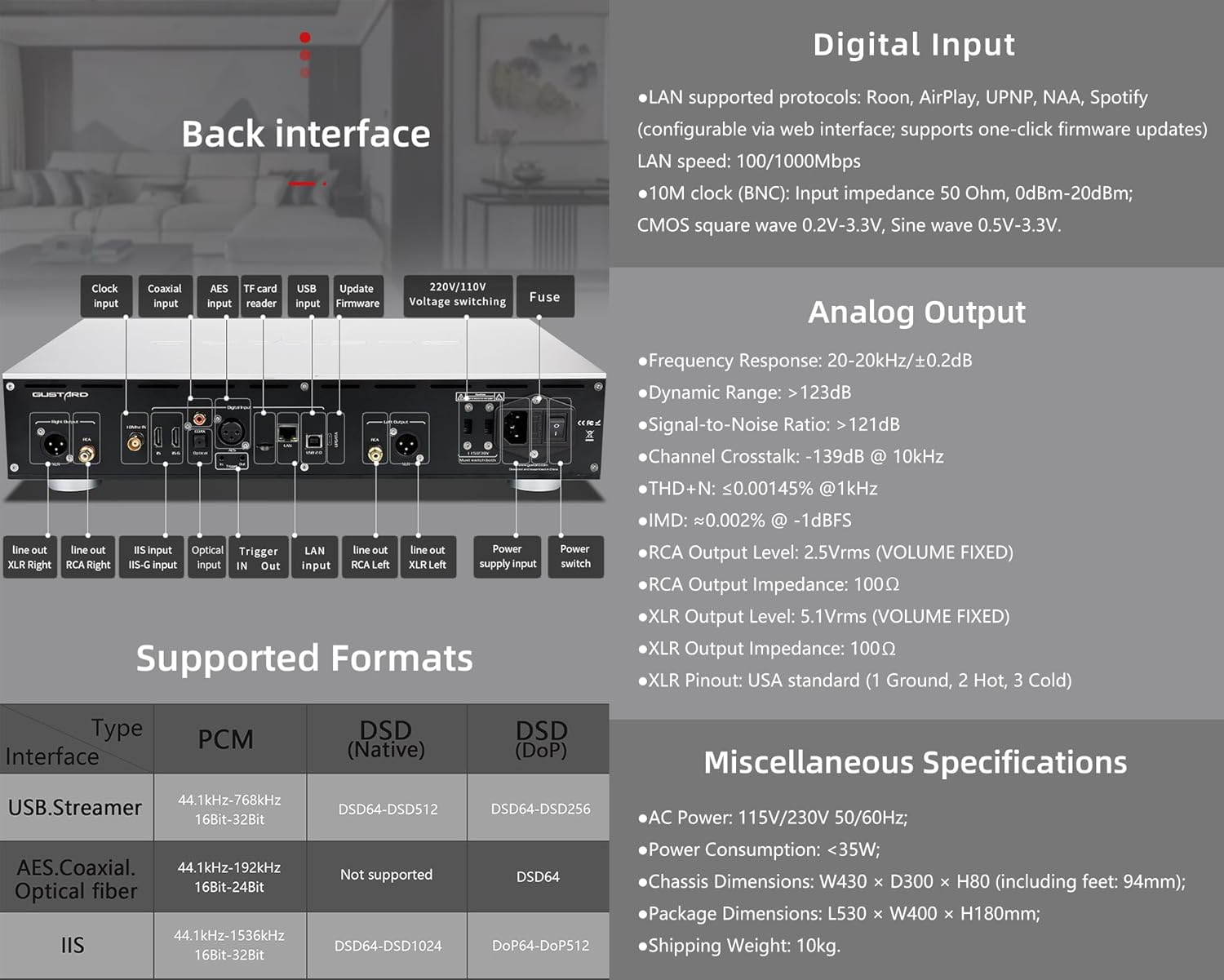
Figure 3.1: Rear panel of the Gustard R30, showing various input and output ports, along with digital input specifications.
- เอาต์พุตอนาล็อก:
- เชื่อมต่อของคุณ amplifier or powered speakers to the ช่องต่อ RCA (2.5Vrms) or เอาต์พุต XLR (5.1Vrms) ports. Ensure correct polarity for XLR (USA standard: 1 Ground, 2 Hot, 3 Cold).
- อินพุตดิจิตอล:
- LAN: Connect an Ethernet cable to the LAN port for network streaming (Roon, AirPlay, UPnP, NAA, Spotify). Supports 100/1000Mbps.
- นาฬิกา 10M (BNC): For external clock synchronization, connect a 10MHz clock source to the BNC input. Input impedance 50 Ohm, 0dBm-20dBm. Supports CMOS square wave (0.2V-3.3V) and Sine wave (0.5V-3.3V).
- ยูเอสบี: Connect your computer or digital audio source via the USB input (XMOS XU216 interface).
- IIS: The R30 features two IIS inputs. Refer to Section 4.4 for IIS Pinout Configuration. Note: IIS is not standard HDMI. Do not connect to a regular HDMI port.
- Other digital inputs include เออีเอส, โคแอกเซียล, และ เส้นใยแก้วนำแสง.
- พลัง: Connect the supplied power cable to the AC power input (115V/230V 50/60Hz). Ensure the voltagสวิตช์ e (ถ้ามี) ได้รับการตั้งค่าอย่างถูกต้องสำหรับภูมิภาคของคุณ
3.3. เปิดเครื่อง
After all connections are secure, press the power switch on the rear panel or the standby switch on the front panel to turn on the R30. The display will illuminate, indicating the unit is operational.
4. คู่มือการใช้งาน
4.1. การควบคุมที่แผงด้านหน้า

Figure 4.1: Front panel layout of the Gustard R30, showing the display area, touch interface, and controller receiver. Also illustrates the CelWare-based network bridge system.
The R30 features a fluid touch control interface on its front panel:
- พื้นที่แสดงผล : แสดงค่าอินพุตปัจจุบัน sample rate, volume level, and other status information.
- อินเทอร์เฟซแบบสัมผัส: Provides intuitive control for navigating menus, changing inputs, and adjusting settings.
- ตัวควบคุม ตัวรับสัญญาณ: For use with the included remote control.
- สวิตช์สแตนด์บาย: Toggles the unit between active and standby modes.
4.2. การสตรีมผ่านเครือข่าย
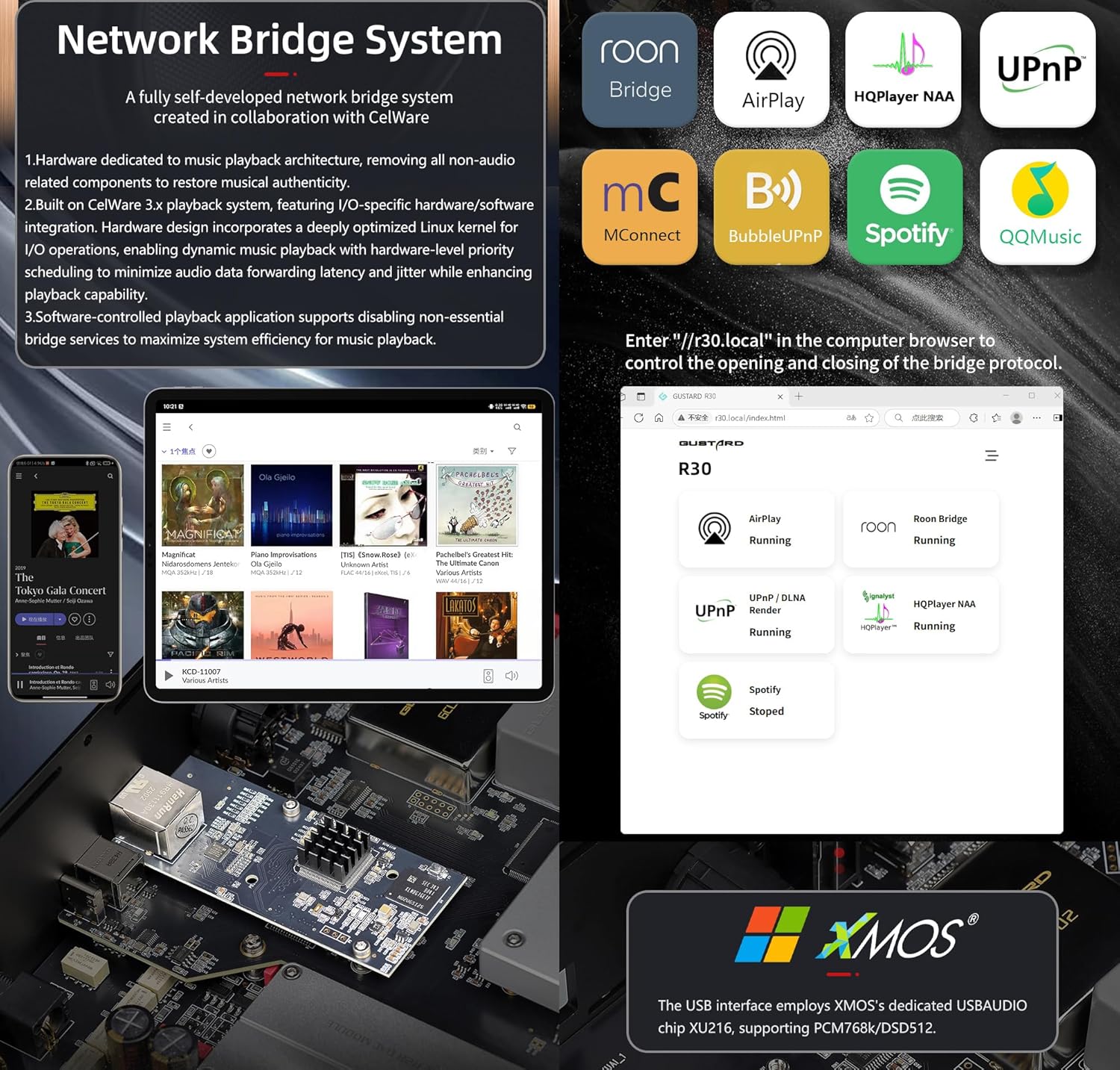
Figure 4.2: Diagram illustrating the R30's self-developed network bridge system and its supported protocols, alongside details of the XMOS USB interface.
The R30's self-developed CelWare-based network bridge system supports various streaming protocols:
- Roon Bridge
- แอร์เพลย์
- HQPlayer NAA
- UPnP / DLNA
- เชื่อมต่อ Spotify
- เอ็มคอนเนคท์
- BubbleUPnP
- คิวคิวมิวสิค
To configure network settings and update firmware, access the web interface by entering "http://r30.local" in your computer's browser.
4.3. Digital Filter Modes
The R30 offers three digital filter modes to tailor the sound to your preference:
- Linear Sharp: Provides a sharp roll-off with pre-ringing.
- Minimum Slow: Offers a slower roll-off with minimal pre-ringing.
- Super Slow: A very gentle roll-off, often preferred for a more natural sound.
These modes can be selected via the front panel controls or remote control.
4.4. Volume Control and Preamp ฟังก์ชันการทำงาน
The R30 features a passive analog preamplifier with R2R relay-based volume control, offering a range of 0dB to -65dB. This allows you to connect the R30 directly to powered monitors or a power amplifier and control the volume remotely. You can also switch to a pure bypass mode if you prefer to use an external preampชีวิต.
4.5. IIS Pinout Configuration
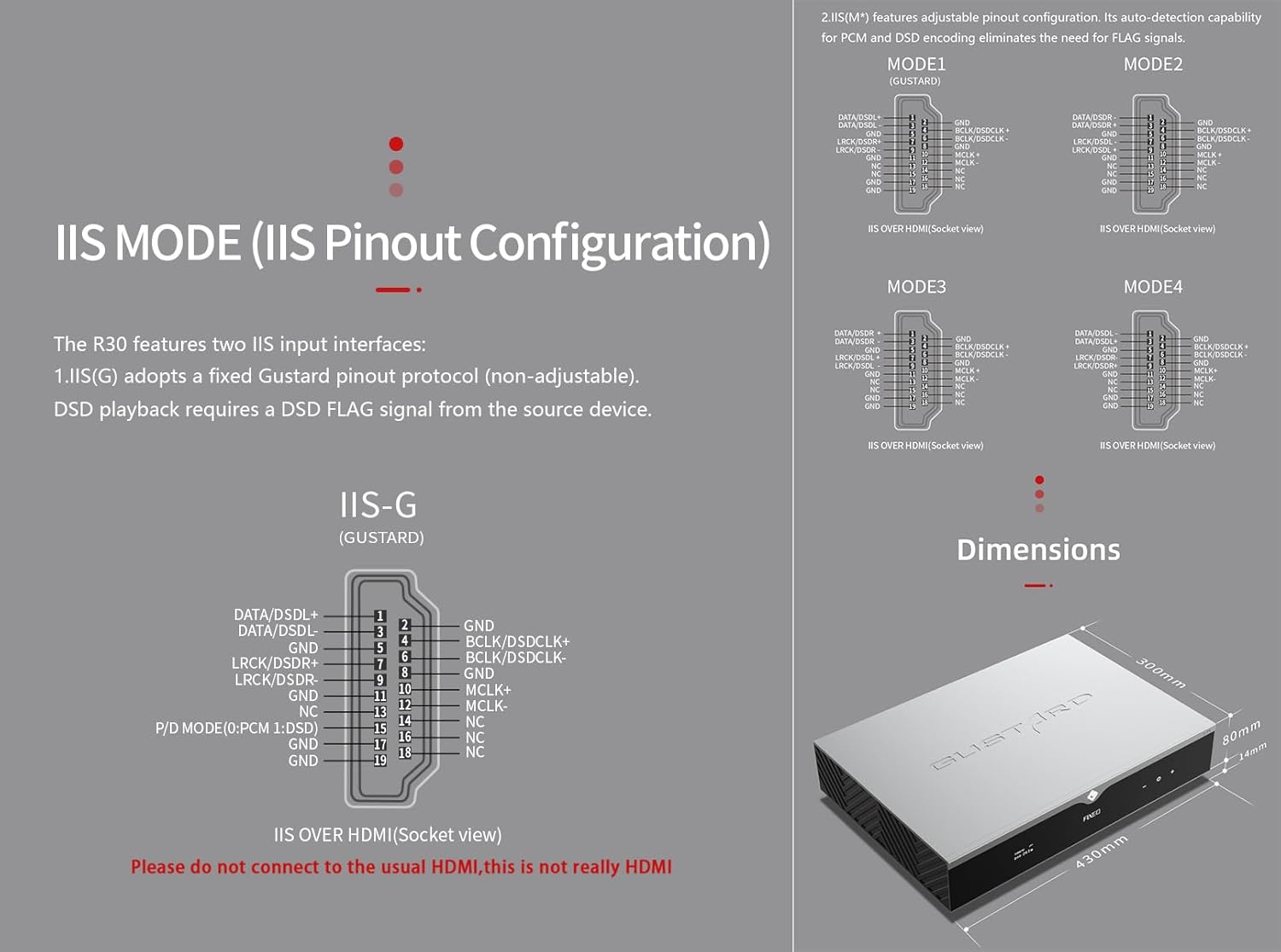
Figure 4.3: Detailed diagrams of the R30's IIS pinout configurations (IIS-G and IIS(M*)) and the overall dimensions of the unit.
The R30 includes two IIS input interfaces:
- IIS(G): Adopts a fixed Gustard pinout protocol (non-adjustable). DSD playback requires a DSD FLAG signal from the source device.
- IIS(M*): มีคุณสมบัติในการปรับแต่งการกำหนดค่าขาเชื่อมต่อ ความสามารถในการตรวจจับการเข้ารหัส PCM และ DSD โดยอัตโนมัติช่วยลดความจำเป็นในการใช้สัญญาณ FLAG
Refer to Figure 4.3 for detailed pinout diagrams (MODE1, MODE2, MODE3, MODE4 for IIS(M*) and IIS-G). สำคัญ: These IIS inputs are not standard HDMI. Do not connect them to regular HDMI ports on other devices.
5. การบำรุงรักษา
- การทำความสะอาด: ใช้ผ้าแห้งเนื้อนุ่มเช็ดทำความสะอาดภายนอกตัวเครื่อง หลีกเลี่ยงการใช้สารทำความสะอาดที่มีฤทธิ์กัดกร่อนหรือตัวทำละลาย
- การระบายอากาศ : Ensure adequate ventilation around the unit to prevent overheating. Do not block the ventilation slots.
- พื้นที่จัดเก็บ: หากจะจัดเก็บเครื่องเป็นเวลานาน ควรถอดปลั๊กออกและเก็บไว้ในที่แห้งและเย็น
6 การแก้ไขปัญหา
This section addresses common issues you might encounter with your Gustard R30.
6.1. ไม่มีอำนาจ
- ตรวจสอบว่าสายไฟเชื่อมต่อกับ R30 และเต้ารับไฟฟ้าอย่างแน่นหนาแล้วหรือไม่
- ตรวจสอบว่าเต้ารับไฟฟ้าสามารถใช้งานได้
- ตรวจสอบให้แน่ใจว่าสวิตช์เปิด/ปิดที่แผงด้านหลังอยู่ในตำแหน่ง 'เปิด'
- Check the fuse on the rear panel (refer to Figure 3.1). If blown, replace it with a fuse of the same rating.
6.2. ไม่มีเสียงออก
- ตรวจสอบให้แน่ใจว่าได้เลือกแหล่งสัญญาณเข้าที่ถูกต้องบน R30 แล้ว
- Check all audio cable connections between the R30 and your ampเครื่องขยายเสียง/ลำโพง
- Ensure the volume level on the R30 is not set to minimum or muted.
- ตรวจสอบว่าของคุณ amplifier/speakers are powered on and functioning correctly.
6.3 ปัญหาการเชื่อมต่อเครือข่าย
- Ensure the Ethernet cable is properly connected to the LAN port.
- ตรวจสอบการตั้งค่าเราเตอร์และเครือข่ายของคุณ
- Access the R30's web interface (http://r30.local) to check network status and configuration.
- Restart your router, the R30, and the streaming device.
7. ข้อมูลจำเพาะ
| หมวดหมู่ | ข้อมูลจำเพาะ |
|---|---|
| Digital Input (LAN) | Supported protocols: Roon, AirPlay, UPNP, NAA, Spotify (configurable via web interface; supports one-click firmware updates) LAN speed: 100/1000Mbps |
| Digital Input (10M Clock BNC) | Input impedance 50 Ohm, 0dBm-20dBm; CMOS square wave 0.2V-3.3V, Sine wave 0.5V-3.3V. |
| Digital Input (USB) | XMOS XU216 interface, supports PCM768k and DSD512. |
| Digital Input (IIS) | DSD1024, PCM 1536kHz (only IIS) |
| Analog Output - Frequency Response | 20-20kHz/±0.2dB |
| Analog Output - Dynamic Range | มากกว่า 123 เดซิเบล |
| Analog Output - Signal-to-Noise Ratio | มากกว่า 121 เดซิเบล |
| Analog Output - Channel Crosstalk | -139dB @10กิโลเฮิรตซ์ |
| Analog Output - THD+N | ≤0.00145% @1kHz |
| Analog Output - IMD | ≈0.002% @-1dBFS |
| Analog Output - RCA Level | 2.5Vrms (ปริมาณคงที่) |
| Analog Output - RCA Impedance | 100Ω |
| Analog Output - XLR Level | 5.1Vrms (ปริมาณคงที่) |
| Analog Output - XLR Impedance | 100Ω |
| Analog Output - XLR Pinout | USA standard (1 Ground, 2 Hot, 3 Cold) |
| ไฟฟ้ากระแสสลับ | 115V/230V 50/60Hz |
| การใช้พลังงาน | <35วัตต์ |
| Chassis Dimensions (W×D×H) | 430 × 300 × 80 mm (including feet: 94mm) |
| ขนาดบรรจุภัณฑ์ (กว้าง×ยาว×สูง) | 530 × 400 × 180 มม. |
| น้ำหนักการจัดส่ง | 10 กก. (22 ปอนด์) |
| สี | เงิน |
| หมายเลขรุ่นสินค้า | กัสตาร์ด R30 |
Figure 7.1: Dimensional drawing of the Gustard R30 unit.
8. การรับประกันและการสนับสนุน
For warranty information and technical support, please refer to the warranty card included with your product or visit the official KGUSS webไซต์ โปรดเก็บใบเสร็จรับเงินไว้เป็นหลักฐานการซื้อสำหรับการเรียกร้องการรับประกัน
For further assistance, you may also contact the seller, HIFI College, through the Amazon platform.


