การแนะนำ
The MUSE M-285 CTV is a versatile wireless headphone system designed for an enhanced audio experience with your television and other audio devices. It features 2.4 GHz wireless transmission for stable, low-latency audio, Bluetooth 5.3 for broader compatibility, and multiple input options including optical and 3.5mm AUX. The integrated charging station also functions as the transmitter, providing convenience and organization. This manual provides detailed instructions for setting up, operating, and maintaining your M-285 CTV headphones.

Image: The MUSE M-285 CTV wireless headphones resting on their dedicated charging and transmitter stand. The headphones are black with comfortable earcups.
เนื้อหาแพ็คเกจ
กรุณาตรวจสอบแพ็คเกจสำหรับรายการต่อไปนี้:
- MUSE M-285 CTV Wireless Headphones
- เครื่องส่งสัญญาณ / สถานีชาร์จ
- Power Adapter (AC Adaptor)
- สายสัญญาณเสียง
- สายสัญญาณเสียง AUX 3.5 มม.
- สายชาร์จ USB-C
- คู่มือการใช้งาน (เอกสารนี้)
คุณสมบัติผลิตภัณฑ์
- 2.4 GHz Wireless Transmission: Enjoy stable, low-latency audio with a range of up to 30 meters, even through walls.
- การเชื่อมต่อบลูทูธ 5.3: Connect wirelessly to a wide range of Bluetooth-enabled devices.
- อินพุตเสียงหลายช่อง: Optical, 3.5mm AUX, and USB-C for broad compatibility with TVs and audio sources.
- เสียงที่ปรับแต่งได้: Three EQ modes (Normal, Clear Voice, Full Mode) and adjustable Left/Right balance for personalized listening.
- อายุการใช้งานแบตเตอรี่ยาวนาน: Up to 30 hours of continuous playback on a single charge (800 mAh Li-ion battery).
- สถานีชาร์จแบบครบวงจร: Conveniently charges the headphones and acts as the wireless transmitter.
- Hands-Free Function & Amplifying Microphone: Allows for clearer perception of ambient conversations or phone calls.
- แถบคาดศีรษะปรับได้: ออกแบบมาเพื่อมอบความสบายสูงสุดระหว่างการใช้งานต่อเนื่องเป็นเวลานาน

Image: The MUSE M-285 CTV headphones on their stand, accompanied by icons illustrating key features such as Bluetooth-Out, EQ Effect, Aux-Input, and 30 hours operating time with 3-4 hours charging time.
การตั้งค่า
1. การชาร์จหูฟัง
- เชื่อมต่ออะแดปเตอร์แปลงไฟเข้ากับแท่นชาร์จ แล้วเสียบเข้ากับเต้ารับไฟฟ้า
- Place the headphones onto the charging station. Ensure the charging contacts on the headphones align with those on the station.
- The charging indicator light on the headphones (or station) will illuminate, indicating charging is in progress. A full charge takes approximately 3.5 hours.
- เมื่อชาร์จเต็มแล้ว ไฟแสดงสถานะอาจเปลี่ยนสีหรือดับลง
2. การเชื่อมต่อเครื่องส่งสัญญาณเข้ากับแหล่งกำเนิดเสียง
The transmitter/charging station can connect to your TV or audio device using several methods:
2.1. 2.4 GHz Wireless Connection (Recommended for TV)
- Optical (TOSLINK) Connection:
- Connect one end of the optical audio cable to the OPTICAL OUT port on your TV.
- Connect the other end to the OPTICAL IN port on the MUSE M-285 CTV transmitter.
- Ensure your TV's audio output settings are configured to "Optical" or "PCM" (Pulse Code Modulation). Some TVs may require disabling Dolby Digital or DTS.
- การเชื่อมต่อAUX 3.5 มม.:
- Connect one end of the 3.5mm AUX cable to the HEADPHONE OUT or AUDIO OUT port on your TV or audio device.
- Connect the other end to the AUX IN port on the MUSE M-285 CTV transmitter.
Once connected via 2.4 GHz, the headphones will automatically pair with the transmitter when powered on.
2.2. Bluetooth Connection (for other devices)
- Ensure the headphones are powered on and not connected to the 2.4 GHz transmitter.
- Activate Bluetooth pairing mode on the headphones (refer to the operating section for specific button presses). The indicator light will flash, indicating pairing mode.
- On your Bluetooth-enabled device (e.g., smartphone, tablet), go to Bluetooth settings and search for available devices.
- Select "MUSE M-285 CTV" from the list.
- Once paired, the indicator light on the headphones will stop flashing and remain solid.

Image: A person wearing the MUSE M-285 CTV headphones while watching television, demonstrating the product in use for TV audio.
คำแนะนำการใช้งาน
1. เปิด/ปิดเครื่อง
- To power on, press and hold the Power button on the headphones for approximately 3 seconds.
- To power off, press and hold the Power button for approximately 3 seconds.
2. การควบคุมระดับเสียง
Use the Volume Up (+) and Volume Down (-) buttons located on the headphones to adjust the listening volume.
3. โหมด EQ
The M-285 CTV offers three Equalizer (EQ) modes to optimize your listening experience:
- ปกติ: ผู้เชี่ยวชาญด้านเสียงมาตรฐานfile.
- เสียงที่ชัดเจน: Enhances vocal clarity, ideal for dialogue in TV shows or movies.
- โหมดเต็ม: Provides a richer, fuller sound profile.
Press the EQ button on the headphones to cycle through these modes.
4. Left/Right Balance Control
Adjust the audio balance between the left and right earcups to suit individual hearing preferences. This feature is particularly useful for users with hearing differences.
- Use the Balance Left (L) and Balance Right (R) buttons on the headphones to fine-tune the audio output for each ear.
5. Hands-Free Function and Amplifying Microphone
The integrated microphone allows you to hear ambient sounds more clearly or engage in phone calls when connected via Bluetooth.
- To activate the ambient sound amplification, press the dedicated microphone button.
- When a call comes in via Bluetooth, press the Multi-function button (often the Power button) to answer/end the call.

Image: A user wearing the MUSE M-285 CTV headphones, with various feature icons displayed, including Hands-free, 2.4 GHz, 30H Working time, Charging Transmitter Base, 3 EQ Modes, Adjustable, Foldable Design, L/R Balance Control, Optical Cable, RCA Cable, and AC Adaptor.
การซ่อมบำรุง
- การทำความสะอาด: Use a soft, dry cloth to clean the headphones and charging station. Do not use abrasive cleaners or solvents.
- พื้นที่จัดเก็บ: When not in use, store the headphones on the charging station to keep them charged and organized. Store in a cool, dry place away from direct sunlight and extreme temperatures.
- การดูแลแบตเตอรี่ เพื่อยืดอายุการใช้งานแบตเตอรี่ ควรหลีกเลี่ยงการใช้หูฟังจนหมดบ่อย ควรชาร์จหูฟังเป็นประจำ แม้จะไม่ได้ใช้งานเป็นเวลานานก็ตาม
- ความต้านทานน้ำ: The MUSE M-285 CTV headphones are ไม่กันน้ำหลีกเลี่ยงการสัมผัสกับน้ำหรือความชื้นมากเกินไป
การแก้ไขปัญหา
ไม่มีเสียง
- ตรวจสอบให้แน่ใจว่าหูฟังเปิดใช้งานและชาร์จแบตเตอรี่เรียบร้อยแล้ว
- Verify the transmitter is properly connected to the audio source (TV) and powered on.
- Check the volume levels on both the headphones and the audio source.
- If using optical connection, ensure the TV's audio output is set to PCM and not Dolby Digital/DTS.
- If using Bluetooth, ensure the headphones are correctly paired and connected to your device.
Poor Sound Quality / Intermittent Audio
- Ensure the headphones are within the 30-meter range of the transmitter (for 2.4 GHz).
- Reduce interference by moving away from other wireless devices (Wi-Fi routers, cordless phones).
- ตรวจสอบการเชื่อมต่อสายเคเบิลทั้งหมดว่าหลวมหรือเสียหายหรือไม่
- Recharge the headphones if the battery is low.
หูฟังชาร์จไม่เข้า
- Ensure the charging station is properly connected to power.
- Verify the headphones are correctly seated on the charging station, with contacts aligned.
- Check the charging cable and power adapter for any damage.
ข้อมูลจำเพาะ
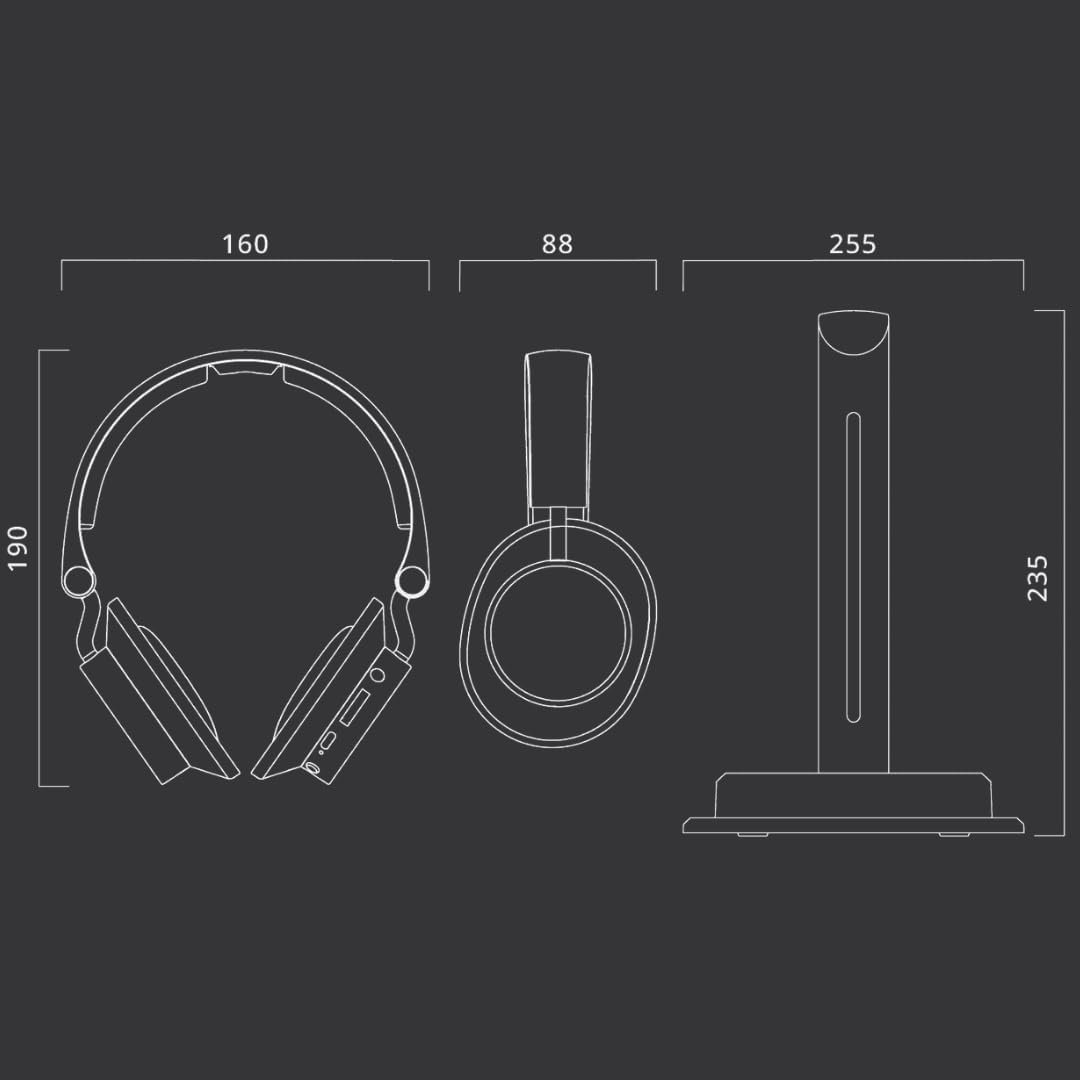
Image: Technical diagram illustrating the dimensions of the MUSE M-285 CTV headphones and their charging stand in millimeters.
| คุณสมบัติ | ข้อมูลจำเพาะ |
|---|---|
| ชื่อรุ่น | เอ็ม-285 ซีทีวี |
| ยี่ห้อ | มิวส์ |
| เทคโนโลยีการเชื่อมต่อ | Wireless (2.4 GHz, Bluetooth 5.3) |
| เทคโนโลยีการสื่อสารไร้สาย | บลูทูธ |
| อินพุตเสียง | Optical, 3.5mm AUX, USB-C |
| อายุการใช้งานแบตเตอรี่ | นานถึง 30 ชั่วโมง |
| เวลาในการชาร์จ | ประมาณ 3.5 ชั่วโมง |
| การตอบสนองความถี่ | 20 เฮิรตซ์ - 20000 เฮิรตซ์ |
| ความไวต่อความรู้สึก | 116 เดซิเบล |
| วิธีการควบคุม | ปุ่มสัมผัส |
| น้ำหนัก | 1 Kilogram (approximate, including packaging/accessories) |
| ระดับความต้านทานต่อน้ำ | ไม่กันน้ำ |
| การวางตำแหน่งหู | ครอบหู |
การรับประกันและการสนับสนุน
Information regarding specific warranty terms and support contact details is not available in the provided product data. Please refer to the warranty card included with your product or contact MUSE customer support directly for assistance.
For further support, visit the official MUSE webเว็บไซต์หรือติดต่อร้านค้าปลีกของคุณ


