1. บทนำและเรื่องอื่นๆview
The AOC ACG 2502 Wireless Gaming Headset is designed to provide a versatile and immersive audio experience across various gaming platforms and devices. Featuring dual-mode wireless connectivity (2.4GHz and Bluetooth 5.4), 7.1 virtual surround sound, and a noise-cancelling microphone, this headset offers high-quality audio and clear communication for extended gaming sessions.

Image: The AOC ACG 2502 Wireless Gaming Headset, showcasing its design and included connectivity accessories.
2. อะไรอยู่ในกล่อง
- 1 x ACG2502 Gaming Headset
- สายชาร์จ Type-C 1 เส้น
- 1 x USB Transmitter (2.4GHz wireless dongle)
- 1 x สายสัญญาณเสียง Type-C ถึง 3.5 มม.
- 1 x คู่มือผู้ใช้
3. คุณสมบัติของผลิตภัณฑ์
- Dual-Mode Wireless with Ultra-Low Latency: Enjoy both 2.4 GHz and Bluetooth 5.4 connectivity with a guaranteed maximum latency of 20 ms for rock-solid audio synchronization.
- 4-in-1 Universal Connectivity: Equipped with USB-A, Type-C, Bluetooth 5.4, and 3.5 mm wired modes, allowing connection to consoles, mobile devices, and PCs. Note: Bluetooth modes are incompatible with PS5 and PS4. Only the 3.5mm wired mode is compatible with Xbox Series X/S; other Xbox models are not supported.
- High-Resolution 7.1 Virtual Surround Sound: Features dual acoustic chambers and 50 mm graphene diaphragms, plus a built-in DAC delivering 96 kHz/24-bit output for precise directional audio.
- Lightweight, Ergonomic Comfort: Weighing just 239 g, the headset includes protein-leather earcups with breathable foam and an adjustable headband for fatigue-free extended use.
- Long-Lasting Battery with Fast Charge: Provides up to 45 hours of gameplay on a single charge. A full recharge takes approximately 2 hours via USB-C, with the ability to game while charging.
- Triple-Stage Noise Cancelling Microphone: The boom mic features foam isolation, DSP filters for echo and background noise elimination, and AI-driven voice enhancement for clear communication.
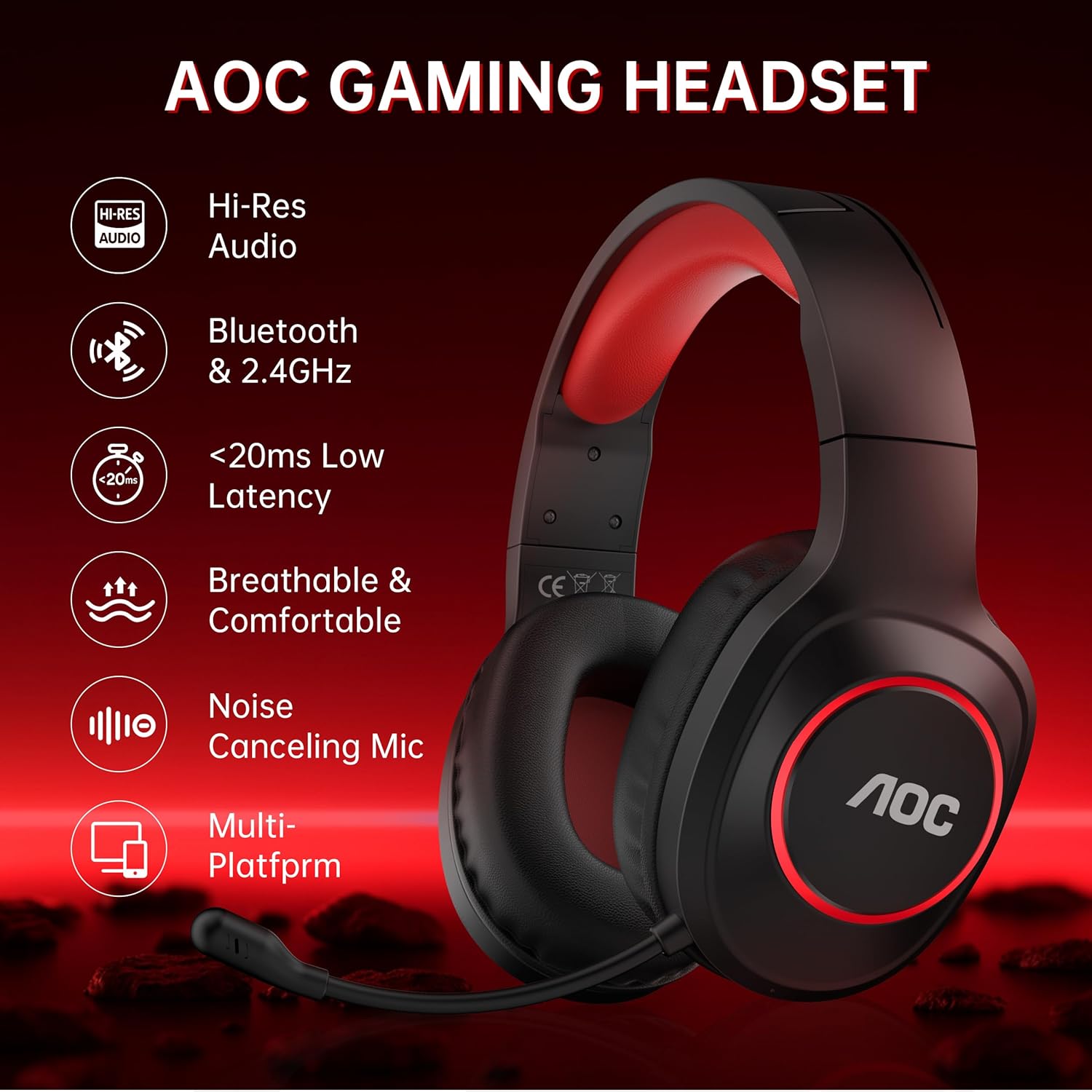
Image: Key features of the AOC Gaming Headset, including Hi-Res Audio and multi-platform compatibility.
4. การตั้งค่าและการเชื่อมต่อ
4.1 การชาร์จเริ่มต้น
Before first use, fully charge the headset. Connect the Type-C charging cable to the charging port on the headset and the other end to a USB power source. The indicator light will be red while charging and turn blue when fully charged. A full charge takes approximately 2.5 hours.
4.2 2.4GHz Wireless Connection (USB Transmitter)
- Plug the USB Transmitter into an available USB-A or Type-C port on your PC, PS5/PS4, or Nintendo Switch.
- Press and hold the Power Button on the headset for 3 seconds to turn it on.
- Double-click the Power Button to switch to "Adapter mode." The headset will announce "Adapter mode," and its indicator light will flash white.
- Once successfully connected, the headset's indicator light will turn solid white, and the transmitter's blue light will stay on.
Note: The microphone is disabled when connected to Nintendo Switch via 2.4GHz.

Image: The 2.4GHz USB wireless dongle, emphasizing low latency connectivity.
4.3 การเชื่อมต่อบลูทูธ 5.4
- Press and hold the Power Button on the headset for 3 seconds to turn it on.
- Double-click the Power Button to switch to "Bluetooth mode." The headset will announce "Bluetooth mode," and the indicator light will blink blue, indicating it's in pairing mode.
- On your mobile device or PC, open Bluetooth settings and search for "AOC ACG2502" to connect.
- หลังจากจับคู่สำเร็จแล้ว คุณสามารถเล่นเพลงหรือโทรออกได้
Note: Bluetooth modes are incompatible with PS5 and PS4.
4.4 การเชื่อมต่อแบบใช้สาย 3.5 มม.
Connect the Type-C to 3.5mm audio cable to the headset's Type-C port and the 3.5mm end to your device (e.g., Xbox Series X/S controller, PC, mobile device). This mode does not require battery power.
Note: Only the 3.5mm wired mode is compatible with Xbox Series X/S; all other Xbox models are not supported.

Image: Visual guide for connecting the headset to various platforms using different modes.
5. คู่มือการใช้งาน
The headset features intuitive controls located on the left earcup.
- ปุ่มเปิด/ปิด:
- Press and hold for 3 seconds to power On/Off.
- Single click to play/pause audio or answer a call.
- Double click to end or reject a call.
- Double click to switch between 2.4GHz and Bluetooth modes.
- ระดับเสียง + ปุ่ม: Click to increase volume. Press and hold to continuously raise volume.
- ปุ่มปรับระดับเสียง: Click to decrease volume. Press and hold to continuously lower volume.
- Microphone & Light Switch:
- Single click to mute/unmute the microphone.
- Double click to toggle ambient RGB lighting On/Off.
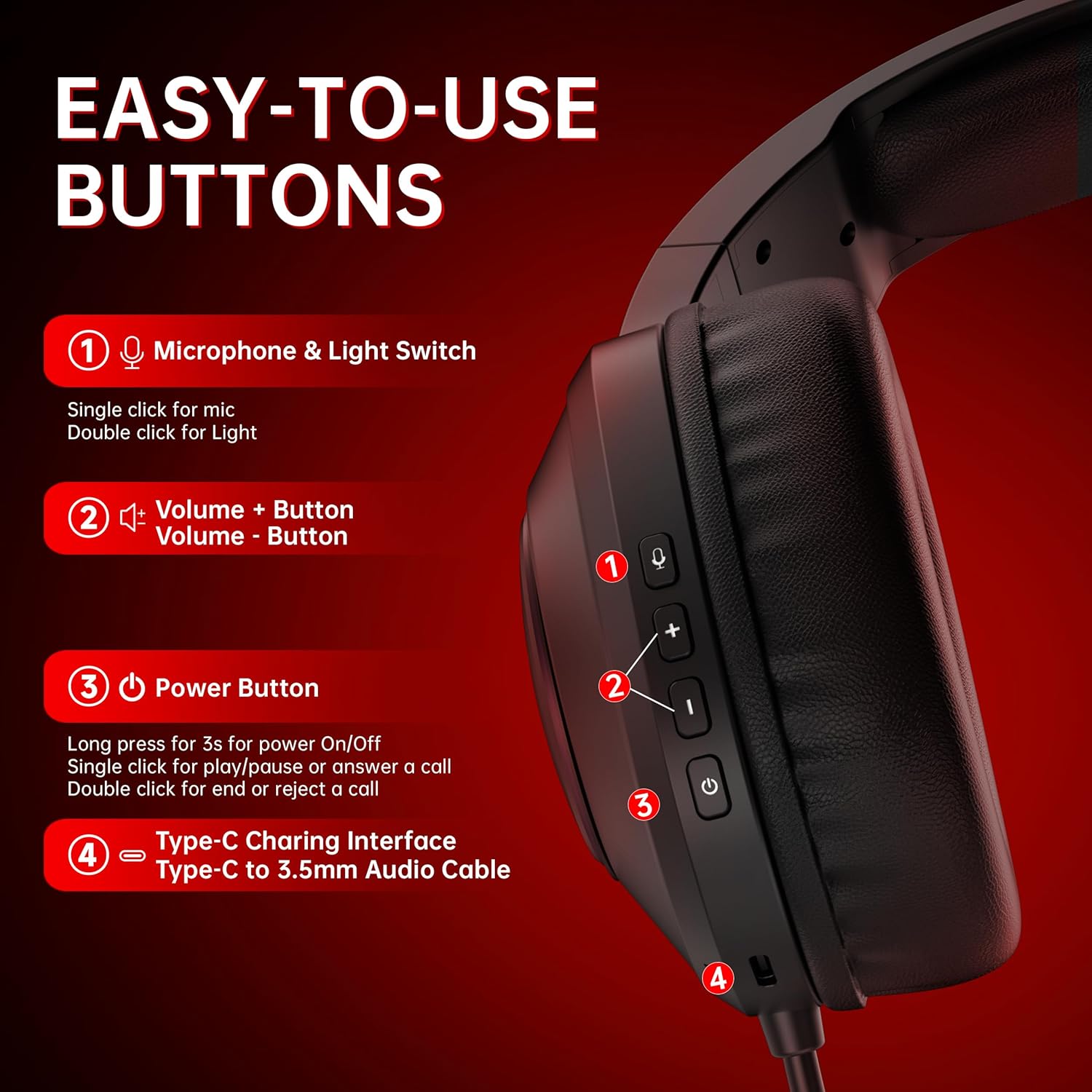
ภาพ: รายละเอียด view of the headset's control buttons for easy operation.
6. การชาร์จไฟ
The headset offers up to 45 hours of battery life on a single charge. When the battery is low, the indicator light will flash red, and you will hear a "Battery low" sound. Connect the Type-C charging cable to recharge. The headset can be used while charging, ensuring uninterrupted gameplay.

Image: Illustration of the headset's 45-hour battery life.
7. การใช้ไมโครโฟน
The detachable boom microphone features triple-stage noise cancelling technology to ensure clear voice transmission. This includes foam isolation to block ambient sounds, DSP filters to eliminate echo and background noise, and AI-driven voice enhancement. The microphone is adjustable and can be moved up or down as needed.
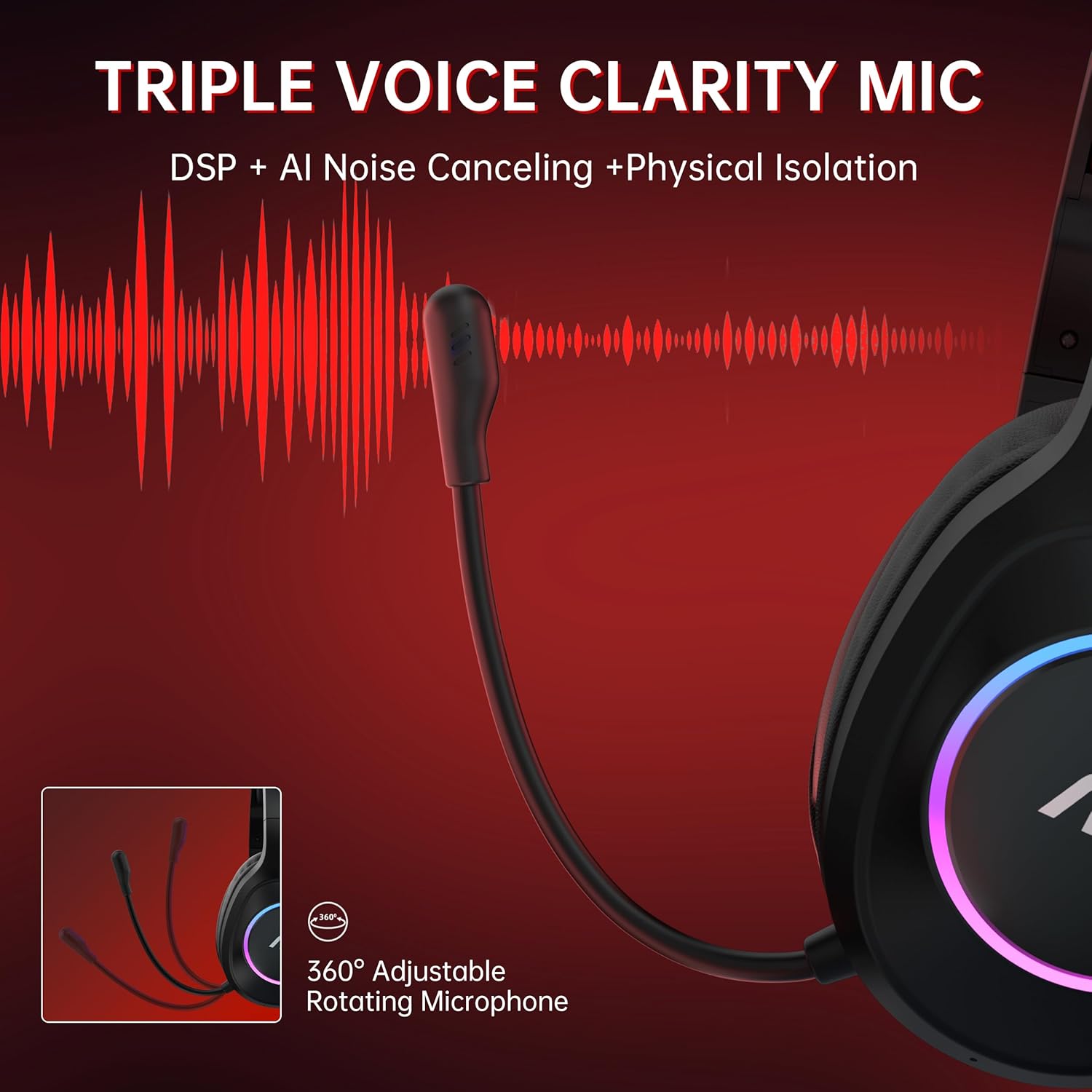
Image: The headset's adjustable microphone and its noise-cancelling capabilities.
8. ข้อมูลจำเพาะ
| คุณสมบัติ | รายละเอียด |
|---|---|
| ชื่อรุ่น | ACG 2502 |
| เทคโนโลยีการเชื่อมต่อ | 2.4GHz, Bluetooth 5.4, Wired (3.5mm) |
| เวลาแฝงของเสียง | 20 Milliseconds (max) |
| อายุการใช้งานแบตเตอรี่ | นานถึง 45 ชั่วโมง |
| เวลาในการชาร์จ | ประมาณ 2.5 ชั่วโมง |
| ขนาดไดร์เวอร์เสียง | 50 มิลลิเมตร |
| ความต้านทานของลำโพง | 32 โอห์ม |
| การตอบสนองความถี่ | 20 เฮิรตซ์ - 20 กิโลเฮิรตซ์ |
| ความไวต่อความรู้สึก | 90 เดซิเบล |
| ประเภทไมโครโฟน | All-round, Noise Cancelling |
| Transmission Distance (2.4GHz) | 10 เมตร |
| ช่วงบลูทูธ | 33 ฟุต (ประมาณ 10 เมตร) |
| น้ำหนัก | 15.2 ออนซ์ (ประมาณ 431 กรัม) |
| วัสดุ | Acrylonitrile Butadiene Styrene (ABS), Polyurethane (PU) |
9. การบำรุงรักษา
- การทำความสะอาด: ใช้ผ้าแห้งนุ่มๆ เช็ดทำความสะอาดหูฟัง หลีกเลี่ยงการใช้สารเคมีรุนแรงหรือวัสดุที่มีฤทธิ์กัดกร่อน
- พื้นที่จัดเก็บ: เก็บหูฟังไว้ในที่แห้งและเย็น หลีกเลี่ยงแสงแดดโดยตรงและอุณหภูมิที่สูงหรือต่ำเกินไป
- การดูแลแบตเตอรี่ เพื่อยืดอายุการใช้งานแบตเตอรี่ ควรหลีกเลี่ยงการใช้หูฟังจนหมดบ่อย ควรชาร์จหูฟังเป็นประจำ แม้จะไม่ได้ใช้งานเป็นเวลานานก็ตาม
- การจัดการสายเคเบิล: ควรจับสายเคเบิลอย่างระมัดระวังเพื่อป้องกันความเสียหาย หลีกเลี่ยงการดัดงอหรือการดึงอย่างรุนแรง
10 การแก้ไขปัญหา
- ไม่มีเสียง/คุณภาพเสียงไม่ดี:
- ตรวจสอบให้แน่ใจว่าชุดหูฟังเปิดอยู่และชาร์จไฟอยู่
- Verify the correct connectivity mode (2.4GHz, Bluetooth, or Wired) is selected and properly connected to your device.
- Check device volume settings and headset volume controls.
- If using 2.4GHz, ensure the USB transmitter is securely plugged in and its indicator light is solid blue.
- If using Bluetooth, ensure the headset is paired and connected in your device's Bluetooth settings.
- Test with the 3.5mm wired connection to isolate if the issue is wireless-related.
- ไมโครโฟนไม่ทำงาน:
- Ensure the microphone is not muted (single click the Microphone & Light Switch).
- Verify the microphone is securely attached.
- ตรวจสอบการตั้งค่าอินพุตเสียงของอุปกรณ์ของคุณเพื่อให้แน่ใจว่าได้เลือกไมโครโฟนของชุดหูฟังแล้ว
- Remember the microphone is disabled when connected to Nintendo Switch via 2.4GHz.
- ไม่สามารถเชื่อมต่อ/จับคู่ได้:
- Ensure the headset is in the correct pairing mode (flashing white for 2.4GHz, flashing blue for Bluetooth).
- Move closer to the device to ensure you are within range.
- Turn off and on both the headset and the device's wireless function.
- ล้างการจับคู่บลูทูธครั้งก่อนหน้าบนอุปกรณ์ของคุณ แล้วลองจับคู่ใหม่อีกครั้ง
- แบตเตอรี่หมดเร็ว:
- ตรวจสอบให้แน่ใจว่าชุดหูฟังชาร์จเต็มแล้วก่อนใช้งาน
- Reduce RGB lighting usage, as this consumes additional power.
- หากปัญหายังคงอยู่ โปรดติดต่อฝ่ายสนับสนุนลูกค้า
11. การรับประกันและการสนับสนุน
The AOC ACG 2502 Wireless Gaming Headset comes with a 1-year free replacement or repair warranty. AOC also provides ฝ่ายสนับสนุนลูกค้าตลอด 24 ชั่วโมงทุกวัน และก นโยบายการคืนสินค้าแบบไม่ยุ่งยากภายใน 60 วัน. For any issues or inquiries, please refer to the contact information provided in the included user manual or visit the official AOC support webเว็บไซต์.


