1. บทนำ
Thank you for choosing the Nobsound G3 Bluetooth 5.0 Stereo Amplifier. This compact HiFi power amplifier is designed to enhance your home or desktop audio experience with versatile connectivity and adjustable sound controls. Please read this manual thoroughly before operation to ensure proper setup and optimal performance.

Image 1: Nobsound G3 Bluetooth 5.0 Stereo Ampไลไฟเออร์, ด้านหน้า view พร้อมเสาอากาศ
2. เนื้อหาบรรจุภัณฑ์
โปรดตรวจสอบแพ็คเกจอย่างละเอียดเพื่อให้แน่ใจว่ามีสินค้าทั้งหมดอยู่และอยู่ในสภาพดี
- 1x Nobsound G3 Ampชีวิต
- 1x Bluetooth Antenna
- อะแดปเตอร์ไฟ DC 1V 19x
- 1x คู่มือผู้ใช้ (เอกสารนี้)

Image 2: Contents of the Nobsound G3 amplifier package, including the amplifier unit, Bluetooth antenna, power adapter, and user manual.
3. สินค้าหมดview
The Nobsound G3 amplifier features a compact design with essential controls and connectivity options for a versatile audio setup.
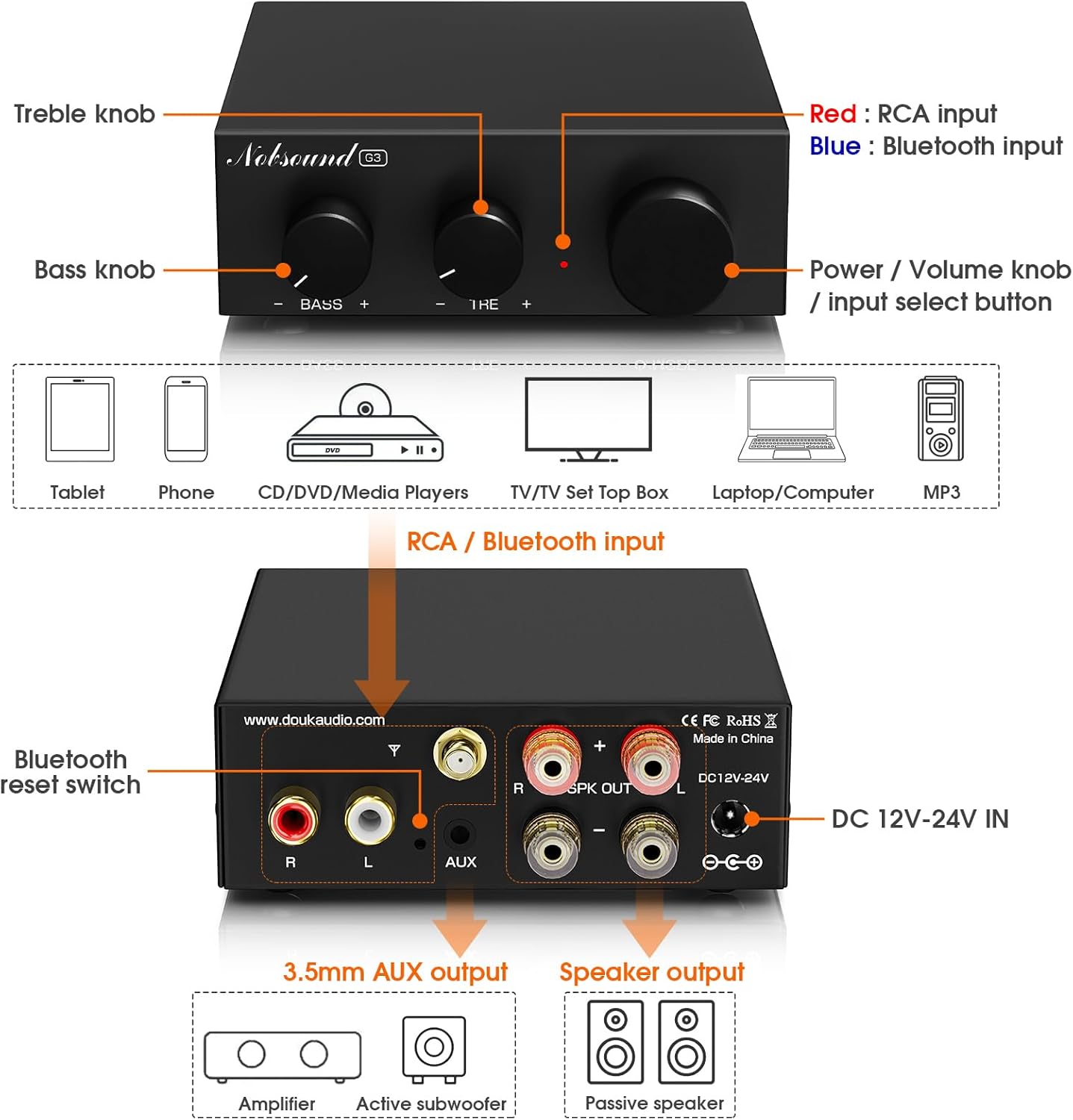
Image 3: Diagram illustrating the front panel controls (Bass, Treble, Power/Volume/Mode knob) and rear panel connections (RCA input, Bluetooth antenna port, 3.5mm AUX pre-out, speaker outputs, DC power input).
แผงควบคุมด้านหน้า:
- ปุ่มเบส: ปรับเอาท์พุตความถี่ต่ำ
- ปุ่มเสียงแหลม: ปรับเอาท์พุตความถี่สูง
- Power / Volume Knob / Input Select Button:
- กดค้างไว้เพื่อเปิด/ปิด
- หมุนเพื่อปรับระดับเสียง
- Short press to switch between RCA and Bluetooth inputs.
การเชื่อมต่อแผงด้านหลัง:
- ช่องต่อ RCA (ซ้าย/ขวา): For connecting traditional audio sources like CD players, TVs, or PCs.
- Bluetooth Antenna Port: Connect the included Bluetooth antenna for wireless connectivity.
- 3.5mm AUX Pre-Out: For connecting an active subwoofer to create a 2.1 channel system.
- เอาต์พุตลำโพง (L/R): Connect passive bookshelf or tower speakers (4-8Ω impedance).
- DC 12V-24V IN: Power input for the included DC 19V power adapter.
- Bluetooth Reset Switch: A small button to reset Bluetooth pairing.
4. คำแนะนำในการตั้งค่า
4.1 การเชื่อมต่อลำโพง
- ให้แน่ใจว่า amplifier ถูกปิด
- Connect your passive bookshelf or tower speakers to the เอาต์พุตลำโพง (L/R) terminals on the rear panel. Ensure correct polarity (+ to + and - to -) for each speaker. The amplifier supports speakers with 4-8Ω impedance.
4.2 การเชื่อมต่อแหล่งเสียง
The Nobsound G3 offers two primary input methods: Bluetooth and RCA.
4.2.1 การเชื่อมต่อบลูทูธ
- Screw the included Bluetooth antenna firmly into the antenna port on the rear panel.
- เปิดเครื่อง ampชีวิต.
- Short press the Power/Volume knob to select Bluetooth input mode. The indicator light will flash, indicating it's ready for pairing.
- On your Bluetooth device (e.g., smartphone, tablet), search for "Nobsound G3" in the Bluetooth settings and pair.
- เมื่อจับคู่เสร็จแล้ว ไฟแสดงสถานะจะติดสว่างตลอดเวลา
4.2.2 RCA Connection
- Connect your audio source (e.g., TV, PC, CD player) to the RCA Input (L/R) ports on the rear panel using an RCA cable. Ensure left and right channels are connected correctly.
- Short press the Power/Volume knob to select RCA input mode. The indicator light will be solid (and a different color than Bluetooth, typically red for RCA and blue for Bluetooth, refer to Image 3).

Image 4: The Nobsound G3 amplifier connected to speakers via RCA cables from a laptop, and wirelessly via Bluetooth to a smartphone. This illustrates both wired and wireless input options.
4.3 Connecting an Active Subwoofer (Optional)
To create a 2.1 channel audio system with enhanced bass, you can connect an active subwoofer.
- เชื่อมต่อ 3.5mm AUX Pre-Out on the rear panel of the G3 amplifier to the input of your active subwoofer using a 3.5mm to RCA or 3.5mm to 3.5mm cable, depending on your subwoofer's input type.
- Adjust the subwoofer's volume and crossover frequency as desired.
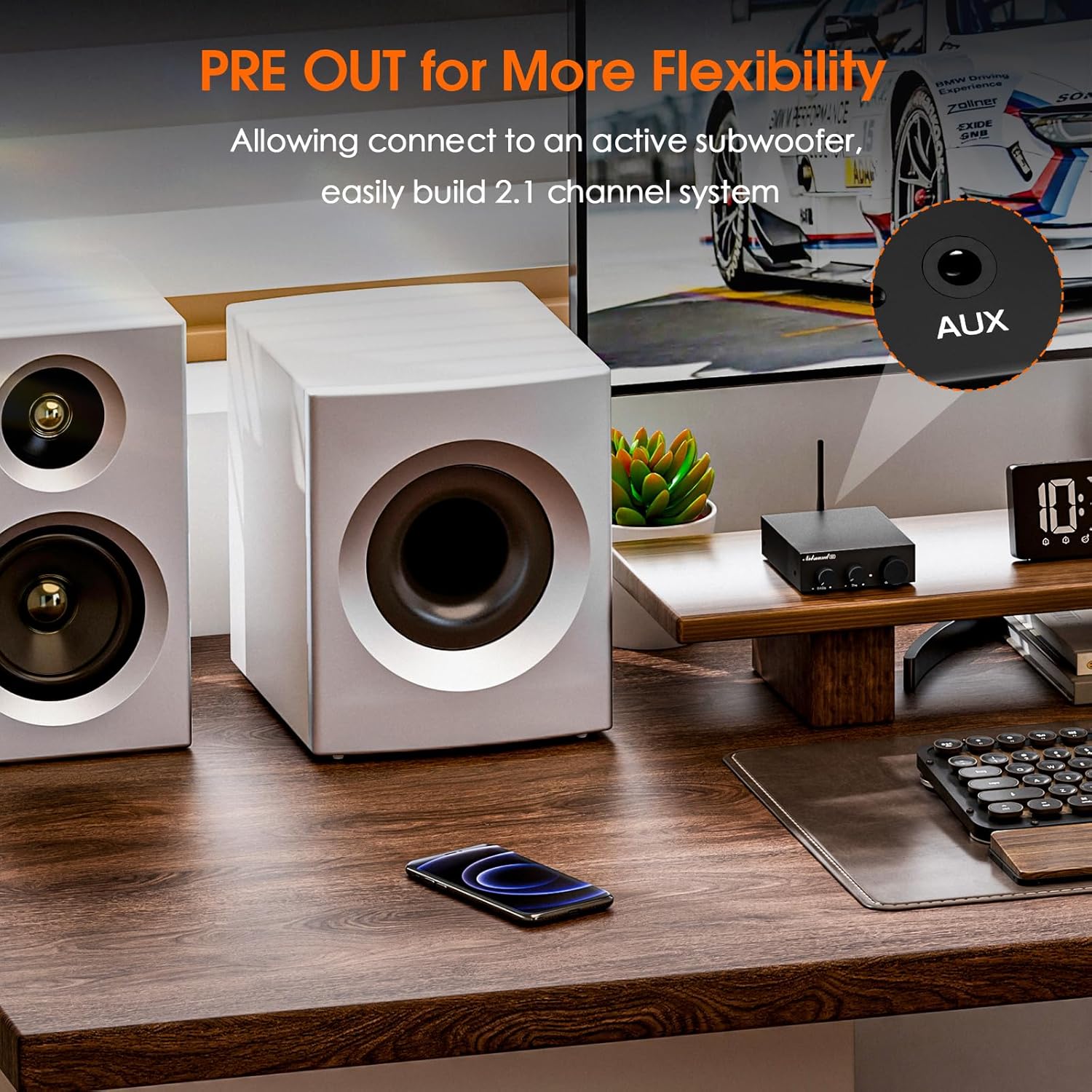
Image 5: The Nobsound G3 amplifier positioned on a desk with a connected active subwoofer, demonstrating the 2.1 channel pre-out functionality.
4.4 การเชื่อมต่อสายไฟ
- Connect the DC 19V power adapter to the DC 12V-24Vเข้า พอร์ตที่แผงด้านหลัง
- เสียบอะแดปเตอร์ไฟฟ้าเข้ากับเต้ารับไฟฟ้าที่เหมาะสม
5. คู่มือการใช้งาน
5.1 เปิด/ปิดเครื่อง
- To power on, press and hold the Power/Volume knob for approximately 3 seconds.
- To power off, press and hold the Power/Volume knob for approximately 3 seconds.
5.2 การเลือกอินพุต
Short press the Power/Volume knob to cycle between Bluetooth and RCA inputs. The indicator light color will change to reflect the selected input (e.g., blue for Bluetooth, red for RCA).
5.3 การควบคุมระดับเสียง
หมุนปุ่มเปิด/ปิดเครื่อง/ระดับเสียงตามเข็มนาฬิกาเพื่อเพิ่มระดับเสียง และทวนเข็มนาฬิกาเพื่อลดระดับเสียง
5.4 Tone Adjustment
ใช้ เบส และ เสียงแหลม knobs on the front panel to fine-tune the audio output to your preference.
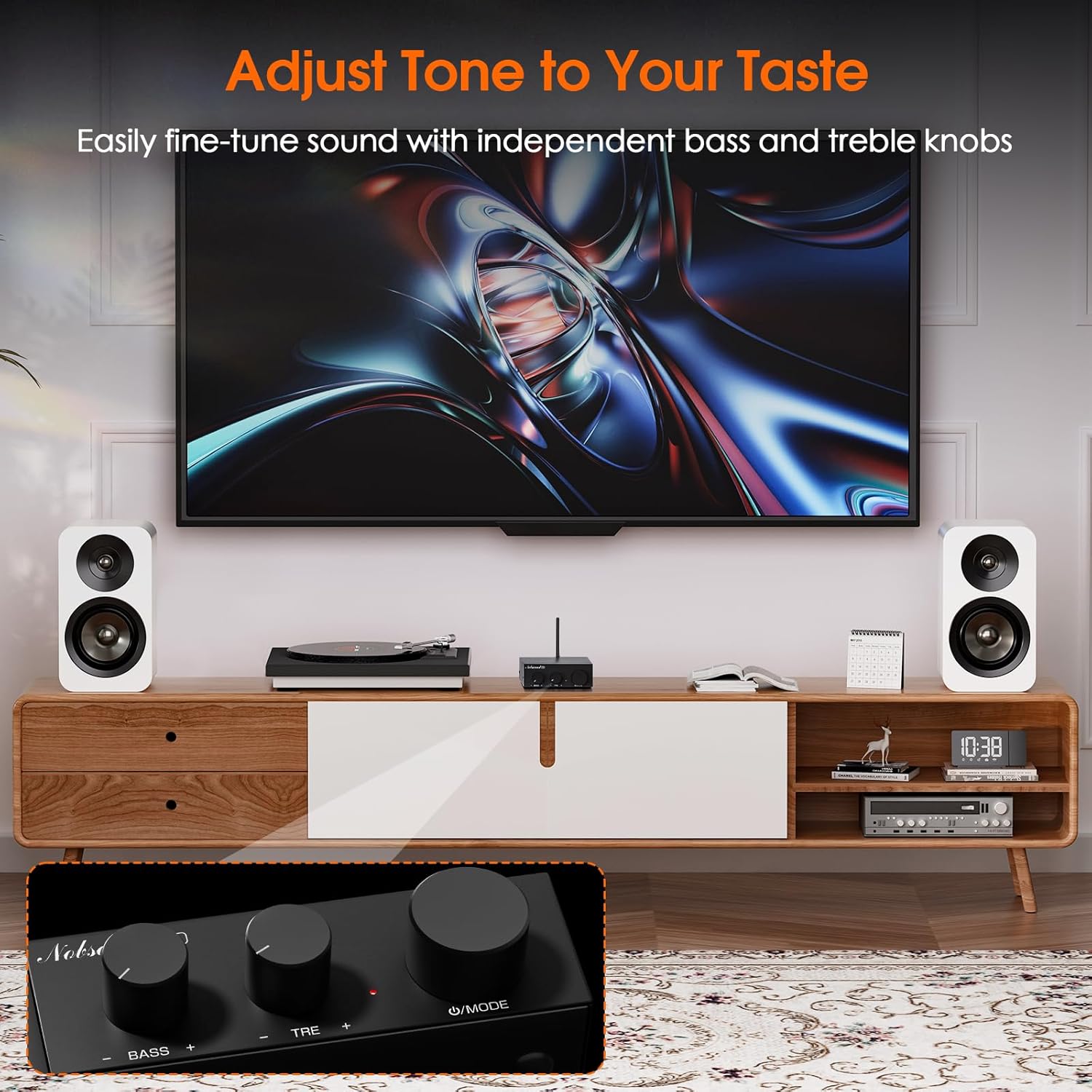
Image 6: The Nobsound G3 amplifier in a living room setup, highlighting the bass and treble adjustment knobs on the front panel for sound customization.
6. การบำรุงรักษา
- เก็บรักษาไว้ amplifier in a dry, well-ventilated area, away from direct sunlight, heat sources, and moisture.
- เช็ดทำความสะอาดภายนอกด้วยผ้าแห้งเนื้อนุ่ม ห้ามใช้น้ำยาทำความสะอาดหรือสารละลายใดๆ
- Ensure proper airflow around the unit to prevent overheating.
- หลีกเลี่ยงการวางของหนักทับด้านบน ampชีวิต.
7 การแก้ไขปัญหา
| ปัญหา | สาเหตุที่เป็นไปได้ | สารละลาย |
|---|---|---|
| No power / Indicator light off | Power adapter not connected or faulty; unit not powered on. |
|
| ไม่มีเสียงออก | Incorrect input selected; loose speaker connections; low volume; faulty audio source. |
|
| ปัญหาการจับคู่บลูทูธ | Bluetooth not in pairing mode; device too far; interference. |
|
| เสียงเพี้ยน | Volume too high; incorrect tone settings; poor audio source quality. |
|
8. ข้อมูลจำเพาะ
| คุณสมบัติ | รายละเอียด |
|---|---|
| ยี่ห้อ | นอบซาวน์ |
| หมายเลขรุ่น | SUC-G3-US |
| การเชื่อมต่อ | Bluetooth 5.0, RCA |
| เอาท์พุต วัดtage | 110 Watts (Max. 55W x2 stereo output) |
| อุปกรณ์ที่รองรับ | Passive Speakers (4-8Ω), Active Subwoofer, CD Player, PC, TV |
| พรีเอาท์ | 3.5mm AUX for active subwoofer |
| การควบคุมโทนเสียง | Adjustable Bass and Treble |
| กำลังไฟเข้า | DC 12V-24V (19V adapter included) |
| วัสดุ | อลูมิเนียม |
| สี | สีดำ |
| น้ำหนักสินค้า | 13.4 ออนซ์ (ประมาณ 380 กรัม) |
| ขนาดสินค้า | 4.13 x 3.54 x 1.18 นิ้ว (105 x 90 x 30 มม.) |

Image 7: The Nobsound G3 amplifier placed on top of a speaker, illustrating its compact dimensions and suitability for various spaces.
9. การรับประกันและการสนับสนุน
For warranty information or technical support, please contact Nobsound Direct, the seller of this product. You can typically find their contact information through your purchase platform or by visiting the Nobsound brand store.
การสนับสนุนทางออนไลน์: For further assistance, please visit the official Nobsound store or contact customer service via the platform where you purchased the product.


