1. บทนำ
Thank you for choosing the JOMAA VM604 Wireless Ergonomic Vertical Mouse. This advanced mouse is designed to provide superior comfort and efficiency, reducing wrist strain during prolonged use. Featuring multi-device connectivity, adjustable DPI, and a unique multi-function dial, the VM604 is an ideal tool for various computing environments.
โปรดอ่านคู่มือนี้อย่างละเอียดก่อนใช้งานผลิตภัณฑ์ เพื่อให้มั่นใจได้ว่าผลิตภัณฑ์ใช้งานได้อย่างถูกต้องและยืดอายุการใช้งานให้ยาวนานที่สุด
2. สินค้าหมดview
2.1 เนื้อหาบรรจุภัณฑ์
- JOMAA VM604 Ergonomic Vertical Mouse
- ตัวรับสัญญาณ USB (2.4G)
- สายชาร์จ USB-C
- คู่มือการใช้งาน
2.2 ส่วนประกอบของเมาส์
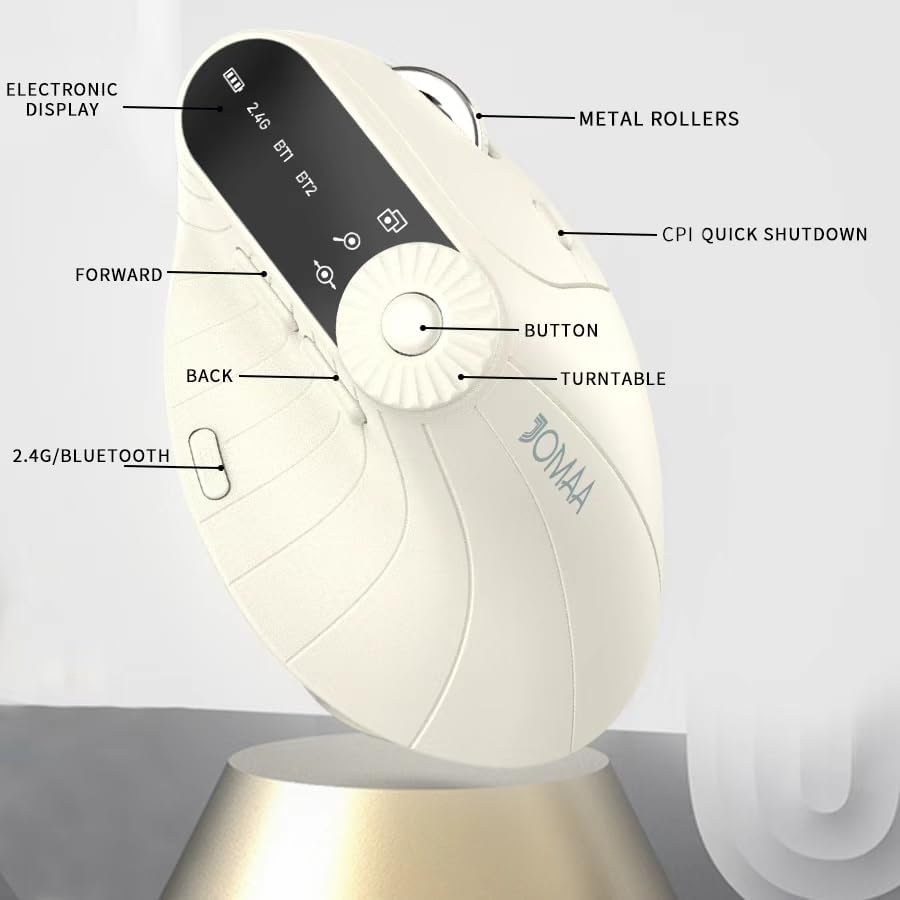
ภาพที่ 1: Labeled components of the JOMAA VM604 mouse, highlighting the electronic display, metal rollers, CPI quick shutdown, forward/back buttons, turntable, and 2.4G/Bluetooth switch.
- ปุ่มคลิกซ้าย: Standard left mouse function.
- ปุ่มคลิกขวา: Standard right mouse function.
- ล้อเลื่อน: สำหรับการเลื่อนหน้าจอในแนวตั้ง
- ปุ่มไปข้างหน้า: นำทางไปข้างหน้าใน web เบราว์เซอร์หรือ file นักสำรวจ
- ปุ่มย้อนกลับ: นำทางย้อนกลับใน web เบราว์เซอร์หรือ file นักสำรวจ
- Multi-function Turntable/Dial: Offers three functions: 1. Window switching, 2. Zoom in/out (for pages and images), 3. Page moves left/right (for Excel).
- DPI/CPI Adjustment Button: สลับไปมาระหว่างการตั้งค่า DPI (1000/1200/1600/2400)
- จอแสดงผลอิเล็กทรอนิกส์: Shows battery level, connection mode (2.4G, BT1, BT2), and DPI setting.
- Connection Mode Switch (Bottom): Toggles between 2.4G, Bluetooth 1 (BT1), and Bluetooth 2 (BT2) modes.
- Power ON/OFF Switch (Bottom): เปิดหรือปิดเมาส์
- พอร์ตชาร์จ USB-C: Located at the front of the mouse.
- ช่องเก็บตัวรับสัญญาณ USB: Located at the bottom of the mouse.
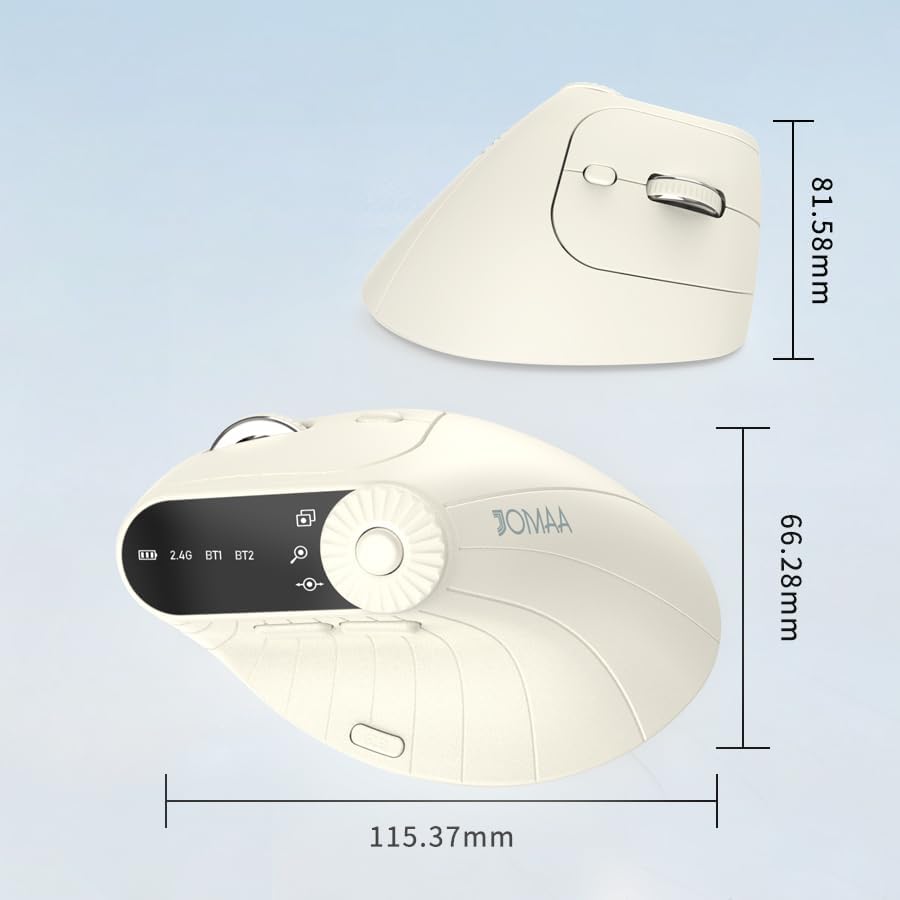
ภาพที่ 2: Dimensions of the JOMAA VM604 mouse, showing its ergonomic vertical design.

ภาพที่ 3: Illustration of the JOMAA VM604's 57-degree ergonomic design, promoting a natural handshake posture to reduce wrist pressure.
3. การตั้งค่า
3.1 การชาร์จเมาส์
The JOMAA VM604 mouse features a built-in rechargeable battery. To charge:
- Connect the provided USB-C charging cable to the charging port at the front of the mouse.
- เชื่อมต่อปลายอีกด้านหนึ่งของสาย USB เข้ากับแหล่งพลังงาน USB (เช่น พอร์ต USB ของคอมพิวเตอร์ อะแดปเตอร์ติดผนัง USB)
- The electronic display will indicate charging status.

ภาพที่ 4: The JOMAA VM604 mouse connected via USB-C for charging, with a visible charging indicator on the electronic display.
3.2 การเชื่อมต่อไร้สาย 2.4G
For a stable and fast wireless connection:
- ค้นหาตัวรับสัญญาณ USB ที่เก็บไว้ในช่องด้านล่างของเมาส์
- เสียบตัวรับสัญญาณ USB เข้ากับพอร์ต USB ที่พร้อมใช้งานบนคอมพิวเตอร์ของคุณ
- Turn on the mouse using the ON/OFF switch at the bottom.
- Slide the connection mode switch to the '2.4G' position. The mouse should automatically connect to your computer.
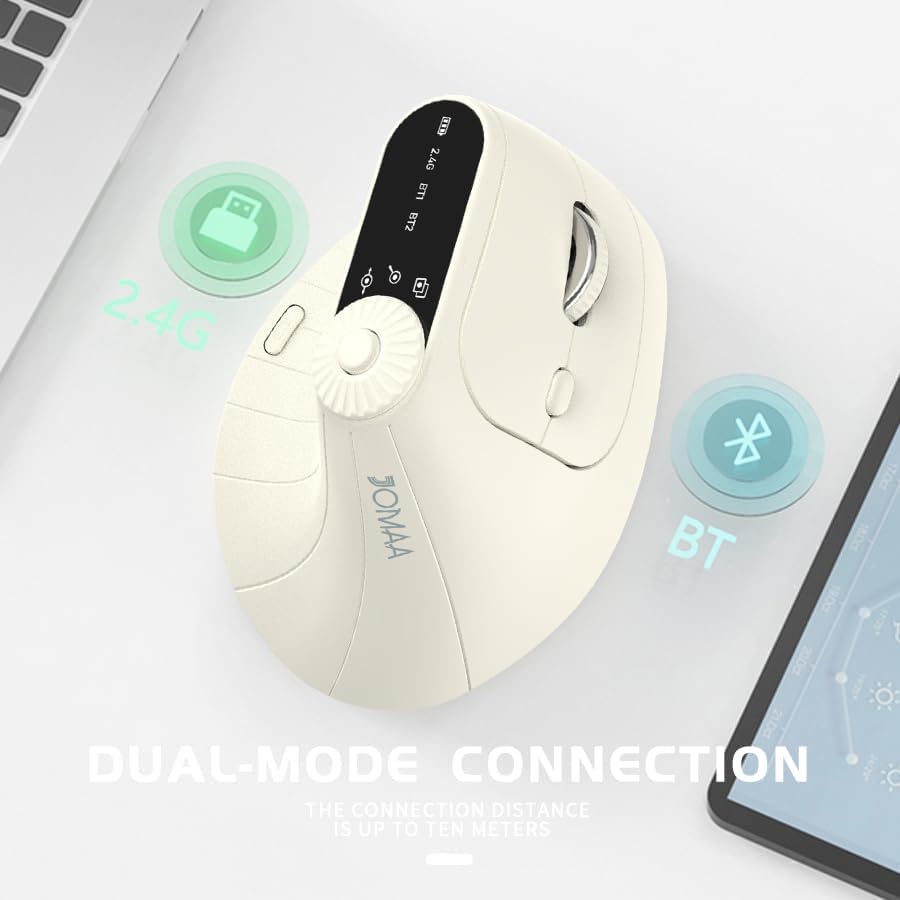
ภาพที่ 5: The JOMAA VM604 mouse illustrating its dual-mode connection capabilities, including the 2.4G USB receiver and Bluetooth options.
3.3 Bluetooth Connection (BT1/BT2)
The mouse can connect to two different Bluetooth devices:
- Turn on the mouse using the ON/OFF switch at the bottom.
- Slide the connection mode switch to either 'BT1' or 'BT2' position.
- For the first Bluetooth connection or to reset a connection, press and hold the connection mode switch for 3-5 seconds until the Bluetooth indicator on the electronic display starts blinking.
- On your device (PC, Laptop, MacBook), go to Bluetooth settings and search for 'JOMAA VM604' (or similar name).
- เลือกเมาส์ที่ต้องการเชื่อมต่อ ไฟแสดงสถานะจะหยุดกะพริบเมื่อเชื่อมต่อเสร็จแล้ว
- To switch between connected devices, simply double-click the connection mode switch to cycle through 2.4G, BT1, and BT2.
4. คู่มือการใช้งาน
4.1 การปรับ DPI
Adjust the mouse sensitivity (DPI/CPI) to suit your preference:
- Press the DPI Adjustment Button (Component 7) located near the multi-function dial.
- Each press will cycle through the available DPI settings: 1000, 1200, 1600, and 2400.
- The electronic display will show the current DPI setting.
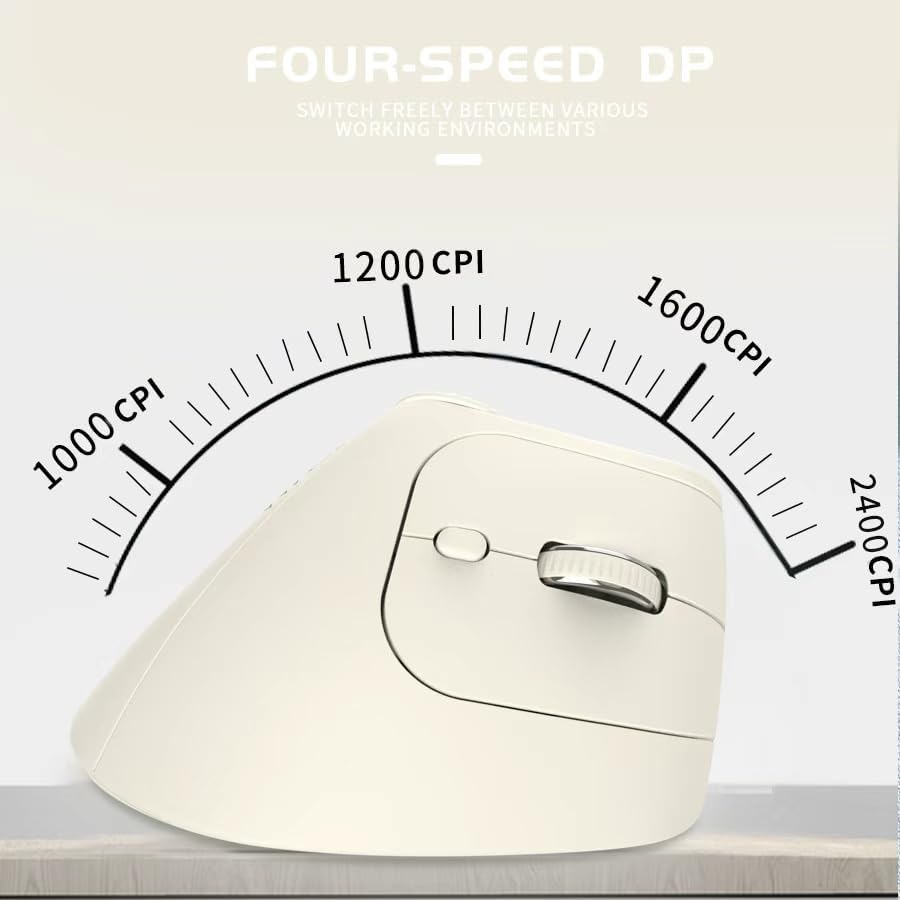
ภาพที่ 6: The JOMAA VM604 mouse highlighting its four-speed CPI settings (1000, 1200, 1600, 2400) for precise optical tracking.
4.2 Multi-Function Turntable
The unique turntable (Component 6) provides enhanced control:
- Window Switching: Rotate the dial to quickly switch between open application windows.
- ซูมเข้า/ออก: Rotate the dial to zoom in or out on pages and images.
- Page Left/Right: Useful for navigating large spreadsheets in applications like Excel.

ภาพที่ 7: The multi-function knob on the JOMAA VM604 mouse, demonstrating its uses for window switching, zooming in/out on pages and images, and moving pages left/right in applications like Excel.
4.3 ปุ่มเดินหน้า/ถอยหลัง
Use the Forward (Component 4) and Back (Component 5) buttons for quick navigation in web เบราว์เซอร์และ file นักสำรวจ
5. การบำรุงรักษา
5.1 การทำความสะอาด
เพื่อรักษาประสิทธิภาพและสุขอนามัยที่เหมาะสมที่สุด:
- ปิดเมาส์ก่อนทำความสะอาด
- ใช้แบบนุ่มๆamp cloth to wipe the surface of the mouse.
- หลีกเลี่ยงการใช้สารเคมีรุนแรงหรือวัสดุที่มีฤทธิ์กัดกร่อน
- Periodically clean the optical sensor at the bottom with a cotton swab.
5.2 การดูแลแบตเตอรี่
เพื่อยืดอายุแบตเตอรี่:
- หลีกเลี่ยงการปล่อยแบตเตอรี่จนหมดบ่อยครั้ง
- ควรชาร์จเมาส์เป็นประจำ แม้ว่าจะยังไม่แบตหมดเกลี้ยงก็ตาม
- If the mouse will not be used for an extended period, turn it off.

ภาพที่ 8: The JOMAA VM604 mouse demonstrating its intelligent hibernate mode, which activates after 60 seconds of inactivity to save power.
6 การแก้ไขปัญหา
- เมาส์ไม่ตอบสนอง: Ensure the mouse is turned on and fully charged. Check the connection mode (2.4G or Bluetooth) and ensure it's correctly paired/connected to your device. For 2.4G, try plugging the USB receiver into a different port. For Bluetooth, try re-pairing the device.
- การเคลื่อนไหวของเคอร์เซอร์ไม่แน่นอน: Clean the optical sensor at the bottom of the mouse. Ensure the surface you are using is clean and suitable for mouse operation. Adjust the DPI setting to a lower value if the cursor is too fast.
- ปัญหาการเชื่อมต่อบลูทูธ: Ensure your device's Bluetooth is enabled. Try forgetting the device in your Bluetooth settings and re-pairing. Ensure the mouse is in the correct BT1 or BT2 mode and in pairing mode (blinking indicator).
- Multi-function dial not working: Ensure the mouse is properly connected. Some functions may require specific application support.
7. ข้อมูลจำเพาะ
| คุณสมบัติ | รายละเอียด |
|---|---|
| ขนาดสินค้า | 6 x 4 x 0.04 นิ้ว |
| น้ำหนักสินค้า | 7.4 ออนซ์ |
| หมายเลขรุ่นสินค้า | VM604 |
| แบตเตอรี่ | ต้องใช้แบตเตอรี่ 9V จำนวน 1 ก้อน (มีให้ในชุด) - Note: Product features built-in rechargeable battery, 9V battery information may be a listing error. |
| เทคโนโลยีการเชื่อมต่อ | บลูทูธ, USB (ไร้สาย 2.4G) |
| คุณสมบัติพิเศษ | Ergonomic Design, Multi-function Turntable, Adjustable DPI, Rechargeable |
| เทคโนโลยีตรวจจับการเคลื่อนไหว | ออฟติคอล |
| การตั้งค่า DPI | 1000/1200/1600/2400 |
| สี | Beiga |
8. การรับประกันและการสนับสนุน
JOMAA products are designed and manufactured to the highest quality standards. This product is covered by a limited warranty from the date of purchase. For detailed warranty information, technical support, or customer service inquiries, please refer to the contact information provided on the product packaging or visit the official JOMAA webเว็บไซต์.
โปรดเก็บหลักฐานการซื้อของคุณไว้เพื่อเรียกร้องการรับประกัน
9. วิดีโอผลิตภัณฑ์อย่างเป็นทางการ
1 วิดีโอ: โอเวอร์view of the JOMAA VM604 Ergonomic Mouse, showcasing its unique vertical design and comfortable grip. This video highlights the physical appearance and ergonomic benefits of the mouse.


