1. บทนำ
This manual provides detailed instructions for the setup, operation, and maintenance of your NexiGo Nova Mini Portable Laser Projector. Please read this manual thoroughly before using the device to ensure proper functionality and safety.

Image 1.1: The NexiGo Nova Mini Portable Laser Projector.
2. คุณสมบัติหลัก
- บูรณาการ Google TV: Access a wide range of streaming services and apps directly.
- ความละเอียด Full HD 1080p: Delivers clear and vibrant images.
- ความสว่าง 1200 ลูเมนส์: Provides a bright picture for various viewสิ่งแวดล้อม
- 15,000:1 Contrast Ratio with Scene Adapt Engine (SAE): Enhances image depth and detail.
- Active 3D Support: เพื่อการดื่มด่ำ viewการสร้างประสบการณ์
- Intelligent Auto Setup: Features Auto Adaptive Brightness, Auto Keystone Correction, Autofocus, Intelligent Obstacle Avoidance, Intelligent Screen Alignment, and Intelligent Eye Protection.
- การออกแบบพกพา: กะทัดรัดและน้ำหนักเบาเพื่อการขนย้ายที่ง่ายดาย
- 8W Dolby Audio Speaker: Integrated sound system for a complete audio experience.
- USB-C PD Power Compatibility: Can be powered by a 100W power bank for on-the-go use.
3. การตั้งค่า
3.1 การเปิดเครื่องครั้งแรก
- Connect the projector to a power source using the provided power adapter. For portable use, connect a 100W USB-C PD power bank.
- กดปุ่มเปิด/ปิดบนโปรเจ็กเตอร์หรือรีโมทคอนโทรลเพื่อเปิดอุปกรณ์
3.2 การจัดวางและการฉายภาพ
Position the projector on a stable surface. The built-in kickstand allows for tilting the projection angle between 7° and 15°.
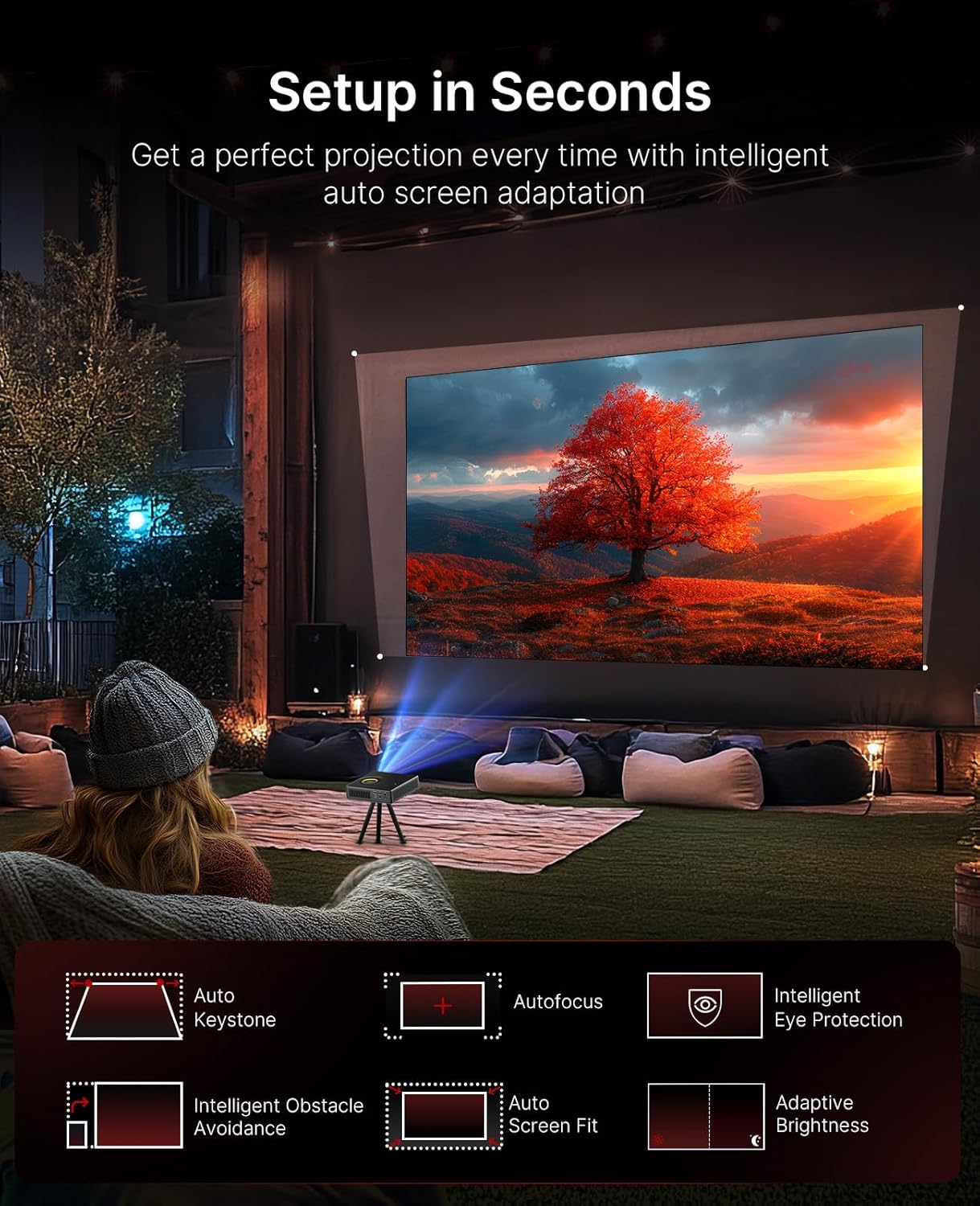
Image 3.1: The projector demonstrating its intelligent auto setup features, including auto keystone, autofocus, and obstacle avoidance.
3.3 Intelligent Screen Adaptation (ISA)
The Nova Mini features Intelligent Screen Adaptation for an effortless setup:
- Auto Adaptive Brightness: Adjusts image brightness based on ambient light conditions.
- แก้ไขภาพบิดเบี้ยวอัตโนมัติ: Automatically corrects image distortion for a rectangular picture.
- โฟกัสอัตโนมัติ: Sharpens the image for clear viewการไอเอ็นจี
- การหลีกเลี่ยงอุปสรรคอันชาญฉลาด: Adjusts the projection to avoid objects on the wall.
- การจัดตำแหน่งหน้าจออัจฉริยะ: ปรับภาพให้พอดีกับหน้าจอของคุณโดยอัตโนมัติ
- ระบบป้องกันดวงตาอัจฉริยะ: Dims the image brightness when someone stands in front of the laser to protect eyes.

Image 3.2: Visual representation of the projector's effortless setup features.
4. คู่มือการใช้งาน
4.1 อินเทอร์เฟซ Google TV
The projector integrates Google TV, providing access to over 10,000 apps and 800+ free channels via Google Play. Popular streaming services like Netflix, YouTube, Prime Video, and Disney+ are available.

Image 4.1: The Google TV home screen on the projector.
4.2 การควบคุมด้วยเสียง
Utilize the intuitive remote with built-in voice control (Hey Google) to navigate content, search for shows, and control playback.

Image 4.2: Using the remote control for voice commands.
4.3 การคัดเลือกเนื้อหา
With Google Cast, you can wirelessly stream content from Android, iOS, Mac, or Windows devices to the projector.

Image 4.3: Wireless content casting from a mobile device.
5. คุณภาพของภาพและเสียง
5.1 Laser Projection
The Nova Mini utilizes laser projection technology, offering 1080p resolution and 1200 Lumens brightness. It covers 100% Rec.709 color gamut, enhanced by HDR10 and HLG for accurate colors and contrast.

ภาพที่ 5.1: อดีตample of lifelike image quality.
5.2 Scene Adapt Engine (SAE)
The Scene Adapt Engine (SAE) improves contrast and detail by adjusting laser brightness in real-time based on content. This results in ultra-deep blacks and brilliant highlights with a contrast ratio over 15,000:1.
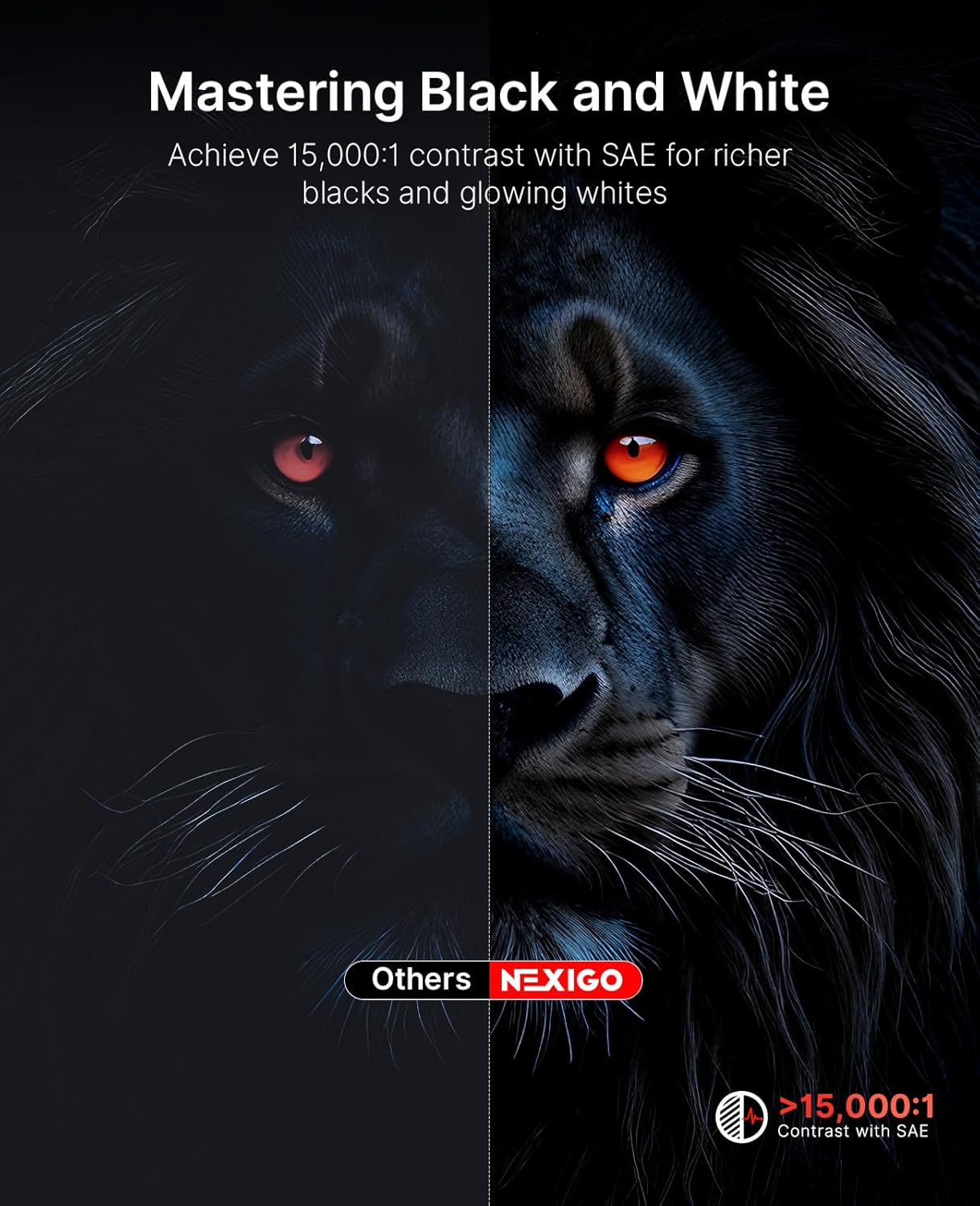
Image 5.2: Contrast enhancement with Scene Adapt Engine.
5.3 รองรับ 3 มิติ
The Nova Mini supports Active 3D content, providing an immersive home entertainment experience.

Image 5.3: Immersive 3D viewการสร้างประสบการณ์
5.4 ระบบเสียง
Equipped with an 8W speaker and Dolby Audio, the projector delivers clear and rich sound for an enhanced viewการสร้างประสบการณ์

Image 5.4: The projector's audio capabilities in an outdoor setting.
6. ความสามารถในการพกพา
The Nova Mini is designed for portability, measuring under 2 inches thick and weighing only 3 lbs. Its compact size allows for easy transport and setup in various locations, both indoors and outdoors.
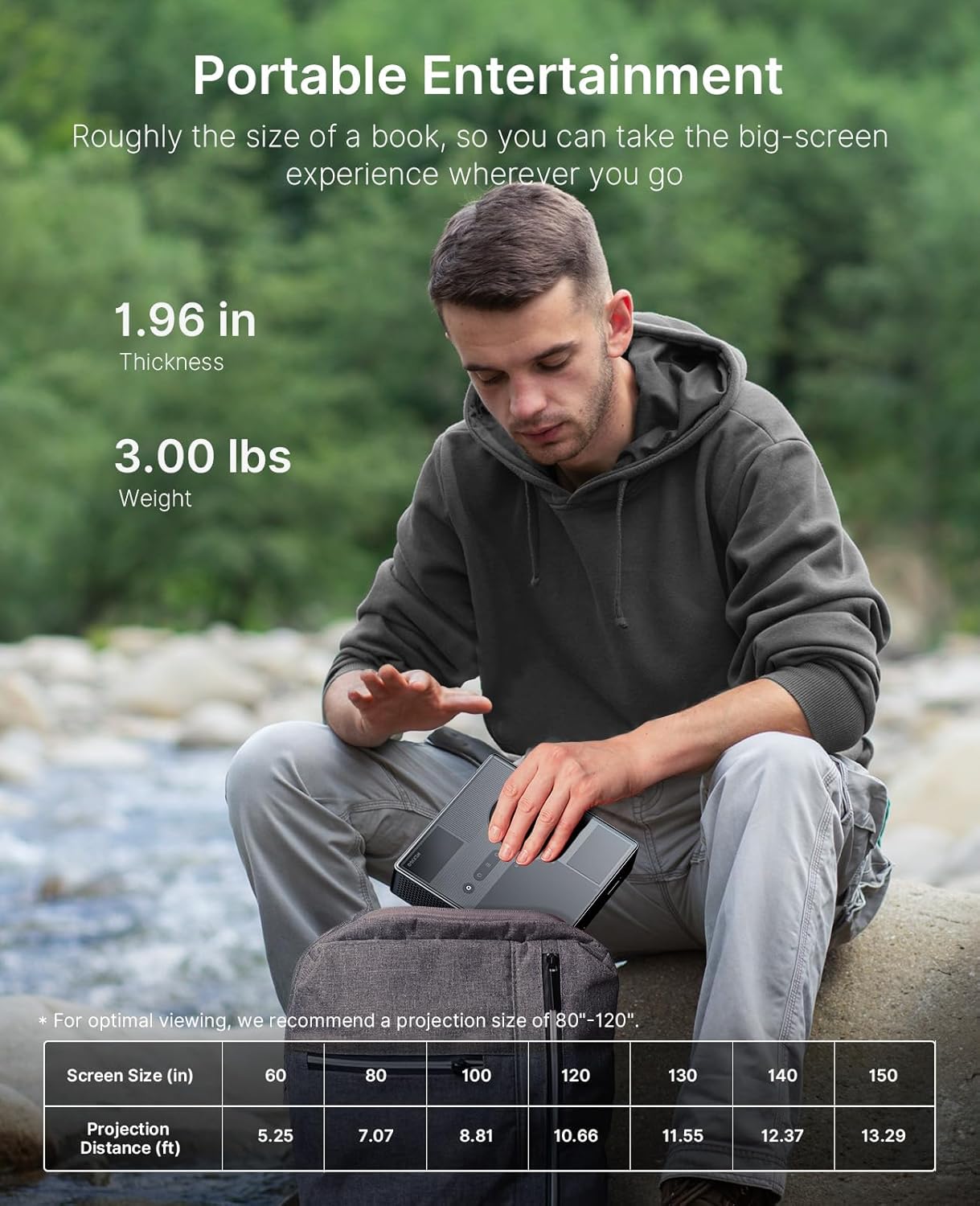
Image 6.1: The projector's compact size for portable entertainment.
| Screen Size (in) | ระยะฉาย (ฟุต) |
|---|---|
| 60 | 5.25 |
| 80 | 7.07 |
| 100 | 8.81 |
| 120 | 10.66 |
| 130 | 11.55 |
| 140 | 12.37 |
| 150 | 13.29 |
Table 6.1: Optimal viewing is recommended for projection sizes between 80"-120".

Image 6.2: The projector used for outdoor entertainment.
7. การเชื่อมต่อ
The projector offers various connectivity options for different devices:
- ช่องต่อ HDMI: Two HDMI ports (HDMI 1 supports ARC) for connecting laptops, game consoles, and other media players.
- ยูเอสบี 2.0: สำหรับเชื่อมต่ออุปกรณ์ USB
- แจ็คเสียง 3.5 มม.: สำหรับการเชื่อมต่อหูฟังหรือลำโพงภายนอก
- LAN: พอร์ตอีเทอร์เน็ตสำหรับการเชื่อมต่อเครือข่ายแบบใช้สาย
- ยูเอสบี-C: For power delivery (PD) and data transfer.

ภาพที่ 7.1: จบแล้วview of the projector's connectivity ports.
8. ข้อมูลจำเพาะ
- หมายเลขรุ่น: พีเจ08
- ขนาดสินค้า : 7.8 x 7.8 x 2.3 นิ้ว
- น้ำหนักสินค้า: 6.23 ปอนด์
- ปณิธาน: ความละเอียด 1080p
- ความสว่าง: 1200 ลูเมน
- อัตราส่วนคอนทราสต์: 15,000:1 with SAE
- ช่วงสี: 100% เรค.709
- รองรับ HDR: HDR10,เอชแอลจี
- การรองรับ 3D: แอ็คทีฟ 3D
- ระบบปฏิบัติการ: กูเกิลทีวี
- เสียง: 8W Dolby Audio Speaker
- กำลังไฟเข้า: USB-C PD (requires 100W power source)
- ผู้ผลิต: Nextight INC
- วันที่เข้าใช้งานครั้งแรก: วันที่ 15 สิงหาคม 2025
9. การบำรุงรักษา
To ensure the longevity and optimal performance of your NexiGo Nova Mini projector, follow these maintenance guidelines:
- การทำความสะอาดเลนส์: ใช้ผ้านุ่มไม่เป็นขุยที่ออกแบบมาสำหรับเลนส์สายตาโดยเฉพาะ หลีกเลี่ยงวัสดุที่มีฤทธิ์กัดกร่อนหรือสารเคมีรุนแรง
- การทำความสะอาดภายนอก: เช็ดทำความสะอาดภายนอกของโปรเจคเตอร์ด้วยผ้าแห้งเนื้อนุ่ม ห้ามใช้น้ำยาทำความสะอาดโดยตรงกับตัวเครื่อง
- การระบายอากาศ : Ensure that the projector's ventilation openings are not blocked to prevent overheating. Maintain adequate space around the device for airflow.
- พื้นที่จัดเก็บ: เมื่อไม่ได้ใช้งานเป็นเวลานาน ควรเก็บโปรเจ็กเตอร์ไว้ในที่แห้งและเย็น หลีกเลี่ยงแสงแดดโดยตรงและอุณหภูมิที่สูงหรือต่ำเกินไป
- การจัดการพลังงาน: ควรปิดเครื่องโปรเจคเตอร์อย่างถูกต้องทุกครั้งก่อนถอดปลั๊ก
10 การแก้ไขปัญหา
If you encounter issues with your NexiGo Nova Mini, refer to the following common troubleshooting steps:
- ไม่มีไฟฟ้า: Ensure the power adapter is securely connected to both the projector and a working power outlet. If using a power bank, confirm it is a 100W USB-C PD compatible model and fully charged.
- ไม่มีรูป: Check that the lens cap is removed. Verify the input source is correctly selected in the projector's settings. Ensure all cables (HDMI, etc.) are securely connected.
- ภาพเบลอ: The projector features autofocus. If the image remains blurry, try moving the projector slightly or manually adjusting focus if an option is available in the settings. Ensure the projection surface is flat.
- ไม่มีเสียง: Check the volume levels on both the projector and the connected source device. If using external speakers, ensure they are properly connected and powered on.
- รีโมทคอนโทรลไม่ตอบสนอง: ใส่แบตเตอรี่กลับเข้าไปในรีโมทคอนโทรล ตรวจสอบให้แน่ใจว่าไม่มีสิ่งกีดขวางระหว่างรีโมทและโปรเจ็กเตอร์
- คำเตือนความร้อนสูงเกินไป: Ensure the projector's vents are clear and not obstructed. Allow the projector to cool down in a well-ventilated area.
หากมีปัญหาเกิดขึ้นอย่างต่อเนื่อง โปรดติดต่อฝ่ายสนับสนุนลูกค้า
11. การรับประกันและการสนับสนุน
NexiGo products are designed for quality and reliability. For specific warranty details, please refer to the warranty card included with your product or visit the official NexiGo website. For technical assistance, troubleshooting, or customer service inquiries, please contact NexiGo USA support.
NexiGo USA Support:
- การสนับสนุนลูกค้าตลอด 24 ชั่วโมง
- 30 Days Return or Exchange Policy
- การสนับสนุนทางเทคนิคตลอดอายุการใช้งาน


