1. บทนำ
This manual provides instructions for the operation and maintenance of your LIGE FV26-F Smartwatch. Please read this manual carefully before using the device to ensure proper function and to maximize its features. The smartwatch is designed for women, featuring a round display, silver stainless steel band with diamond accents, and a silicone strap option.
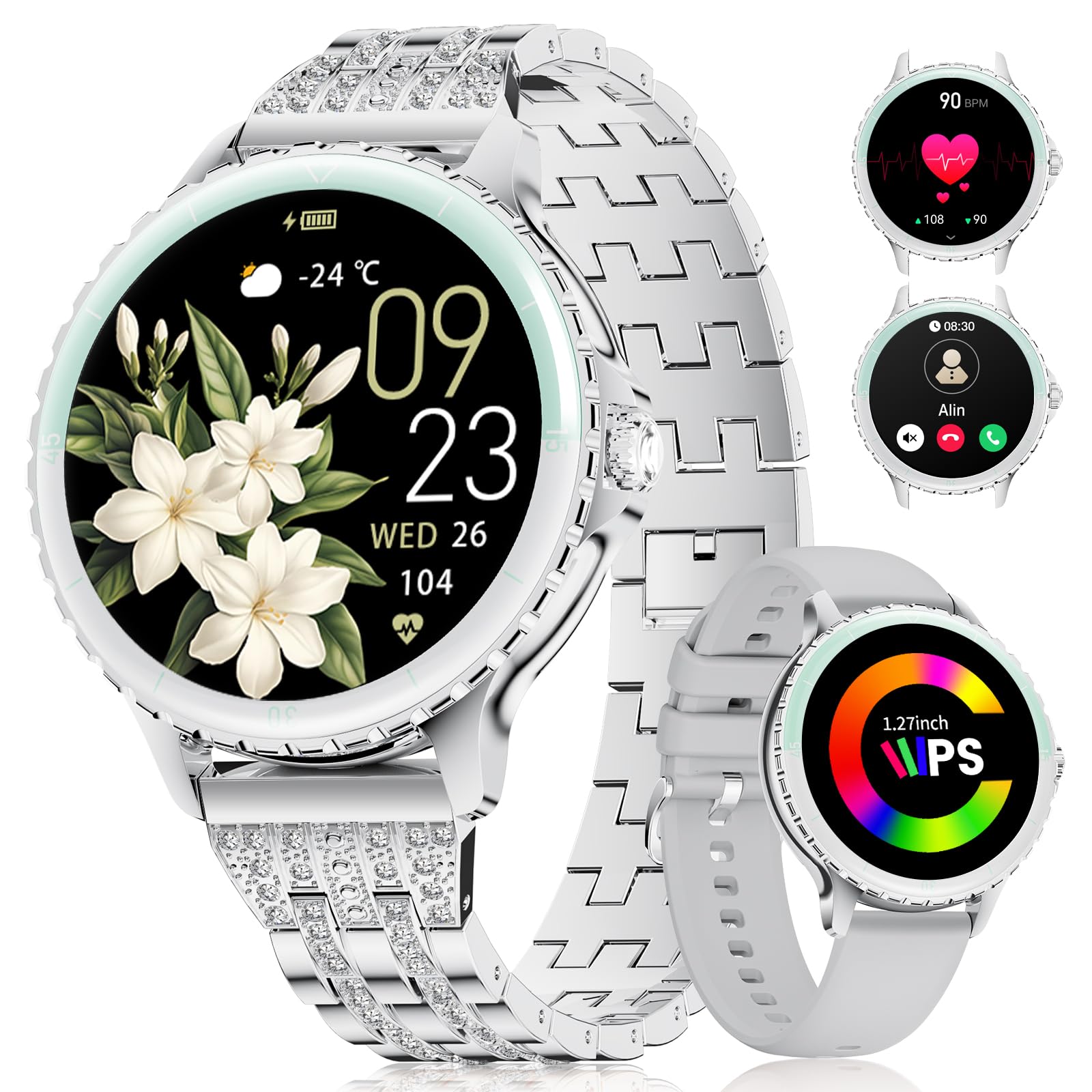
Image: LIGE FV26-F Smartwatch displaying its elegant design with both stainless steel and silicone strap options.
2. การตั้งค่า
2.1 การชาร์จสมาร์ทวอทช์
- เชื่อมต่อสายชาร์จเข้ากับพอร์ตชาร์จที่ด้านหลังของสมาร์ทวอทช์
- เสียบปลายสาย USB เข้ากับอะแดปเตอร์ไฟ USB มาตรฐาน (ไม่รวมอยู่ด้วย) หรือพอร์ต USB ของคอมพิวเตอร์
- Ensure the charging pins are properly aligned with the smartwatch's contacts.
- A charging indicator will appear on the screen. Allow approximately 2-3 hours for a full charge.
2.2 การติดตั้งและการจับคู่แอป
- ดาวน์โหลด ฟิตคลาวด์โปร application from your smartphone's app store (Google Play Store for Android, Apple App Store for iOS).
- Ensure your smartphone meets the compatibility requirements: Android 6.0 or higher, or iOS 9.0 or higher.
- เปิดใช้งานบลูทูธบนสมาร์ทโฟนของคุณ
- Open the FitcloudPro app and follow the on-screen instructions to create an account or log in.
- In the app, navigate to the device pairing section and search for your LIGE FV26-F smartwatch.
- Select your smartwatch from the list of available devices to initiate the pairing process. Confirm any pairing requests on both your phone and the smartwatch.
Once paired, the smartwatch will synchronize data with the app, and you can customize settings.
3. คู่มือการใช้งาน
3.1 การนำทางพื้นฐาน
- หน้าจอสัมผัส: ปัดไปทางซ้าย ขวา ขึ้น หรือลง เพื่อเลื่อนดูเมนูและฟีเจอร์ต่างๆ แตะเพื่อเลือกตัวเลือก
- ปุ่มด้านข้าง: Typically used to return to the home screen or to power on/off the device (long press).
3.2 การโทรผ่านบลูทูธ
- After successful Bluetooth pairing, you can make and receive calls directly from your wrist.
- The smartwatch supports contact uploading from your phone and displays call history.
- Utilize the integrated AI voice assistant for hands-free control of your phone's calling functions.
3.3 การแจ้งเตือนแบบเรียลไทม์
- Receive alerts for incoming calls, messages, WhatsApp, and other application activities.
- The smartwatch will gently vibrate to notify you.
- Note for WhatsApp: To ensure WhatsApp notifications are received, set your WhatsApp notification settings on your phone to "Show comments - Always show." If your software is connected to a computer, the watch may not send messages.
3.4 การตรวจติดตามสุขภาพ
- อัตราการเต้นของหัวใจ: Continuous 24/7 heart rate measurement.
- สปอ2: Blood oxygen saturation measurement (data for reference only).
- สุขภาพสตรี: Features include menstrual cycle prediction, pregnancy preparation mode, and pregnancy mode.
- การติดตามการนอนหลับ: Tracks and analyzes sleep patterns.
- การแจ้งเตือนอยู่ประจำ: เตือนให้คุณเคลื่อนไหวหลังจากช่วงเวลาที่ไม่ได้ใช้งาน
- การออกกำลังกายการหายใจ: การฝึกหายใจแบบมีคำแนะนำเพื่อการผ่อนคลาย
โหมดกีฬา 3.5 โหมด
- The smartwatch supports over 100 sport modes.
- Ten built-in sports include yoga, cycling, running, and badminton.
- Use the "Sport Push" function in the FitcloudPro app to transfer additional sport modes to your watch.
- During workouts, the watch provides comprehensive data such as steps, training time, distance, calories burned, and heart rate (data for reference only).
3.6 Camera Remote and Music Control
- รีโมทกล้อง: ควบคุมกล้องสมาร์ทโฟนของคุณจากระยะไกลเพื่อถ่ายภาพ
- การควบคุมเพลง: เล่น หยุดชั่วคราว ข้ามเพลง และปรับระดับเสียงสำหรับเพลงที่กำลังเล่นอยู่บนสมาร์ทโฟนที่เชื่อมต่อของคุณ
หน้าปัดนาฬิกาที่ปรับแต่งได้ 3.7 แบบ
- Personalize your smartwatch by setting photos from your phone (e.g., family, pets) as watch faces through the FitcloudPro app.
4. การบำรุงรักษา
- การทำความสะอาด: Wipe the smartwatch and straps regularly with a soft, dry cloth. Avoid harsh chemicals.
- การดูแลแบตเตอรี่ The 300 mAh battery provides approximately 3 to 5 days of usage depending on feature use. Charge the device before the battery is completely depleted to prolong its lifespan.
- พื้นที่จัดเก็บ: เก็บสมาร์ทวอทช์ไว้ในที่แห้งและเย็นเมื่อไม่ได้ใช้งาน
5 การแก้ไขปัญหา
- ปัญหาการเชื่อมต่อ: If the smartwatch disconnects from your phone, ensure Bluetooth is enabled on both devices and that the FitcloudPro app is running in the background. Try restarting both the smartwatch and your phone.
- ไม่ได้รับการแจ้งเตือน: Verify that app notifications are enabled in your phone's settings and within the FitcloudPro app. For WhatsApp, ensure the specific setting "Show comments - Always show" is active.
- ข้อมูลสุขภาพที่ไม่ถูกต้อง: Ensure the smartwatch is worn snugly on your wrist, but not too tight. Environmental factors and movement can affect sensor readings. Health data is for reference only and not for medical diagnosis.
- หน้าจอไม่ตอบสนอง: Try restarting the smartwatch by long-pressing the side button. If the issue persists, ensure the device is charged.
6. ข้อมูลจำเพาะ
| คุณสมบัติ | ข้อมูลจำเพาะ |
|---|---|
| ยี่ห้อ | ลีเก้ |
| หมายเลขรุ่น | FV26-F |
| สี | เงิน |
| ระบบปฏิบัติการ | ไอโอเอส, แอนดรอยด์ |
| ขนาดหน้าจอ | 1.27 นิ้ว |
| รูปร่าง | กลม |
| เทคโนโลยีการเชื่อมต่อ | บลูทูธ |
| มาตรฐานการสื่อสารไร้สาย | บลูทูธ |
| คุณสมบัติพิเศษ | Phone Call, Voice Control, Email, Notification, Touchscreen |
| อุปกรณ์ที่รองรับ | สมาร์ทโฟน |
| ความจุของแบตเตอรี่ | 300 มิลลิแอมป์ |
| องค์ประกอบของแบตเตอรี่ | ลิเธียมโพลิเมอร์ |
| แบตเตอรี่แบบชาร์จไฟได้ | ใช่ |
| ความจุของหน่วยความจำ | 256MB |
| จีพีเอส | GPS ผ่านสมาร์ทโฟน |
7. การรับประกันและการสนับสนุน
Specific warranty information for the LIGE FV26-F Smartwatch is not provided in the product data. Please refer to the manufacturer's official website or your point of purchase for detailed warranty terms and conditions.
For technical support, software updates, or further assistance, please consult the ฟิตคลาวด์โปร application or visit the LIGE official support channels.