การแนะนำ
This manual provides detailed instructions for the EasySMX S10 Wireless Controller. It covers setup, operation, maintenance, and troubleshooting to ensure optimal performance and user experience across various platforms including Nintendo Switch, PC, iOS, and Android devices.
คุณสมบัติผลิตภัณฑ์
- One-Tap Wake Up: Seamlessly wake up your Nintendo Switch console with a single button press.
- TMR Anti-Drift Joysticks: Combines Hall Effect durability with carbon-film precision for zero-drift and ultra-smooth analog input.
- ปุ่มกดแบบกลไกเต็มรูปแบบ: Micro-switch buttons with 0.3mm actuation and a lifespan of over 5 million clicks, providing tactile feedback.
- HD Vibration: Equipped with ALPS Linear HD Rumble motors for multi-layered haptic feedback.
- แบตเตอรี่ใช้งานได้ยาวนาน: Built-in 1200mAh battery offers up to 17 hours of playtime with lights and vibration, or up to 26 hours without.
- Interchangeable D-pad & Custom Faceplate: Allows swapping between disc and cross-style D-pads and magnetic removable faceplates for personalization.
- คุณสมบัติเพิ่มเติม: Customizable RGB lighting, 2 programmable back buttons, 6-axis gyroscope for motion sensing, and NFC function.
การตั้งค่า
เนื้อหาแพ็คเกจ
- คอนโทรลเลอร์ไร้สาย EasySMX S10
- สายชาร์จ USB-C
- Interchangeable D-pads (if included)
- Customizable Faceplates (if included)
- คู่มือการใช้งาน
เค้าโครงคอนโทรลเลอร์
The EasySMX S10 controller features standard gaming buttons, including A/B/X/Y buttons, directional pad, left and right analog sticks, shoulder buttons (L/R), and triggers (ZL/ZR). Additionally, it includes a HOME button, a Capture button, and two programmable back buttons (GR/GL).
การชาร์จคอนโทรลเลอร์
Connect the provided USB-C cable to the controller's charging port and the other end to a USB power source (e.g., a computer, wall adapter). The LED indicators on the controller will show charging status and turn off when fully charged. A full charge typically takes approximately 3 hours.
คำแนะนำการใช้งาน
Connecting to Nintendo Switch / Switch 2
- Set the mode toggle switch on the back of the controller to the "S" mode.
- กดปุ่ม HOME บนรีโมทคอนโทรลค้างไว้ 3 วินาที จนกว่าไฟ LED จะกะพริบเร็ว
- บนเครื่อง Nintendo Switch ของคุณ ให้ไปที่... ตัวควบคุม > เปลี่ยนกริป/สั่งซื้อ.
- When the LED on the controller becomes solid and you feel a short vibration, pairing is complete.
- (First-time connection only) Within 20 seconds after pairing, remove and reattach the Joy-Con controllers from the console. This action activates the wireless wake-up function for future use.
- For future reconnections, simply short-press the HOME button to automatically reconnect and wake the console.
Video: Instructions on how to connect the EasySMX S10 controller to a Nintendo Switch or Switch 2 console for the first time and for subsequent reconnections.
การเชื่อมต่อกับพีซี
- Set the mode toggle switch on the back of the controller to the "X" mode.
- Connect the controller to your PC via the provided Type-C cable. The controller will be recognized as an Xbox Wireless Controller.
- For wireless connection, ensure Bluetooth is enabled on your PC. ค้นหา "Xbox Wireless Controller" in your Bluetooth settings and select it to pair.
Video: Tutorial on connecting the EasySMX S10 controller to a PC, including both wired and wireless (Bluetooth) methods.
Connecting to Mobile (iOS & Android)
- Set the mode toggle switch on the back of the controller to the "X" mode.
- เปิดใช้งาน Bluetooth บนโทรศัพท์มือถือของคุณ
- ค้นหา "Xbox Wireless Controller" in your phone's Bluetooth settings and select it to pair.
- When the LED on the controller becomes steady with a short vibration, pairing is confirmed.
Video: Guide on how to connect the EasySMX S10 controller to both iOS and Android mobile devices via Bluetooth.
การปรับแต่งแสง RGB
The controller features customizable RGB lighting. Refer to the quick start guide included in the packaging for specific button combinations to change lighting modes, colors, or to turn the lighting off.
Programming Back Buttons
The two back buttons (GR and GL) can be programmed to perform specific actions or combos. Consult the quick start guide for detailed instructions on how to map functions to these buttons.
Swapping D-Pads and Faceplates
The S10 controller allows for easy customization. The D-pad can be swapped between a classic cross-style and a smooth circular control. The magnetic faceplates can also be removed and replaced to personalize the controller's appearance.

Image: The EasySMX S10 controller highlighting the swappable D-pads, allowing users to choose between a classic cross-style or a smooth circular control.
การซ่อมบำรุง
- รักษาตัวควบคุมให้สะอาดด้วยการเช็ดด้วยผ้าแห้งและนุ่ม
- หลีกเลี่ยงการให้ตัวควบคุมสัมผัสกับอุณหภูมิที่สูงหรือความชื้นสูงหรือแสงแดดโดยตรง
- ห้ามถอดชิ้นส่วนตัวควบคุมโดยเด็ดขาด เนื่องจากอาจทำให้การรับประกันเป็นโมฆะ
- เก็บตัวควบคุมไว้ในสถานที่ปลอดภัยเมื่อไม่ได้ใช้งานเพื่อป้องกันความเสียหาย
การแก้ไขปัญหา
ตัวควบคุมไม่เชื่อมต่อ/จับคู่
- ตรวจสอบให้แน่ใจว่าตัวควบคุมมีประจุเพียงพอ
- Verify the mode toggle switch on the back is set to the correct platform (S for Switch, X for PC/Mobile).
- Restart the console/device and the controller, then attempt the pairing process again.
- If connecting to Switch for the first time and wake-up function doesn't activate, repeat the pairing process and ensure Joy-Cons are removed and reattached within 20 seconds after initial pairing.
Video: A guide explaining why the S10 controller might not wake up the Switch 2 and how to fix it.
NFC Function Not Working
- Ensure the NFC function is enabled on your console/device settings.
- Place the Amiibo or NFC tag directly over the NFC sensor area on the controller.
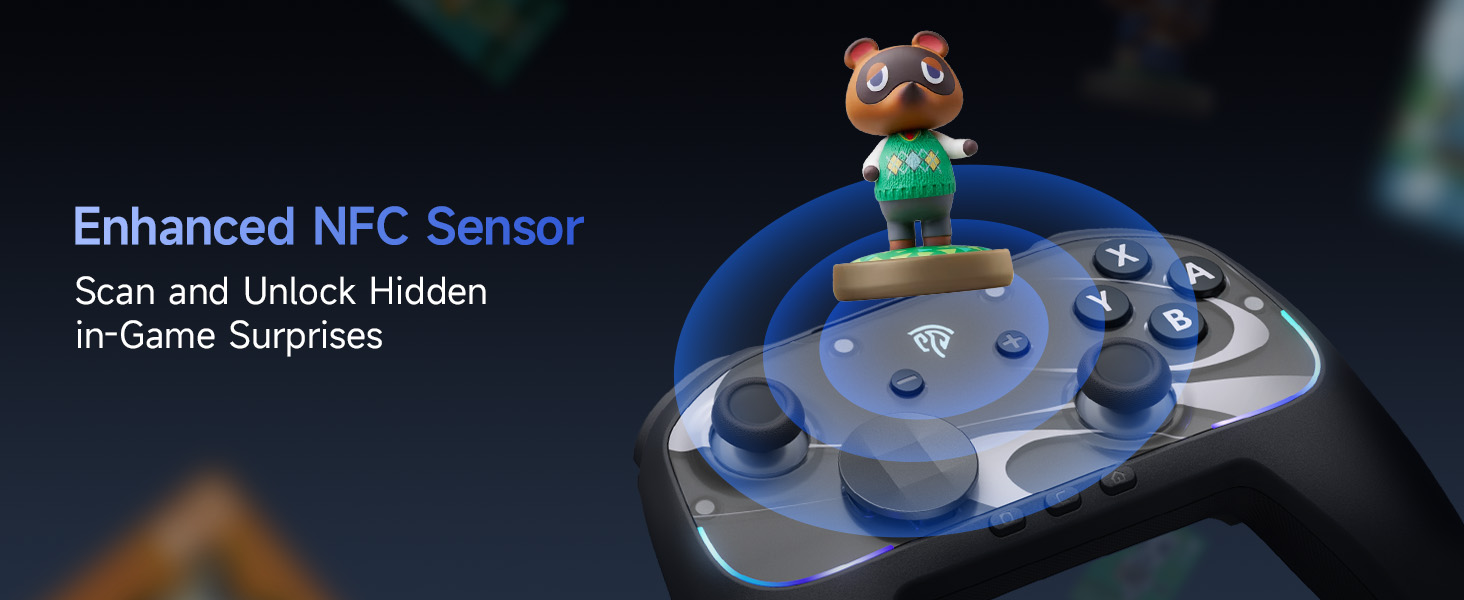
Image: The EasySMX S10 controller demonstrating its NFC function, allowing for scanning and unlocking in-game surprises.
ข้อมูลจำเพาะ
| แบบอย่าง | อีซี่เอสเอ็มเอ็กซ์เอส10 |
| การเชื่อมต่อ | บลูทูธ, USB-C (แบบมีสาย) |
| ความเข้ากันได้ | Nintendo Switch / Switch 2, PC (Windows), iOS (13.0 and above), Android (8.0 and above) |
| ประเภทจอยสติ๊ก | TMR Anti-Drift Joysticks |
| ประเภทปุ่ม | Full Mechanical Micro-Switch Buttons |
| การสั่นสะเทือน | HD Rumble (ALPS Linear HD Rumble Motors) |
| การตรวจจับการเคลื่อนไหว | ไจโรสโคปแบบแกน 6 |
| ความจุของแบตเตอรี่ | 1200mAh |
| เวลาเล่น | Up to 17 hours (with lights/vibration), up to 26 hours (without) |
| เวลาในการชาร์จ | ประมาณ 3 ชั่วโมง |
| น้ำหนัก | 1.17 ปอนด์ |
| ขนาด | 7.32 x 5.79 x 2.91 นิ้ว |
การรับประกันและการสนับสนุน
ผลิตภัณฑ์ EasySMX โดยทั่วไปจะมาพร้อมกับการรับประกันจากผู้ผลิต โปรดดูรายละเอียดในบัตรรับประกันที่อยู่ในบรรจุภัณฑ์ของผลิตภัณฑ์ หรือเยี่ยมชมเว็บไซต์อย่างเป็นทางการของ EasySMX webเว็บไซต์สำหรับข้อมูลการรับประกันและเงื่อนไขโดยละเอียด
For technical support, troubleshooting assistance, or any product-related inquiries, please contact EasySMX customer service through their official webคุณสามารถดูรายละเอียดเพิ่มเติมได้ที่เว็บไซต์หรือข้อมูลติดต่อที่ระบุไว้ในเอกสารผลิตภัณฑ์ของคุณ นอกจากนี้ คุณยังสามารถเยี่ยมชมเว็บไซต์ได้อีกด้วย ร้าน EasySMX บน Amazon สำหรับข้อมูลเพิ่มเติมและทรัพยากรสนับสนุน


