1. บทนำ
This manual provides detailed instructions for the operation and maintenance of your HIFI WALKER H2 Touch 64GB Hi Res MP3 Player. Please read this manual thoroughly before using the device to ensure proper functionality and to maximize your audio experience.
2. คุณสมบัติของผลิตภัณฑ์
- Hi-Res Lossless Audio Performance: Equipped with an ESS9219Q DAC chip, supporting FLAC, APE, WAV, ALAC, AIFF, and native DSD64/128 up to 32-bit/384 kHz.
- Bluetooth 5.2: Bi-directional (TX/RX) with aptX-HD and LDAC support for high-fidelity wireless audio.
- อินเทอร์เฟซควบคุมคู่: 2.4-inch full-touch 480x360 display combined with six physical buttons for intuitive navigation.
- Premium Build & Outputs: CNC-machined aluminum alloy body with 3.5 mm headphone out and line-out ports.
- การเชื่อมต่อที่หลากหลาย: Functions as a USB DAC, offers SPDIF output via Type-C port.
- พื้นที่เก็บข้อมูลที่ขยายได้: Includes a pre-inserted 64 GB micro SD card, expandable up to 512 GB via micro SD or USB OTG.
- การบันทึกที่มีความเที่ยงตรงสูง: Digital stereo MIC for 48 kHz high-fidelity recording.
- อายุการใช้งานแบตเตอรี่ยาวนาน: 1500 mAh lithium battery provides up to 10 hours of playback.
- ฟังก์ชั่นเพิ่มเติม: E-book reading, background music playback, multiple EQ presets.
3. อะไรอยู่ในกล่อง
- HIFI WALKER H2 Touch MP3 Player
- สายชาร์จ
- 64GB Micro SD Card (pre-inserted)
- คู่มือการใช้งาน
4. สินค้าหมดview
4.1 เค้าโครงอุปกรณ์
The HIFI WALKER H2 Touch features a compact design with a 2.4-inch display and strategically placed physical controls.
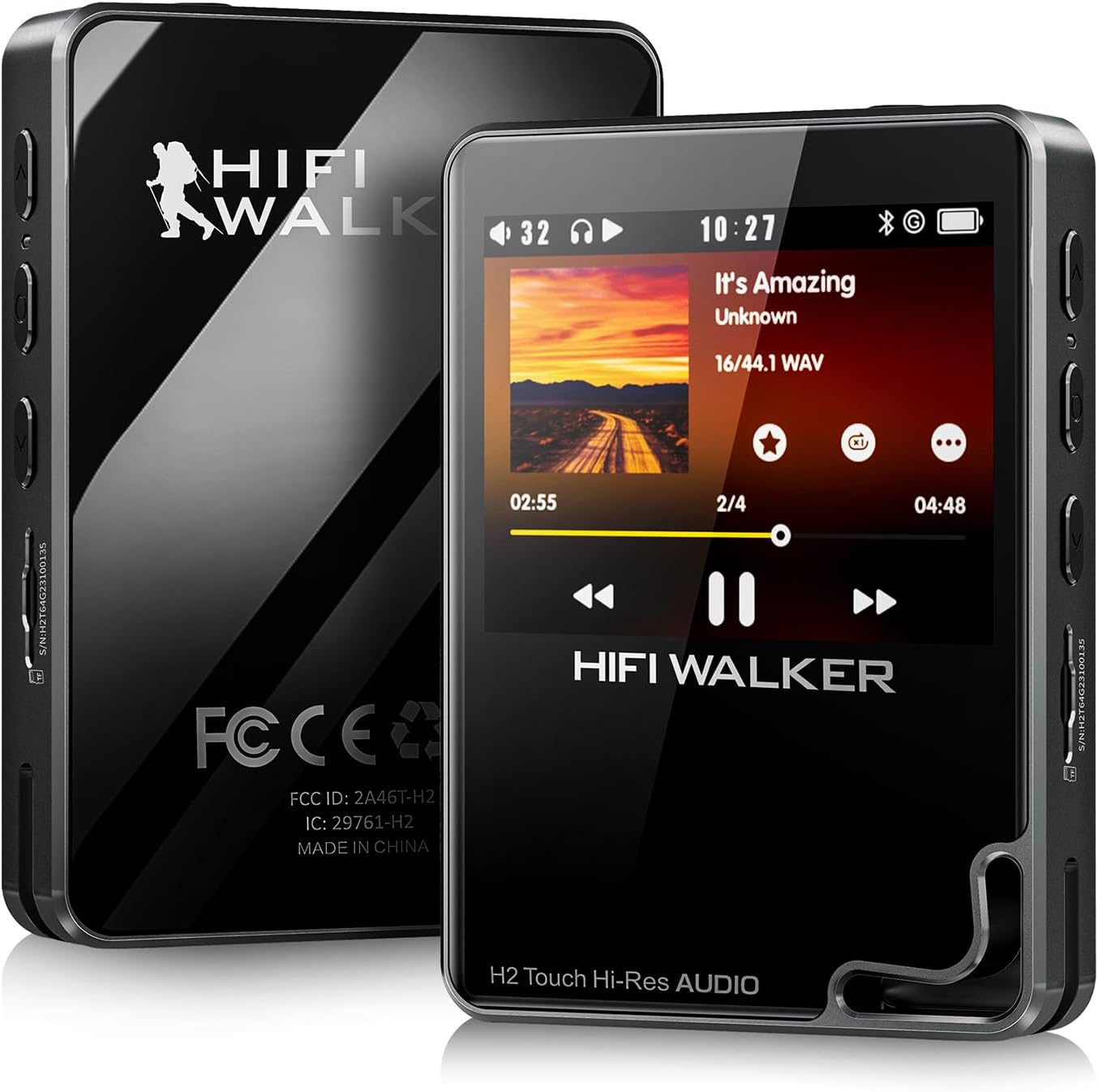
รูปที่ 1: ด้านหน้าและด้านหลัง view of the HIFI WALKER H2 Touch MP3 Player.
4.2 Physical Buttons and Ports
The device combines a touch screen with tactile buttons for ease of use.

Figure 2: Close-up of the H2 Touch screen and physical control buttons.
- ปุ่มเปิด/ปิด: Located on the top edge. Press and hold to power on/off.
- ปุ่มปรับระดับเสียง: Located on the side, marked '+' and '-'.
- ช่องเสียบการ์ด Micro SD: Located on the side, for memory expansion.
- 3.5mm Headphone Out: Standard audio output port.
- Line-Out Port: สำหรับการเชื่อมต่อกับภายนอก amplifiers or car audio systems.
- พอร์ต USB Type-C: For charging, data transfer, and USB DAC/SPDIF output.
- ปุ่มนำทาง: Play/Pause, Previous/Rewind, Next/Fast-forward, Back, and Menu buttons are located on the front panel.

รูปที่ 3: รายละเอียด view of the device's ports.
5. การตั้งค่า
5.1 ค่าบริการเริ่มต้น
Before first use, fully charge the device using the provided USB Type-C cable connected to a computer or a compatible USB power adapter. A full charge typically takes about 3 hours.
5.2 Inserting/Expanding Storage
Your device comes with a 64GB micro SD card pre-inserted. To expand storage, power off the device, gently insert a micro SD card (up to 512GB) into the designated slot until it clicks. The device also supports USB OTG for additional storage.
5.3 การถ่ายโอนเพลง
Connect the H2 Touch to your computer using the USB Type-C cable. The device will appear as a removable drive. Simply drag and drop your music files into the device's storage or the inserted micro SD card. The player supports various formats including FLAC, APE, WAV, ALAC, AIFF, DSD64/128, and MP3.
Video 1: Demonstrates connecting the H2 Touch to a computer and transferring music files.
6. คู่มือการใช้งาน
6.1 เปิด/ปิดเครื่อง
Press and hold the Power button on the top edge for a few seconds to turn the device on or off.
6.2 การนำทางพื้นฐาน
Navigate the menu using the 2.4-inch touch screen or the physical buttons on the front panel. The scroll wheel allows for quick browsing through lists, while the Play/Pause, Next/Fast-forward, Previous/Rewind, Back, and Menu buttons provide direct control.
6.3 การเล่นเพลง
From the main menu, select 'Music' to browse your library by song, artist, album, or genre. Select a track to begin playback. Use the physical buttons or on-screen controls to play, pause, skip tracks, or adjust volume.
6.4 การเชื่อมต่อบลูทูธ
การเชื่อมต่อกับหูฟังหรือลำโพงบลูทูธ:
- Go to 'System Settings' from the main menu.
- Select 'Bluetooth Settings'.
- Ensure Bluetooth is 'On'.
- Select 'Bluetooth Scan' to find available devices.
- Choose your desired device from the list to pair.
The H2 Touch supports bi-directional Bluetooth 5.2, allowing it to transmit audio to headphones/speakers or receive audio from another device (e.g., a smartphone) to act as a Bluetooth DAC.
Video 2: Demonstrates Bluetooth pairing and UI navigation on the H2 Touch.
6.5 โหมด USB DAC
Connect the H2 Touch to a computer or compatible smartphone via the USB Type-C cable. In the device's settings, select 'USB Mode' and choose 'DAC'. This allows the player to function as an external sound card, enhancing the audio quality of your connected device.
6.6 การตั้งค่าอีควอไลเซอร์
Customize your sound experience by accessing the 'Equalizer' settings. Choose from various presets (Rock, Jazz, Classical, Pop, etc.) or create a custom EQ profile เพื่อให้เหมาะกับความต้องการของคุณ

Figure 4: Custom Equalizer modes for personalized audio.
6.7 ฟังก์ชั่นการบันทึก
The H2 Touch features a digital stereo MIC for high-fidelity recording. Access the 'Record' function from the main menu to start, pause, and save recordings.
7. ข้อมูลจำเพาะ
| ชื่อรุ่น | เอชทูทัช |
| ยี่ห้อ | ไฮไฟ วอล์คเกอร์ |
| ความจุของหน่วยความจำ | 64GB (เพิ่มได้สูงสุด 512GB) |
| ขนาดหน้าจอ | 2.4 นิ้ว |
| เทคโนโลยีการเชื่อมต่อ | Bluetooth 5.2 (bi-directional) |
| คุณสมบัติพิเศษ | Hi-Res Audio, USB DAC, SPDIF Output, Recording |
| ชิป DAC | ESS9219Q |
| รูปแบบเสียงที่รองรับ | FLAC, APE, WAV, ALAC, AIFF, native DSD64/128, MP3 |
| แบตเตอรี่ | 1500 mAh Lithium Polymer (up to 10 hours playback) |
| น้ำหนักสินค้า | 10.5 ออนซ์ |
| ขนาด | 5.91 x 3.78 x 2.24 นิ้ว |
8 การแก้ไขปัญหา
- อุปกรณ์ไม่เปิดเครื่อง: ตรวจสอบให้แน่ใจว่าอุปกรณ์ชาร์จแบตเตอรี่เต็มแล้ว หากแบตเตอรี่หมดเกลี้ยง อาจต้องใช้เวลาชาร์จสักครู่ก่อนจึงจะสามารถเปิดเครื่องได้
- ไม่มีเสียง: Check headphone connection, volume level, and ensure the correct output mode (headphone out/line-out) is selected. Verify Bluetooth connection if using wireless audio.
- ดนตรี files not recognized: ทำให้มั่นใจ files are in a supported format and correctly transferred to the device's internal storage or micro SD card. Try updating the music library from the settings.
- ปัญหาการเชื่อมต่อบลูทูธ: Ensure the H2 Touch and the target Bluetooth device are in pairing mode and within range. Try restarting both devices.
- อุปกรณ์ไม่ตอบสนอง: Press and hold the power button for 10-15 seconds to force a restart. If issues persist, consider performing a factory reset (note: this will erase all user data).
9. การบำรุงรักษา
- เก็บอุปกรณ์ให้แห้งและห่างจากอุณหภูมิที่สูงหรือต่ำเกินไป
- เช็ดหน้าจอและตัวเครื่องด้วยผ้าแห้งเนื้อนุ่ม หลีกเลี่ยงการใช้สารเคมีรุนแรง
- หลีกเลี่ยงการทำอุปกรณ์หล่นหรือกระแทกอย่างรุนแรง
- สำรองเพลงของคุณเป็นประจำ fileเพื่อป้องกันข้อมูลสูญหาย
10. การรับประกันและการสนับสนุน
สำหรับข้อมูลการรับประกันและการสนับสนุนทางเทคนิค โปรดดูที่ HIFI WALKER อย่างเป็นทางการ webหรือติดต่อฝ่ายบริการลูกค้าโดยตรง โปรดเก็บหลักฐานการซื้อไว้เพื่อใช้ในการเคลมประกัน


