1. บทนำ
Welcome to the user manual for your new Lava A1 Music keypad mobile phone. This guide provides essential information on setting up, operating, maintaining, and troubleshooting your device. Please read this manual carefully to ensure proper use and to maximize the performance of your phone.
The Lava A1 Music is designed for reliable communication with features such as clear sound, long battery life, and user-friendly operation.
2. ข้อมูลด้านความปลอดภัย
- ความปลอดภัยของแบตเตอรี่: Use only original or approved batteries and chargers. Do not short-circuit, puncture, or expose the battery to extreme temperatures. Dispose of batteries properly.
- ความปลอดภัยในการขับขี่: Do not use your phone while driving. If necessary, use a hands-free accessory.
- อุปกรณ์ทางการแพทย์: รักษาระยะห่างที่ปลอดภัยระหว่างโทรศัพท์ของคุณกับอุปกรณ์ทางการแพทย์ เช่น เครื่องกระตุ้นหัวใจ ปรึกษาแพทย์และผู้ผลิตอุปกรณ์ทางการแพทย์สำหรับคำแนะนำเฉพาะเจาะจง
- อากาศยาน: Turn off your phone when on an aircraft.
- สภาพแวดล้อมที่ระเบิดได้: ปิดโทรศัพท์มือถือในบริเวณที่มีความเสี่ยงต่อการระเบิด เช่น ปั๊มน้ำมัน หรือโรงงานเคมี
- ความต้านทานน้ำ: This device is not waterproof. Avoid exposure to liquids.
- เด็ก: ควรเก็บโทรศัพท์และอุปกรณ์เสริมต่างๆ ให้พ้นมือเด็กเล็ก
3. เนื้อหาบรรจุภัณฑ์
เมื่อเปิดบรรจุภัณฑ์ โปรดตรวจสอบว่าสินค้าทั้งหมดอยู่ในบรรจุภัณฑ์และอยู่ในสภาพดี:
- Lava A1 Music Mobile Phone
- แบตเตอรี่
- อะแดปเตอร์ (เครื่องชาร์จ)
- คู่มือผู้ใช้ (เอกสารนี้)
4. อุปกรณ์โอเวอร์view
Familiarize yourself with the physical components of your Lava A1 Music phone.

ภาพที่ 4.1: ด้านหน้าและด้านหลัง view of the Lava A1 Music mobile phone, showcasinด้วยดีไซน์ที่กะทัดรัดและแป้นพิมพ์
The phone features a durable build with a comfortable keypad for easy dialing and navigation. The rear panel includes the speaker grille and the A1 Music branding.
เค้าโครงปุ่มกด

ภาพที่ 4.2: รายละเอียด view of the Lava A1 Music keypad, highlighting the numerical and function keys.
- ปุ่มนำทาง: ใช้สำหรับการนำทางและเลือกเมนู
- รหัสโทร: Initiates or answers calls.
- ปุ่มสิ้นสุด/เปิดปิด: Ends calls, returns to standby, or powers the phone on/off.
- ซอฟท์คีย์: Context-sensitive keys for menu options.
- Numerical Keys: สำหรับการโทรออกและป้อนข้อความ
5. การตั้งค่า
5.1 การใส่ซิมการ์ดและแบตเตอรี่
- ถอดฝาหลังออก: ค่อยๆ งัดฝาหลังของโทรศัพท์ออกทางรอยบากที่กำหนดไว้
- ใส่ซิมการ์ด: Locate the SIM card slot(s). Insert your SIM card(s) into the slot(s) with the gold contacts facing down, ensuring they are correctly seated. This phone supports Dual SIM functionality.
- ใส่แบตเตอรี่: ใส่แบตเตอรี่ลงในช่องใส่แบตเตอรี่ โดยจัดตำแหน่งขั้วสีทองบนแบตเตอรี่ให้ตรงกับขั้วสีทองในโทรศัพท์
- เปลี่ยนฝาหลัง: จัดวางและกดฝาครอบด้านหลังอย่างระมัดระวังจนกระทั่งล็อคเข้าที่อย่างแน่นหนา
5.2 การชาร์จแบตเตอรี่
ก่อนใช้งานครั้งแรกขอแนะนำให้ชาร์จแบตเตอรี่ให้เต็ม
- เสียบอะแดปเตอร์ชาร์จเข้ากับเต้ารับไฟฟ้า
- Connect the other end of the charger to the phone's charging port.
- ไฟแสดงสถานะแบตเตอรี่บนหน้าจอจะแสดงสถานะการชาร์จ
- เมื่อชาร์จเต็มแล้ว ให้ถอดเครื่องชาร์จออก
The Lava A1 Music features a 1000mAh battery, providing up to 5 days of standby time under optimal conditions.
5.3 การเปิด/ปิดเครื่อง
- การเปิดเครื่อง: กดปุ่มค้างไว้ ปุ่มวางสาย/เปิดปิด จนกว่าหน้าจอจะสว่างขึ้น
- วิธีปิดเครื่อง: กดปุ่มค้างไว้ ปุ่มวางสาย/เปิดปิด until the power-off options appear, then select "Power Off".
6. คู่มือการใช้งาน
6.1 การโทรออก
- From the standby screen, enter the phone number using the keypad.
- กดปุ่ม แป้นโทร เพื่อเริ่มการโทร
- หากต้องการวางสาย ให้กด ปุ่มวางสาย/เปิดปิด.
6.2 การส่งข้อความ SMS
- ไปที่ เมนู > ข้อความ > เขียนข้อความ.
- กรอกข้อความของคุณโดยใช้แป้นพิมพ์
- ป้อนหมายเลขโทรศัพท์ของผู้รับหรือเลือกจากรายชื่อติดต่อ
- เลือก ส่ง.
6.3 การเชื่อมต่อบลูทูธ
The Lava A1 Music supports Bluetooth for wireless connectivity with compatible devices.
- ไปที่ เมนู > การตั้งค่า > การเชื่อมต่อ > บลูทูธ.
- เปิดใช้งานบลูทูธ On.
- เลือก อุปกรณ์ที่จับคู่ or ค้นหา อุปกรณ์ใหม่ การเชื่อมต่อ
6.4 เครื่องเล่นเพลง
Enjoy your favorite music with the phone's built-in music player and clear sound output.

ภาพที่ 6.1: Illustration of the powerful sound feature, indicating high-quality audio output for music and calls.
- ไปที่ เมนู > มัลติมีเดีย > เครื่องเล่นเพลง.
- Select a song from your storage to play.
- Use the navigation keys to control playback (play, pause, skip).
6.5 ฟังก์ชันไฟฉาย
The phone includes an instant torch feature for convenience.
- To turn on the torch, press and hold the designated torch key (refer to your phone's keypad for exact key, often the '0' or a dedicated side button).
- ทำซ้ำขั้นตอนเดิมเพื่อปิดการใช้งาน
6.6 Auto Call Recording
The Lava A1 Music supports automatic call recording.
- ไปที่ เมนู > การตั้งค่า > การตั้งค่าการโทร.
- Locate and enable the บันทึกการโทรอัตโนมัติ ตัวเลือก.
- Recorded calls will be saved in the phone's memory or on an inserted memory card.
รองรับ 6.7 ภาษา
The device supports 22 Indian languages, allowing you to operate the phone in your preferred language.
- ไปที่ เมนู > การตั้งค่า > การตั้งค่าโทรศัพท์ > ภาษา.
- เลือกภาษาที่คุณต้องการจากรายการ
6.8 Super Battery Mode
Activate Super Battery Mode to extend your phone's battery life when power is low.
- This mode typically optimizes background processes and display settings to conserve power.
- Access this feature through เมนู > การตั้งค่า > การจัดการพลังงาน or a similar path.
6.9 Display and Contact Photo Icons
The phone features a 2-inch display for clear viewing and supports contact photo icons for easy call verification.

ภาพที่ 6.2: The 2-inch display of the Lava A1 Music, showing clear visuals.
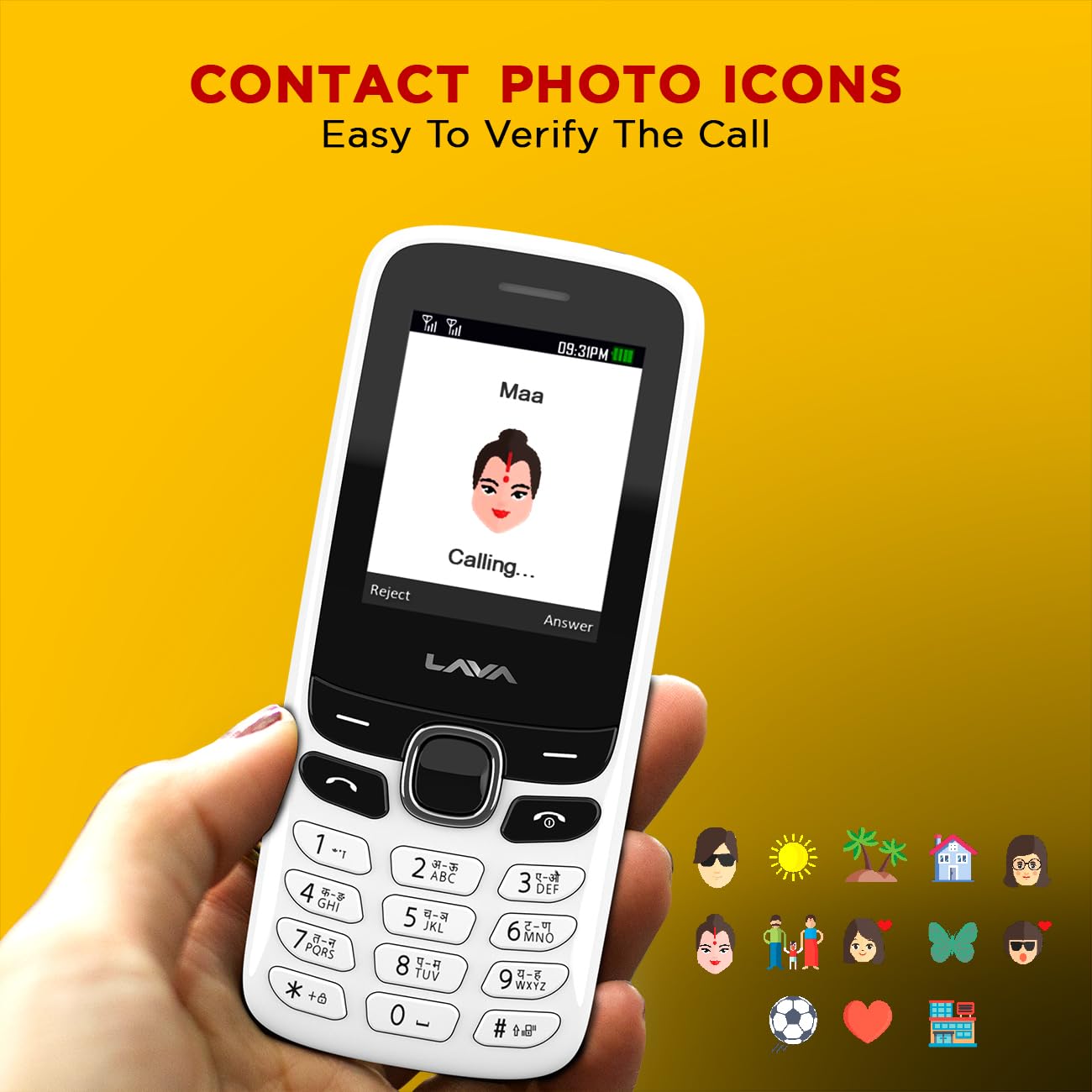
ภาพที่ 6.3: Example of contact photo icons on the Lava A1 Music, aiding in quick identification of callers.
7. การบำรุงรักษา
7.1 การดูแลแบตเตอรี่
- ควรหลีกเลี่ยงการชาร์จแบตเตอรี่มากเกินไปหรือปล่อยให้แบตเตอรี่หมดจนเกลี้ยงบ่อยๆ
- อย่าให้แบตเตอรี่โดนความร้อนหรือความเย็นจัด
- หากไม่ได้ใช้งานโทรศัพท์เป็นเวลานาน ควรชาร์จแบตเตอรี่ให้ได้ประมาณ 50% ก่อนเก็บรักษา
7.2 การทำความสะอาดเครื่อง
- ใช้ผ้าแห้งนุ่มๆ เช็ดทำความสะอาดพื้นผิวโทรศัพท์
- หลีกเลี่ยงการใช้สารเคมีรุนแรง น้ำยาทำความสะอาด หรือผงซักฟอกที่แรง
- รักษาช่องชาร์จและช่องเสียบหูฟังให้ปราศจากฝุ่นและสิ่งสกปรก
7.3 พื้นที่จัดเก็บ
เก็บโทรศัพท์ไว้ในที่แห้งและเย็น หลีกเลี่ยงแสงแดดโดยตรงและอุณหภูมิที่สูงหรือต่ำเกินไป
8 การแก้ไขปัญหา
This section addresses common issues you might encounter with your Lava A1 Music phone.
| ปัญหา | วิธีแก้ปัญหาที่เป็นไปได้ |
|---|---|
| โทรศัพท์ไม่เปิด | ตรวจสอบให้แน่ใจว่าแบตเตอรี่ชาร์จเต็มแล้ว และตรวจสอบว่าใส่แบตเตอรี่ถูกต้องหรือไม่ |
| ไม่มีสัญญาณเครือข่าย | Check if the SIM card is properly inserted. Move to an area with better network coverage. Contact your service provider. |
| ไม่สามารถโทรออกหรือรับสายได้ | Check network signal. Ensure your SIM card is active. Verify call barring settings. |
| แบตเตอรี่หมดเร็ว | Reduce screen brightness. Close unused applications. Activate Super Battery Mode. |
| แป้นพิมพ์ไม่ตอบสนอง | Restart the phone. Ensure no physical obstruction on the keys. |
หากปัญหายังคงอยู่หลังจากลองวิธีแก้ปัญหาเหล่านี้แล้ว โปรดติดต่อฝ่ายบริการลูกค้า
9. ข้อมูลจำเพาะ
Detailed technical specifications for the Lava A1 Music mobile phone:
| ยี่ห้อ | ลาวา |
| หมายเลขรุ่น | A1 Music |
| ระบบปฏิบัติการ | แอนดรอยด์ 10.0 |
| ขนาดหน้าจอ | 2 นิ้ว (5.08 ซม.) |
| ปณิธาน | 240 x 320 พิกเซล |
| ความจุของแบตเตอรี่ | 1000 มิลลิวินาทีampก่อนชั่วโมง (mAh) |
| เวลาสนทนาทางโทรศัพท์ | นานถึง 96 ชั่วโมง |
| เทคโนโลยีการเชื่อมต่อ | ยูเอสบี, บลูทูธ |
| คุณสมบัติพิเศษ | Dual SIM, Auto Call Recording, Instant Torch, 22 Indian Language Support, Super Battery Mode |
| แจ็คเสียง | 3.5 มม. |
| ฟอร์มแฟกเตอร์ | บาร์ |
| ขนาดสินค้า | 11.25 x 4.8 x 1.47 ซม. |
| น้ำหนักสินค้า | 70 กรัม |
| ประเทศต้นกำเนิด | อินเดีย |
| มีอะไรอยู่ในกล่อง | อะแดปเตอร์ |
10. การรับประกันและการสนับสนุน
10.1 ข้อมูลการรับประกัน
Your Lava A1 Music mobile phone comes with a รับประกันสินค้าเปลี่ยน 1 ปี from the date of purchase. This warranty covers manufacturing defects and ensures a replacement device in case of eligible issues. Please retain your purchase receipt as proof of purchase for warranty claims.
The warranty does not cover damages caused by misuse, accidents, unauthorized repairs, or normal wear and tear.
10.2 การสนับสนุนลูกค้า
For any technical assistance, warranty claims, or further inquiries, please contact Lava customer support. Refer to the official Lava website or your product packaging for the most current contact details, including phone numbers and service center locations.
คุณสามารถเยี่ยมชมเว็บไซต์ทางการได้ Lava Store on Amazon สำหรับข้อมูลผลิตภัณฑ์และทรัพยากรสนับสนุนเพิ่มเติม


