1. บทนำ
This manual provides detailed instructions for the Bikevee Wireless Cycling GPS Computer, a device designed to track and display various cycling data. It features a 2.4-inch LCD display with auto backlight, IPX7 waterproofing, and multi-satellite GPS tracking for accurate data collection.
1.1 คุณสมบัติหลัก
- อายุการใช้งานแบตเตอรี่ที่ยาวนานขึ้น: Equipped with a 650mAh rechargeable battery, providing up to 28 hours of continuous use.
- Precision GPS Tracking: Utilizes 5-satellite systems (GPS, BDS, GLONASS, Galileo, QZSS) for stable and accurate signal reception.
- ทนทานและกันน้ำ: IPX7 waterproof rating ensures resistance to rain and splashes.
- จอแสดงผลที่ชัดเจน: 2.4-inch LCD screen with automatic backlight for visibility in various lighting conditions.
- ข้อมูลโดยละเอียด: Tracks speed (MPH/KM/H), distance, time, temperature, altitude, gradient, and more.
1.2 อะไรอยู่ในกล่อง
ตรวจสอบว่ามีส่วนประกอบทั้งหมดอยู่ในแพ็คเกจ:
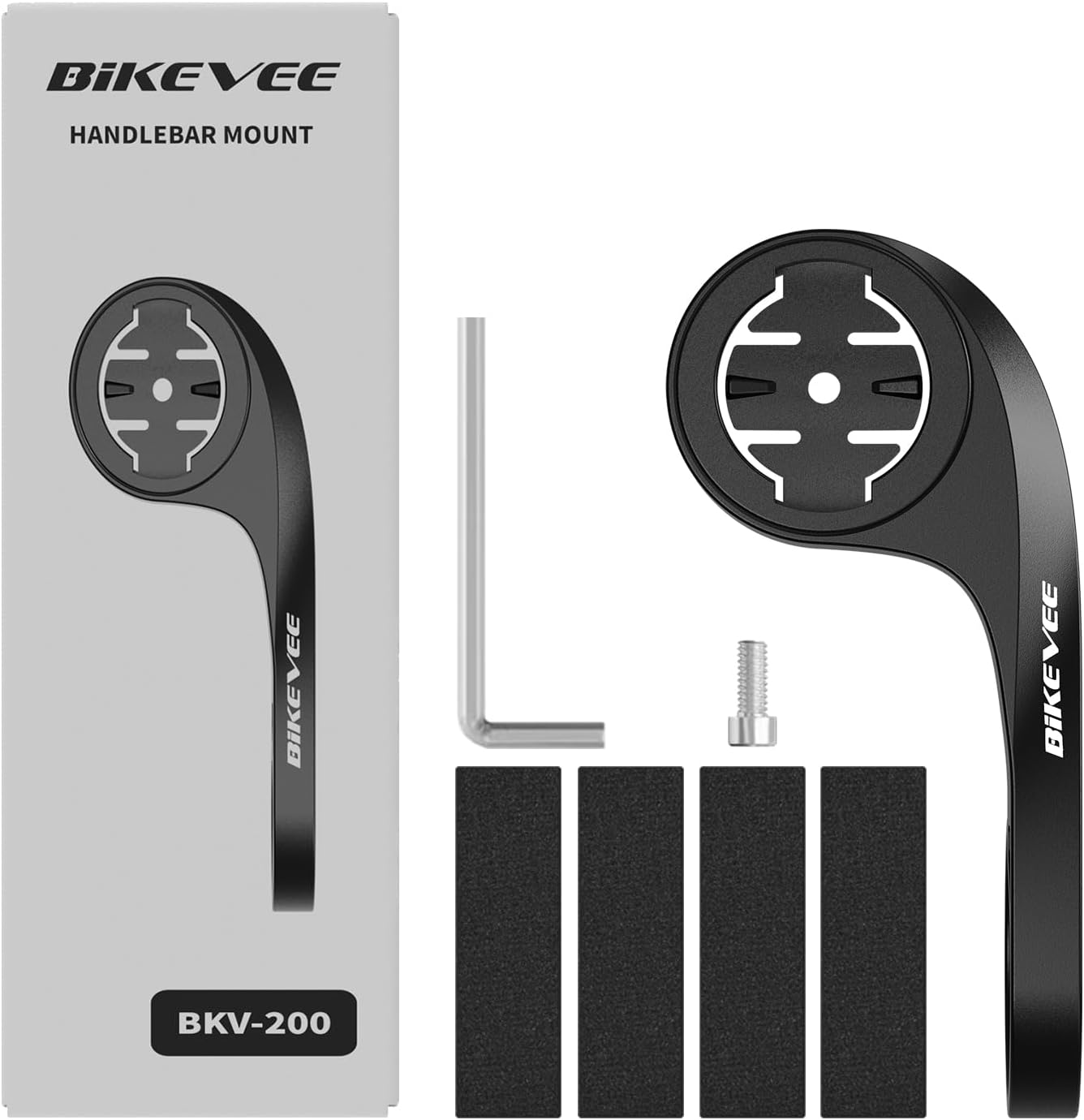
Figure 1.1: Package Contents. Includes Bike Computer, Charging Cable, Rubber Rings, Mount, Rubber Pad, and User Manual.
- Bikevee GPS Cycling Computer
- ที่ยึดจักรยานแบบมาตรฐาน
- Out Front Mount
- แผ่นยางรอง
- สายชาร์จ (Type-C)
- Rubber Rings for Mount Installation
- คู่มือการใช้งาน
2. การตั้งค่าและการติดตั้ง
2.1 การชาร์จอุปกรณ์
Before first use, fully charge the Bikevee GPS Computer. Connect the provided Type-C charging cable to the device's charging port and a USB power source. The battery indicator on the screen will show charging status.
2.2 การติดตั้งอุปกรณ์
The Bikevee GPS Computer comes with both a standard bike mount and an out front mount. Choose the mount that best suits your preference and bicycle setup.
2.2.1 Standard Bike Mount Installation
- Place the rubber pad on your bicycle's handlebar or stem.
- Position the standard bike mount on top of the rubber pad.
- Secure the mount using the provided rubber rings, wrapping them around the handlebar/stem and hooking them onto the mount.
- Align the Bikevee GPS Computer with the mount's grooves and twist clockwise until it locks into place.
2.2.2 Out Front Mount Installation

Figure 2.1: Bikevee Out Front Mount.
- Place the rubber pad around your bicycle's handlebar where you intend to install the mount.
- Position the out front mount over the rubber pad.
- Use the provided Allen key to tighten the screw on the mount's clamp around the handlebar until it is secure.
- Align the Bikevee GPS Computer with the mount's grooves and twist clockwise until it locks into place.
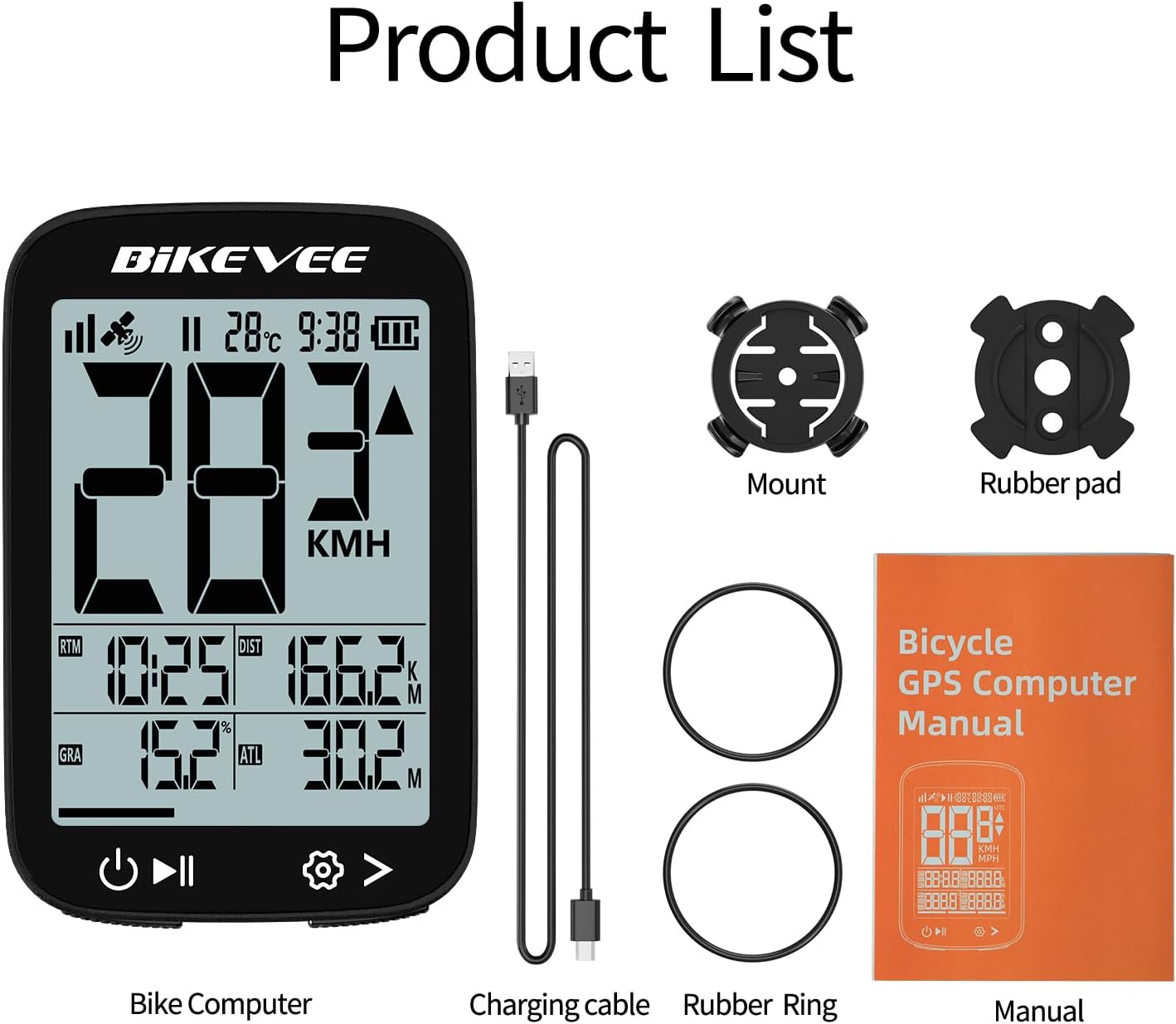
Figure 2.2: Handlebar Mount Components.
2.3 การเปิดเครื่องครั้งแรกและการตั้งค่า
- เปิดเครื่อง: Press and hold the power button (usually located at the bottom left) until the screen illuminates.
- การเลือกหน่วย: Upon first power-on or after a reset, you may be prompted to select your preferred unit of measurement (MPH or KM/H). Use the navigation buttons to select and confirm.
- การเก็บข้อมูล GPS: Take the device outdoors to an open area to allow it to acquire GPS satellite signals. This may take a few moments. A stable GPS signal icon will appear once connected.
3. คู่มือการใช้งาน
3.1 การทำงานพื้นฐาน
- เปิด/ปิดเครื่อง: Press and hold the left button to power on or off.
- เริ่ม/หยุดชั่วคราว/หยุดการขับขี่: Press the middle button to start recording a ride. Press again to pause. Press and hold to stop and save the ride data.
- Page Switching: Use the right button to cycle through different data display pages.
- แสงไฟด้านหลัง: The device features an automatic backlight that adjusts based on ambient light conditions.
3.2 Data Display and Interpretation
The Bikevee GPS Computer displays up to 14 types of cycling data, providing comprehensive insights into your ride.
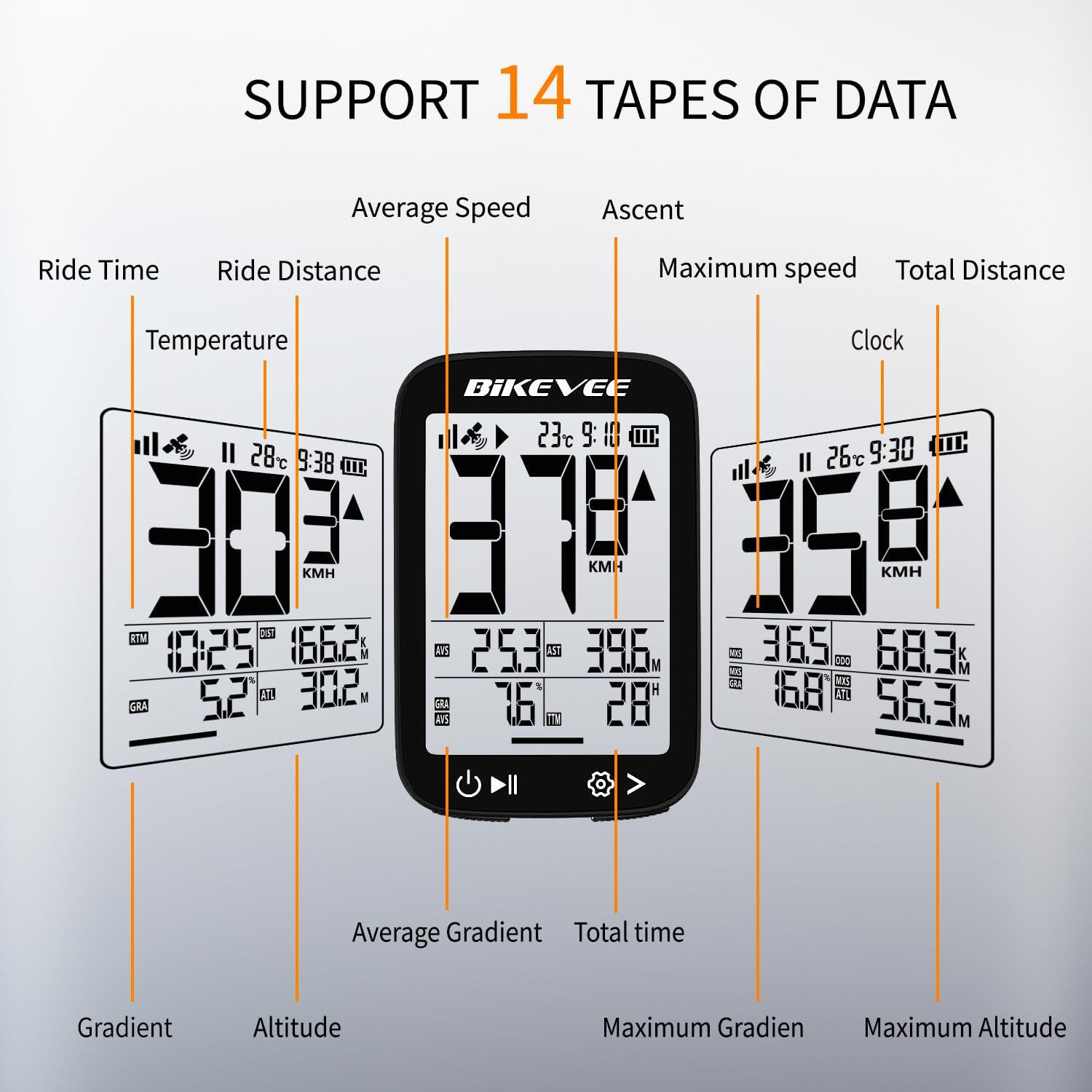
Figure 3.1: Supported Data Types Display.
- ความเร็วปัจจุบัน: Displays your real-time speed (MPH or KM/H).
- ความเร็วเฉลี่ย: The average speed for the current ride.
- ความเร็วสูงสุด: The highest speed recorded during the current ride.
- ระยะเวลาการเดินทาง: Duration of the current active ride.
- Ride Distance: ระยะทางที่ปั่นไปแล้วในการปั่นครั้งนี้
- ระยะทางรวม (มาตรวัดระยะทาง): Cumulative distance recorded by the device.
- อุณหภูมิ: อุณหภูมิโดยรอบ
- นาฬิกา: เวลาปัจจุบัน.
- การขึ้น: Total elevation gained during the ride.
- การไล่ระดับ: Current incline or decline percentage.
- ระดับความสูง: Current elevation above sea level.

Figure 3.2: Display Icons and Their Meanings.
- สัญญาณดาวเทียม: บ่งชี้ความแรงของสัญญาณ GPS
- IPX7: Confirms waterproof rating.
- ระดับแบตเตอรี่: แสดงประจุแบตเตอรี่ที่เหลืออยู่
- แสงพื้นหลังอัตโนมัติ: Indicates auto backlight feature is active.
- Type-C: Denotes the charging port type.
- การเปรียบเทียบความเร็ว: Arrow indicates if current speed is higher or lower than average speed.
4. การบำรุงรักษาและการดูแล
4.1 การทำความสะอาดเครื่อง
เพื่อรักษาประสิทธิภาพและรูปลักษณ์ที่ดีที่สุด ควรทำความสะอาดอุปกรณ์เป็นประจำ:
- เช็ดหน้าจอและตัวเครื่องด้วยผ้านุ่มๆamp ผ้า.
- Avoid using abrasive cleaners, solvents, or chemical sprays, as these can damage the device's surface or internal components.
- ตรวจสอบให้แน่ใจว่าฝาปิดช่องชาร์จปิดสนิทเพื่อป้องกันฝุ่นและน้ำเข้า
4.2 ความต้านทานน้ำ (IPX7)

Figure 4.1: IPX7 Waterproof Feature.
The Bikevee GPS Computer has an IPX7 waterproof rating, meaning it is protected against temporary immersion in water (up to 1 meter for 30 minutes). However, it is important to note:
- อย่าจุ่มอุปกรณ์ลงในน้ำเป็นเวลานาน
- หลีกเลี่ยงการฉีดน้ำแรงดันสูง
- Ensure the charging port cover is sealed before exposure to water.
4.3 การดูแลและจัดเก็บแบตเตอรี่
- เก็บอุปกรณ์ไว้ในที่แห้งและเย็นเมื่อไม่ใช้งาน
- ควรหลีกเลี่ยงการวางอุปกรณ์ไว้ในที่ที่มีอุณหภูมิสูงหรือต่ำเกินไปเป็นเวลานาน
- สำหรับการเก็บรักษาในระยะยาว ควรชาร์จแบตเตอรี่ให้เหลือประมาณ 50% เพื่อรักษาอายุการใช้งานของแบตเตอรี่
5 การแก้ไขปัญหา
If you encounter issues with your Bikevee GPS Computer, refer to the following common problems and solutions:
| ปัญหา | สาเหตุที่เป็นไปได้ | สารละลาย |
|---|---|---|
| อุปกรณ์ไม่เปิดเครื่อง | แบตเตอรี่อ่อน | ชาร์จอุปกรณ์ให้เต็มโดยใช้สาย Type-C ที่ให้มา |
| No GPS signal or inaccurate readings. | ถูกขัดขวาง view of sky; initial signal acquisition. | Move to an open outdoor area. Wait a few minutes for signal acquisition. Avoid dense forests or tunnels. |
| จอภาพมืดหรือไม่สามารถอ่านได้ | Auto backlight setting; low battery. | Ensure sufficient battery charge. The backlight adjusts automatically; try moving to a different lighting condition. |
| อุปกรณ์หยุดทำงานหรือไม่ตอบสนอง | ซอฟต์แวร์มีปัญหา | Perform a soft reset by pressing and holding the power button for 10-15 seconds until the device restarts. |
6. ข้อมูลจำเพาะ
Detailed technical specifications for the Bikevee Wireless Cycling GPS Computer:

Figure 6.1: Device Dimensions and Weight.
- แบบอย่าง: Bikevee Cycling GPS Computer
- แสดง: 2.4-inch LCD, Automatic Backlight
- แบตเตอรี่: แบตเตอรี่ลิเธียมไอออนแบบชาร์จได้ 650mAh
- อายุการใช้งานแบตเตอรี่: สูงสุด 28 ชั่วโมง (ใช้งานต่อเนื่อง)
- ระบบ GPS: GPS, BDS, GLONASS, Galileo, QZSS (5-satellite tracking)
- ระดับการกันน้ำ: IPX7
- ขนาด : Approximately 70mm (Height) x 45mm (Width) / 2.76in x 1.77in
- น้ำหนัก: Approximately 50g / 0.11lb
- พอร์ตชาร์จ: USB Type-C
- Data Types Supported: 14 types (e.g., Speed, Distance, Time, Temperature, Altitude, Gradient)
7. ข้อมูลการรับประกัน
The Bikevee Wireless Cycling GPS Computer is covered by a limited manufacturer's warranty. This warranty typically covers defects in materials and workmanship under normal use. Please retain your proof of purchase for warranty claims.
For specific warranty terms and conditions, including duration and coverage details, please refer to the warranty card included with your product or contact Bikevee customer support directly.
8. การสนับสนุนลูกค้า
If you have any questions, require technical assistance, or need to report an issue with your Bikevee Wireless Cycling GPS Computer, please contact our customer support team.
- การสนับสนุนทางออนไลน์: Visit the official Bikevee webไซต์สำหรับคำถามที่พบบ่อย คำแนะนำในการแก้ไขปัญหา และแบบฟอร์มติดต่อ
- การสนับสนุนทางอีเมล์: ดูที่บรรจุภัณฑ์ผลิตภัณฑ์ของคุณหรือที่ทางการ webเว็บไซต์สำหรับที่อยู่อีเมลฝ่ายบริการลูกค้า
When contacting support, please be prepared to provide your product model number (Bikevee Cycling GPS Computer) and a detailed description of the issue.