1. บทนำ
This manual provides comprehensive instructions for the NUBWO HG04L Gaming Headset. It covers product features, setup, operation, maintenance, and troubleshooting to ensure optimal performance and user experience. The HG04L headset is designed for multi-platform compatibility, offering clear audio and communication for gaming and other applications.
2. เนื้อหาบรรจุภัณฑ์
ตรวจสอบว่ามีรายการทั้งหมดอยู่ในแพ็คเกจของคุณ:
- 1 x NUBWO HG04L Gaming Headset

Image: The NUBWO HG04L Gaming Headset, showing its white design and 3.5mm audio jack.
3. สินค้าหมดview
The NUBWO HG04L Gaming Headset features a lightweight design, clear unidirectional microphone, and soft memory earmuffs for extended comfort. It connects via a 3.5mm jack, making it compatible with various gaming consoles and devices.
คุณสมบัติหลัก:
- เสียงสเตอริโอ Hi-Fi: Professionally tuned audio for precise in-game sound, rich music, and immersive movie experiences.
- Clear Unidirectional Microphone: Cardioid microphone design filters ambient noise, focusing on your voice within a 120° pickup angle for clear communication.
- Ergonomic Controls: Mute button and volume wheel are conveniently located on the earcup for easy, intuitive adjustments during use.
- การออกแบบที่สะดวกสบาย: Over-ear earcups with memory foam padding and breathable leather ensure comfort during long gaming sessions.
- Anti-Tangling Braided Cable: Durable 1.5m braided cable resists tangling and wear.
- Foldable & Rotatable Design: Earcups rotate for a personalized fit and noise isolation, and the headset folds for compact storage and portability.

Image: Diagram illustrating the adjustable headband and 90-degree swivel earcups of the NUBWO HG04L headset, highlighting its ergonomic and foldable design.
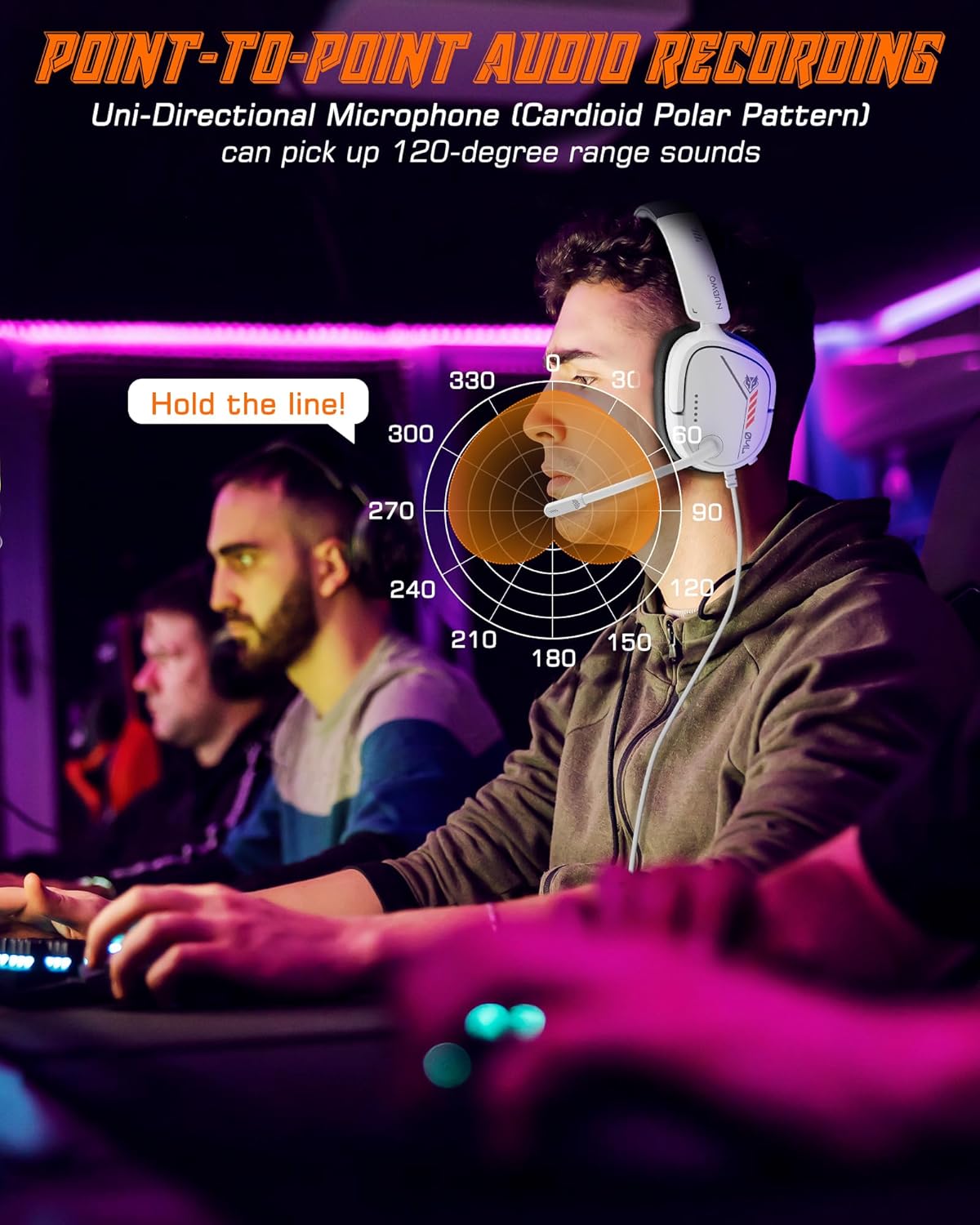
Image: A visual representation of the unidirectional microphone's 120-degree sound pickup pattern, demonstrating its ability to isolate the user's voice.
4. คำแนะนำในการตั้งค่า
The NUBWO HG04L headset connects via a standard 3.5mm audio jack. No additional drivers or software are required for basic functionality.
Connecting to Gaming Consoles (PS5/PS4, Xbox Series X|S/Xbox One, Nintendo Switch):
- Locate the 3.5mm audio jack on your console's controller (for PS5/PS4, Xbox) or directly on the console/handheld device (for Switch).
- Insert the 3.5mm plug of the NUBWO HG04L headset firmly into the audio jack.
- Adjust audio settings on your console if necessary to ensure the headset is selected as the input/output device.

Image: A user connecting the NUBWO HG04L headset to a PlayStation 5 controller, demonstrating console compatibility.
Connecting to PC/Laptop:
- If your PC/laptop has a combined 3.5mm audio jack (headphone/microphone combo), insert the headset's 3.5mm plug directly.
- If your PC/laptop has separate audio (headphone) and microphone jacks, you may need a 3.5mm splitter cable (not included) to connect both functions.
- Verify audio input/output settings in your operating system to ensure the headset is recognized and selected.

Image: A user wearing the NUBWO HG04L headset while using a laptop, illustrating PC compatibility.
5. คู่มือการใช้งาน
การควบคุมระดับเสียง:
The volume wheel is located on the left earcup. Rotate the wheel upwards to increase volume and downwards to decrease volume.
ปิดเสียง/เปิดเสียงไมโครโฟน:
A mute button is located on the left earcup, near the microphone. Press the button to mute the microphone. Press it again to unmute.
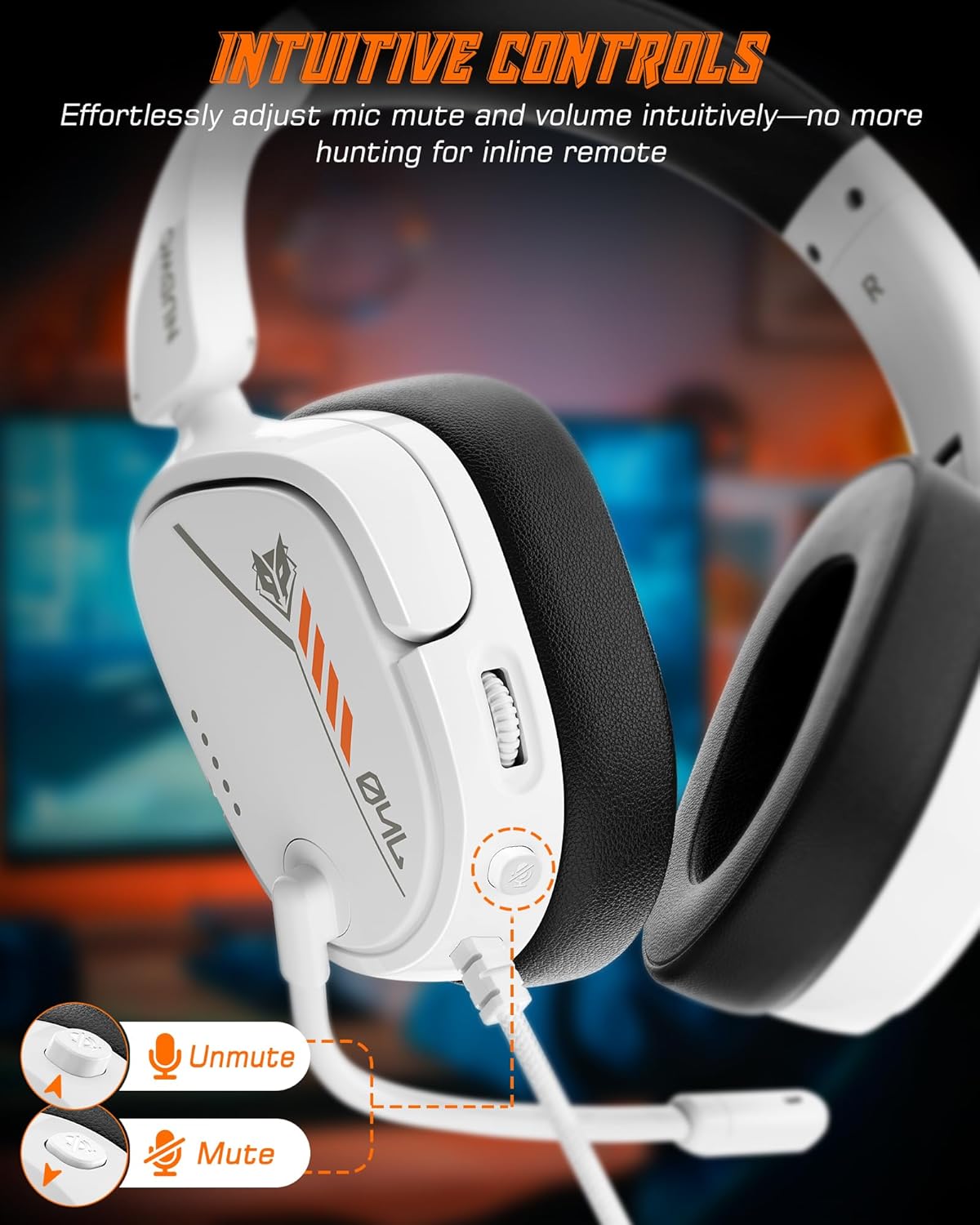
Image: Close-up of the NUBWO HG04L headset's left earcup, highlighting the easily accessible mute button and volume control wheel.
การวางตำแหน่งไมโครโฟน:
The flexible microphone can be adjusted to your preferred position for optimal voice pickup. Ensure the microphone is positioned close to your mouth for the clearest communication.
การปรับความพอดี:
The headband is adjustable to fit various head sizes. The earcups can also rotate 90 degrees to conform to your head shape, providing a comfortable and secure fit. This rotation also allows for single-ear listening if desired.

Image: A woman wearing the NUBWO HG04L headset, illustrating how the rotating earcups provide a personalized and comfortable fit.
6. การบำรุงรักษา
Proper care extends the life of your NUBWO HG04L Gaming Headset.
- การทำความสะอาด: ใช้ผ้าแห้งนุ่มเช็ดทำความสะอาดที่ครอบหูและแถบคาดศีรษะ สำหรับคราบสกปรกที่ติดแน่น ให้ใช้ผ้าชุบน้ำหมาดๆ เช็ดทำความสะอาดamp สามารถใช้ผ้าเช็ดทำความสะอาดได้ แต่ต้องระวังอย่าให้ความชื้นเข้าไปในตะแกรงลำโพงหรือไมโครโฟน
- พื้นที่จัดเก็บ: When not in use, store the headset in a clean, dry place. The foldable design allows for compact storage, protecting it from dust and damage.
- การดูแลสายเคเบิล: ควรหลีกเลี่ยงการดัดงออย่างรุนแรงหรือการดึงสายเคเบิลถักมากเกินไป เพื่อป้องกันความเสียหายภายใน
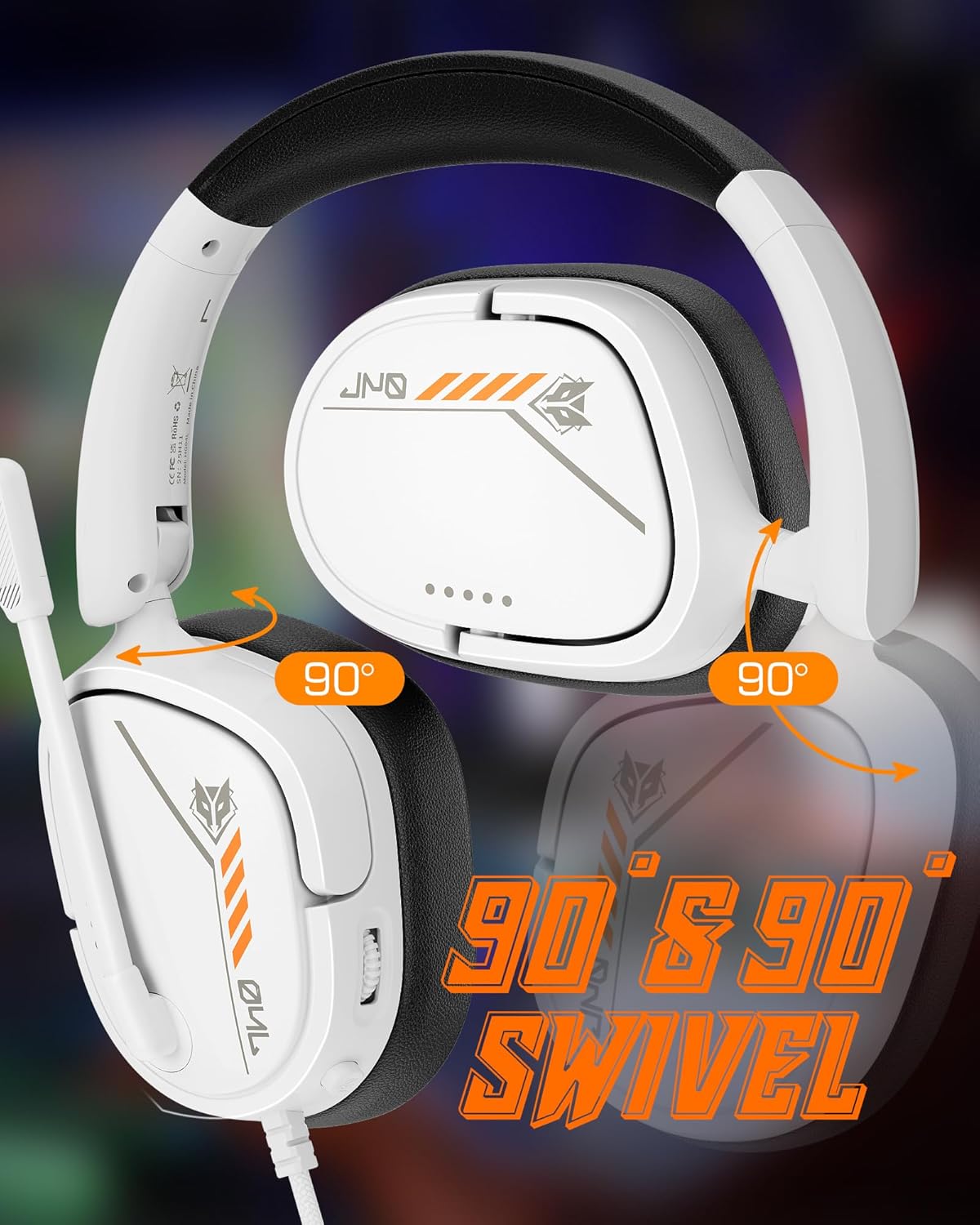
Image: The NUBWO HG04L headset in its folded configuration, demonstrating its portability and ease of storage.
7 การแก้ไขปัญหา
If you encounter issues with your NUBWO HG04L Gaming Headset, refer to the following common solutions:
- ไม่มีเสียง:
- ตรวจสอบให้แน่ใจว่าแจ็ค 3.5 มม. ถูกเสียบเข้าไปในอุปกรณ์อย่างแน่นหนา
- Check the volume wheel on the headset and increase it.
- Verify the audio output settings on your device (console, PC, etc.) to ensure the headset is selected.
- ทดสอบชุดหูฟังกับอุปกรณ์อื่นเพื่อตัดปัญหาเฉพาะอุปกรณ์ออกไป
- ไมโครโฟนไม่ทำงาน:
- ตรวจสอบให้แน่ใจว่าปุ่มปิดเสียงไมโครโฟนบนชุดหูฟังไม่ได้เปิดใช้งาน
- Check the microphone input settings on your device to ensure the headset microphone is selected and its volume is not muted or too low.
- ตรวจสอบให้แน่ใจว่าวางไมโครโฟนในตำแหน่งที่ถูกต้องและไม่มีสิ่งกีดขวาง
- If using a PC with separate audio jacks, confirm you are using a 3.5mm splitter if required.
- Sound Distortion/Poor Quality:
- Ensure the 3.5mm connection is secure and free from debris.
- Reduce the volume on your device or headset if the sound is crackling or distorted.
- Test with another device to determine if the issue is with the headset or the source device.
8. ข้อมูลจำเพาะ
| คุณสมบัติ | รายละเอียด |
|---|---|
| ชื่อรุ่น | HG04L |
| เทคโนโลยีการเชื่อมต่อ | ต่อสาย (แจ็ค 3.5 มม.) |
| ประเภทไดร์เวอร์เสียง | ไดร์เวอร์แบบไดนามิก |
| ขนาดไดร์เวอร์เสียง | 40 มิลลิเมตร |
| การตอบสนองความถี่ | 20 KHz (Upper limit, typical range 20Hz-20kHz) |
| ความไวต่อความรู้สึก | 96 เดซิเบล |
| อิมพีแดนซ์ | 32 โอห์ม |
| ประเภทไมโครโฟน | ทิศทางเดียว (Cardioid) |
| การวางตำแหน่งหู | ครอบหู |
| ฟอร์มแฟกเตอร์ | ครอบหู |
| คุณสมบัติพิเศษ | Foldable, Surround Sound (simulated) |
| น้ำหนักสินค้า | 11.7 ออนซ์ (ประมาณ 331 กรัม) |
| ขนาดสินค้า | 2.36 x 6.1 x 7.17 นิ้ว |
| วัสดุ | พลาสติก |
| สี | สีขาว |
9. การรับประกันและการสนับสนุน
NUBWO products are designed for reliability and performance. For warranty information and customer support, please refer to the official NUBWO webหรือติดต่อผู้ค้าปลีกของคุณ เก็บใบเสร็จรับเงินไว้เป็นหลักฐานการซื้อสำหรับการเรียกร้องการรับประกัน
หากต้องการความช่วยเหลือเพิ่มเติม โปรดไปที่ NUBWO Store on Amazon.


