ข้อมูลด้านความปลอดภัยที่สำคัญ
Please read this manual carefully before installation and use. Keep this manual for future reference.
- ความจุน้ำหนัก: ห้ามบรรทุกน้ำหนักเกินขีดจำกัดสูงสุด 33 ปอนด์ (15 กิโลกรัม) การบรรทุกเกินขีดจำกัดนี้อาจส่งผลให้เกิดการบาดเจ็บร้ายแรงหรือความเสียหายต่อทรัพย์สินได้
- ขนาดจอภาพ: The monitor arm supports monitors up to 42 inches. The VESA extender supports monitors from 17 to 35 inches. Ensure your monitor's size and weight are within these limits.
- ความเข้ากันได้ของ VESA: The arm supports VESA patterns 75x75mm and 100x100mm. The extender converts these to 200x100mm and 200x200mm. Verify your monitor's VESA pattern before installation.
- ความหนาของโต๊ะ: C-clamp requires a desk thickness between 0.39 inches (10mm) and 2.76 inches (70mm). Ensure your desk can support the combined weight of the arm, monitor, and extender.
- การประกอบ: Assemble the product according to the instructions. Improper assembly may cause damage or serious personal injury.
- ชิ้นส่วนที่เคลื่อนไหว: This product contains moving parts. Exercise caution during adjustment to avoid pinching or crushing injuries.
- การซ่อมบำรุง: Periodically check all screws and connections to ensure they are secure. Retighten as necessary.
เนื้อหาแพ็คเกจ
Verify that all components are present and undamaged before proceeding with installation. If any parts are missing or damaged, please contact MOUNTUP customer support.
- ชุดแขนยึดจอภาพ
- ซี-ซีแอลamp ฐาน
- VESA Extender Bracket (2 pieces)
- VESA Extender Plate
- ชุดอุปกรณ์ฮาร์ดแวร์ (สกรู แหวนรอง ตัวเว้นระยะ ประแจหกเหลี่ยม)

ภาพ: เหนือview of the MOUNTUP Heavy Duty Single Monitor Arm, including the main arm, C-clamp, and the VESA extender components.
ข้อมูลจำเพาะ
| ยี่ห้อ | ขึ้น |
| แบบอย่าง | Heavy Duty Single Monitor Arm with VESA Extender |
| Monitor Arm Compatibility | Monitors up to 42 inches |
| VESA Extender Compatibility | Monitors 17-35 inches |
| ความจุน้ำหนัก | 4.4 - 33 ปอนด์ (2 - 15 กิโลกรัม) |
| VESA Patterns (Arm) | 75x75มม., 100x100มม. |
| VESA Patterns (Extender) | Converts to 200x100mm, 200x200mm, 150x150mm, 100x200mm |
| ความหนาของโต๊ะ (C-Cl)amp) | 0.39 - 2.76 นิ้ว (10 - 70 มม.) |
| ช่วงความสูง | 9.3 - 22.1 นิ้ว |
| ขยายสูงสุด | 23.8 นิ้ว |

Image: Illustration highlighting the monitor arm's robust load capacity of up to 33 lbs.

Image: Diagram showing the monitor arm's height adjustment range from 9.3 to 22.1 inches and a maximum extension of 23.8 inches.
การติดตั้งและการตั้งค่า
Step 1: Install the C-Clamp ฐาน
- วาง C-clamp base on the edge of your desk.
- Ensure the desk thickness is between 0.39 and 2.76 inches.
- กระชับ C-clamp screw until the base is securely fastened to the desk. Do not overtighten.

Image: The monitor arm's C-clamp securely attached to a desk, demonstrating its stable mounting.
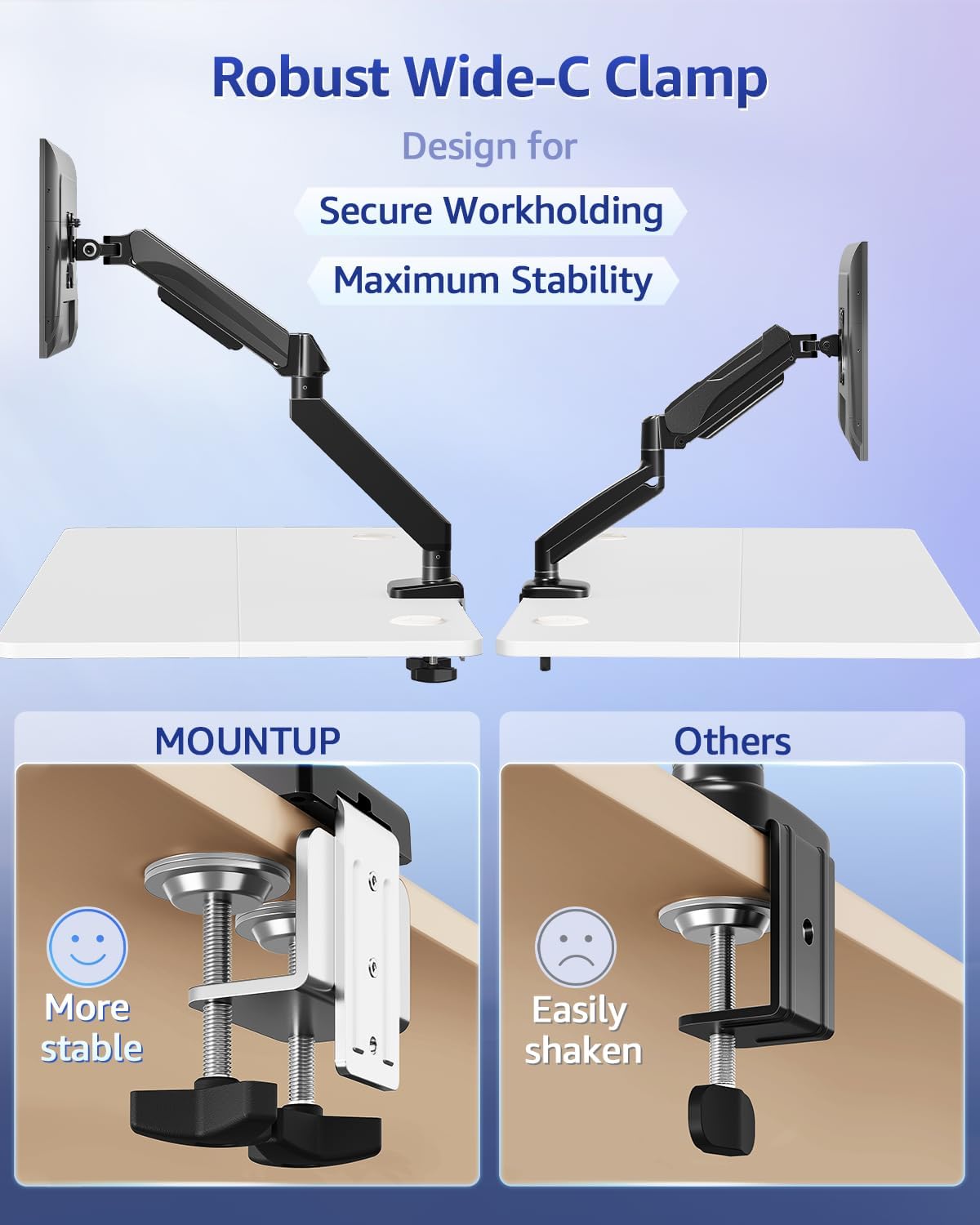
Image: A visual comparison highlighting the wider and more stable design of the MOUNTUP C-clamp compared to a standard clamp.
Step 2: Assemble the VESA Extender (if needed)
If your monitor has a VESA pattern larger than 100x100mm (e.g., 200x100mm or 200x200mm), use the VESA extender bracket.
- Attach the two extender brackets to the VESA extender plate using the provided screws. Ensure the ridge on the extender plate aligns with the brackets for a secure fit.
- Securely fasten the extender assembly to your monitor's VESA mounting holes using the appropriate screws from the hardware kit.

Image: Step-by-step visual guide for assembling the VESA extender brackets onto the main plate using screws.

ภาพ: รายละเอียด view of the VESA extender plate, showing its design for adapting to various VESA patterns.

Image: A diagram illustrating the various VESA patterns (200x100mm, 150x150mm, 200x200mm, 100x200mm) supported by the extender.

Image: A visual comparison showing a monitor that previously could not be mounted (before) and how the VESA extender enables mounting for larger VESA patterns (after).
Step 3: Attach Monitor to Arm
- Slide the monitor (with or without the VESA extender attached) onto the VESA head of the monitor arm.
- Secure the monitor to the VESA head using the provided screws. Ensure all screws are tightened to prevent the monitor from detaching.
คำแนะนำการใช้งาน
การปรับตำแหน่งจอภาพ
The MOUNTUP monitor arm allows for flexible adjustment of your monitor's position to achieve optimal ergonomics.
- การปรับความสูง: Gently push or pull the monitor up or down to the desired height. The gas spring mechanism will hold it in place.
- การปรับเอียง: Tilt the monitor screen up or down to reduce glare and find a comfortable viewมุมอิง
- การปรับหมุน: Rotate the monitor horizontally (left or right) to share your screen or change viewไอเอ็นจีทิศทาง
- การปรับการหมุน: หมุนจอภาพ 360 องศาเพื่อสลับระหว่างโหมดแนวนอนและแนวตั้ง
การปรับความตึง
If the monitor arm is too stiff or too loose, you may need to adjust the gas spring tension.
- Locate the tension adjustment screw on the arm (usually near the pivot points).
- Use the provided Allen wrench to turn the screw:
- เปลี่ยน clockwise (-) ถึง ลด tension (for lighter monitors or if the arm is too stiff).
- เปลี่ยน counter-clockwise (+) ถึง เพิ่มขึ้น tension (for heavier monitors or if the arm sags).
- Adjust gradually and test the arm's movement after each adjustment until it holds your monitor securely at any position.
การซ่อมบำรุง
- การทำความสะอาด: Wipe the monitor arm and VESA extender with a soft, damp ผ้า หลีกเลี่ยงการใช้น้ำยาทำความสะอาดที่มีฤทธิ์กัดกร่อนหรือตัวทำละลายที่อาจทำลายพื้นผิวได้
- การตรวจสอบตามระยะเวลา: Regularly inspect all screws and connections (C-clamp, VESA plate, arm joints) to ensure they remain tight. Retighten any loose fasteners to maintain stability and safety.
- การหล่อลื่น: The gas spring mechanism is maintenance-free and does not require lubrication.
การแก้ไขปัญหา
Monitor Sags or Does Not Hold Position
- สารละลาย: The gas spring tension is likely too low for your monitor's weight. Increase the tension by turning the adjustment screw counter-clockwise (+) with the provided Allen wrench until the arm can hold the monitor in place.
- ตรวจสอบน้ำหนัก: Ensure your monitor's weight is within the 4.4 - 33 lbs capacity.
Arm is Too Stiff to Move
- สารละลาย: The gas spring tension is likely too high. Decrease the tension by turning the adjustment screw clockwise (-) with the provided Allen wrench.
Monitor Wobbles
- สารละลาย: Check if the C-clamp is securely tightened to the desk. Ensure all VESA mounting screws are tight. Verify that the monitor arm joints are properly secured.
- Desk Stability: Ensure your desk itself is stable and not prone to wobbling.
การรับประกันและการสนับสนุน
MOUNTUP products are designed for durability and performance. For specific warranty information, please refer to the documentation included with your purchase or visit the official MOUNTUP webเว็บไซต์.
If you encounter any issues or have questions regarding the installation or operation of your MOUNTUP Heavy Duty Single Monitor Arm and VESA Extender, please contact MOUNTUP customer support for assistance.
ข้อมูลติดต่อ: Please refer to your product packaging or the MOUNTUP official webเว็บไซต์สำหรับรายละเอียดการติดต่อฝ่ายสนับสนุนลูกค้าล่าสุด


