การแนะนำ
This manual provides comprehensive instructions for the setup, operation, and maintenance of your Hiseeu 5MP Wireless Security Camera System. This system features 5MP HD video quality, a pre-installed 3TB HDD for 24/7 recording, a combination of PTZ and fixed bullet cameras, IP66 waterproofing, smart motion alerts with humanoid detection, and remote access via the EseeCloud App. The system is designed for stable and reliable surveillance for your home or business.
เนื้อหาแพ็คเกจ
- กล้อง X 8
- NVR x 1
- สาย HDMI x 1
- สายเคเบิลอีเธอร์เน็ต x 1
- คู่มือการใช้งาน x 1

Figure 1: All components included in the Hiseeu 5MP Wireless Security Camera System package.
วิดีโอ 1: แกะกล่องและอื่นๆview of the Hiseeu security camera system components.
หมดระบบview & ส่วนประกอบ
The Hiseeu security camera system consists of a Network Video Recorder (NVR) and multiple cameras (PTZ and Bullet types). Each component has specific ports and features for optimal performance.

Figure 2: Detailed diagram illustrating the ports and features of the NVR, PTZ camera, and Bullet camera.
NVR Ports:
- เสาอากาศ WiFi: Double antennas to receive WiFi signal.
- เอาต์พุตเสียง: เชื่อมต่อกับอุปกรณ์เสียงภายนอก
- Monitor (VGA): Connect with VGA cable to view on VGA monitor.
- Monitor (HDMI): Connect with HDMI cable to view on HDTV.
- Router (WAN): Connect your NVR to the internet or for data transmission with cameras.
- ยูเอสบี: Connect with mouse or insert flash drive for backup.
- DC 12V 2A Power Supply: Power input for the NVR.
Camera Ports (PTZ & Bullet):
- DC 12V 1A Port: Input power for the camera.
- พอร์ตเครือข่าย: For wired connection to the network.
- ปุ่มรีเซ็ต: Press for 6 seconds to reset camera to factory settings or pair with NVR via WiFi.
- เสาอากาศ: Ensure antenna is vertical when installed outside for optimal signal.
- ช่องเสียบการ์ด SD: For local storage (if used standalone).
การตั้งค่า
NVR Initial Setup
- Connect the NVR to a power source using the provided 12V 2A DC supply.
- Connect the NVR to a monitor (TV or VGA monitor) using the HDMI or VGA cable.
- Connect the NVR to your home router via an Ethernet cable for internet access, or configure wireless network settings during the setup wizard.
- Upon first boot, the system will guide you through a setup wizard. Follow the on-screen prompts to select language, set date and time, and create a password.
- The NVR comes with a pre-installed 3TB HDD for continuous recording. Ensure the storage status is working properly during setup.

Figure 3: NVR connected to a monitor, showing multiple camera views.
Video 2: A video guide demonstrating the EseeCloud App setup and navigation.
การติดตั้งกล้อง
- Choose suitable locations for your cameras, ensuring a clear field of view and strong WiFi signal.
- Use the provided mounting screws and anchors to securely attach the camera brackets to the desired surface (wall or ceiling). A template is included to assist with drilling holes.
- Attach the camera to the mounted bracket. Adjust the camera angle as needed.
- Connect each camera to a power source using its 12V 1A DC supply. The cameras are pre-paired to the NVR for plug-and-play functionality.
- For outdoor installations, ensure the waterproof caps are correctly installed over the network and power connections to protect against weather elements.
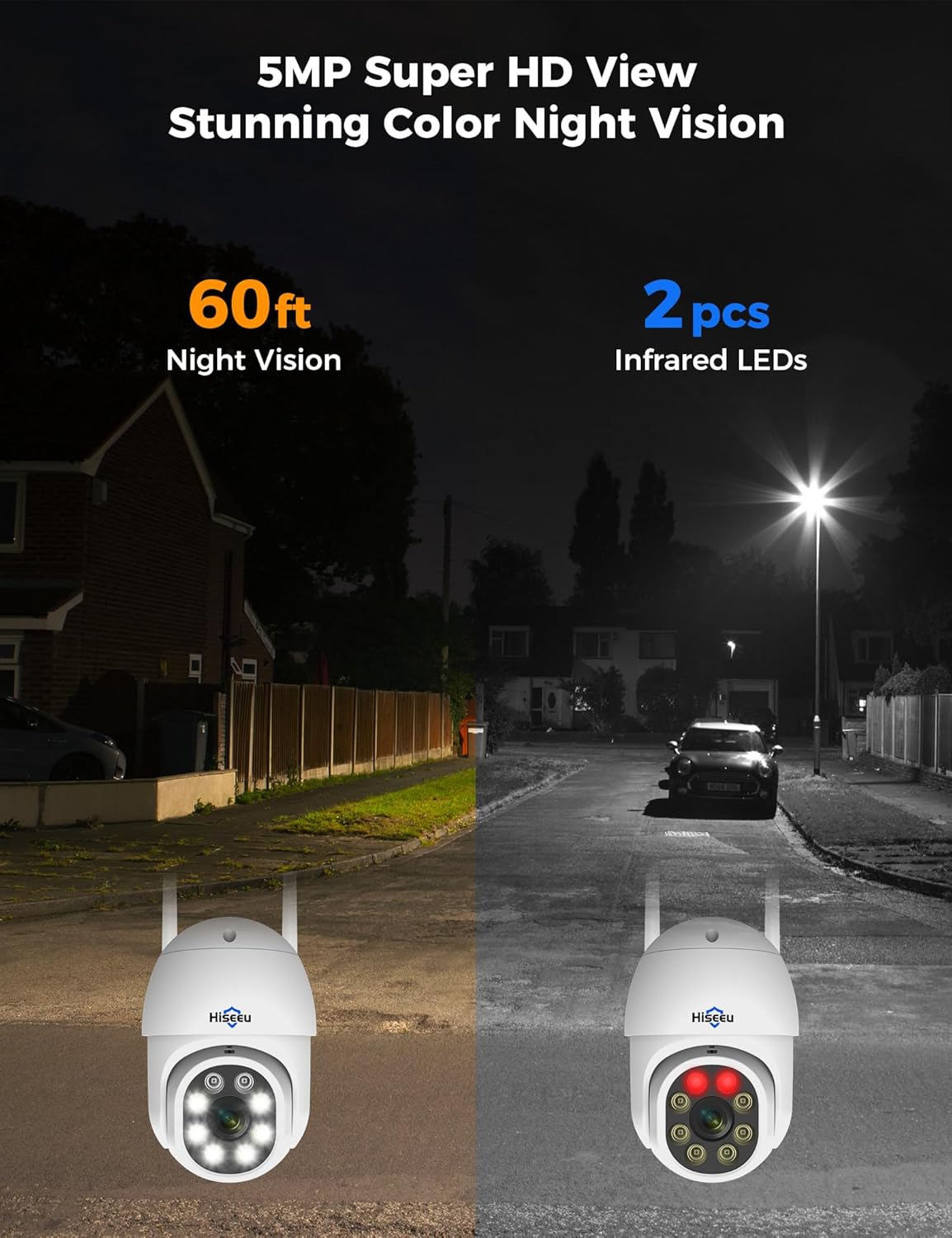
Figure 4: A Hiseeu PTZ camera securely mounted on an exterior wall, ready for surveillance.
Video 3: Demonstration of how to properly use a waterproof cap for camera connections.
คำแนะนำการใช้งาน
สด View & การเล่น
- Access live camera feeds directly from the NVR connected to a monitor or through the EseeCloud App on your smartphone.
- The NVR supports various display layouts (e.g., 4-split, 9-split, 16-split) to view กล้องหลายตัวพร้อมกัน
- Use the NVR's interface (with a USB mouse) or the app to navigate through recorded footage. The 3TB HDD provides continuous 24/7 recording.

รูปที่ 5: สด view of multiple camera feeds displayed on a monitor connected to the NVR.
การตรวจจับการเคลื่อนไหวและการแจ้งเตือน
- The system features smart humanoid detection, which minimizes false alarms by focusing on human shapes.
- Receive instant motion detection alerts directly to your smartphone via the EseeCloud App.
- Configure activity zones to monitor specific areas and reduce unnecessary notifications.

Figure 6: A smartphone screen showing an instant motion detection alert from the EseeCloud App.
การมองเห็นตอนกลางคืน
- Experience crystal clear 5MP HD video quality day and night.
- The cameras are equipped with color night vision technology, providing vivid details even in low-light conditions.

Figure 7: A visual comparison demonstrating the effectiveness of 60ft night vision and color night vision with infrared LEDs.
ระบบเสียงสองทาง
- Utilize the built-in microphone and speaker on the cameras for two-way communication.
- Speak to visitors or deter intruders directly through the EseeCloud App.

Figure 8: A user engaging in clear two-way communication through the camera via their smartphone.
Remote Access & Sharing
- Access your security system remotely from anywhere with a stable internet connection using the EseeCloud App.
- View live feeds, play back recordings, and adjust camera settings on the go.
- Share access to your security system with family members or trusted individuals.

รูปที่ 9: ระยะไกล viewing of the security system on various devices, including smartphones, tablets, and computers.
การซ่อมบำรุง
การบำรุงรักษาตามปกติจะช่วยให้ระบบรักษาความปลอดภัยของคุณมีประสิทธิภาพสูงสุดและมีอายุการใช้งานยาวนาน
- Periodically clean camera lenses to ensure clear image quality.
- Check all cable connections for secure fit and signs of wear.
- The cameras are IP66 waterproof, designed to withstand rain, dust, and harsh weather conditions. However, avoid direct high-pressure water jets.
- Ensure the NVR is placed in a well-ventilated area to prevent overheating.

Figure 10: The IP66 waterproof rating ensures the camera's durability in diverse outdoor environments, from extreme cold to intense heat.
การแก้ไขปัญหา
หากพบปัญหาใด ๆ โปรดดูขั้นตอนการแก้ไขปัญหาทั่วไปต่อไปนี้:
- No Camera Signal: Ensure cameras are powered on and within range of the NVR's WiFi signal. Check antenna positioning. If issues persist, try re-pairing the camera using the reset button.
- สัญญาณ WiFi อ่อน: Position the NVR centrally or use the dual-band WiFi Pro chipset for stronger signal penetration.
- Excessive Motion Alerts: Verify that humanoid detection is enabled in the app settings. Adjust activity zones to exclude areas with frequent non-human movement.
- ปัญหาการบันทึก: Check the NVR's storage management settings to ensure the 3TB HDD is formatted and functioning correctly.
- ปัญหาเกี่ยวกับการเข้าถึงระยะไกล: Ensure the NVR has a stable internet connection and your smartphone has network access. Verify app login credentials.
ข้อมูลจำเพาะ
- ยี่ห้อ: ฮิซิอู
- เทคโนโลยีการเชื่อมต่อ: ไร้สาย
- ความละเอียดการจับภาพวิดีโอ: 5MP
- คุณสมบัติพิเศษ: Human Detection, Motion Sensor, Night Vision, Siren Alarm, Two-Way Audio
- ความจุหน่วยความจำ: 3TB HDD (pre-installed)
- แหล่งพลังงาน: สายไฟ
- ขนาดรายการ L x W x H: 15.28 x 12.99 x 9.96 นิ้ว
- การใช้ที่แนะนำ: ในร่ม, กลางแจ้ง
- อุปกรณ์ที่รองรับ: Smartphones, TV
- เทคโนโลยีแสงน้อย: การมองเห็นตอนกลางคืน
- ช่วงการมองเห็นตอนกลางคืน: 65 ฟุต
- ระดับการกันน้ำ: IP66
- ช่วงอุณหภูมิในการทำงาน: -13°F ถึง 122°F (-25°C ถึง 50°C)
- ช่องที่รองรับ: สูงถึง 16
การรับประกันและการสนับสนุน
Hiseeu products are designed for reliability and performance. For specific warranty details, please refer to the warranty card included in your package or contact customer support.
For 24/7 online support and technical assistance, please use the following contact information:
- อีเมล: จอห์นนี่@hiseeu.com
- Webเว็บไซต์: www.hiseeu.com
- YouTube Search: @HiseeuOfficial
- วอทส์แอพ: +8613392818423


