1. บทนำ
The Level Lock (Matter) is a smart deadbolt designed to integrate seamlessly into your home. It offers advanced security features and convenient access options through Matter-over-Thread technology. This manual provides essential information for the proper installation, operation, and care of your Level Lock.
คุณสมบัติหลัก:
- Impossibly Small Design: Technology is hidden inside the door, making it the smallest smart lock available.
- Bluetooth + Matter Built-In: Interoperable with Apple Home, Google Home, Amazon Alexa, and SmartThings (SmartThings hub required) for easy integration.
- การเข้าถึงระยะไกล: Lock or unlock your door and receive activity notifications from anywhere using certified smart home apps (requires Matter-over-Thread Hub + Border Router).
- ระบบเข้าแบบไร้กุญแจ: Utilize the Level Home app (iOS & Android) for keyless access, sharing, and activity history.
- Best-in-Class Security: Certified AAA by BHMA and ANSI grade 1/A, meeting the highest industry standards for security, durability, and finish.
- การติดตั้งง่าย: Wire-free design, easy to install with a screwdriver, fitting standard American deadbolts.
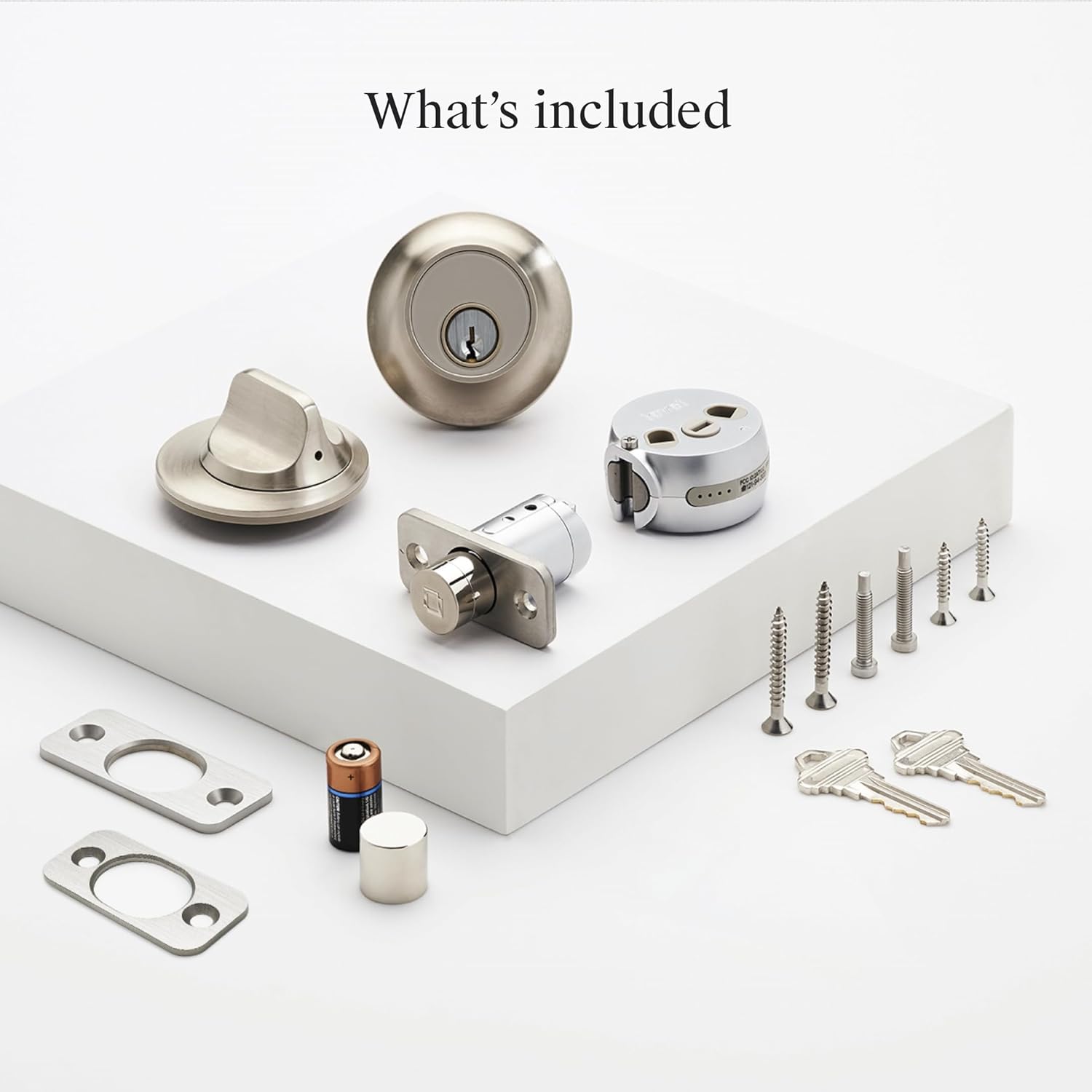
2. สิ่งที่รวมอยู่
Verify that all components are present in your Level Lock (Matter) package:
- 1 Level Lock (Matter) Assembly
- 1 คู่มือการติดตั้ง
- 2 คีย์
- สกรูติดตั้ง 6 ตัว
- แผ่นยึด 2 แผ่น
- 1 CR2 แบตเตอรี่
3. การตั้งค่าและการติดตั้ง
The Level Lock is designed for straightforward installation, typically requiring only a screwdriver. It replaces most American standard deadbolts.
ความเข้ากันได้ของประตู:
- Works with most American standard deadbolts.
- โปรมาตรฐานfile deadbolt: 0.75 inches or greater.
- Backset lengths: 2.375 inches or 2.75 inches.
- Door thickness: 1.75 inches - 2 inches.
- ANSI standard 2.125 inches bore hole diameter.
ขั้นตอนการติดตั้ง:
- เตรียมประตูของคุณ: Ensure your door meets the compatibility requirements. Remove any existing deadbolt hardware.
- ติดตั้งสลักเกลียว: Insert the Level Lock bolt into the door edge.
- Install the Housing: Place the interior and exterior housings, securing them with the provided screws.
- ใส่แบตเตอรี่: Install the CR2 battery into the designated compartment.
- การดำเนินการทดสอบ: Manually test the lock and unlock mechanism to ensure smooth operation.
- การตั้งค่าแอพ: Download the Level Home app (available for iOS and Android) and follow the on-screen instructions to pair your lock and complete the setup.

Exterior and Interior Design:
The Level Lock is designed to be discreet, maintaining the aesthetic of your door without bulky external keypads or large interior housings.


4. คู่มือการใช้งาน
The Level Lock offers multiple ways to control access to your home, integrating with various smart home platforms.
วิธีการควบคุม:
- Level Home App: Use the dedicated Level Home app (iOS & Android) to lock/unlock, manage access, and view activity history.
- การควบคุมด้วยเสียง: Integrate with Amazon Alexa, Google Assistant, or Apple HomeKit for voice commands (e.g., "Alexa, unlock front door").
- คีย์ทางกายภาพ: ระบบเข้าออกด้วยกุญแจแบบดั้งเดิมนั้นพร้อมใช้งานเสมอ
- Level Keypad (Sold Separately): For key code access, a Level Keypad can be installed within 30 feet of your lock.

Smart Home Integration (Matter-over-Thread):
The Level Lock (Matter) is designed for multi-platform control, allowing you to manage it through various compatible smart home ecosystems.
- ฮับที่รองรับ: To use Matter-enabled features, a Matter-over-Thread hub connected to your home Wi-Fi and updated to the latest firmware is required. Examples include Apple TV 4K (2nd/3rd Gen), HomePod (2nd Gen), HomePod mini, various Echo devices, Nest Hub (2nd Gen), Nest Hub Max, and SmartThings hubs.
- การเข้าถึงระยะไกล: Requires a Matter-over-Thread Hub + Border Router for remote lock/unlock and notifications.
- การควบคุมท้องถิ่น: Manage your lock from your phone while at home without internet access.


5. การบำรุงรักษา
การเปลี่ยนแบตเตอรี่:
The Level Lock is powered by one CR2 Lithium Manganese Dioxide battery. When the battery level is low, you will receive notifications through the Level Home app. To replace the battery:
- Locate the battery compartment within the lock assembly.
- ถอดแบตเตอรี่ CR2 เก่าออก
- ใส่แบตเตอรี่ CR2 ใหม่ โดยตรวจสอบให้แน่ใจว่าใส่ขั้วถูกต้อง
- ปิดช่องใส่แบตเตอรี่ให้แน่น
การทำความสะอาด:
To maintain the appearance and functionality of your Level Lock, wipe it with a soft, damp ใช้ผ้าเช็ดทำความสะอาด หลีกเลี่ยงการใช้สารทำความสะอาดที่มีฤทธิ์กัดกร่อนหรือตัวทำละลาย เพราะอาจทำให้พื้นผิวเสียหายได้
6 การแก้ไขปัญหา
If you encounter issues with your Level Lock, consider the following:
- ล็อคไม่ตอบสนอง: Check the battery level in the Level Home app. Replace the CR2 battery if it is low.
- ปัญหาการเชื่อมต่อ: Ensure your Matter-over-Thread hub and border router are powered on and connected to your home network. Verify that the Level Home app and your smart home platforms are updated to the latest versions.
- ปัญหาแอพ: Try restarting the Level Home app or reinstalling it. Ensure your smartphone's Bluetooth is enabled.
- การอุดตันทางกายภาพ: Check for any physical obstructions in the door frame or strike plate that might prevent the deadbolt from extending or retracting fully.
For persistent issues, refer to the Level Home app's help section or contact Level customer support.
7. ข้อมูลจำเพาะ
| คุณสมบัติ | รายละเอียด |
|---|---|
| ยี่ห้อ | ระดับ |
| ชื่อรุ่น | Lock (Matter) |
| หมายเลขรุ่นสินค้า | C2 |
| ยูพีซี | 850058738291 |
| ประเภทล็อค | deadbolt |
| วัสดุ | Metal (440C stainless steel and strengthened metal alloys) |
| สี | นิกเกิลซาติน |
| ขนาดสินค้า (กว้าง x ยาว x สูง) | 4.5 x 2.75 x 2.75 นิ้ว |
| น้ำหนักสินค้า | 3.38 ปอนด์ |
| คุณสมบัติพิเศษ | Auto-Lock, Matter-Enabled, Scratch-Resistant, Smart Lock, Weather Resistant |
| โปรโตคอลการเชื่อมต่อ | Matter, Bluetooth |
| วิธีการควบคุม | แอป, รีโมท, เสียง |
| ประเภทตัวควบคุม | Amazon Alexa, Android, Apple HomeKit, Google Assistant, iOS |
| แหล่งพลังงาน | 1 CR2 Battery (included) |
| ประเภทเซลล์แบตเตอรี่ | ลิเธียมแมงกานีสไดออกไซด์ |
| ใบรับรองความปลอดภัย | BHMA AAA, ANSI Grade 1/A |

8. ข้อมูลการรับประกัน
The Level Lock (Matter) Smart Lock is backed by a รับประกันจำกัด 2 ปี. This warranty covers defects in materials and workmanship under normal use. For specific terms and conditions, please refer to the warranty documentation included with your product or visit the official Level webเว็บไซต์.
9. การสนับสนุน
For further assistance, technical support, or to access additional resources, please visit the official Level support website or contact their customer service team. You can typically find contact information within the Level Home app or on the Level webเว็บไซต์.
แหล่งข้อมูลออนไลน์: www.level.co/support


