การแนะนำ
This manual provides essential instructions for setting up, operating, maintaining, and troubleshooting your DOOGEE Note 56 smartphone. Please read this guide thoroughly to ensure proper use and to maximize the device's capabilities.
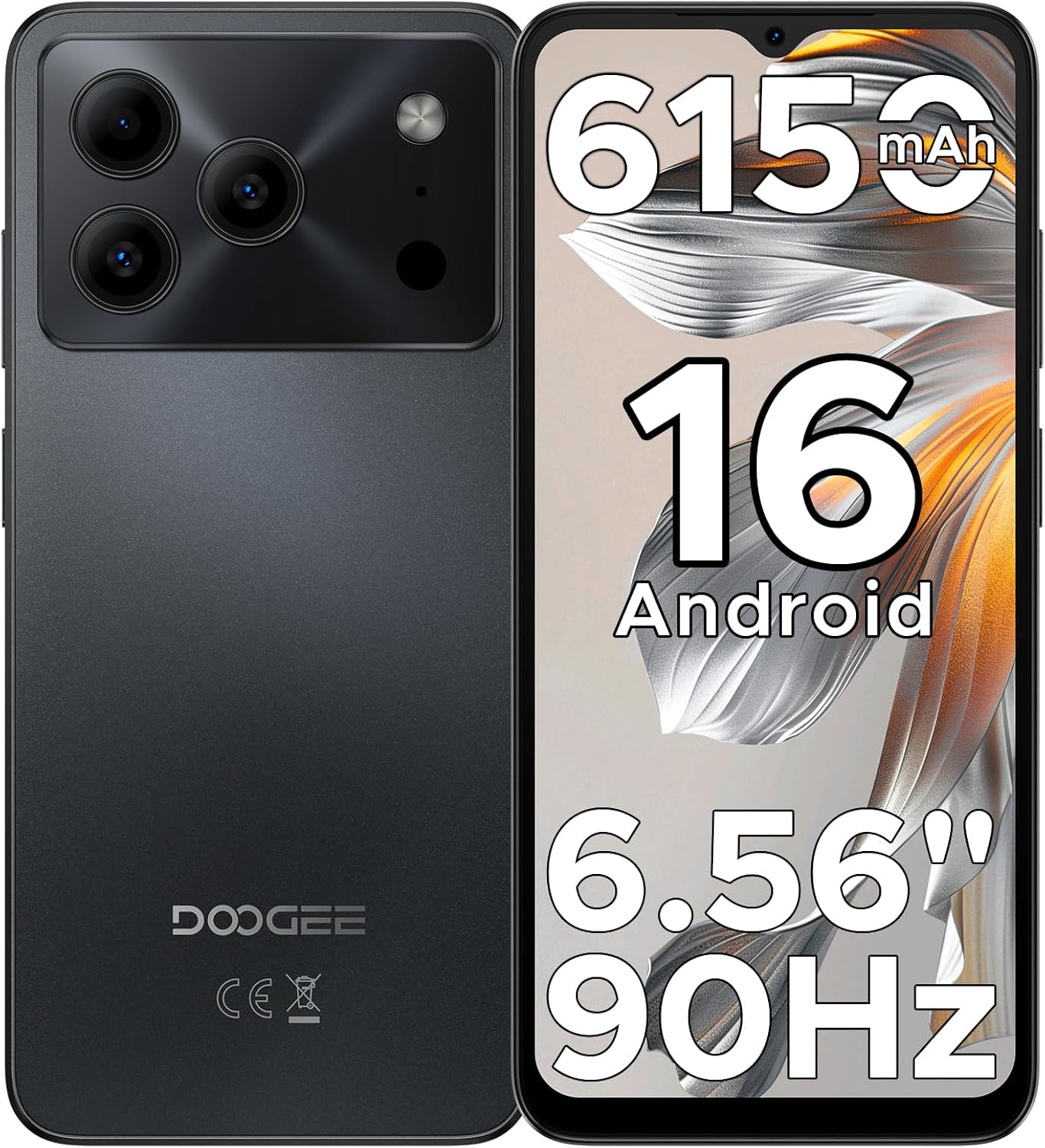
Figure 1: DOOGEE Note 56 Smartphone Overview
1. การตั้งค่า
1.1 เนื้อหาบรรจุภัณฑ์
ตรวจสอบว่ามีรายการทั้งหมดอยู่ในบรรจุภัณฑ์ผลิตภัณฑ์ของคุณ:
- 1 x DOOGEE Note 56 Cellphone
- สายเคเบิลพอร์ต Type-C จำนวน 1 เส้น
- 1 x เครื่องชาร์จ
- 1 x ฟิล์มป้องกัน (ติดไว้ล่วงหน้า)
- 1 x เข็มสำหรับใส่ซิมการ์ด
- 1 x กล่องบรรจุภัณฑ์
- 1 x คู่มือ (เอกสารนี้)
- ใบรับประกัน 1 ใบ
- 1 x เคสป้องกัน TPU
1.2 การใส่ซิมการ์ดและการ์ด TF
- ค้นหาถาดใส่การ์ด SIM ที่ด้านข้างของโทรศัพท์
- ใส่พินการ์ด SIM เข้าไปในรูเล็ก ๆ ข้างถาดเพื่อดันการ์ดออกมา
- Place your Nano-SIM cards (up to two) and/or a TF card (microSD) into the designated slots on the tray. Ensure the gold contacts face downwards.
- ใส่ถาดกลับเข้าไปในโทรศัพท์อย่างระมัดระวัง

Figure 2: SIM Card Tray Location (Illustrative)
1.3 การชาร์จแบตเตอรี่
Before first use, fully charge the phone's battery. Connect the Type-C cable to the phone's charging port and the charger to a power outlet.
- The phone features a 6150mAh Silicon-Carbon Battery.
- It supports 5W reverse charging, allowing you to charge other devices using your phone (requires an OTG cable, sold separately).

Figure 3: 6150mAh Battery Feature
1.4 การเปิด/ปิดเครื่อง
- วิธีเปิดเครื่อง: กดปุ่มเปิด/ปิดค้างไว้จนกว่าโลโก้ DOOGEE จะปรากฏขึ้น
- วิธีปิดเครื่อง: กดปุ่มเปิด/ปิดค้างไว้ จากนั้นเลือก "ปิดเครื่อง" จากตัวเลือกบนหน้าจอ
2. คู่มือการใช้งาน
ระบบปฏิบัติการ Android 16 2.1
The DOOGEE Note 56 runs on the latest Android 16 OS, providing a secure and user-friendly experience. Navigate through the interface using gestures and on-screen controls.

รูปที่ 4: อินเทอร์เฟซระบบปฏิบัติการ Android 16
2.2 การแสดงผลและการโต้ตอบ
- หน้าจอ: The device features a 6.56-inch HD+ IPS waterdrop screen with a 90Hz refresh rate for smooth visuals.
- ปลดล็อคด้วยใบหน้า: Utilize the front camera for quick and secure access to your device.
- แจ็คหูฟัง 3.5 มม.: เชื่อมต่อหูฟังแบบมีสายเพื่อเล่นเสียง

Figure 5: 6.56" HD+ 90Hz Display
2.3 ฟังก์ชันกล้อง
The DOOGEE Note 56 is equipped with an 8MP main camera and a 5MP front camera. The camera app includes various modes to enhance your photography:
- การจดจำฉาก AI: Automatically detects 12 scenes and optimizes settings for improved photos.
- เอชดีอาร์: High Dynamic Range for balanced exposure in challenging lighting.
- โหมดกลางคืน: ช่วยเพิ่มคุณภาพของภาพถ่ายที่ถ่ายในสภาพแสงน้อย
- โหมดความงาม: Applies enhancements for portraits.
- โหมดแนวตั้ง: สร้างเอฟเฟกต์ความลึกของภาพ
- โหมดโปร: ควบคุมการตั้งค่ากล้องด้วยตนเอง
- Smile Capture, Panoramas, Burst Shots, Fun Filters.

Figure 6: Camera Features and AI Scene Recognition
2.4 การเชื่อมต่อ
- 4G สองซิม: รองรับซิมการ์ดสองซิมเพื่อความยืดหยุ่นในการใช้งานเครือข่าย
- ไวไฟ : เชื่อมต่อกับเครือข่ายไร้สายเพื่อการเข้าถึงอินเทอร์เน็ต
- Bluetooth 4.2: Pair with compatible accessories.
- จีพีเอส: สำหรับบริการนำทางและระบุตำแหน่ง
- วิทยุ FM: ฟังสถานีวิทยุท้องถิ่น

Figure 7: Supported Network Connections
2.5 การจัดเก็บและประสิทธิภาพการทำงาน
- โปรเซสเซอร์: UNISOC SC9863A Octa-Core processor for efficient operation.
- แรม : 24GB RAM (3GB physical + 21GB virtual expansion) for smooth multitasking.
- พื้นที่เก็บข้อมูลภายใน: 64GB for apps and media.
- พื้นที่เก็บข้อมูลที่ขยายได้: Supports up to 2TB via TF (microSD) card (sold separately).

Figure 8: Storage and RAM Configuration
2.6 Smart OS Features
The Android 16 OS includes several smart features:
- โหมดระบบคู่: Allows for separate user profileหรือสภาพแวดล้อม
- ซุปเปอร์คลิปบอร์ด: Enhanced clipboard functionality.
- การขยายหน่วยความจำ: Software-based RAM expansion.
- การเพิ่มประสิทธิภาพหน้าจอ: Adjusts display settings for various content.
- Customize Screen Colors: Personalize your display's color profile.
- การตรวจจับร่างกายอัจฉริยะ: (Details not specified, likely related to gestures or proximity).

Figure 9: Smart OS Features Overview
3. การบำรุงรักษา
3.1 การดูแลแบตเตอรี่
- หลีกเลี่ยงอุณหภูมิที่สูงเกินไปซึ่งอาจทำให้แบตเตอรี่มีอายุการใช้งานลดลง
- Do not leave the phone fully charged or fully discharged for extended periods.
- Use only the provided charger and cable for optimal charging.
3.2 การอัปเดตซอฟต์แวร์
Regularly check for and install system updates to ensure your device has the latest security patches and features. You can usually find this option in การตั้งค่า > ระบบ > อัปเดตระบบ.
3.3 การทำความสะอาดเครื่อง
- ใช้ผ้านุ่มที่ไม่เป็นขุยในการทำความสะอาดหน้าจอและตัวเครื่องโทรศัพท์
- หลีกเลี่ยงการใช้สารเคมีรุนแรงหรือวัสดุที่มีฤทธิ์กัดกร่อน
- อย่าให้โทรศัพท์โดนความชื้นมากเกินไป
3.4 การจัดการการจัดเก็บข้อมูล
To maintain optimal performance, regularly manage your phone's storage. Delete unnecessary files, uninstall unused apps, and utilize the TF card for additional storage.
4 การแก้ไขปัญหา
หากคุณพบปัญหาเกี่ยวกับ DOOGEE Note 56 ของคุณ ให้ลองทำตามขั้นตอนการแก้ไขปัญหาทั่วไปต่อไปนี้:
| ปัญหา | สารละลาย |
|---|---|
| โทรศัพท์ไม่เปิด | ตรวจสอบให้แน่ใจว่าแบตเตอรี่ชาร์จเต็มแล้ว เสียบที่ชาร์จและรอสักครู่ก่อนลองเปิดเครื่องอีกครั้ง |
| แบตเตอรี่หมดเร็ว | Close unused apps, reduce screen brightness, disable Wi-Fi/Bluetooth when not in use. Check battery usage in settings to identify power-consuming apps. |
| แอปทำงานช้าหรือขัดข้อง | Clear app cache (Settings > Apps > [App Name] > Storage > Clear cache). Restart the phone. Ensure sufficient free storage space. |
| ไม่สามารถเชื่อมต่อ Wi-Fi/ข้อมูลมือถือได้ | Toggle Wi-Fi/Mobile Data off and on. Restart the phone. Check router/network settings. Ensure SIM cards are correctly inserted and activated. |
| Face Unlock not working | Ensure your face is well-lit and clearly visible to the front camera. Re-register your face data in security settings if the issue persists. |
สำหรับปัญหาที่ซับซ้อนกว่านี้ โปรดติดต่อฝ่ายสนับสนุนของ DOOGEE webเว็บไซต์หรือติดต่อฝ่ายบริการลูกค้า
5. ข้อมูลจำเพาะ
| คุณสมบัติ | รายละเอียด |
|---|---|
| ชื่อรุ่น | หมายเหตุ56 |
| ระบบปฏิบัติการ | แอนดรอยด์ 16 |
| ซีพียู | UNISOC SC9863A Octa-Core, 1.6 GHz |
| แรม | หน่วยความจำ 24 GB (3 GB แบบกายภาพ + 21 GB แบบเสมือน) |
| การจัดเก็บข้อมูลภายใน | 64GB |
| พื้นที่เก็บข้อมูลแบบขยายได้ | Up to 2 TB via TF card (microSD) |
| ขนาดจอแสดงผล | 6.56 นิ้ว |
| ประเภทจอภาพ | HD+ IPS Waterdrop Screen, 90Hz Refresh Rate |
| กล้องหลัง | 8 MP |
| กล้องหน้า | 5 MP |
| ความจุของแบตเตอรี่ | 6150 มิลลิแอมป์ |
| การเชื่อมต่อ | 4G Dual SIM, Wi-Fi, Bluetooth 4.2, GPS, USB Type-C |
| แจ็คเสียง | 3.5 มม. |
| คุณสมบัติพิเศษ | Face Unlock, OTG Reverse Charging, Expandable Memory, Dual SIM |
| ขนาด | 7.63 x 4.09 x 2 นิ้ว (ขนาดบรรจุภัณฑ์) |
| น้ำหนักสินค้า | 14.6 ออนซ์ |
6. การรับประกันและการสนับสนุน
Your DOOGEE Note 56 smartphone comes with a warranty. Please refer to the included Warranty Card in your package for detailed information regarding warranty terms, conditions, and duration.
For technical support or further assistance, please visit the official DOOGEE website or contact their customer service department. Contact information can typically be found on the warranty card or the manufacturer's webเว็บไซต์.


