1. บทนำ
This manual provides essential information for the safe and efficient use of your DOOGEE Blade 20 Max Rugged Phone. Please read this manual thoroughly before operating your device to ensure optimal performance and longevity.
2. อะไรอยู่ในกล่อง
Upon opening your DOOGEE Blade 20 Max package, you should find the following items:
- 1 x Blade 20 Max Rugged Phone
- สาย USB Type-C 1 เส้น
- 1 x เครื่องชาร์จ
- 1 x Screen-printed Protective Film (Pre-applied)
- 1 x ฟิล์มกันระเบิด
- 1 x กล่องบรรจุภัณฑ์
- 1 x คู่มือ
- ใบรับประกัน 1 ใบ
คำอธิบายวิดีโอ: This video demonstrates the unboxing process of the DOOGEE Blade 20 Max Rugged Phone, showcasing all included accessories and the phone itself as it is removed from its packaging.
3. สินค้าหมดview
The DOOGEE Blade 20 Max is a rugged smartphone designed for durability and high performance. It features a robust build, a large display, and advanced camera capabilities.
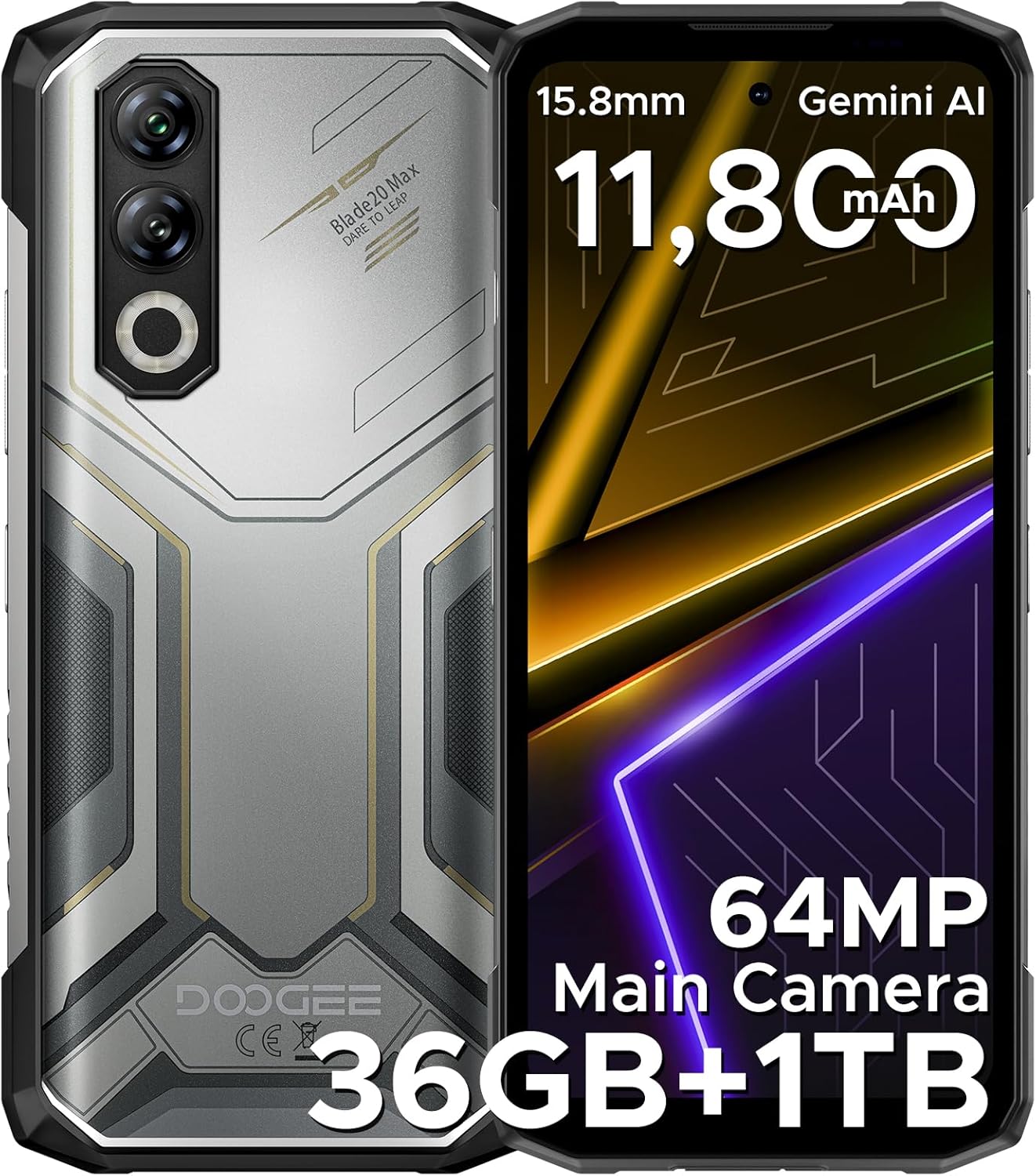
คำอธิบายภาพ: รายละเอียด view of the DOOGEE Blade 20 Max Rugged Phone, showing both the front display and the textured back panel with its multi-camera setup.

คำอธิบายภาพ: An infographic highlighting key features of the DOOGEE Blade 20 Max, including its 1TB ROM, 15.8mm slim body, 11,800mAh Silicon Battery, 64MP Main Camera, and 20MP Night Vision.
4. การตั้งค่า
4.1. การติดตั้งซิมการ์ดและการ์ด TF
The DOOGEE Blade 20 Max supports a triple-card slot, allowing for two SIM cards and one TF (microSD) card simultaneously.
- ค้นหาถาดใส่การ์ด SIM ที่ด้านข้างของอุปกรณ์
- เสียบเครื่องมือถอดซิม (ถ้ามี) เข้าไปในรูเล็กๆ ข้างถาดเพื่อเปิดถาด
- Carefully place your Nano-SIM cards and TF card into the designated slots on the tray. Ensure they are correctly oriented.
- ค่อยๆ ดันถาดกลับเข้าไปในโทรศัพท์จนกระทั่งชิดกับด้านข้างของอุปกรณ์
4.2. เปิดเครื่องครั้งแรก
- กดปุ่มเปิด/ปิด (โดยปกติจะอยู่ด้านขวา) ค้างไว้จนกว่าโลโก้ DOOGEE จะปรากฏบนหน้าจอ
- ทำตามคำแนะนำบนหน้าจอเพื่อทำการตั้งค่าเบื้องต้นให้เสร็จสมบูรณ์ รวมถึงการเลือกภาษา การเชื่อมต่อ Wi-Fi และการตั้งค่าบัญชี Google
4.3. การกำหนดค่าเครือข่าย
This device supports various frequency bands. Before purchasing, it is recommended to verify compatibility with your local carrier's network to ensure proper functionality. Refer to the specifications section for detailed frequency band information.
5. คู่มือการใช้งาน
5.1. การแสดงผล
The Blade 20 Max features a 6.6-inch HD+ IPS notch-free punch-hole display with a 120Hz refresh rate for smooth visuals. It offers vibrant colors and clear images.

คำอธิบายภาพ: An image detailing the 6.6-inch HD+ 120Hz display of the DOOGEE Blade 20 Max, highlighting its Incell screen type, 16.7M screen color, 84% screen-to-body ratio, and 1500:1 screen contrast.
5.2. ประสิทธิภาพและการจัดเก็บ
Powered by the 6nm Mediatek Helio G100 Octa Core processor and running Android 15, the device offers fast and responsive performance. It comes with 12GB of physical RAM, expandable by an additional 24GB of virtual memory, totaling 36GB RAM. Storage includes a massive 1TB ROM, suitable for extensive data and applications.

คำอธิบายภาพ: A diagram illustrating the Helio G100 Octa-core chipset, emphasizing its 6nm processing and Mali G57 GPU for efficient performance.

คำอธิบายภาพ: An illustration showing the 12GB+1TB massive storage configuration of the DOOGEE Blade 20 Max, detailing 36GB RAM (12GB Basic + 24GB Virtual RAM) and 1TB ROM.
คำอธิบายวิดีโอ: This video highlights the 1TB ROM storage capacity of the DOOGEE Blade 20 Max, demonstrating its ability to store a large volume of data.
5.3. ระบบกล้อง
The device is equipped with a triple-camera system: a 64MP main camera, a 16MP front camera, and a 20MP night vision camera, allowing for clear photos in various lighting conditions.

คำอธิบายภาพ: A visual representation of the DOOGEE Blade 20 Max's camera system, highlighting the 64MP main camera, 20MP night vision camera, and 16MP front camera.

คำอธิบายภาพ: ภาพแสดงasing various multi-mode camera features of the DOOGEE Blade 20 Max, including anti-shake, anti-flicker, multi-frame noise reduction, pro mode, and burst mode.
5.4. การจัดการแบตเตอรี่
The phone is equipped with a large 11800mAh Silicon Anode Battery, providing extended usage times. It supports 33W fast charging and 5W reverse charging, allowing you to charge other devices.
- เวลาสแตนด์บาย: นานถึง 19 วัน
- การรับชมวิดีโอ: นานถึง 29.9 ชั่วโมง
- กำลังเล่นเพลง: นานถึง 186 ชั่วโมง
- การโทร: นานถึง 100 ชั่วโมง

คำอธิบายภาพ: An illustration of the DOOGEE Blade 20 Max's 11800mAh Silicon Anode Battery, highlighting its 33W fast charging and 5W reverse charging capabilities, along with estimated usage times.
คำอธิบายวิดีโอ: This video demonstrates the long-lasting 11800mAh battery of the DOOGEE Blade 20 Max Rugged Phone, showcasing its endurance for extended use.
5.5. คุณสมบัติด้านความปลอดภัย
Unlock your device securely using either side fingerprint recognition or facial unlock.

คำอธิบายภาพ: An infographic illustrating the security features (Face & Side Fingerprint Unlock) and connectivity options (NFC, GPS, Glonass, Galileo, Beidou, 2 SIM + 1 TF Card Slot) of the DOOGEE Blade 20 Max.
5.6. การเชื่อมต่อ
The Blade 20 Max supports Bluetooth, NFC (for Google Pay), Wi-Fi, and multiple navigation systems including GPS, Glonass, Galileo, and Beidou.
5.7. คุณสมบัติ AI
The device includes built-in Gemini AI for enhanced functionality, supporting tasks such as content creation, image analysis, code development, language learning, and smart assistance.

คำอธิบายภาพ: A visual representation of the Built-in Gemini AI features on the DOOGEE Blade 20 Max, showing examples of content creation, image analysis, code development, language learning, smart assistant, and Gemini Live.
5.8. คุณสมบัติของระบบปฏิบัติการ Android 15
Experience a smooth and intuitive user interface with Android 15, offering features like App Cloning, Dual System Mode, Split Screen, Screen Awareness, Live Caption (English Only), Enhanced Privacy Protection, Glove Mode, and Super Clipboard.

คำอธิบายภาพ: ภาพอินโฟกราฟิกแสดงให้เห็น...asing various features of the Android 15 operating system on the DOOGEE Blade 20 Max, including App Cloning, Dual System Mode, Split Screen, Screen Awareness, Live Caption, Enhanced Privacy Protection, Glove Mode, and Super Clipboard.
6. คุณสมบัติความทนทาน
The DOOGEE Blade 20 Max is built to withstand harsh environments, featuring:
- ระดับ IP68: Water-resistant, capable of being submerged in 1.5m of water for 30 minutes.
- IP69K Rating: Dustproof and resistant to high-pressure, high-temperature water jets.
- MIL-STD-810H Certification: Military-grade durability, tested for drops from 1.5 meters.

คำอธิบายภาพ: An image illustrating the IP68, IP69K, and MIL-STD-810H durability ratings of the DOOGEE Blade 20 Max, showing the phone submerged in water, covered in dust, and with a drop test indication.
7. การบำรุงรักษา
To ensure the longevity and optimal performance of your DOOGEE Blade 20 Max, follow these maintenance guidelines:
- การทำความสะอาด: Regularly wipe the phone with a soft, damp ผ้า หลีกเลี่ยงสารเคมีรุนแรงหรือวัสดุที่มีฤทธิ์กัดกร่อน
- การอัปเดตซอฟต์แวร์: Keep your device's software updated to the latest version to benefit from security patches and performance improvements.
- การดูแลแบตเตอรี่ Avoid extreme temperatures. Do not fully discharge the battery frequently. Use the original charger and cable for optimal charging.
- การป้องกันพอร์ต: Ensure all port covers (for USB-C, SIM tray) are securely closed to maintain water and dust resistance.
8 การแก้ไขปัญหา
หากคุณพบปัญหาเกี่ยวกับอุปกรณ์ของคุณ โปรดดูขั้นตอนการแก้ไขปัญหาทั่วไปต่อไปนี้:
- อุปกรณ์ไม่เปิด: ตรวจสอบให้แน่ใจว่าแบตเตอรี่ชาร์จเต็มแล้ว เสียบโทรศัพท์เข้ากับเครื่องชาร์จอย่างน้อย 15 นาที แล้วลองเปิดเครื่องอีกครั้ง
- ปัญหาเครือข่าย: Check if your SIM card is properly inserted. Verify that your carrier's frequency bands are supported by the device. Restart the phone.
- ประสิทธิภาพการทำงานช้า: Close unnecessary background applications. Clear cache regularly. Consider performing a factory reset if issues persist (back up your data first).
- หน้าจอสัมผัสไม่ตอบสนอง: รีสตาร์ทอุปกรณ์ หากปัญหายังคงอยู่ โปรดติดต่อฝ่ายบริการลูกค้า
9. ข้อมูลจำเพาะ
| คุณสมบัติ | รายละเอียด |
|---|---|
| ชื่อรุ่น | Blade 20 Max |
| ยี่ห้อ | ดูจี้ |
| ระบบปฏิบัติการ | แอนดรอยด์ 15 |
| รุ่นซีพียู | MediaTek Helio G100 Octa Core |
| ความเร็วซีพียู | 2.2 กิกะเฮิรตซ์ |
| ขนาดหน่วยความจำ RAM ที่ติดตั้ง | หน่วยความจำ 36 GB (12 GB แบบกายภาพ + 24 GB แบบเสมือน) |
| ความจุของหน่วยความจำ | 1TB |
| ขนาดหน้าจอ | 6.6 นิ้ว |
| ปณิธาน | 720 x 1280 |
| อัตราการรีเฟรช | 120 เฮิรตซ์ |
| ความจุของแบตเตอรี่ | 11800 มิลลิวินาทีamp ชั่วโมง |
| เทคโนโลยีการเชื่อมต่อ | บลูทูธ, เอ็นเอฟซี, ไวไฟ |
| จีพีเอส | True (GPS, Glonass, Galileo, Beidou) |
| คุณสมบัติพิเศษ | Expandable Memory, Fast Charging Support, Rugged Body, Face ID, Fingerprint Recognition, Night Vision Camera |
| น้ำหนักสินค้า | 1 ปอนด์ |
| ขนาดแพ็คเกจ | 8 x 4 x 2 นิ้ว |
| ระดับความทนทาน | IP68, IP69K, MIL-STD-810H |
| แถบความถี่ที่รองรับ | GSM: B2/3/5/8; WCDMA: B1/2/4/5/8; TDD: B34/38/39/40/41; FDD: B1/2/3/4/5/7/8/12/17/18/19/20/25/26/28AB/66 |
10. การรับประกันและการสนับสนุน
Your DOOGEE Blade 20 Max Rugged Phone comes with a warranty. Please refer to the included Warranty Card in your product packaging for detailed terms and conditions, including warranty period and coverage.
For technical support, service, or further inquiries, please visit the official DOOGEE website or contact their customer service channels. Keep your purchase receipt and warranty card handy for any support requests.


