1. บทนำ
Thank you for choosing the WOLFANG WDV01 Portable DVD Player. This manual provides essential information for setting up, operating, and maintaining your device. Please read it carefully before use to ensure optimal performance and longevity of your product.
The WOLFANG WDV01 is designed for portable entertainment, featuring a 9.5-inch unit with a 7.5-inch HD swivel screen, stereo speakers, and a long-lasting battery. It supports various disc and file formats, making it versatile for different media content.
2. เนื้อหาบรรจุภัณฑ์
ตรวจสอบว่ามีรายการทั้งหมดอยู่ในแพ็คเกจ:
- WOLFANG WDV01 Portable DVD Player
- รีโมทคอนโทรล
- คู่มือการใช้งาน
- AC Charger
- ที่ชาร์จในรถยนต์
- สาย AV 3-in-1

Image: Contents of the WOLFANG WDV01 package, showing the DVD player, remote control, user manual, AC charger, car charger, and AV cable.
3. สินค้าหมดview
3.1 คุณสมบัติหลัก
- แสดง: 9.5-inch unit with 7.5-inch HD eye-protection screen.
- การหมุนหน้าจอ: 270° horizontal rotation and 180° vertical flip for flexible viewมุมการเอียง
- เสียง: ลำโพงสเตอริโอในตัว
- อายุการใช้งานแบตเตอรี่: Up to 6 hours of playback on a full charge.
- ตัวเลือกพลังงาน: AC power adapter and car charger included.
- ฟังก์ชั่นหน่วยความจำ: Breakpoint memory resumes playback from the last stopped point.
- ความเข้ากันได้ของสื่อ: Supports DVD, SVCD, VCD, CD-R/RW discs.
- File รูปแบบการสนับสนุน: JPEG, WMA, MPG, MP3, DIVX, VOB, AVI.
- การเชื่อมต่อภายนอก: USB port, SD card slot (max 32GB), AV input, AV output, 3.5mm headphone jack.
3.2 เค้าโครงอุปกรณ์
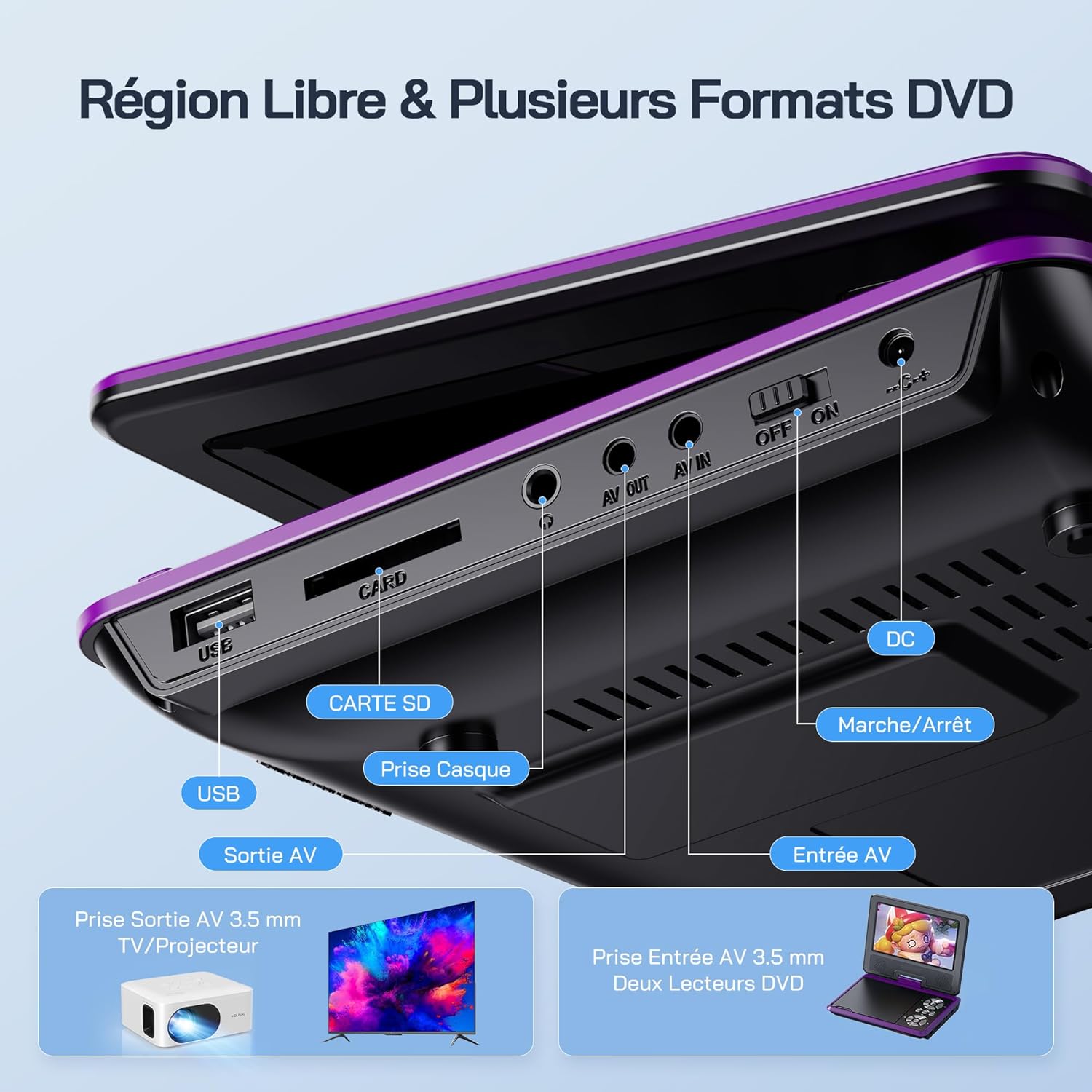
ภาพ: รายละเอียด view of the side panel of the WOLFANG WDV01, highlighting the USB port, SD card slot, headphone jack, AV OUT, AV IN, DC power input, and ON/OFF switch.
- พอร์ต USB: สำหรับการเชื่อมต่อแฟลชไดรฟ์ USB
- ช่องเสียบการ์ด SD: For inserting SD/MMC cards.
- แจ็คหูฟัง: ช่องเสียบหูฟังขนาด 3.5 มม.
- AV ออก: Audio/Video output for connecting to a TV or projector.
- AV ใน: Audio/Video input for connecting external devices or another DVD player.
- DC IN: อินพุตพลังงานสำหรับอะแดปเตอร์ AC หรือเครื่องชาร์จในรถยนต์
- สวิตช์เปิด/ปิด: การควบคุมพลังงานสำหรับอุปกรณ์
4. การตั้งค่า
4.1 การชาร์จเริ่มต้น
Before first use, fully charge the device. Connect the AC charger to the DC IN port on the player and plug it into a wall outlet. The charging indicator light will illuminate. Once fully charged, the light may change color or turn off, depending on the model.
4.2 การเปิด/ปิดเครื่อง
To power on the device, slide the ON/OFF switch to the "ON" position. To power off, slide it to the "OFF" position.
4.3 การปรับหน้าจอ
The screen can be rotated 270 degrees horizontally and flipped 180 degrees vertically. Adjust the screen to your preferred viewing angle. This feature is particularly useful for mounting in a car or for shared viewการไอเอ็นจี

Image: Illustration demonstrating the 270-degree rotation and 180-degree flip capabilities of the WOLFANG WDV01 screen.
5. คู่มือการใช้งาน
5.1 Playing a DVD/CD
- Open the disc cover gently.
- Place a compatible DVD or CD onto the spindle, label side up.
- ปิดฝาครอบแผ่นดิสก์
- The player will automatically detect and begin playback. If not, select "Disc" from the main menu.
บันทึก: This device supports DVD, SVCD, VCD, CD-R/RW discs. It is not compatible with 1080p, 4K, or Blu-ray discs.
5.2 Playing from USB/SD Card
- ใส่แฟลชไดรฟ์ USB เข้าในพอร์ต USB หรือใส่การ์ด SD เข้าในช่องเสียบการ์ด SD
- From the main menu, select "USB" or "SD" depending on your media source.
- นำทางผ่านโฟลเดอร์และ files using the control buttons or remote control.
- เลือกสิ่งที่คุณต้องการ file (JPEG, WMA, MPG, MP3, DIVX, VOB, AVI) to begin playback.
บันทึก: Maximum supported Micro SD card capacity is 32GB. Video files should have a resolution up to 720x480. Image files should have a resolution up to 2650x1440.
5.3 Breakpoint Memory Function
The player automatically remembers the last playback position. When you power on the device again or re-insert the same disc/media, it will prompt you to resume playback from where you left off. This function may need to be activated in the system settings.

Image: Visual representation of the breakpoint memory feature, illustrating how the player can pause and resume video playback from the exact point of interruption.
5.4 Connecting to an External Display (TV/Projector)
Use the provided 3-in-1 AV cable to connect the player to a TV or projector.
- Connect one end of the AV cable to the AV OUT port on the DVD player.
- Connect the other end of the AV cable to the corresponding AV input ports (Yellow for Video, Red for Right Audio, White for Left Audio) on your TV or projector.
- Select the correct AV input source on your TV or projector.
- The player's screen content will now be displayed on the external screen.

Image: A WOLFANG WDV01 Portable DVD Player connected to a large television screen, displaying content for a family watching together, demonstrating the TV sync feature.
5.5 Connecting to Another DVD Player (AV IN)
The AV IN port allows you to connect another compatible device, such as a second DVD player, to display its content on the WOLFANG WDV01 screen.
- Connect one end of an AV cable to the AV OUT port of the external device.
- Connect the other end of the AV cable to the AV IN port on the WOLFANG WDV01.
- Switch the WOLFANG WDV01 to AV input mode (refer to the on-screen menu or remote control for this option).
6. การบำรุงรักษา
6.1 การทำความสะอาดเครื่อง
- ตรวจสอบให้แน่ใจว่าอุปกรณ์ปิดอยู่และถอดปลั๊กออกก่อนทำความสะอาด
- ใช้ผ้าแห้งนุ่มเช็ดภายนอกเครื่องเล่น
- For the screen, use a soft, lint-free cloth specifically designed for electronics screens. Do not use abrasive cleaners or solvents.
- ในการทำความสะอาดเลนส์แผ่นดิสก์ ให้ใช้แผ่นทำความสะอาดเลนส์ DVD เฉพาะทาง อย่าพยายามทำความสะอาดเลนส์ด้วยตนเอง
6.2 การดูแลแบตเตอรี่
- หลีกเลี่ยงการสัมผัสอุปกรณ์ในอุณหภูมิที่สูงหรือต่ำเกินไป (ร้อนหรือเย็น)
- If storing the device for an extended period, charge the battery to approximately 50% to prolong its lifespan.
- Do not attempt to replace the internal battery yourself. Contact customer support if battery issues arise.
6.3 พื้นที่จัดเก็บ
Store the player in a cool, dry place away from direct sunlight and moisture. Keep it in its original packaging or a protective case when not in use to prevent damage.
7 การแก้ไขปัญหา
| ปัญหา | สาเหตุที่เป็นไปได้ | สารละลาย |
|---|---|---|
| ไม่มีไฟฟ้า | Battery drained, power adapter not connected, power switch off. | Charge the battery, ensure power adapter is securely connected, slide power switch to ON. |
| แผ่นไม่เล่น | Incompatible disc format, disc dirty/scratched, disc inserted incorrectly. | Check disc compatibility (no Blu-ray/4K), clean disc, insert disc label side up. |
| ไม่มีเสียง | Volume too low, headphones connected, audio settings incorrect. | Increase volume, disconnect headphones, check audio output settings. |
| ไม่มีภาพในทีวี | AV cable loose, incorrect TV input selected. | Ensure AV cable is securely connected, select correct AV input on TV. |
| ไม่พบการ์ด USB/SD | Incompatible format, card/drive damaged, incorrect file ระบบ. | Ensure media is formatted to FAT32, check for damage, try another USB/SD card. Max 32GB SD card. |
If the problem persists after trying these solutions, please contact WOLFANG customer support.
8. ข้อมูลจำเพาะ
| คุณสมบัติ | รายละเอียด |
|---|---|
| ยี่ห้อ | วูลฟาง |
| แบบอย่าง | WDV01 |
| ขนาดหน้าจอ | 7.5 นิ้ว |
| ขนาดหน่วย | 9.5 นิ้ว (แนวทแยง) |
| ความละเอียดหน้าจอ | สูงสุด 800 x 480 พิกเซล |
| ความเข้ากันได้ของดิสก์ | DVD, SVCD, VCD, CD-R/RW |
| File รูปแบบการสนับสนุน | Video: AVI, MPG, MP3, DIVX, VOB; Audio: WMA, MP3; Image: JPEG |
| USB/SD Card Support | Max 32GB (Micro SD) |
| Video Resolution (USB/SD) | สูงสุด 720 x 480 พิกเซล |
| Image Resolution (USB/SD) | สูงสุด 2650 x 1440 พิกเซล |
| อายุการใช้งานแบตเตอรี่ | 4-6 ชั่วโมง |
| น้ำหนักสินค้า | 1100 กรัม |
| ยูพีซี | 850067892205 |
9. การรับประกันและการสนับสนุน
9.1 การรับประกันของผู้ผลิต
The WOLFANG WDV01 Portable DVD Player comes with a การรับประกันจากผู้ผลิต 24 เดือน นับจากวันที่ซื้อสินค้า การรับประกันนี้ครอบคลุมถึงข้อบกพร่องในวัสดุและฝีมือการผลิตภายใต้การใช้งานปกติ ไม่ครอบคลุมถึงความเสียหายที่เกิดจากการใช้งานผิดวิธี อุบัติเหตุ การดัดแปลงโดยไม่ได้รับอนุญาต หรือการสึกหรอตามปกติ
โปรดเก็บหลักฐานการซื้อของคุณไว้เพื่อเรียกร้องการรับประกัน
9.2 การสนับสนุนลูกค้า
For any questions, technical assistance, or warranty claims, please contact WOLFANG customer support. Our team is available to assist you and aims to respond within 24 hours.
Contact information can typically be found on the official WOLFANG webเว็บไซต์หรือผ่านแพลตฟอร์มการซื้อของคุณ


