1. บทนำ
Welcome to the user manual for the MARSTEK 63A 110V Automatic/Manual Transfer Switch. This device is engineered to provide seamless power management by automatically or manually switching between primary (L1) and backup (L2) power sources. It features an LED display for real-time monitoring and incorporates comprehensive protection features to ensure the safety and reliability of your electrical system.
This manual provides essential information for the safe and efficient installation, operation, and maintenance of your transfer switch. Please read it thoroughly before installation and use.
2. ข้อมูลด้านความปลอดภัยที่สำคัญ
Always follow basic safety precautions when installing, operating, and maintaining this product to reduce the risk of fire, electric shock, and injury to persons.
- การติดตั้งจะต้องดำเนินการโดยช่างไฟฟ้าที่มีคุณสมบัติตามมาตรฐานไฟฟ้าท้องถิ่นและระดับชาติทั้งหมด
- Disconnect all power sources before performing any installation, wiring, or maintenance.
- ห้ามใช้งานสวิตช์หากพบว่ามีความเสียหาย
- ตรวจสอบให้แน่ใจว่ามีการต่อสายดินอย่างเหมาะสมเพื่อป้องกันไฟฟ้าช็อต
- This device is designed for indoor use in a dry environment.
- Keep children away from electrical equipment.
3. เนื้อหาบรรจุภัณฑ์
- 1 x MARSTEK 63A 110V Automatic/Manual Transfer Switch
- 1 x DIN Rail
- 1 x คู่มือผู้ใช้ (เอกสารนี้)
4. สินค้าหมดview
The MARSTEK 63A 110V Automatic/Manual Transfer Switch is a compact device designed for reliable power source switching. It features an LED display for real-time voltage and operational status, and offers both automatic and manual control options.
คุณสมบัติหลัก
- Automatic or Manual Switching: Seamless transfer between primary (L1) and backup (L2) power sources.
- การป้องกันที่ครอบคลุม: รวมถึงโอเวอร์โวลด้วยtage, อันเดอร์โวลtage และการป้องกันกระแสเกิน
- การตรวจสอบแบบเรียลไทม์: High-definition LED display shows voltage และสถานะ
- ติดตั้งง่าย: DIN rail mountable design.
- การประยุกต์ใช้ที่กว้าง: Suitable for commercial, industrial, and residential backup power systems.
แผนผังผลิตภัณฑ์

This image displays the main unit of the transfer switch, highlighting its compact design and the integrated LED display. The DIN rail is also shown, indicating its mounting method.
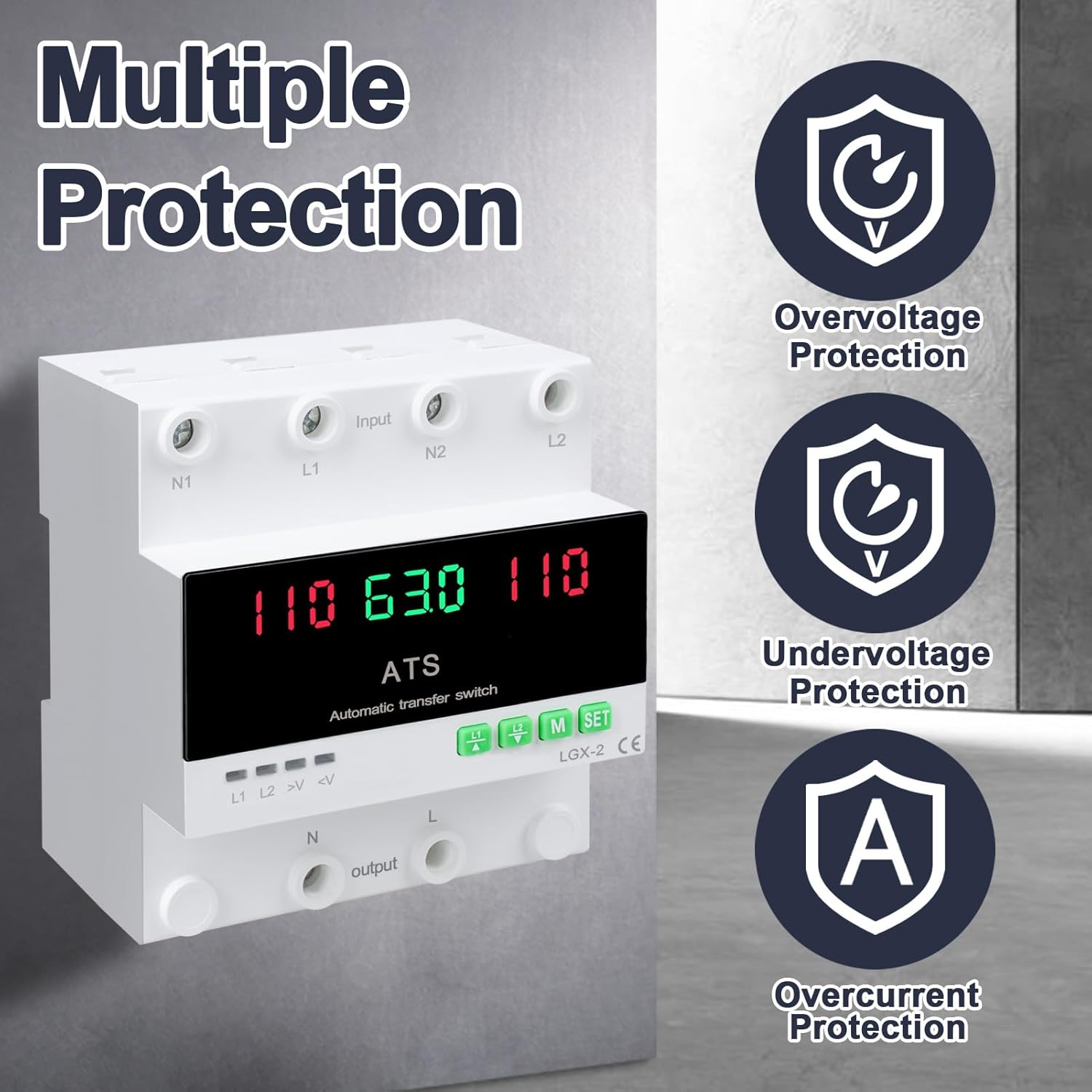
This image illustrates the built-in safety mechanisms of the transfer switch, emphasizing its capability to protect connected devices from electrical instability through overvoltage, อันเดอร์โวลtage, and overcurrent safeguards.
5. ข้อมูลจำเพาะ
| พารามิเตอร์ | ค่า |
|---|---|
| แบบอย่าง | Dual Power 63A |
| คะแนนปัจจุบัน | 63 Amps |
| ปฏิบัติการฉบับที่tage | 120 โวลต์ |
| โหมดการทำงาน | ON-AUTO-MANUAL |
| ขนาดสินค้า (กว้าง x ยาว x สูง) | 4.3 x 3.5 x 3.3 นิ้ว |
| น้ำหนัก | 13.12 ออนซ์ |
| ประเภทการติดต่อ | ปิดปกติ |
| ประเภทขั้วต่อ | เสียบปลั๊ก |
| เทอร์มินัล | สกรู |
| ประเภทวงจร | 2 ทาง |
| วัสดุติดต่อ | ทองแดง |
| ความถี่ที่กำหนด | 50/60เฮิรตซ์ |
| โอเวอร์โวลtagเกณฑ์การป้องกัน | ไฟ AC140V |
| อันเดอร์โวลtagเกณฑ์การป้องกัน | ไฟ AC90V |
6. การตั้งค่าและการติดตั้ง
Proper installation is crucial for the safe and reliable operation of the transfer switch. This device is designed for DIN rail mounting.
ก่อนการติดตั้ง
- Ensure all power sources are disconnected at the main breaker before beginning installation.
- ตรวจสอบว่าปริมาตรtage and current ratings of the transfer switch match your electrical system requirements.
- Prepare the installation location, ensuring it is dry, well-ventilated, and easily accessible.
แผนผังการเดินสายไฟ

This diagram illustrates the correct wiring connections for the transfer switch. It shows the input terminals for primary power (N1, L1) and backup power (N2, L2), and the output terminals (N, L) to the load. The diagram also labels the LED indicators for L1 output, L2 output, overvoltagอี และอันเดอร์วอลุ่มtage, as well as the menu/reset and manual ON/OFF buttons.
ขั้นตอนการติดตั้ง
- Mount the DIN rail securely in your electrical panel or enclosure.
- Attach the transfer switch onto the DIN rail.
- Connect the primary power source (N1, L1) to the designated input terminals.
- Connect the backup power source (N2, L2) to the designated input terminals.
- Connect the load (N, L) to the output terminals.
- ตรวจสอบการเชื่อมต่อทั้งหมดอีกครั้งว่าแน่นหนาและถูกต้องหรือไม่
- เมื่อต่อสายไฟเสร็จเรียบร้อยและตรวจสอบเรียบร้อยแล้ว ให้จ่ายไฟกลับเข้าสู่ระบบ
7. การดำเนินการ
The MARSTEK transfer switch offers both automatic and manual operation modes.
โหมดอัตโนมัติ

In automatic mode, the switch prioritizes the primary power source (L1). If L1 fails or experiences voltage fluctuations (undervoltage หรือ overvoltage), the switch will automatically transfer the load to the backup power source (L2). When L1 is restored and stable, the switch will automatically transfer the load back to L1.
โหมดแมนนวล

The transfer switch can be manually operated using the buttons on the front panel.
- To close L1: Press the button labeled "L1" (often indicated by an up arrow or similar icon). Press again to open L1.
- To close L2: Press the button labeled "L2" (often indicated by a down arrow or similar icon). Press again to open L2.
In manual mode, the automatic transfer function is overridden. Ensure you understand the implications of manual switching before use.
LED Display and Indicators
The LED display provides real-time information about the system status.
- The main display shows voltage readings for the active power source.
- L1: Indicates L1 output is active.
- L2: Indicates L2 output is active.
- >V: โอเวอร์โวลtagไฟแสดงสถานะ
- <V: อันเดอร์โวลtagไฟแสดงสถานะ
- M: Menu selection/Reset button.
- SET: Manual ON/OFF button.
8. การบำรุงรักษา
The MARSTEK transfer switch requires minimal maintenance.
- ตรวจสอบการเชื่อมต่อสายไฟเป็นระยะเพื่อให้แน่ใจว่าแน่นหนาและปราศจากสนิม
- รักษาอุปกรณ์ให้สะอาด ปราศจากฝุ่นและสิ่งสกปรก ใช้ผ้าแห้งนุ่มๆ ในการทำความสะอาด
- ห้ามใช้น้ำยาทำความสะอาดที่มีฤทธิ์กัดกร่อนหรือตัวทำละลาย
- ตรวจสอบให้แน่ใจว่ามีการระบายอากาศเพียงพอรอบๆ เครื่องเพื่อป้องกันความร้อนสูงเกินไป
Warning: Always disconnect all power sources before performing any maintenance.
9 การแก้ไขปัญหา
หัวข้อนี้ให้แนวทางแก้ไขปัญหาทั่วไปที่คุณอาจพบเจอ
| ปัญหา | สาเหตุที่เป็นไปได้ | สารละลาย |
|---|---|---|
| เครื่องเปิดไม่ติด | ไม่มีไฟเข้า; การเดินสายไฟไม่ถูกต้อง; ความผิดพลาดภายใน | Check main breakers and power sources. Verify all wiring connections. If the problem persists, contact support. |
| No automatic transfer. | Device in manual mode; power source within acceptable limits; fault in L1 or L2 detection. | Ensure the device is set to automatic mode. Check voltage levels of both L1 and L2. Contact support if automatic transfer fails despite correct settings. |
| โอเวอร์โวลtage (>V) or Undervoltage (<V) indicator lit. | ปริมาณอินพุตtage outside specified range. | ตรวจสอบปริมาณtage of the active power source. The device will automatically switch if the voltage is outside the set parameters (AC140V overvoltage, AC90V undervoltage). Address the power source issue. |
| Overcurrent protection triggered. | Load exceeds the 63A current rating. | Reduce the connected load. Ensure total current draw does not exceed 63 Amps. |
10. การรับประกันและการสนับสนุน
For warranty information and technical support, please refer to the MARSTEK official webหรือติดต่อผู้ค้าปลีกของคุณ เก็บใบเสร็จรับเงินไว้เป็นหลักฐานการซื้อ
ผู้ผลิต: JUXIANG
ยี่ห้อ: MARSTEK


