1. บทนำ
Thank you for choosing the WIWU Magnetic Detachable Keyboard Case. This product is designed to enhance your iPad experience by providing a versatile keyboard, a precise trackpad, and robust protection. This manual provides essential information for setup, operation, and maintenance of your new keyboard case.

Image 1.1: The WIWU Keyboard Case with an iPad, illustrating its magnetic detachment and adjustable stand capabilities.
2. ความเข้ากันได้
เคสคีย์บอร์ดนี้ออกแบบมาโดยเฉพาะสำหรับ iPad รุ่นต่อไปนี้:
- iPad Air 13-inch (M2 2024, M3 2025)
- iPad Pro 12.9-inch (3rd Gen 2018, 4th Gen 2020, 5th Gen 2021, 6th Gen 2022)
สำคัญ: Please verify your iPad model before use to ensure proper fit and functionality. This case is ไม่ compatible with iPad Pro 13-inch (M4) 2024.

Image 2.1: Visual guide to compatible iPad models, highlighting specific generations and sizes.
3. เนื้อหาบรรจุภัณฑ์
- WIWU Magnetic Detachable Keyboard Case
- สายชาร์จ USB-C
- คู่มือการใช้งาน
4. การตั้งค่า
4.1 การติด iPad เข้ากับเคส
- Align your iPad with the protective back panel of the case.
- The strong magnets will securely attach the iPad to the case, ensuring full-edge coverage and protection.
4.2 Connecting the Keyboard via Bluetooth
- ตรวจสอบให้แน่ใจว่าคีย์บอร์ดได้ชาร์จแบตเตอรี่แล้ว (ดูหัวข้อ 4.3)
- เปิดคีย์บอร์ดโดยใช้สวิตช์เปิดปิดที่อยู่ด้านข้าง
- บน iPad ของคุณไปที่ การตั้งค่า > บลูทูธ.
- Enable Bluetooth. The iPad will search for available devices.
- Select "WIWU Keyboard" (or similar name) from the list of devices to pair.
- Once paired, the keyboard is ready for use. Bluetooth 5.3 ensures stable and lag-free connectivity.
4.3 การชาร์จคีย์บอร์ด
The keyboard features a built-in rechargeable battery. Use the provided USB-C cable to charge the keyboard.
- เสียบปลายสาย USB-C เข้ากับพอร์ตชาร์จของคีย์บอร์ด
- เชื่อมต่อปลายอีกด้านหนึ่งเข้ากับอะแดปเตอร์ไฟ USB (ไม่รวมอยู่ด้วย) หรือพอร์ต USB ของคอมพิวเตอร์
- การชาร์จเต็มใช้เวลาประมาณ 2 ชั่วโมง และสามารถใช้งานได้ต่อเนื่องสูงสุด 100 ชั่วโมง
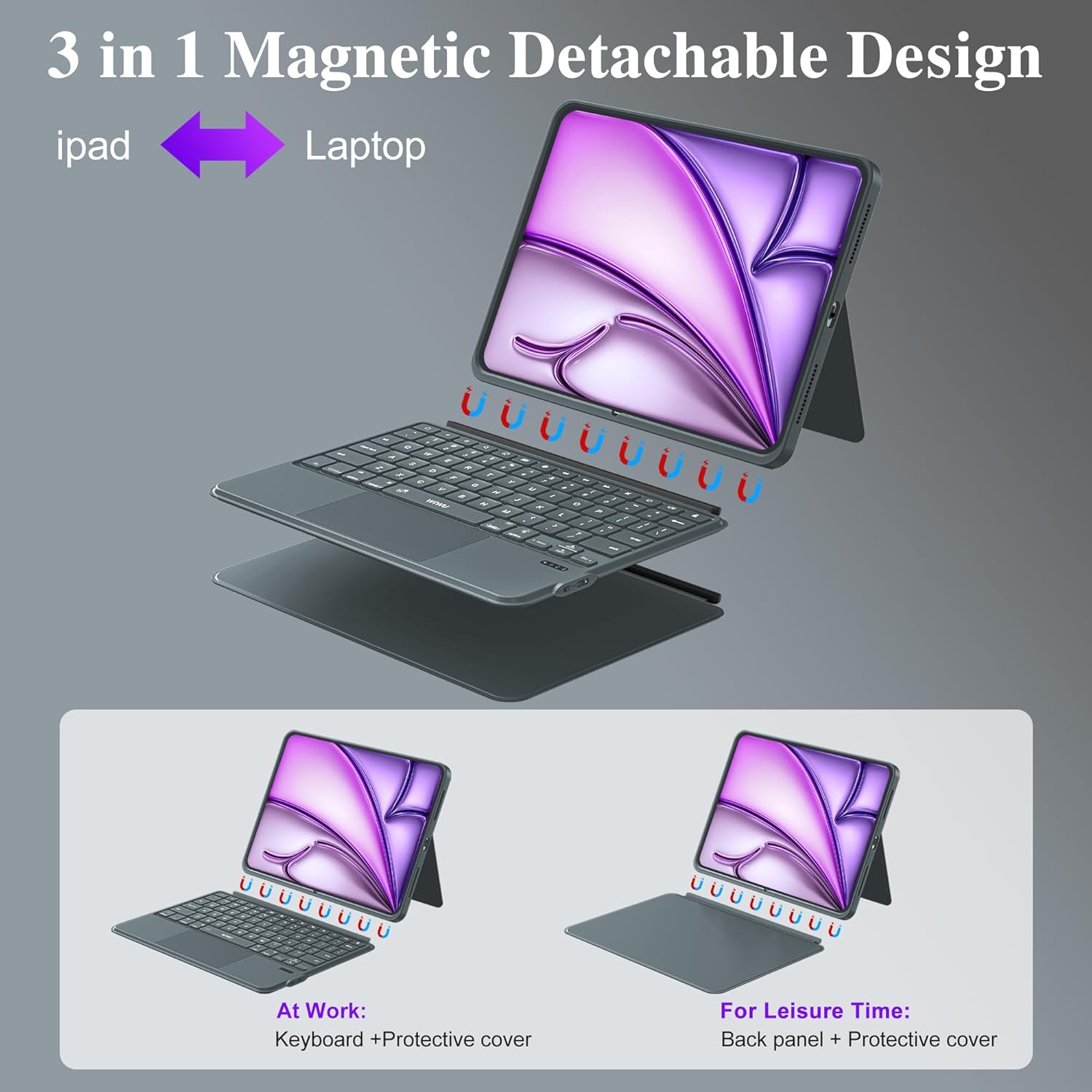
Image 4.1: The keyboard's charging port and indicators for Bluetooth connectivity and battery life.

Image 4.2: The magnetic detachment feature, allowing the keyboard to be separated from the iPad case.
5. คู่มือการใช้งาน
5.1 ขาตั้งแบบปรับได้
The case features a foldable stand that allows for angle adjustments from 0° to 170°. This provides multiple viewing angles for typing, watching videos, or video calls.
5.2 ปุ่มกดมีไฟส่องสว่าง
The keyboard includes 7 RGB color backlit keys for comfortable typing in various lighting conditions.
- กดปุ่ม หลอดไฟ key to cycle through backlight colors.
- กด Fn + หลอดไฟ เพื่อปรับระดับความสว่างของแสงไฟพื้นหลัง
5.3 ทางลัดแป้นพิมพ์
The keyboard is equipped with dedicated iPadOS shortcut keys to enhance productivity. These include quick access to screenshot, return to desktop, and other multimedia functions.
5.4 ท่าทางบนแทร็กแพด
The integrated multi-touch trackpad supports 18 intuitive gestures for navigation, clicking, and app switching, similar to a laptop experience. It also features palm rejection technology.

Image 5.1: Common single-finger trackpad gestures for iPadOS systems above iOS 14.5.

Image 5.2: Details of the keyboard features, including backlit keys and iPadOS shortcuts.
5.5 การสลับโหมด
The magnetic design allows for easy transformation between three modes:
- โหมดแล็ปท็อป: iPad attached to the keyboard for typing and trackpad use.
- โหมดแท็บเล็ต: Keyboard detached, using only the protective case for tablet functionality.
- Viewโหมดการใช้งาน: Keyboard detached, using the protective case's adjustable stand for media consumption.
6. การบำรุงรักษา
- การทำความสะอาด: เช็ดทำความสะอาดเคสและแป้นพิมพ์ด้วยผ้าเนื้อนุ่มamp ผ้า หลีกเลี่ยงสารเคมีรุนแรงหรือวัสดุที่มีฤทธิ์กัดกร่อน
- พื้นที่จัดเก็บ: Store the keyboard case in a cool, dry place when not in use.
- การป้องกัน: The PU leather exterior and honeycomb structure back panel provide protection against drops and scratches. Avoid exposing the device to extreme temperatures or direct sunlight.

Image 6.1: Features highlighting the case's durability and design, including the adjustable stand and protective materials.
7 การแก้ไขปัญหา
- แป้นพิมพ์ไม่เชื่อมต่อ: Ensure Bluetooth is enabled on your iPad and the keyboard is powered on and charged. Try re-pairing the device in iPad's Bluetooth settings.
- คีย์ไม่ตอบสนอง: Check if the keyboard is charged. If the issue persists, try restarting both the keyboard and your iPad.
- แทร็กแพดใช้งานไม่ได้: Ensure the keyboard is connected via Bluetooth. Verify that trackpad support is enabled in your iPad's accessibility settings.
- ไฟแบ็คไลท์ไม่ทำงาน: Press the backlight key or Fn + backlight key to ensure it's not turned off or at the lowest brightness setting.
8. ข้อมูลจำเพาะ
| คุณสมบัติ | รายละเอียด |
|---|---|
| หมายเลขรุ่น | เอ็มเค-005 |
| การเชื่อมต่อ | บลูทูธ 5.3 |
| อายุการใช้งานแบตเตอรี่ | สูงสุด 100 ชั่วโมง (ใช้งานต่อเนื่อง) |
| เวลาในการชาร์จ | ประมาณ 2 ชั่วโมง (USB-C) |
| ประเภทกุญแจ | Scissor-switch keys, 1mm travel |
| แสงไฟแบ็คไลท์ | 7 สี RGB |
| แทร็กแพด | Multi-Touch with 18 gesture controls, palm rejection |
| ขาตั้งปรับได้ | 0° ถึง 170° |
| วัสดุ | Skin-friendly PU Leather, Honeycomb Structure Back Panel |
| ขนาดสินค้า | 12.56 x 10.24 x 1.02 นิ้ว |
| น้ำหนักสินค้า | 2.31 ปอนด์ |
9. การรับประกันและการสนับสนุน
For warranty information and technical support, please refer to the official WIWU webหรือติดต่อผู้ค้าปลีกของคุณ เก็บใบเสร็จรับเงินไว้เพื่อใช้ในการเคลมประกัน


