การแนะนำ
This manual provides detailed instructions for the installation, operation, and maintenance of your Alpine ILX-W670-S 7-inch Double-DIN Digital Multimedia Receiver with Backup Bullet Camera. Please read this manual thoroughly before using the product to ensure proper operation and to prevent damage.
ข้อมูลด้านความปลอดภัย
Always observe the following safety precautions to prevent injury or damage to the unit and vehicle:
- อย่าใช้งานอุปกรณ์ในลักษณะที่รบกวนสมาธิในการขับขี่ ให้ความสำคัญกับความปลอดภัยบนท้องถนนเสมอ
- Ensure all wiring is correctly connected to prevent short circuits or electrical hazards. Incorrect wiring can cause fire or damage.
- ปรึกษาผู้เชี่ยวชาญเกี่ยวกับการติดตั้งหากคุณไม่แน่ใจเกี่ยวกับขั้นตอนใดๆ
- รักษาระดับเสียงให้อยู่ในระดับที่สามารถได้ยินเสียงจากภายนอกได้ เช่น เสียงรถพยาบาล
- ห้ามถอดประกอบหรือดัดแปลงตัวเครื่อง เพราะอาจทำให้เกิดความเสียหายและทำให้การรับประกันเป็นโมฆะ
เนื้อหาแพ็คเกจ
ตรวจสอบว่ามีรายการทั้งหมดอยู่ในแพ็คเกจ:
- Alpine ILX-W670-S Digital Multimedia Receiver
- BULCAMC-1 Backup Bullet Camera
- สายรัดสายไฟและขั้วต่อ
- ฮาร์ดแวร์สำหรับติดตั้ง
- คู่มือการใช้งาน (เอกสารนี้)

รูปที่ 1: Alpine ILX-W670-S Digital Multimedia Receiver with included Backup Bullet Camera. The image displays the 7-inch touchscreen receiver unit, the compact bullet-style backup camera, and a small key fob accessory.
การตั้งค่า
การติดตั้งเครื่องรับสัญญาณ
The ILX-W670-S is designed for standard double-DIN vehicle openings. Its shallow-mount chassis is beneficial for vehicles with limited dash space. Professional installation is recommended for optimal performance and safety.
- การตระเตรียม: ถอดขั้วลบของแบตเตอรี่รถยนต์ออกก่อนเริ่มงานเกี่ยวกับระบบไฟฟ้าใดๆ
- การติดตั้ง: Secure the receiver into the double-DIN opening using the provided mounting hardware. Ensure it is firmly seated.
- การเชื่อมต่อสายไฟ:
- Connect the main power harness (constant 12V, accessory 12V, ground).
- เชื่อมต่อสายลำโพงเข้ากับระบบลำโพงของรถยนต์
- Connect the backup camera input cable.
- Connect the USB and AUX input cables as needed.
- For steering wheel control integration, connect the SWC adapter via the 3.5mm mini jack.
- หากใช้ภายนอก amplifiers, connect the 4V pre-outs (front, rear, subwoofer).
- การทดสอบ: เชื่อมต่อแบตเตอรี่กลับเข้าไปและทำการทดสอบการทำงานเบื้องต้นก่อนประกอบแผงหน้าปัดกลับเข้าที่อย่างสมบูรณ์
การติดตั้งกล้องสำรอง
The BULCAMC-1 bullet camera provides a wide-angle view for enhanced safety when reversing.

รูปที่ 2: ภาพระยะใกล้ view of the BULCAMC-1 Backup Bullet Camera. This image highlights the compact design and mounting bracket of the camera, which is designed for discreet installation.
- ตำแหน่งการติดตั้ง: Choose a central location at the rear of the vehicle, typically near the license plate, that offers a clear, unobstructed view.
- การติดตั้งที่ปลอดภัย: Drill necessary holes (if required) and securely mount the camera using the provided hardware. Ensure the camera is aimed correctly.
- การเดินสายไฟ:
- Connect the camera's power wire to the vehicle's reverse light circuit (12V) so it activates when the vehicle is in reverse.
- Run the video signal cable from the camera to the camera input on the ILX-W670-S receiver.
- การกันน้ำ: Ensure all connections are properly sealed, as the camera is IP67-68 waterproof rated.
คำแนะนำการใช้งาน
เปิด/ปิดเครื่อง
The unit will power on automatically when the vehicle's ignition is turned to the accessory or on position. To turn off the unit, turn off the vehicle's ignition.
อินเทอร์เฟซหน้าจอสัมผัส
The ILX-W670-S features a responsive 6.75-inch touchscreen display with 800 x 480 resolution. The home screen is customizable, allowing you to arrange icons and even upload your own background image. The key illumination can be set to one of five colors (red, green, blue, amber, white).
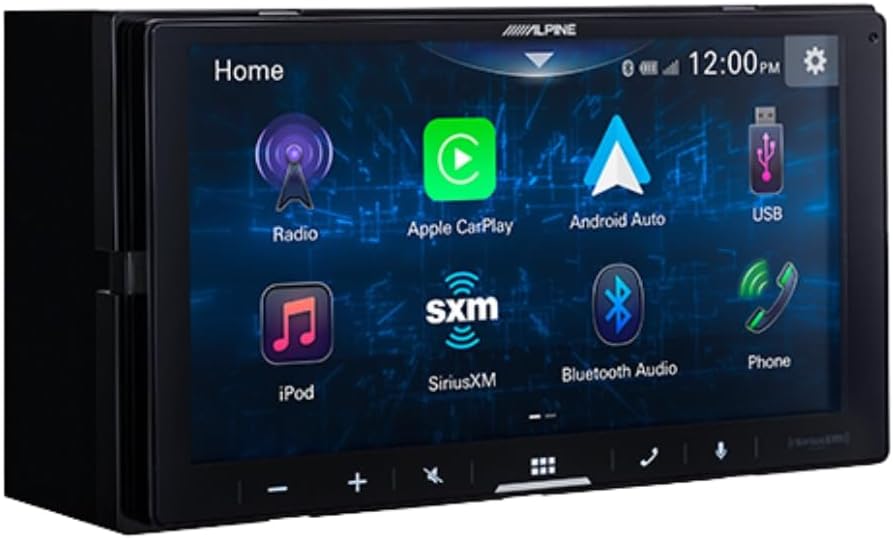
รูปที่ 3: Alpine ILX-W670-S home screen displaying various application icons. This image shows the customizable interface with options for Radio, Apple CarPlay, Android Auto, USB, iPod, SiriusXM, Bluetooth Audio, and Phone.
คุณสมบัติด้านเสียง
- Equalizer: Utilize the 13-band graphic EQ to fine-tune audio frequencies to your preference.
- การแก้ไขเวลา: The 6-channel time correction feature allows for precise adjustment of sound delivery to each speaker, optimizing the sound stage.
- ครอสโอเวอร์: Adjust front, rear, and subwoofer crossovers to manage frequency distribution to your speakers.
- เมนูเพิ่มระดับเสียง: Access dedicated controls for bass, mid-bass, and subwoofer output.
- รูปแบบเสียงที่รองรับ: The unit supports AAC, FLAC, MP3, and WMA audio playback.
การเชื่อมต่อ
- Apple CarPlay และ Android Auto: Connect your compatible smartphone via USB for wired access to navigation, music, messaging, and other apps directly on the receiver's screen.

รูปที่ 4: Alpine ILX-W670-S display showing the Apple CarPlay interface. This image illustrates the integration of smartphone applications like Phone, Music, Maps, Messages, and Podcasts onto the receiver's screen.
- บลูทูธ: Pair your smartphone for hands-free calling and wireless audio streaming.
- SiriusXM-Ready: The unit is compatible with SiriusXM satellite radio (requires a separate SiriusXM Connect Vehicle Tuner and subscription).
- อินพุต AUX: Connect external audio devices using the 3.5mm auxiliary input.
- ช่องต่อ USB: Use the USB port for media playback or smartphone connectivity.
- ระบบควบคุมพวงมาลัย (SWC): Integrate with your vehicle's factory steering wheel controls using a compatible adapter connected to the 3.5mm mini jack.
การเล่นวิดีโอ
The receiver supports various video formats including MP4, MKV, MOV, H.264, FLV, MPEG-4, and AVC. Video playback is typically restricted while the vehicle is in motion for safety reasons.
การทำงานของกล้องสำรอง
When the vehicle is shifted into reverse, the display will automatically switch to the camera view, providing a 155-degree wide-angle perspective. The camera has a low light sensitivity of 0.5 lux, ensuring visibility in various lighting conditions.
การซ่อมบำรุง
- การทำความสะอาดหน้าจอ: ใช้ผ้านุ่มไม่เป็นขุยเช็ดหน้าจอสัมผัสเบาๆ สำหรับรอยเปื้อนฝังแน่น ให้เช็ดเบาๆampชุบผ้าด้วยน้ำหรือน้ำยาทำความสะอาดที่ปลอดภัยต่อหน้าจอ หลีกเลี่ยงวัสดุที่มีฤทธิ์กัดกร่อนหรือสารเคมีรุนแรง
- การดูแลทั่วไป: Keep the unit free from dust and debris. Ensure all connections remain secure.
- การทำความสะอาดกล้อง: ควรเช็ดเลนส์กล้องด้วยผ้านุ่มเป็นระยะ เพื่อให้ภาพที่ได้คมชัดอยู่เสมอ view.
การแก้ไขปัญหา
| ปัญหา | สาเหตุที่เป็นไปได้ | สารละลาย |
|---|---|---|
| ไม่มีไฟเข้าเครื่อง | Blown fuse; incorrect wiring; loose power connection. | Check vehicle fuses and the unit's fuse. Verify power and ground connections. Ensure the ignition is on. |
| ไม่มีเสียงออก | Volume too low; mute activated; speaker wires disconnected; incorrect audio source selected. | Increase volume. Check if mute is active. Verify speaker wiring. Select the correct audio source. |
| Apple CarPlay/Android Auto ไม่เชื่อมต่อ | Faulty USB cable; phone not compatible; software issue; phone settings. | Use a high-quality, certified USB cable. Ensure your phone's OS is updated. Check phone settings for CarPlay/Android Auto permissions. Restart phone and receiver. |
| กล้องสำรองไม่แสดงผล | Camera power issue; video cable disconnected; vehicle not in reverse. | Ensure vehicle is in reverse. Check camera power connection (to reverse lights). Verify video cable connection to the receiver. |
| หน้าจอสัมผัสไม่ตอบสนอง | ความผิดพลาดของซอฟต์แวร์ชั่วคราว; หน้าจอเสียหาย | Restart the unit (turn vehicle off and on). If issue persists, contact support. |
ข้อมูลจำเพาะ
Alpine ILX-W670-S Digital Multimedia Receiver
- แสดง: 6.75-inch capacitive touchscreen (800 x 480 resolution)
- การส่องสว่างหลัก: 5-color customizable (red, green, blue, amber, white)
- Ampเครื่องฟอก: Built-in 16W RMS / 45W peak x 4 channels
- การประมวลผลเสียง: 13-band graphic EQ, 6-channel time correction, Sound Boost menu, Front/Rear/Subwoofer crossovers
- ก่อนออก: 3 pairs (Front, Rear, Subwoofer) at 4V
- ข้อมูลอินพุต: 1x AUX (3.5mm), 1x USB, 1x Camera, SWC adapter via 3.5mm mini jack
- การเชื่อมต่อ: Wired Apple CarPlay, Wired Android Auto, Bluetooth (hands-free calling & audio streaming), SiriusXM-ready
- รูปแบบเสียงที่รองรับ: AAC, FLAC, MP3, WMA
- รูปแบบวิดีโอที่รองรับ: MP4, MKV, MOV, H.264, FLV, MPEG-4, AVC
- ขนาด : 8.75 x 6 x 7 นิ้ว (ผลิตภัณฑ์)
- น้ำหนัก: 3.4 ปอนด์
BULCAMC-1 Backup Bullet Camera
- เซ็นเซอร์: ซีมอส
- ปณิธาน: 420 บรรทัด
- ความสว่างขั้นต่ำ: 0.5 ลักซ์
- View มุม: 155 องศา
- ระดับการกันน้ำ: ไอพี67-68
- อุณหภูมิในการทำงาน: -30 ถึง 70 ℃ (-22 ถึง 158 ℉)
ข้อมูลการรับประกัน
Alpine products are manufactured to high-quality standards. For specific warranty terms and conditions, please refer to the warranty card included with your product or visit the official Alpine webไซต์นี้ โปรดเก็บหลักฐานการซื้อไว้เพื่อใช้ยืนยันการรับประกัน
สนับสนุน
For further assistance, technical support, or to download the latest firmware updates, please visit the official Alpine webไซต์ที่ www.alpine-usa.com. You may also contact Alpine customer service directly for personalized support.


