การแนะนำ
ขอบคุณสำหรับการซื้อasing the Douk Audio P7 Vacuum Tube Phono Preamplifier. This device is designed to enhance your audio experience by providing a high-quality pre-ampลิฟิเคชั่นtage for turntables and other audio sources, featuring vacuum tube warmth, balanced XLR output, and precise tone controls. Please read this manual thoroughly before operation to ensure proper setup and optimal performance.
มีอะไรอยู่ในกล่อง?
- 1x Douk Audio P7 Preamp หน่วย
- 2x PSVANE ECC83 Tubes
- อะแดปเตอร์ไฟ DC 1V 12x
- 1x คู่มือผู้ใช้

Image: The Douk Audio P7 package contents, showing the main unit, two PSVANE ECC83 tubes, a DC 12V power adapter, and the user manual.
คำแนะนำเพื่อความปลอดภัย
- อย่าให้อุปกรณ์นี้โดนฝนหรือความชื้น
- ห้ามถอดชิ้นส่วนเครื่อง ควรส่งเครื่องเข้ารับบริการจากช่างผู้ชำนาญการเท่านั้น
- ตรวจสอบให้แน่ใจว่ามีการระบายอากาศที่เหมาะสมรอบๆ ตัวเครื่องเพื่อป้องกันความร้อนสูงเกินไป
- Use only the provided power adapter. Using an incorrect adapter may damage the unit and void the warranty.
- เก็บให้พ้นจากมือเด็ก
- หลีกเลี่ยงการวางเครื่องไว้ใกล้แหล่งความร้อนหรือโดนแสงแดดโดยตรง
สินค้าเกินview
เค้าโครงแผงด้านหน้าและด้านหลัง
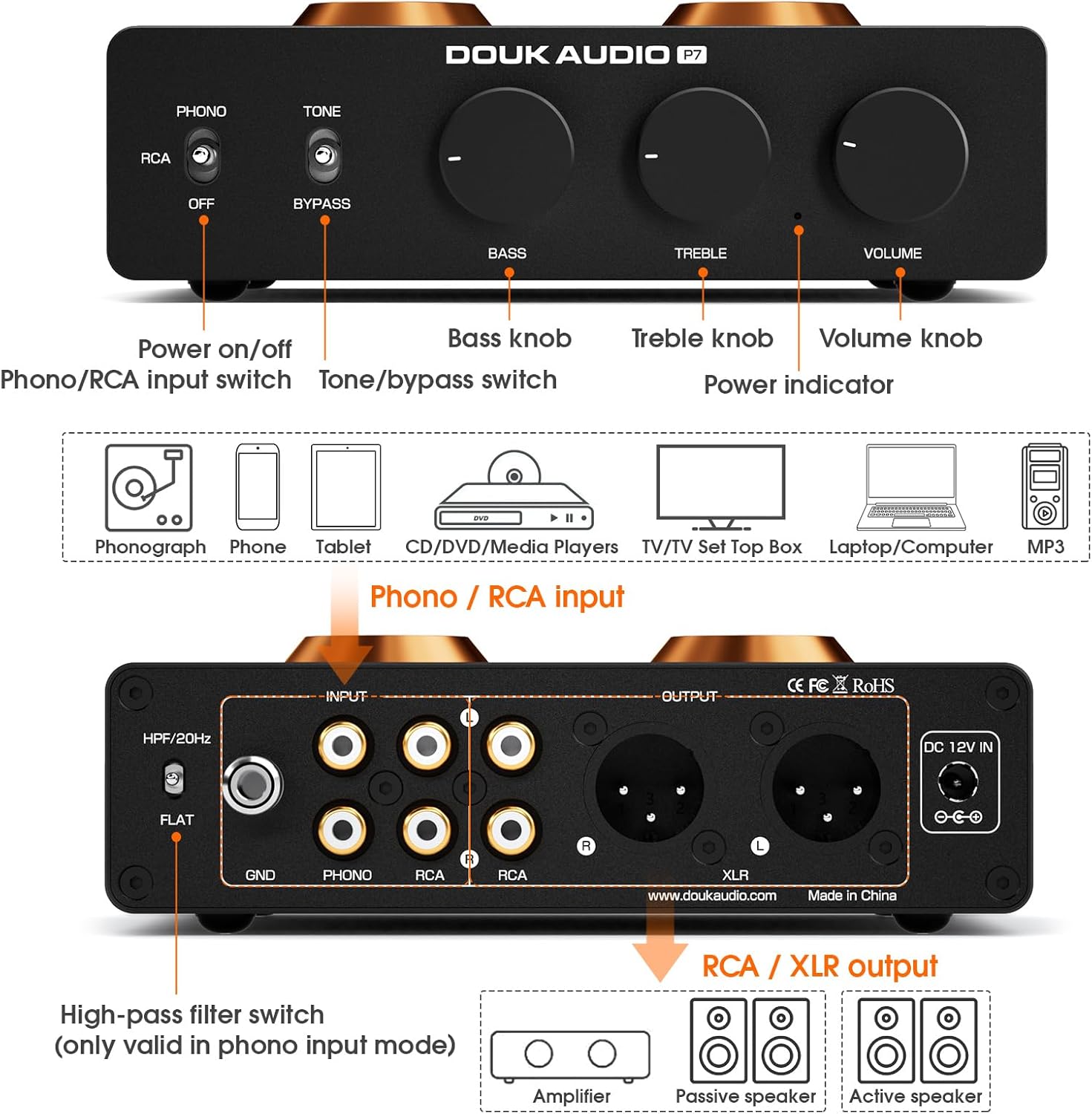
Image: A comprehensive diagram illustrating the front and rear panels of the Douk Audio P7, highlighting the location and function of each control, input, and output.
แผงควบคุมด้านหน้า:
- สวิตช์เปิด/ปิด: เปิด/ปิดเครื่อง
- Phono/RCA Input Switch: Selects between Phono (turntable) and RCA (line-level) inputs.
- Tone/Bypass Switch: Engages or bypasses the Bass and Treble tone controls.
- ปุ่มเบส: ปรับการตอบสนองความถี่ต่ำ
- ปุ่มเสียงแหลม: ปรับการตอบสนองความถี่สูง
- ปุ่มปรับระดับเสียง: ควบคุมปริมาณเอาต์พุตโดยรวม
- ไฟแสดงสถานะพลังงาน: สว่างขึ้นเมื่อเปิดเครื่อง
การเชื่อมต่อแผงด้านหลัง:
- High-Pass Filter (HPF) Switch: Activates a 20Hz high-pass filter (only for Phono input).
- ขั้วต่อ GND: Ground connection for turntables.
- PHONO Input (RCA L/R): Connects to a turntable with MM cartridge.
- ช่องต่อ RCA (ซ้าย/ขวา): Connects to line-level audio sources (CD player, TV, phone, etc.).
- ช่องต่อ RCA (ซ้าย/ขวา): Standard unbalanced audio output.
- XLR Output (L/R): Balanced audio output for reduced noise and improved dynamic range.
- DC 12V ใน: Power input for the included DC 12V adapter.
การตั้งค่า
1. การติดตั้งท่อ
Carefully insert the two PSVANE ECC83 tubes into their respective sockets on the top of the unit. Ensure the pins align correctly with the socket holes and gently push down until the tubes are seated firmly. Do not force them.

ภาพ: รายละเอียด view of two PSVANE ECC83 vacuum tubes, ready for installation into the preampชีวิต.
2. การเชื่อมต่อแหล่งเสียง
- For Turntables (MM Cartridge): Connect your turntable's RCA output cables to the PHONO input (L/R) on the rear panel. Connect the turntable's ground wire to the GND terminal on the P7.
- For Line-Level Sources (CD Player, Phone, TV, etc.): Connect your audio source's RCA output cables to the RCA input (L/R) on the rear panel.
3. การเชื่อมต่อกับ Ampเครื่องขยายเสียง/ลำโพง
- Using RCA Output: Connect the P7's RCA Output (L/R) to the RCA input of your ampลำโพงขยายหรือลำโพงแอคทีฟ
- Using Balanced XLR Output: For optimal noise reduction and dynamic range, connect the P7's XLR Output (L/R) to the balanced XLR input of your ampลำโพงขยายหรือลำโพงแอคทีฟ

ภาพ: รายละเอียด view of the Douk Audio P7's rear panel, focusing on the balanced XLR output connections.
4. การเชื่อมต่อไฟฟ้า
Connect the provided DC 12V power adapter to the DC 12V IN port on the rear panel of the P7, then plug the adapter into a wall outlet.
คำแนะนำการใช้งาน
1. การเปิด/ปิดเครื่อง
Press the Power On/Off switch on the front panel to turn the unit on. The power indicator light will illuminate. Press it again to turn off the unit.
2. การเลือกอินพุต
Use the Phono/RCA Input Switch on the front panel to select the appropriate input source:
- ตั้งค่าเป็น โฟโน for turntables.
- ตั้งค่าเป็น อาร์ซีเอ for line-level devices.
3. การควบคุมระดับเสียง
Adjust the Volume Knob on the front panel to achieve your desired listening level. Start with a low volume and gradually increase it.
4. Tone Control and Bypass
The P7 features Bass and Treble controls for sound customization. Use the Tone/Bypass Switch to engage or disengage these controls:
- ตั้งค่าเป็น โทนเสียง to enable the Bass and Treble knobs. Adjust them to your preference.
- ตั้งค่าเป็น บายพาส for a pure, unaltered audio signal, bypassing the tone control circuit.

Image: The front panel controls of the Douk Audio P7, illustrating the Bass, Treble, and Volume knobs, and the Tone/Bypass switch.
5. ตัวกรองความถี่สูง (HPF)
The High-Pass Filter (HPF) switch on the rear panel is only active when the Phono input is selected. It cuts off subsonic noise below 20Hz, which can improve sound clarity and reduce distortion from turntable rumble.
- ตั้งค่าเป็น HPF/20Hz to activate the filter.
- ตั้งค่าเป็น แบน to disable the filter.

Image: The rear panel of the Douk Audio P7, showing the High-Pass Filter switch with its two settings: HPF/20Hz and FLAT.
การเปลี่ยนหลอด
The PSVANE ECC83 tubes are designed to be easily swappable, allowing for tube rolling to tailor the sound to your preference. To replace tubes:
- Ensure the unit is powered off and unplugged from the wall outlet.
- Allow the tubes to cool down completely if the unit has been in use.
- Gently pull the existing tubes straight up from their sockets. Avoid twisting or bending.
- Carefully insert the new ECC83 tubes, aligning the pins with the socket holes. Push down gently until they are seated firmly.
- Reconnect power and test the unit.
การซ่อมบำรุง
- การทำความสะอาด: ใช้ผ้านุ่มและแห้งเช็ดทำความสะอาดภายนอกตัวเครื่อง ห้ามใช้น้ำยาทำความสะอาดหรือตัวทำละลาย
- การระบายอากาศ : Ensure the ventilation holes on the unit are not obstructed to maintain proper airflow.
- พื้นที่จัดเก็บ: เมื่อไม่ได้ใช้งานเป็นเวลานาน ควรเก็บเครื่องไว้ในที่แห้งและเย็น หลีกเลี่ยงแสงแดดโดยตรงและอุณหภูมิที่สูงหรือต่ำเกินไป
การแก้ไขปัญหา
| ปัญหา | สาเหตุที่เป็นไปได้ | สารละลาย |
|---|---|---|
| ไม่มีไฟฟ้า | Power adapter not connected; Power outlet faulty; Unit switched off. | ตรวจสอบการเชื่อมต่อสายไฟ ลองใช้ปลั๊กไฟอื่น และตรวจสอบให้แน่ใจว่าสวิตช์ไฟเปิดอยู่ |
| ไม่มีเสียงออก | Incorrect input selected; Cables not connected properly; Volume too low; Ampปิดเครื่องขยายเสียง/ลำโพง | Select correct input (Phono/RCA); Check all audio cable connections; Increase volume; Ensure amplifier/speakers are on. |
| Humming/Buzzing noise (Phono) | Turntable ground not connected; Ground loop; HPF not engaged. | Connect turntable ground wire to GND terminal; Try engaging HPF; Ensure all components are properly grounded. |
| เสียงเพี้ยน | Volume too high; Faulty cables; Damaged tubes. | Reduce volume; Replace audio cables; Inspect tubes for damage or try new tubes. |
| ปุ่มปรับเสียงไม่ทำงาน | Tone/Bypass switch set to BYPASS. | Set Tone/Bypass switch to TONE. |
ข้อมูลจำเพาะ
| คุณสมบัติ | รายละเอียด |
|---|---|
| หมายเลขรุ่น | SUC-P7 |
| ขนาดสินค้า | 4.88 x 6.1 x 1.65 นิ้ว |
| น้ำหนักสินค้า | 1.56 ปอนด์ |
| ประเภทอินพุต | MM Phono, RCA Line-level |
| ประเภทเอาต์พุต | RCA, Balanced XLR |
| ท่อ | 2x PSVANE ECC83 |
| กรองเสียงสูง | 20Hz (Phono input only) |
| การควบคุมโทนเสียง | Bass & Treble (with Bypass function) |
| ผู้ผลิต | ดุ๊ก ออดิโอ |
การรับประกันและการสนับสนุน
ผลิตภัณฑ์ของ Douk Audio ได้รับการออกแบบมาเพื่อความน่าเชื่อถือและประสิทธิภาพ สำหรับข้อมูลการรับประกันและการสนับสนุนทางเทคนิค โปรดดูที่เว็บไซต์อย่างเป็นทางการของ Douk Audio webหรือติดต่อผู้ค้าปลีกของคุณ เก็บใบเสร็จรับเงินไว้เป็นหลักฐานการซื้อสำหรับการเรียกร้องการรับประกัน
For further assistance, you may visit the Douk Audio store on Amazon: Douk Audio Store


