1. บทนำ
The Nobsound M5.1PRO is a versatile 5.1 channel Bluetooth amplifier designed for home theater audio systems. It features professional DSP decoding, multiple input options including Bluetooth 5.1, Optical, Coaxial, and USB, and supports high-resolution audio formats up to DSD256. This amplifier delivers immersive surround sound and offers flexible output modes (2.0, 2.1, 5.1) to integrate with various speaker configurations. An intuitive OLED display and remote control provide convenient operation.

Figure 1: Nobsound M5.1PRO 5.1 Channel Bluetooth Ampลิไฟเออร์พร้อมรีโมทคอนโทรล
2. เนื้อหาบรรจุภัณฑ์
ตรวจสอบว่ารายการทั้งหมดที่ระบุไว้ด้านล่างนี้รวมอยู่ในแพ็คเกจของคุณ:
- 1x M5.1PRO Ampชีวิต
- แหล่งจ่ายไฟ 1x 24V/8A
- สายออปติคอล 1 เส้น
- เสาอากาศบลูทูธ 1 ชิ้น
- 1x รีโมทคอนโทรล
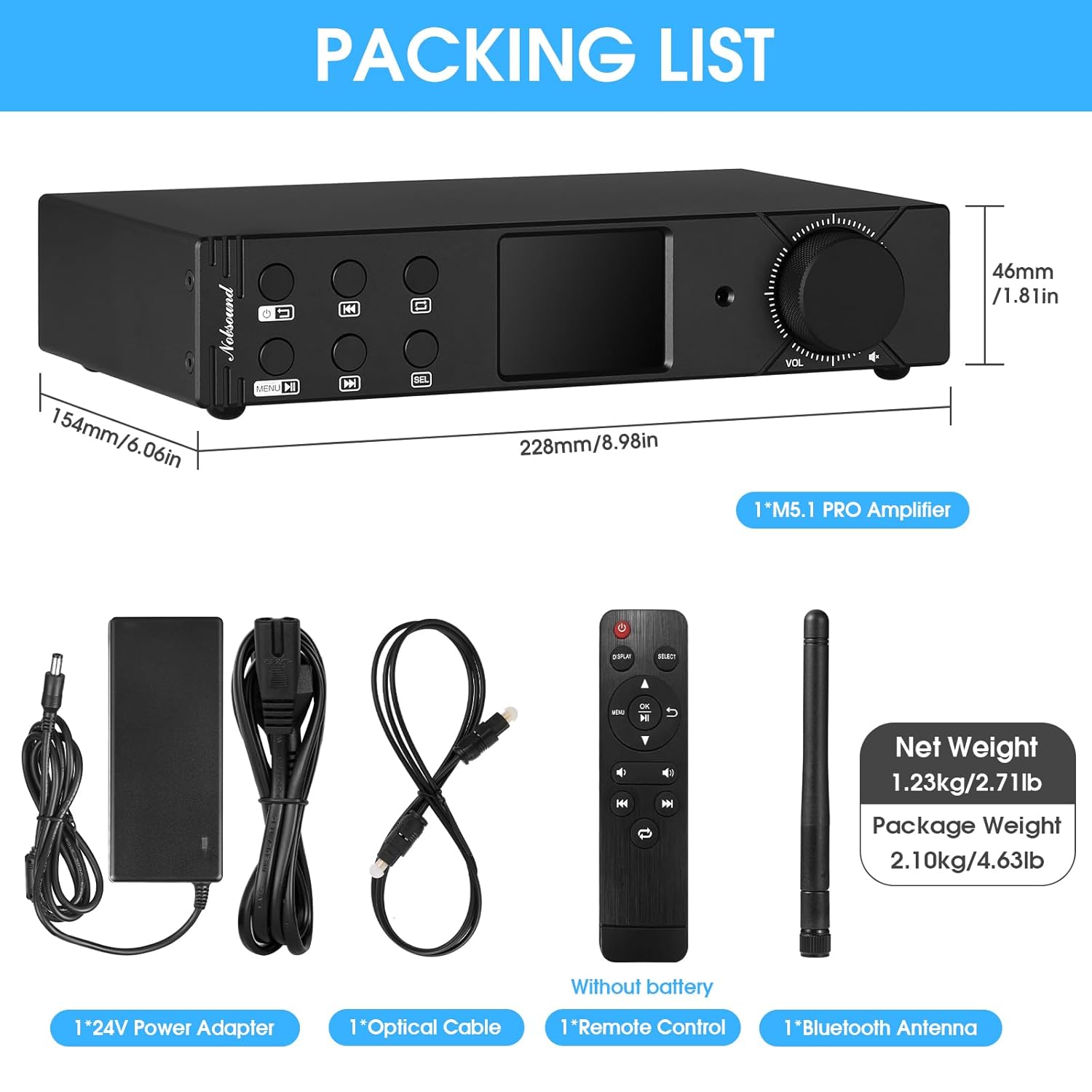
Figure 2: Contents included in the Nobsound M5.1PRO package.
3. สินค้าหมดview
3.1 แผงด้านหน้า
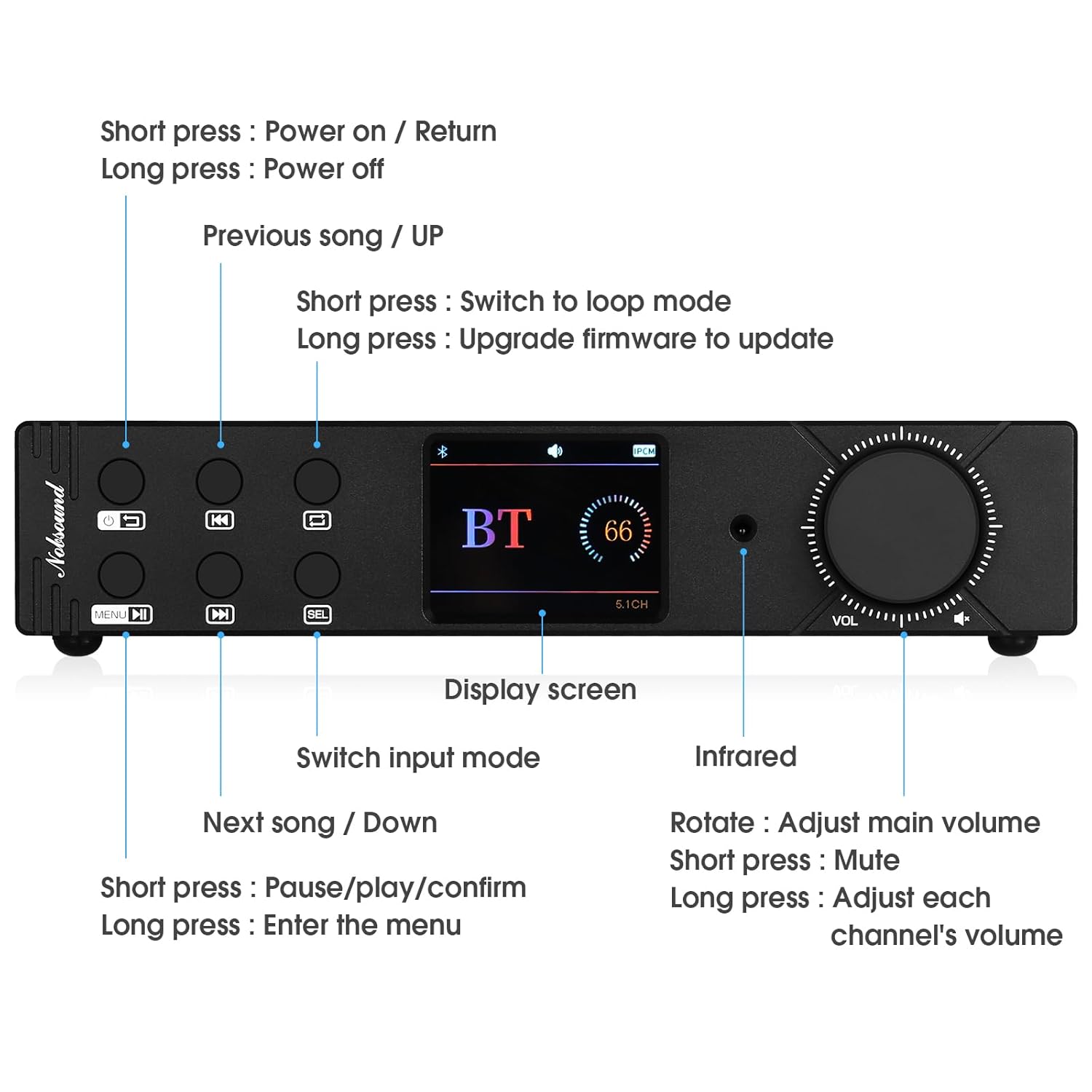
Figure 3: Front panel controls and display of the M5.1PRO ampชีวิต.
- ปุ่มเปิด/ปิด: Short press to power on/return. Long press to power off.
- Previous Song / Up: Short press for previous song. Long press to switch to loop mode.
- หน้าจอแสดงผล: 2.4-inch OLED screen showing input mode, connection status, and track information.
- สวิตช์โหมดอินพุต: Button to cycle through available input sources.
- Next Song / Down: Short press for next song. Long press for firmware update.
- Play/Pause / Confirm: Short press for play/pause/confirm. Long press to enter the menu.
- ตัวรับสัญญาณอินฟราเรด: สำหรับสัญญาณควบคุมระยะไกล
- ปุ่มปรับระดับเสียง: Rotate to adjust main volume. Short press to mute. Long press to adjust individual channel volumes.
3.2 แผงด้านหลัง

Figure 4: Rear panel connections of the M5.1PRO ampชีวิต.
- เอาต์พุตลำโพง: Banana speaker jacks for Front (FL/FR), Surround (SL/SR), Center (CEN), and Subwoofer (SUB) channels. Supports 2.0, 2.1, and 5.1 channel configurations.
- อาร์ซีเอเอาท์พุต: Stereo RCA output for connecting to an external ampลำโพงขยายหรือลำโพงแอคทีฟ
- อินพุตพลังงาน: Dual DC 15V-24V power inputs (Main Power and Sub Power).
- ช่องต่อ USB: For U-disk or hard disk playback.
- อินพุตโคแอกเชียล: อินพุตเสียงดิจิตอล
- อินพุตออปติคัล: อินพุตเสียงดิจิตอล
- ช่องเสียบการ์ด SD: สำหรับการเล่นไฟล์จากการ์ด SD
- Bluetooth Antenna Port: For connecting the included Bluetooth antenna.
4. คำแนะนำในการตั้งค่า
4.1 การเชื่อมต่อลำโพง
The M5.1PRO supports 2.0, 2.1, and 5.1 channel speaker configurations. Use banana plugs or bare wire to connect your passive speakers to the corresponding speaker terminals on the rear panel.
- สำหรับ 2.0 ช่อง: Connect front left (FL) and front right (FR) speakers.
- สำหรับ 2.1 ช่อง: Connect front left (FL), front right (FR) speakers, and a passive subwoofer to the SUB output.
- สำหรับ 5.1 ช่อง: Connect front left (FL), front right (FR), surround left (SL), surround right (SR), center (CEN) speakers, and a passive subwoofer to the SUB output.
Ensure correct polarity (+ to + and - to -) for all speaker connections.
4.2 การเชื่อมต่อแหล่งเสียง
- บลูทูธ: Screw the Bluetooth antenna into its port on the rear panel.
- ออปติคอล/โคแอกเซียล: Connect your digital audio source (e.g., TV, Blu-ray player) to the Optical or Coaxial input using the appropriate cable.
- ยูเอสบี/การ์ด SD: Insert a USB drive (U-disk or hard disk, FAT32/exFAT format, max 2TB) or an SD card (CLASS 10 or above, max 512G) into the respective ports.
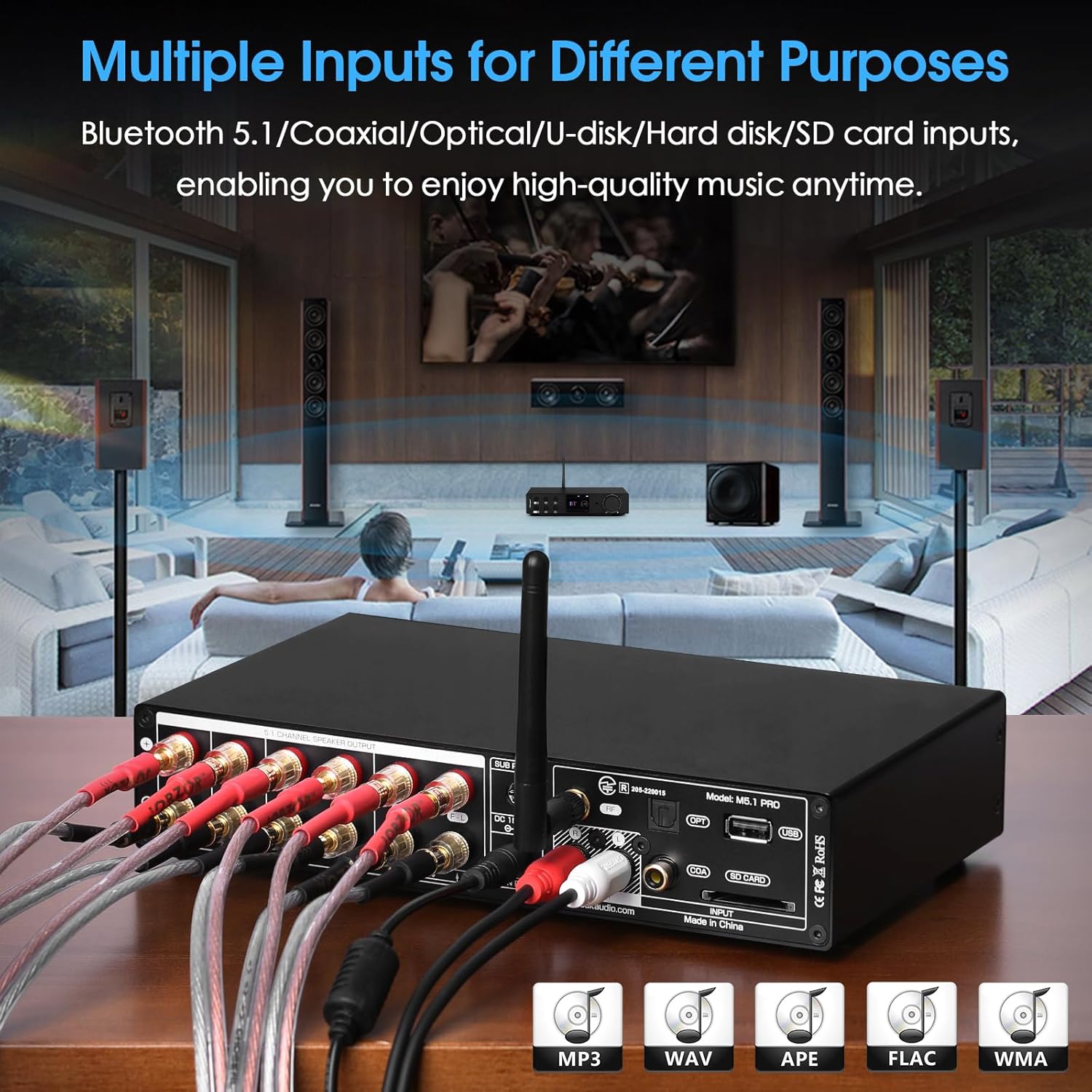
รูปที่ 5: อดีตample of multiple input connections to the M5.1PRO ampชีวิต.
4.3 การเชื่อมต่อสายไฟ
Connect the provided 24V/8A power adapter to one of the DC power inputs (Main Power or Sub Power) on the rear panel, then plug it into a wall outlet. The M5.1PRO features dual power inputs for stable power delivery.
5. คู่มือการใช้งาน
5.1 เปิด/ปิดเครื่อง
Short press the Power button on the front panel or the remote control to turn the amplifier on. Long press the Power button to turn it off.
5.2 การเลือกอินพุต
Press the "Input Mode Switch" button on the front panel or the "INPUT" button on the remote control to cycle through the available input sources: Bluetooth, Coaxial, Optical, USB, SD Card.
5.3 การควบคุมระดับเสียง
Rotate the "Volume Knob" on the front panel or use the volume buttons on the remote control to adjust the main volume. Short press the volume knob to mute/unmute. Long press the volume knob to access individual channel volume adjustments.
5.4 การจับคู่บลูทูธ
- Select Bluetooth as the input source. The OLED display will show "BT" and indicate pairing mode.
- On your Bluetooth device (e.g., smartphone, tablet), search for "Nobsound M5.1PRO" in the Bluetooth settings.
- เลือก amplifier to pair. Once connected, the display will confirm the connection.
- To reset Bluetooth pairing, use the dedicated Bluetooth reset function (refer to front panel controls or remote).
5.5 การเล่นไฟล์ผ่าน USB/การ์ด SD
Insert a USB drive or SD card containing supported audio fileส. การ amplifier will automatically switch to the USB or SD card input and begin playback. Use the "Previous Song / Up" and "Next Song / Down" buttons to navigate tracks, and the "Play/Pause / Confirm" button for playback control.
เพลงที่รองรับ file formats and max sampอัตราลิง:
- WAV: 384kHz / 32Bit
- MP3: 48kHz / 16Bit
- FLAC: 192kHz / 24Bit
- ISO: DSD256
- APE: 48kHz / 16Bit
- DSF: DSD256
- DFF: DSD256
- DTS: Support
- CUE support: MP3 / WAV / APE / FLAC

Figure 6: The 2.4-inch OLED screen displays connection status and playback information.
6. ข้อมูลจำเพาะ
| พารามิเตอร์ | ค่า |
|---|---|
| ยี่ห้อ | นอบซาวน์ |
| แบบอย่าง | M5.1PRO |
| อินพุตเสียง | Bluetooth 5.1 / Coaxial / Optical / USB (U-disk / Hard disk) / SD-Card |
| เอาท์พุตเสียง | Banana Speaker Jacks / Stereo RCA |
| Rated Output Power @ 4Ω | Front: 60W+60W, Surround: 60W+60W, Center: 60W, Bass: 60W |
| สแนร์ | ≥98.5เดซิเบล |
| ทีเอชดี | 0.04% |
| Rated Output Level of RCA | 2V |
| แม็กซ์ เอสampling Rate (Optical/Coaxial) | PCM 192kHz / 32Bit |
| U-disk / Hard-disk Format | FAT32, exFAT |
| Max Capacity (Hard disk) | 2TB |
| Max Capacity (U-disk / SD-Card) | 512จี |
| พอร์ต USB | USB 3.0 or below |
| พอร์ต SD | CLASS 10 or above |
| ขนาด (กว้าง*ลึก*สูง) | 228*154*46mm / 8.98*6.06*1.81in |
| น้ำหนักสุทธิ | 1.23กก. / 2.71ปอนด์ |
| น้ำหนักแพ็คเกจ | 2.10กก. / 4.63ปอนด์ |
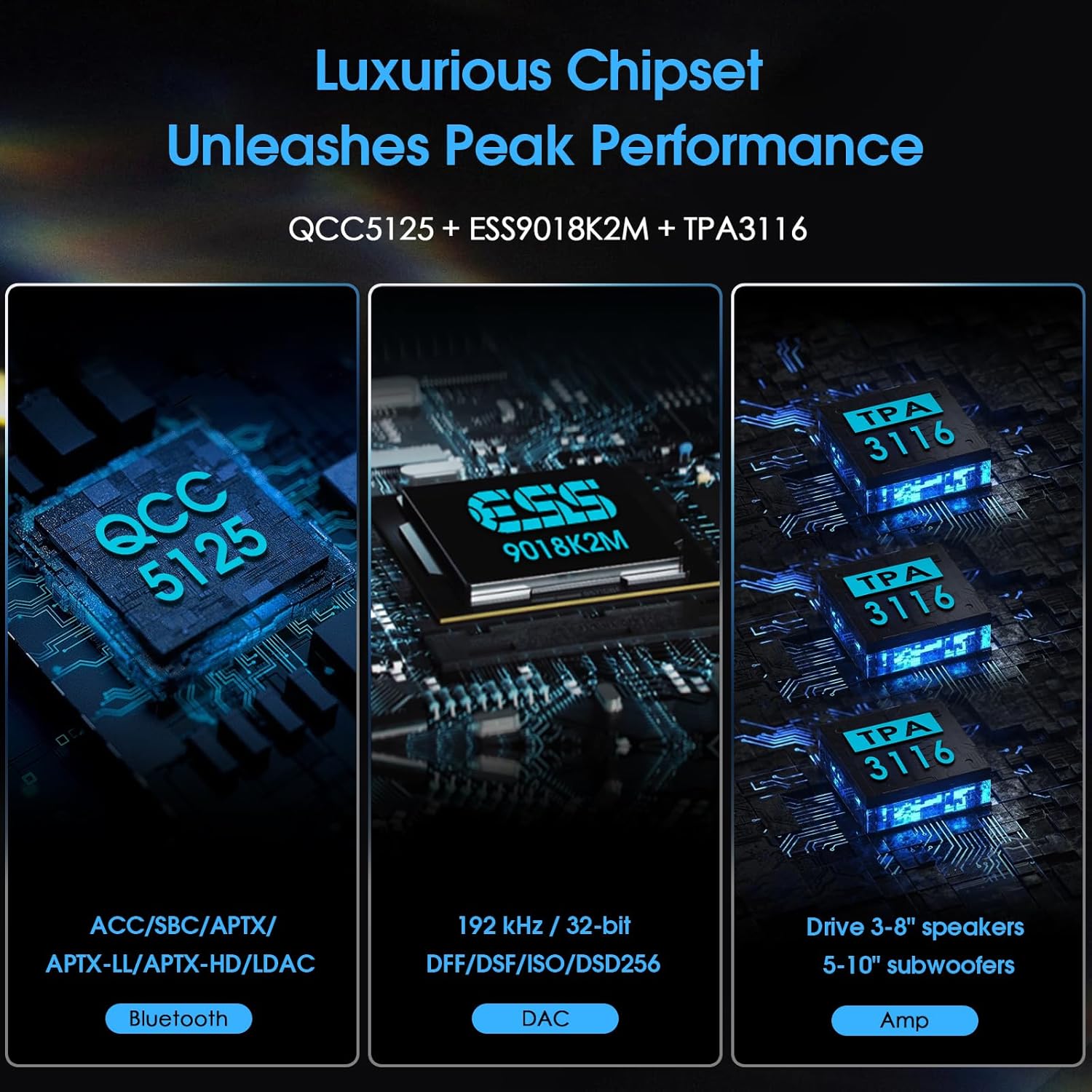
Figure 7: Diagram illustrating the internal chipsets (QCC5125, ESS9018K2M, TPA3116) for Bluetooth, DAC, and ampการทำให้เป็นกรด
7 การแก้ไขปัญหา
- ไม่มีไฟฟ้า:
- ตรวจสอบให้แน่ใจว่าอะแดปเตอร์แปลงไฟเชื่อมต่อแน่นสนิทกับทั้งสองด้านแล้ว amplifier and a working power outlet. Verify the power outlet is active.
- ไม่มีเสียง:
- Check that the correct input source is selected on the ampชีวิต.
- Verify all speaker cables are securely connected to both the amplifier and speakers, with correct polarity.
- Ensure the volume is not muted and is turned up to an audible level.
- If using digital inputs (Optical/Coaxial), confirm the source device is outputting audio in a compatible format (PCM, DTS). Some TVs may require setting the digital audio output to "PCM" or "Stereo" instead of "Bitstream" or "Dolby Digital" for compatibility.
- หากใช้บลูทูธ โปรดตรวจสอบให้แน่ใจว่าอุปกรณ์ได้จับคู่และเชื่อมต่ออย่างถูกต้องแล้ว
- ปัญหาการเชื่อมต่อบลูทูธ:
- ตรวจสอบให้แน่ใจว่าเสาอากาศบลูทูธติดแน่นดีแล้ว
- Try resetting the Bluetooth connection on the amplifier and your source device.
- ขยับอุปกรณ์บลูทูธของคุณให้เข้ามาใกล้ขึ้น amplifier to rule out range issues.
- Ensure no other devices are actively connected to the amplifier ผ่านบลูทูธ
- USB/SD Card Not Playing:
- Check that the USB drive or SD card is inserted correctly.
- ตรวจสอบความถูกต้อง file system is FAT32 or exFAT.
- มั่นใจในเสียง files are in a supported format (WAV, MP3, FLAC, ISO, APE, DSF, DFF, DTS).
- The maximum capacity for hard disks is 2TB, and for U-disks/SD cards is 512G.
8. ข้อมูลด้านความปลอดภัย
- อย่าให้อุปกรณ์นี้โดนฝนหรือความชื้น
- ห้ามถอดชิ้นส่วนเครื่อง ควรส่งเครื่องเข้ารับบริการจากช่างผู้ชำนาญการเท่านั้น
- ตรวจสอบให้แน่ใจว่ามีการระบายอากาศที่เหมาะสมรอบ ๆ amplifier เพื่อป้องกันความร้อนสูงเกินไป
- Use only the provided power adapter or a compatible replacement with the correct voltage และการจัดอันดับปัจจุบัน
- หลีกเลี่ยงการวางเครื่องไว้ใกล้แหล่งความร้อนหรือโดนแสงแดดโดยตรง
- เก็บให้พ้นจากมือเด็ก
9. การรับประกันและการสนับสนุน
For warranty information or technical support, please refer to the documentation provided with your purchase or contact Nobsound customer service directly. You can often find support contact details on the manufacturer's official webเว็บไซต์หรือหน้าสินค้าของผู้ค้าปลีก
สำหรับแหล่งข้อมูลเพิ่มเติม โปรดเยี่ยมชม Nobsound Store on Amazon.


