การแนะนำ
Thank you for choosing the GMBACK Wireless Pro Controller. This manual provides detailed instructions for setting up, operating, and maintaining your controller to ensure optimal performance and an enhanced gaming experience. Please read this manual thoroughly before use.
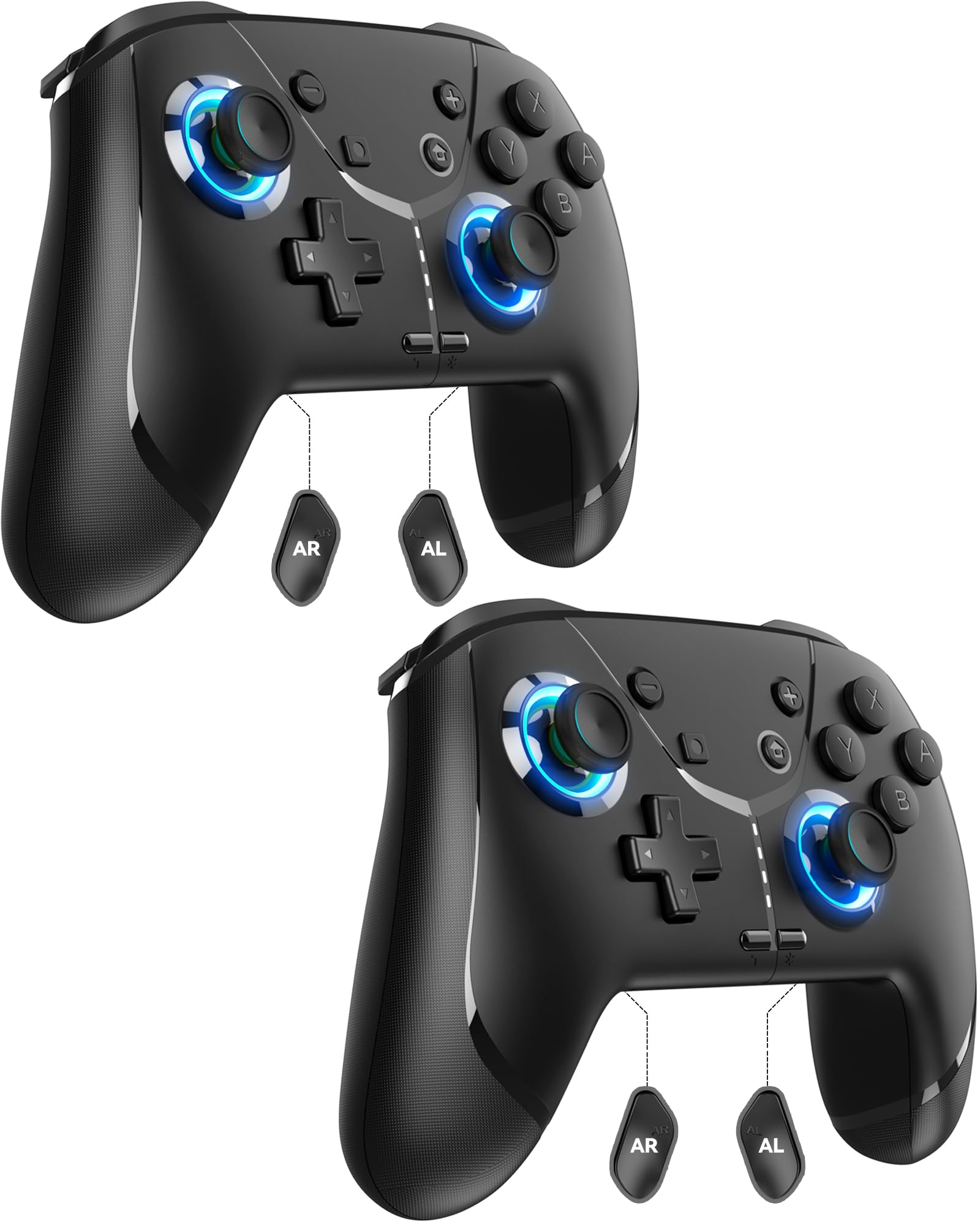
Image: GMBACK Wireless Pro Controller, front view.
เนื้อหาแพ็คเกจ
- 2 x GMBACK Wireless Pro Controllers
- สายชาร์จ USB-C 2 เส้น
- 1 x คู่มือผู้ใช้
การเริ่มต้น
1. การจับคู่กับ Nintendo Switch
- โปรดตรวจสอบให้แน่ใจว่าเครื่อง Nintendo Switch ของคุณเปิดอยู่และอัปเดตซอฟต์แวร์ระบบเป็นเวอร์ชันล่าสุดแล้ว
- จากเมนู HOME เลือก 'Controllers', แล้ว 'Change Grip/Order'.
- On the GMBACK controller, press and hold the ปุ่มซิงค์ (located on the top edge near the USB-C port) for 3-5 seconds until the LED indicators begin to flash rapidly.
- The controller will automatically pair with the Switch. Once paired, the player LED(s) on the bottom of the controller will light up solid.

Image: GMBACK Wireless Pro Controller connected to a Nintendo Switch console.
2. การเชื่อมต่อกับคอมพิวเตอร์ (แบบใช้สาย)
- Connect the GMBACK controller to your PC using the provided USB-C cable.
- The controller will be recognized as a standard gamepad. Drivers may install automatically.
- For optimal compatibility, ensure your PC's operating system is up to date.
3. การชาร์จคอนโทรลเลอร์
- Connect the controller to a USB power source (e.g., Switch dock, PC, USB wall adapter) using the provided USB-C cable.
- The LED indicators will show charging status. A full charge typically takes 2-3 hours.
- The controller features an 800mAh battery, providing approximately 15-20 hours of playtime on a full charge.

Image: Visual representation of the 800mAh battery, 15-20 hours playtime, and 2-3 hours charging time.
คุณสมบัติและฟังก์ชันหลัก
1. Loop Macro Function
The controller supports a loop macro function, allowing you to record and replay a sequence of up to 30 seconds of button presses and joystick movements. This includes joysticks, triggers, D-pad, ABXY, and +/- buttons.
- ในการบันทึก: Refer to the detailed instructions in the included user manual for specific recording steps.
- To Start/Stop Loop: ถือไว้ ปุ่มเทอร์โบ และ ปุ่มมาโคร simultaneously. The controller will automatically replay your recorded actions in a continuous loop.

ภาพ: ด้านหลัง view of the controller highlighting the AR and AL programmable buttons and the text 'Loop Macro Function'.
2. เซ็นเซอร์ไจโร 6 แกน
The integrated 6-axis gyro sensor provides precise motion detection, allowing for intuitive control in compatible games that utilize motion sensing. This enhances immersion and gameplay accuracy.

Image: Controller being used for a racing game, illustrating the 6-Axis Gyro Sensor feature.
3. Customizable Turbo Function
The controller offers three adjustable turbo speeds for rapid-fire actions. This feature can be set to either auto-fire or manual-fire mode.
- To Adjust Turbo Speed: Refer to the included user manual for specific button combinations to cycle through the three turbo speeds.
- To Activate/Deactivate Turbo: กดปุ่ม ปุ่มเทอร์โบ along with the desired action button.

Image: Controller displaying the 'Auto & Manual Turbo' feature with a gaming background.
4. Dual Vibration Adjustment
Experience immersive feedback with four levels of dual vibration intensity: None, Weak, Medium, and Strong. Adjust the vibration to your preference for different games.
- To Adjust Vibration: Consult the user manual for the specific button combination to cycle through vibration levels.

Image: Controller illustrating the four levels of dual vibration: None, Weak, Medium, Strong.
5. แสง RGB
The controller features dynamic RGB lighting around the joysticks, enhancing the visual appeal during gameplay. The lighting can be adjusted or turned off.
- To Adjust RGB Lighting: Refer to the user manual for instructions on changing lighting modes or turning off the lights.

ภาพ: ตัวควบคุมแสดงผลasing its RGB lighting feature around the joysticks.
6. Remappable ABXY Buttons
The ABXY buttons can be remapped to switch between Nintendo Switch and Xbox layouts, providing flexibility for different gaming preferences without needing to physically remove any buttons.
- To Remap ABXY: Follow the instructions in the user manual for the specific button sequence to switch layouts.

Image: Controller illustrating the ABXY button function switching between Nintendo Switch and Xbox layouts.
7. Screenshot and Home Wake-up
- The controller includes a dedicated ปุ่มสกรีนช็อต for capturing in-game moments.
- การ ปุ่มโฮม can be used to wake up your Nintendo Switch console from sleep mode.
การซ่อมบำรุง
- การทำความสะอาด: ใช้ผ้านุ่มและแห้งทำความสะอาดคอนโทรลเลอร์ หลีกเลี่ยงการใช้สารเคมีรุนแรงหรือวัสดุที่มีฤทธิ์กัดกร่อน
- พื้นที่จัดเก็บ: เก็บตัวควบคุมไว้ในที่แห้งและเย็น ห่างจากแสงแดดโดยตรงและอุณหภูมิที่สูงหรือต่ำมาก
- การดูแลแบตเตอรี่ เพื่อยืดอายุการใช้งานแบตเตอรี่ ควรหลีกเลี่ยงการปล่อยประจุแบตเตอรี่จนหมดบ่อยๆ ควรชาร์จเป็นประจำ แม้จะไม่ได้ใช้งานบ่อยก็ตาม
การแก้ไขปัญหา
- ตัวควบคุมไม่เชื่อมต่อ:
- ตรวจสอบให้แน่ใจว่าได้ชาร์จคอนโทรลเลอร์แล้ว
- Verify the Switch is in 'Change Grip/Order' mode.
- Try restarting both the Switch and the controller.
- ตรวจสอบให้แน่ใจว่าไม่มีอุปกรณ์ไร้สายอื่น ๆ ก่อให้เกิดสัญญาณรบกวน
- ปุ่มไม่ตอบสนอง:
- Check if the controller is properly paired.
- Test button functionality in Switch system settings.
- Ensure the controller's firmware is up to date (if applicable, check GMBACK support webเว็บไซต์).
- ปัญหาการชาร์จไฟ:
- ใช้สาย USB-C ที่ให้มา
- ลองใช้แหล่งพลังงาน USB อื่น
- ตรวจสอบให้แน่ใจว่าพอร์ตชาร์จบนตัวควบคุมสะอาดและปราศจากสิ่งสกปรก
ข้อมูลจำเพาะ
| คุณสมบัติ | รายละเอียด |
|---|---|
| แบบอย่าง | เอชดี6900 |
| ความเข้ากันได้ | Nintendo Switch 2, Switch, Switch Lite, Switch OLED, Windows PC (wired) |
| ความจุของแบตเตอรี่ | 800mAh |
| เวลาเล่น | 15-20 ชั่วโมง |
| เวลาในการชาร์จ | 2-3 ชั่วโมง |
| การเชื่อมต่อ | ไร้สาย (บลูทูธ), มีสาย (USB-C) |
| คุณสมบัติพิเศษ | Loop Macro, 6-Axis Gyro Sensor, Dual Vibration (4 levels), Adjustable Turbo (3 speeds), RGB Lighting, Remappable ABXY, Screenshot, Home Wake-up |
| น้ำหนักสินค้า | 8.5 ออนซ์ |
| ขนาดแพ็คเกจ | 6.54 x 5.31 x 5.28 นิ้ว |
วิดีโอผลิตภัณฑ์อย่างเป็นทางการ
วิดีโอ: จบแล้วview of the GMBACK Wireless Switch Controller, demonstrating its features and compatibility with Nintendo Switch, Switch Lite, and Switch OLED consoles.
การรับประกันและการสนับสนุน
GMBACK products come with a standard manufacturer's warranty. For detailed warranty information, technical support, or any inquiries regarding your controller, please refer to the contact information provided on the product packaging or visit the official GMBACK webเว็บไซต์.

Image: Icon representing customer support.
