1. สินค้าหมดview
The Honeywell Home X8S Smart Thermostat is designed to provide advanced climate control and smart home integration. It features a customizable touchscreen display, indoor air quality monitoring, and compatibility with video doorbells for enhanced home management.

The Honeywell Home X8S Smart Thermostat offers a new level of comfort and control.
2. การตั้งค่าและการติดตั้ง
2.1 รายการตรวจสอบก่อนการติดตั้ง
- Ensure system compatibility: Works with up to 3 heat/2 cool heat pump systems with electric backup or 2 heat/2 cool conventional systems. Compatible with hot water heat and forced air (gas, oil, or electric). Not compatible with electric baseboard heat (120-240V).
- A C-wire (common wire) is required for power. If your system lacks a C-wire, a voucher for a Honeywell Home C-Wire Adapter is included in the package.
- Required tools: Screwdriver, drill (if needed), wire strippers.
2.2 การติดตั้งทางกายภาพ
Refer to the included Quick Start Guide for detailed, step-by-step wiring and mounting instructions. Ensure power to your HVAC system is turned off at the breaker before beginning installation.

The thermostat is designed for straightforward installation.
2.3 การเชื่อมต่อ
The X8S Smart Thermostat requires a 2.4 or 5.0 GHz Wi-Fi, 802.11ax/ac/a/b/g/n wireless router for internet connectivity and smart features. Follow the on-screen prompts after installation to connect to your home Wi-Fi network.
3. การใช้งานเทอร์โมสตัท
3.1 จอทัชสกรีน
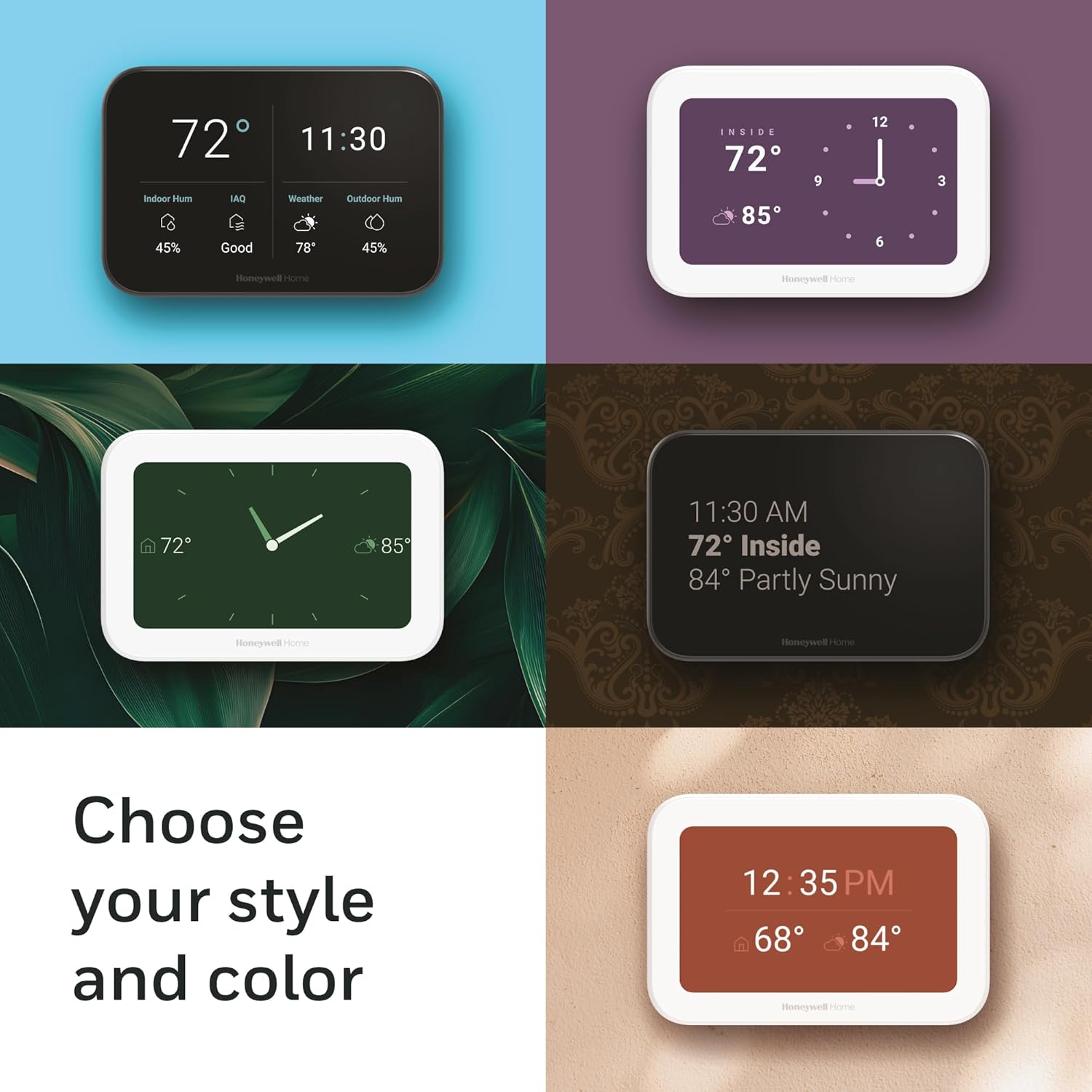
The 5-inch touchscreen display provides clear visibility and intuitive control. You can customize the color and style of the idle screen to match your home decor.

Customize your thermostat's display to suit your preferences.
3.2 การควบคุมขั้นพื้นฐาน
- การปรับอุณหภูมิ: Use the up/down arrows on the screen to set your desired temperature.
- การเลือกโหมด: Tap 'Mode' to switch between heating, cooling, auto, or off.
- การควบคุมพัดลม: Tap 'Fan' to select fan operation (Auto, On, Circulate).
- เมนู: Access advanced settings, schedules, and other features through the 'Menu' option.
3.3 การควบคุมระยะไกลผ่านแอปพลิเคชัน
Control your X8S Smart Thermostat from anywhere using the First Alert app. This allows for remote temperature adjustments, schedule management, and monitoring of indoor air quality.

Manage your home's climate remotely with the First Alert app.
4. คุณสมบัติหลัก
4.1 Video Doorbell Compatibility
The X8S thermostat is compatible with First Alert VX1 and Ring video doorbells (sold separately). This feature allows you to see and speak to visitors directly from your thermostat's display.

View and interact with visitors through your thermostat.
4.2 การควบคุมคุณภาพอากาศภายในอาคาร (IAQ)
The thermostat monitors and helps maintain optimal indoor air quality through humidity and ventilation control. Additional HVAC equipment or accessories may be required for full IAQ functionality.

Monitor and control your home's indoor air quality.
4.3 Advanced Occupancy & Presence Detection
The X8S uses advanced sensors to detect occupancy and presence, automatically adjusting settings to maximize comfort when you are home and save energy when you are away.
The thermostat intelligently adapts to your presence.
4.4 การรวมระบบบ้านอัจฉริยะ
The X8S is Matter certified and compatible with Amazon Alexa, Google Assistant, and Apple Home, allowing for seamless integration into your existing smart home ecosystem and voice control capabilities.

Integrate with popular smart home platforms for voice control.
4.5 ประสิทธิภาพการใช้พลังงาน
As an ENERGY STAR certified device, the X8S helps reduce energy consumption, potentially qualifying you for energy program participation and rebate opportunities.

The X8S is ENERGY STAR certified for energy savings.
4.6 Room Sensor Compatibility
The thermostat works with Honeywell Home Room Sensors (sold separately) to provide more accurate temperature readings and comfort control across different areas of your home.
5. การบำรุงรักษา
To ensure optimal performance, periodically clean the thermostat's touchscreen with a soft, damp cloth. Avoid using abrasive cleaners or solvents. Ensure the thermostat's vents are free from dust and obstructions.
6 การแก้ไขปัญหา
If you encounter issues with your Honeywell Home X8S Smart Thermostat, consider the following:
- ไม่มีไฟ/หน้าจอว่างเปล่า: Check your circuit breaker to ensure power to your HVAC system is on. Verify the C-wire connection.
- ปัญหาการเชื่อมต่อ Wi-Fi: Ensure your Wi-Fi router is functioning correctly and the thermostat is within range. Try restarting your router and the thermostat.
- การอ่านอุณหภูมิที่ไม่ถูกต้อง: Ensure no heat sources (e.g., direct sunlight, lamps) are directly affecting the thermostat. If using room sensors, check their placement and battery levels.
- ระบบไม่ตอบสนอง: Verify that the system mode (Heat, Cool, Auto) is correctly selected. Check wiring connections if recently installed or serviced.
For more detailed troubleshooting steps and solutions, please refer to the comprehensive user guide available online or contact customer support.
7. ข้อมูลจำเพาะ
| คุณลักษณะ | รายละเอียด |
|---|---|
| ยี่ห้อ | ฮันนี่เวลล์ โฮม |
| ชื่อรุ่น | เอ็กซ์8เอส |
| ขนาดสินค้า | ลึก 0.96 นิ้ว x กว้าง 5.24 นิ้ว x สูง 3.54 นิ้ว |
| สี | สีขาว |
| การใช้งานเฉพาะของผลิตภัณฑ์ | เครื่องปรับอากาศ, เตาเผา, ปั๊มความร้อน |
| ประเภทการควบคุมอุณหภูมิ | การทำให้เย็น |
| เทคโนโลยีการเชื่อมต่อ | ไวไฟ |
| ส่วนประกอบที่รวมอยู่ | Quick Start Guide, User Guide, Screws, Anchors, Thermostat, Thermostat ID Card, UWP Mounting Plate, Wire Labels |
| เล่มที่tage | 28 โวลต์ |
| รูปร่าง | สี่เหลี่ยมผืนผ้า |
| ประเภทจอภาพ | นำ |
| ประเภทการควบคุม | การควบคุมแอพ |
| โปรโตคอลการเชื่อมต่อ | ไวไฟ |
| สไตล์ | ไม่มีเซ็นเซอร์ |
| ยูพีซี | 194159018426 |
| ผู้ผลิต | ฮันนี่เวลล์ โฮม |
| ความเข้ากันได้ของสมาร์ทโฮม | Smart Home Compatible (Matter, Amazon Alexa, Google Assistant, Apple Home) |
| น้ำหนักสินค้า | 14.3 ออนซ์ |
| หมายเลขรุ่นสินค้า | X8VWF7W/W |
| ต้องใช้แบตเตอรี่ | เลขที่ |
8. การรับประกันและการสนับสนุน
For warranty information, product registration, or technical assistance, please visit the official Honeywell Home webหรือติดต่อฝ่ายบริการลูกค้า เก็บใบเสร็จรับเงินไว้เพื่อใช้ในการเคลมประกัน
Online resources and FAQs are available to help you get the most out of your X8S Smart Thermostat.


