การแนะนำ
ขอบคุณสำหรับการซื้อasing the Matbip Multi-Platform Wireless Gaming Controller. This controller is designed to enhance your gaming experience across various platforms, including Nintendo Switch, Android, iOS, and PC. It features advanced functions such as TURBO burst, macro programming, customizable RGB lighting, and HD vibration, providing precise control and immersive feedback. Please read this manual carefully before use to ensure proper operation and to fully utilize all features.
สินค้าเกินview
Familiarize yourself with the various components and buttons of your Matbip controller.
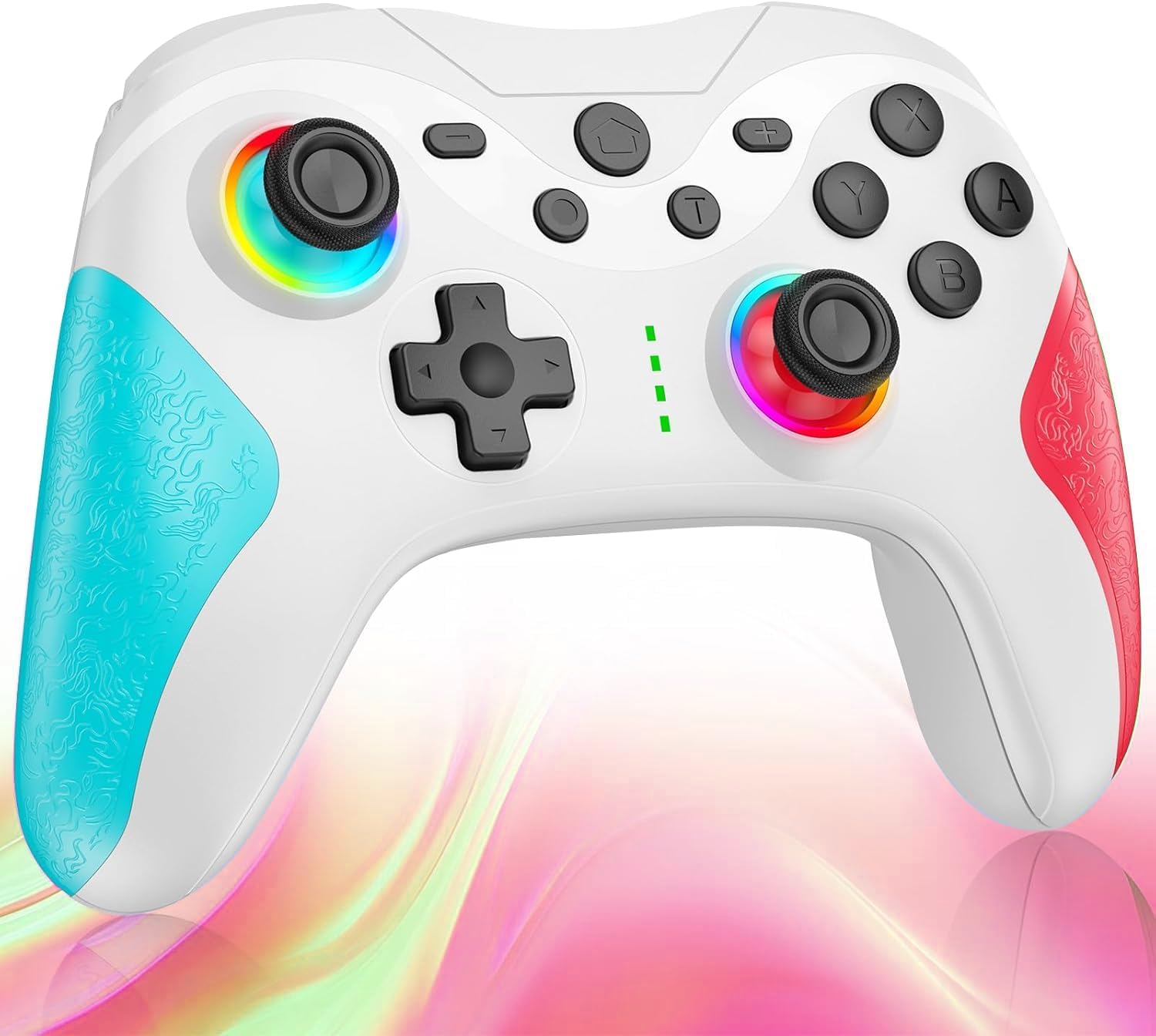
ภาพ: ด้านหน้า view of the Matbip Multi-Platform Wireless Gaming Controller. It features a white body with blue textured grips on the left and red textured grips on the right. The joysticks are illuminated with a rainbow RGB light. Standard buttons (A, B, X, Y), a D-pad, and central function buttons (Home, Plus, Minus, T) are visible.
ส่วนประกอบหลัก:
- จอยสติ๊กซ้าย/ขวา: For directional control, with customizable RGB lighting.
- ดี-แพด: เพื่อการป้อนทิศทางที่แม่นยำ
- ปุ่มการกระทำ (A/B/X/Y): ปุ่มป้อนข้อมูลมาตรฐานสำหรับการเล่นเกม
- Shoulder Buttons (L/R/ZL/ZR): Top-mounted trigger and bumper buttons.
- ปุ่มย้อนกลับ: Additional programmable buttons on the rear for strategic gameplay.
- ปุ่มโฮม: กลับไปยังหน้าจอหลักของระบบ
- ปุ่มบวก (+) / ลบ (-): System-specific function buttons.
- T Button (TURBO): Activates and manages the TURBO burst function.
- พอร์ตชาร์จ: พอร์ต USB-C สำหรับชาร์จ
- ไฟแสดงสถานะ: แสดงสถานะการเชื่อมต่อและระดับแบตเตอรี่
การตั้งค่า
1. การชาร์จคอนโทรลเลอร์
Before first use, fully charge the controller. Connect the provided USB-C cable to the controller's charging port and the other end to a USB power source (e.g., console, PC, or USB wall adapter). The indicator lights will show charging status and turn off when fully charged.
2. การจับคู่กับอุปกรณ์
The controller supports Bluetooth wireless connection across multiple platforms.
สำหรับ Nintendo Switch:
- On the Switch HOME Menu, select ตัวควบคุม > เปลี่ยนกริป/สั่งซื้อ.
- กดปุ่มค้างไว้ ปุ่มโฮม on the Matbip controller for 3-5 seconds until the indicator lights flash rapidly.
- เมื่อจับคู่แล้ว ไฟแสดงสถานะบนตัวควบคุมจะยังคงติดอยู่
สำหรับอุปกรณ์ Android/iOS:
- เปิดใช้งาน Bluetooth บนอุปกรณ์ Android หรือ iOS ของคุณ
- กดปุ่มค้างไว้ ปุ่มโฮม on the Matbip controller for 3-5 seconds until the indicator lights flash rapidly.
- On your device's Bluetooth settings, select the controller (e.g., "Matbip Controller") from the list of available devices to pair.
สำหรับพีซี (Windows):
- Ensure your PC has Bluetooth enabled. Go to การตั้งค่า > อุปกรณ์ > บลูทูธและอุปกรณ์อื่นๆ.
- คลิก เพิ่มบลูทูธหรืออุปกรณ์อื่น ๆ > บลูทูธ.
- กดปุ่มค้างไว้ ปุ่มโฮม on the Matbip controller for 3-5 seconds until the indicator lights flash rapidly.
- Select the controller from the list of devices to pair.
คำแนะนำการใช้งาน
TURBO Burst Function:
The TURBO function allows for rapid, automatic button presses, ideal for combat games.
- วิธีเปิดใช้งานโหมด TURBO: กดปุ่มค้างไว้ ปุ่ม T, then press the desired action button (e.g., A, B, X, Y, L, R, ZL, ZR). The button will now continuously activate when held down.
- การปรับความเร็วเทอร์โบ: ขณะที่ถือ ปุ่ม T, ย้าย right joystick up or down to cycle through 3 different burst speeds.
- วิธีปิดใช้งาน TURBO: กดปุ่มค้างไว้ ปุ่ม Tจากนั้นกดปุ่มการกระทำเดิมอีกครั้ง
ฟังก์ชันมาโคร:
Program a sequence of button presses to a single back button for complex actions.
- Specific instructions for macro programming will be detailed in the full manual. Generally, this involves entering a programming mode, pressing the sequence, and assigning it to a back button.
ไฟ RGB ที่ปรับแต่งได้:
The joysticks feature 9-color RGB lighting to enhance your gaming atmosphere.
- To change RGB color/mode: Press a specific button combination (e.g., T + Left Joystick click) to cycle through different colors and lighting effects.
HD Vibration Adjustment:
Adjust the intensity of the HD vibration feedback to your preference (4 levels).
- วิธีการปรับระดับการสั่น: Press a specific button combination (e.g., T + D-Pad Up/Down) to cycle through the 4 vibration levels.
เซ็นเซอร์ไจโร:
The high-precision gyro sensor enables intuitive motion control in supported games.
- The gyro sensor is automatically active when connected to a compatible device (e.g., Nintendo Switch) and used in games that support motion controls.
Sleep Wake-up Function:
The controller supports waking up your Nintendo Switch console from sleep mode.
- When the Switch is in sleep mode, simply press the ปุ่มโฮม on the controller to wake it up and reconnect.
การซ่อมบำรุง
Proper maintenance ensures the longevity and optimal performance of your controller.
- การทำความสะอาด: ใช้ผ้านุ่มและแห้งเช็ดคอนโทรลเลอร์ สำหรับสิ่งสกปรกฝังแน่น ให้เช็ดเบาๆampชุบผ้าด้วยน้ำ ห้ามใช้สารเคมีรุนแรงหรือน้ำยาทำความสะอาดที่มีฤทธิ์กัดกร่อน
- พื้นที่จัดเก็บ: เก็บตัวควบคุมไว้ในที่แห้งและเย็น หลีกเลี่ยงแสงแดดโดยตรง อุณหภูมิที่สูงหรือต่ำเกินไป และความชื้นสูง
- การดูแลแบตเตอรี่ Avoid fully discharging the battery frequently. If storing for a long period, charge the controller to about 50% every few months.
- หลีกเลี่ยงการหยด: ปกป้องตัวควบคุมจากการตกหล่นและแรงกระแทกซึ่งอาจทำให้ส่วนประกอบภายในเสียหายได้
การแก้ไขปัญหา
หากคุณพบปัญหาเกี่ยวกับคอนโทรลเลอร์ โปรดดูวิธีแก้ไขปัญหาทั่วไปต่อไปนี้:
| ปัญหา | วิธีแก้ปัญหาที่เป็นไปได้ |
|---|---|
| ตัวควบคุมไม่เปิดใช้งาน | ตรวจสอบให้แน่ใจว่าคอนโทรลเลอร์ชาร์จเต็มแล้ว เชื่อมต่อกับแหล่งจ่ายไฟโดยใช้สาย USB-C |
| Controller does not pair. | Ensure Bluetooth is enabled on your device. Make sure the controller is in pairing mode (flashing lights). Try restarting both the controller and the device. |
| ความล่าช้าของอินพุตหรือการตัดการเชื่อมต่อ | Ensure there are no strong wireless interferences nearby. Move closer to the device. Re-pair the controller. |
| ปุ่มกดหรือจอยสติ๊กไม่ตอบสนอง | Try resetting the controller (refer to the full manual for reset instructions, usually a small pinhole button). Ensure no debris is obstructing the buttons. |
| การสั่นสะเทือนไม่ทำงาน | Check if vibration is enabled in the game or system settings. Adjust the vibration intensity on the controller. |
ข้อมูลจำเพาะ
| คุณสมบัติ | รายละเอียด |
|---|---|
| ขนาดสินค้า | 10 x 15 x 6.5 ซม. |
| น้ำหนัก | 300 กรัม |
| การเชื่อมต่อ | บลูทูธไร้สาย |
| ความเข้ากันได้ | Nintendo Switch, Android, iOS, PC (Windows) |
| คุณสมบัติพิเศษ | TURBO Burst, Macro Function, 9-Color RGB Lighting, 4-Level HD Vibration, Gyro Sensor, Back Buttons, Sleep Wake-up |
| ASIN | B0FHWRK7CQ |
| วันที่วางจำหน่าย | 16 กรกฎาคม 2025 |
การรับประกันและการสนับสนุน
Matbip is committed to providing high-quality products and customer satisfaction. This product comes with a standard manufacturer's warranty. For detailed warranty information, please refer to the documentation included with your purchase or contact Matbip customer support.
If you require further assistance, have questions, or encounter issues not covered in this manual, please contact our customer support team. A Japanese instruction manual is included with the product to ensure ease of use for first-time users.
ข้อมูลติดต่อ: Please refer to the packaging or the official Matbip webเว็บไซต์สำหรับรายละเอียดการติดต่อฝ่ายสนับสนุนลูกค้าล่าสุด


