1. บทนำ
Thank you for choosing the PAPIFEED Automatic Cat Feeder. This device is designed to provide convenient and reliable feeding for your small and medium-sized pets, ensuring they receive meals on schedule. Featuring a 1080P HD wide-angle camera, 2.4/5G WiFi connectivity, and smart app control, you can monitor and manage your pet's feeding from anywhere. Please read this manual thoroughly before use to ensure proper operation and maintenance.

Image: The PAPIFEED Automatic Cat Feeder in a modern kitchen setting, with a cat eating from it, emphasizing smart feeding for pet happiness.
2. ข้อมูลด้านความปลอดภัย
- ตรวจสอบให้แน่ใจว่าวางเครื่องป้อนไว้บนพื้นผิวที่มั่นคงและระดับเพื่อป้องกันการพลิกคว่ำ
- This device is intended for dry pet food only. Do not use wet food, canned food, or treats that may cause blockages.
- เก็บอะแดปเตอร์ไฟและสายไฟให้ห่างจากสัตว์เลี้ยง เพื่อป้องกันไม่ให้ถูกกัดหรือเสียหาย
- Do not immerse the main unit in water or any other liquid. Only detachable components are washable.
- เก็บให้พ้นจากมือเด็ก
- ใช้เฉพาะอะแดปเตอร์ที่ให้มาเท่านั้น
3. สินค้าหมดview และส่วนประกอบ
The PAPIFEED Automatic Cat Feeder consists of several key components designed for ease of use and pet safety.
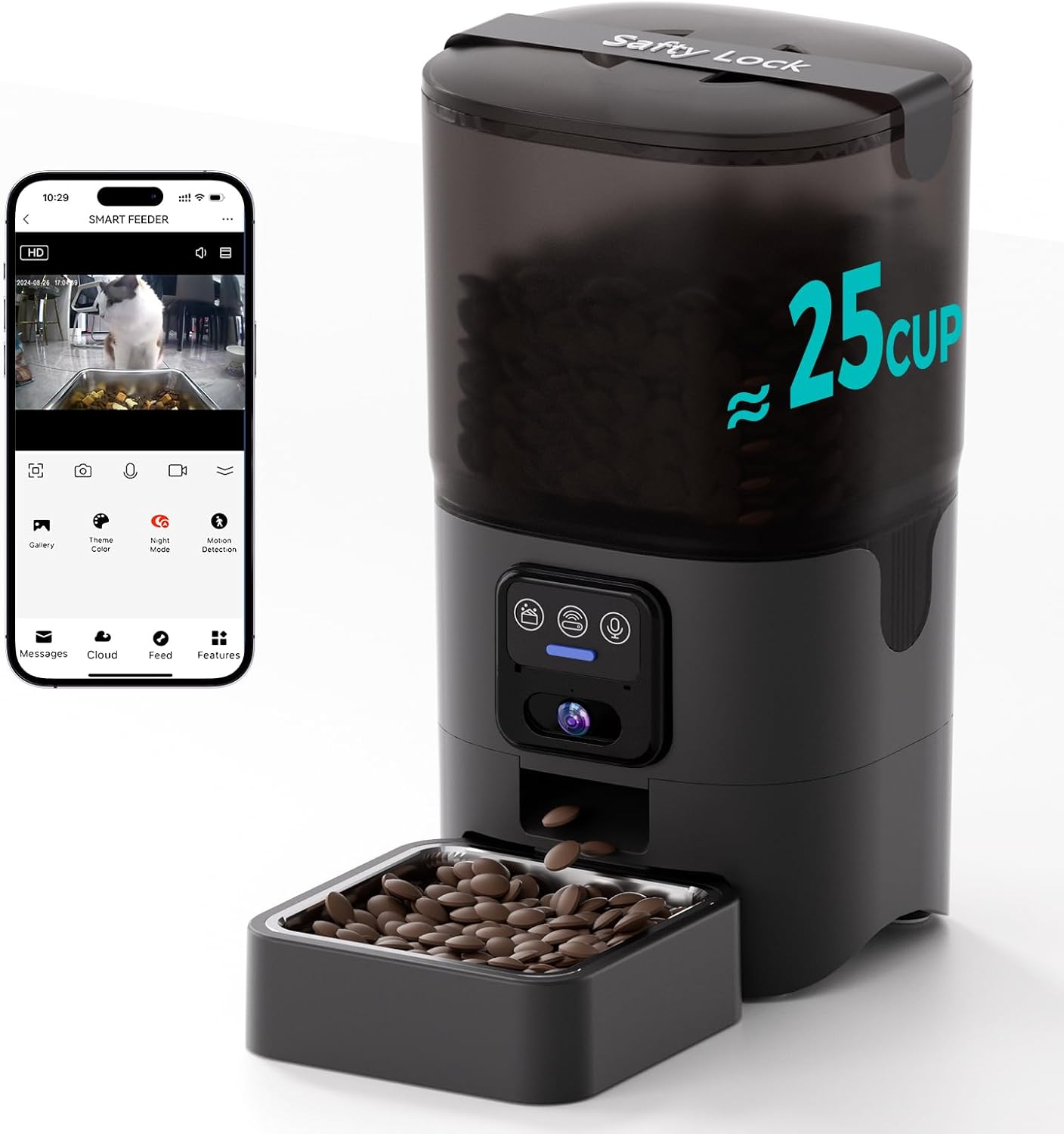
Image: This image shows the PAPIFEED Automatic Cat Feeder in black, with a transparent food reservoir filled with kibble. Food is being dispensed into a removable stainless steel bowl. A smartphone screen next to it displays the live camera feed from the feeder, showing a cat eating.
ส่วนประกอบหลัก:
- หน่วยหลัก: Contains the dispensing mechanism, camera, control panel, and power ports.
- ถังอาหาร: Transparent 6L (25 cup) capacity container for dry food.
- ฝาปิดพร้อมระบบล็อคนิรภัย: Secures the food tank and includes a desiccant compartment.
- ถุงดูดความชื้น: Helps maintain food freshness.
- ชามสแตนเลส: Detachable and hygienic feeding bowl.
- Plastic Bowl Base: Holds the stainless steel bowl and prevents leakage.
- อะแดปเตอร์ไฟฟ้า: DC 5V for primary power.
- แผงควบคุม: Buttons for manual feeding and other functions.
- 1080P HD Wide-Angle Camera: For live monitoring and interaction.

ภาพ: ระเบิด view of the feeder showing its secure lid, desiccant compartment, 6L/25 cup capacity food tank, detachable food tank, stainless steel bowl, and plastic bowl. It emphasizes freshness and capacity.
4. การตั้งค่า
4.1 การแกะและการประกอบ
- นำส่วนประกอบทั้งหมดออกจากบรรจุภัณฑ์อย่างระมัดระวัง
- Assemble the food tank onto the main unit, ensuring it clicks securely into place.
- Place the stainless steel bowl into the plastic bowl base, then attach the base to the main unit.
- Insert a desiccant bag into the designated compartment under the lid and close the lid securely.
4.2 แหล่งจ่ายไฟ
The feeder supports dual power supply for continuous operation.
- กำลังไฟหลัก: Connect the DC 5V power adapter to the feeder and plug it into a wall outlet.
- พลังงานสำรอง: เพื่ออำนาจ outage protection, insert 4 AA batteries (not included) into the battery compartment at the bottom of the feeder. The battery serves as a backup power source; please connect the power cord during normal use.

Image: A collage of images detailing various features: a wide-angle camera view on a phone, the dual power supply (adapter and batteries), a detachable stainless steel bowl, and washable components (excluding the main unit).
4.3 การติดตั้งแอปและการเชื่อมต่อเครือข่าย
- ดาวน์โหลด "ชีวิตอัจฉริยะ" ดาวน์โหลดแอปจาก App Store (iOS) หรือ Google Play Store (Android)
- ลงทะเบียนหรือเข้าสู่ระบบบัญชี Smart Life ของคุณ
- Add the device: Follow the in-app instructions to add your PAPIFEED Automatic Cat Feeder. Ensure your smartphone's Bluetooth is enabled for easier pairing.
- Connect to Wi-Fi: The feeder supports both 2.4GHz and 5GHz Wi-Fi networks. Select your home Wi-Fi network and enter the password when prompted in the app.

Image: The feeder is shown with a graphic indicating support for both 2.4GHz and 5GHz WiFi networks, highlighting its versatile connectivity options.
4.4 การเติมอาหารลงในถังอาหาร
- เปิดฝาถังอาหาร
- Pour dry pet food into the tank. The 360° transparent design allows for easy monitoring of food levels.
- ปิดฝาให้สนิทเพื่อรักษาความสดของอาหาร
5. คู่มือการใช้งาน
5.1 การกำหนดตารางเวลาการให้อาหาร
Use the "Smart Life" app to program your pet's feeding schedule:
- คุณสามารถตั้งค่าอาหารได้สูงสุด 10 มื้อต่อวัน
- Each meal can be customized with 1-12 portions.
- The app allows you to monitor feeding records.
5.2 การให้อาหารด้วยตนเอง
To dispense food immediately, use the "Feed" button within the app. This is useful for rewarding your pet or providing extra food if needed.
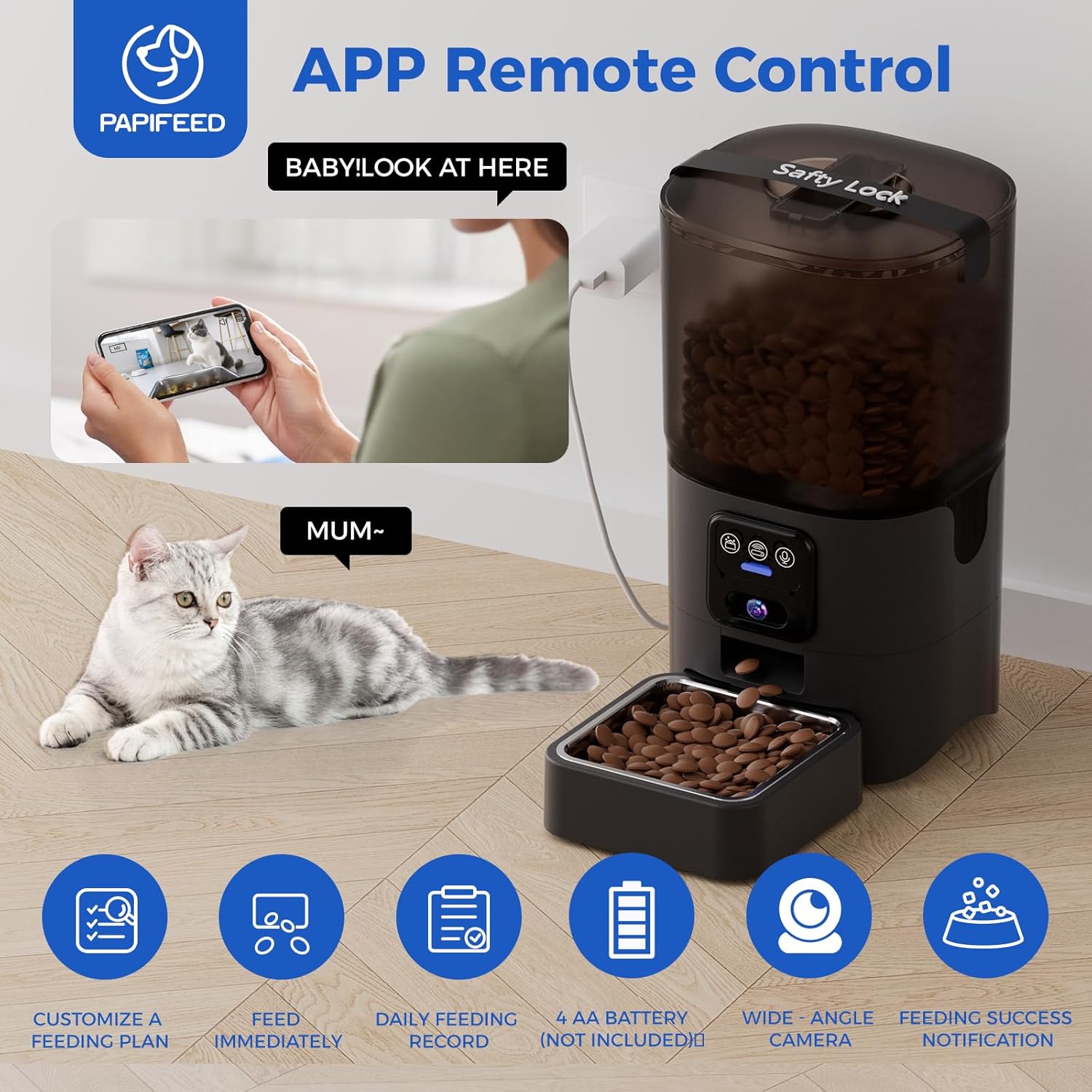
Image: This image illustrates the feeder's app remote control capabilities, showing a cat next to the feeder and a person interacting with the 'Smart Life' app on a smartphone. Icons below highlight features like customizable feeding plans, immediate feeding, daily feeding records, 4 AA battery support, wide-angle camera, and feeding success notifications.
5.3 คุณสมบัติกล้อง
The integrated 1080P HD wide-angle camera allows for comprehensive monitoring:
- การตรวจสอบแบบเรียลไทม์: Watch your pet eat and observe their habits anytime, anywhere.
- เลนส์มุมกว้าง: Provides an extra-large viewing angle, minimizing blind spots.
- อินฟราเรดคืนวิสัยทัศน์: Ensures clear visibility even in low-light conditions or complete darkness.
- เสียงสองทาง: Communicate with your pet remotely (feature implied by "Video AccessChat with your furry friend").
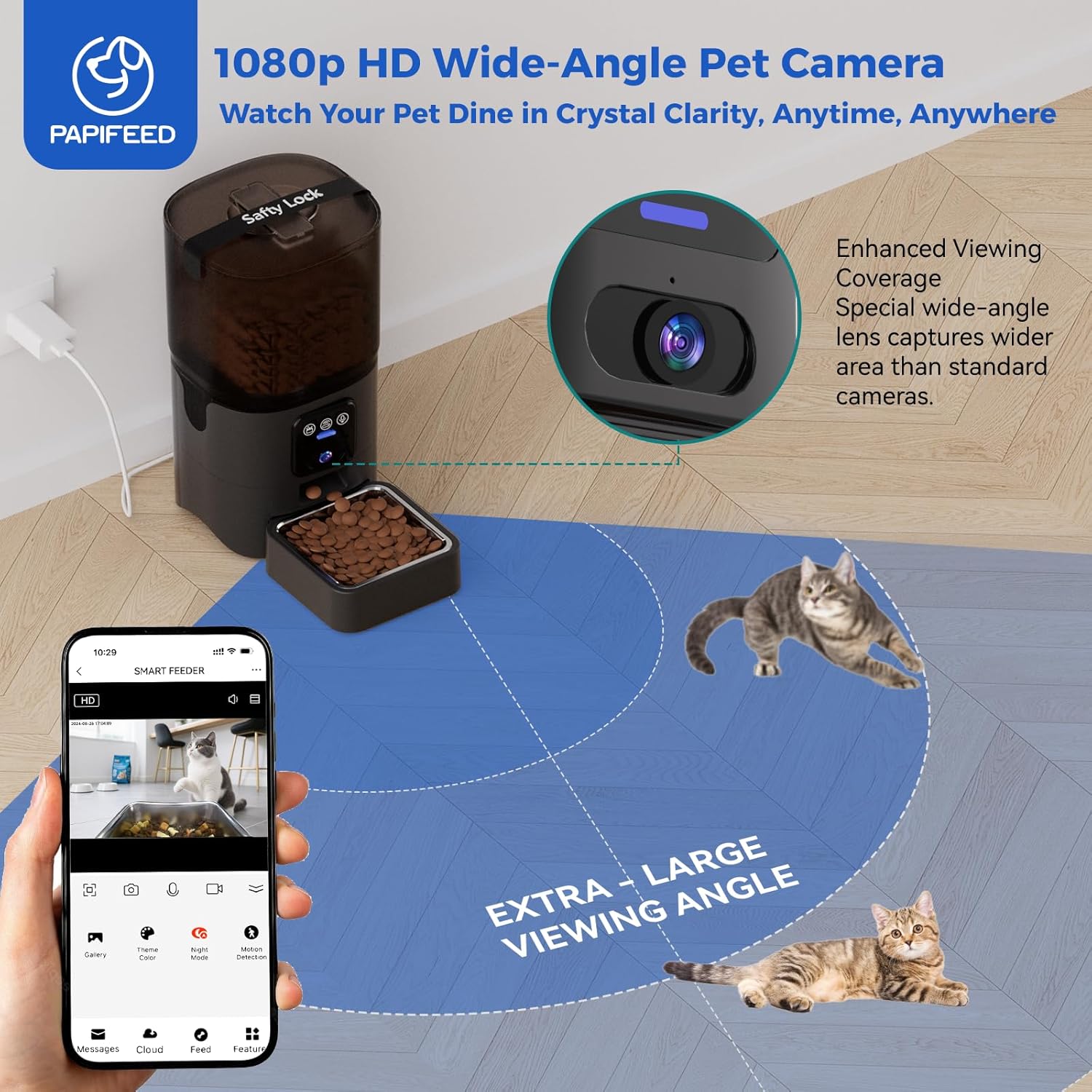
Image: This image highlights the 1080p HD wide-angle camera feature, showing the feeder in a room with a cat, and a smartphone displaying the camera's extra-large viewing angle, capturing the pet's dining area.
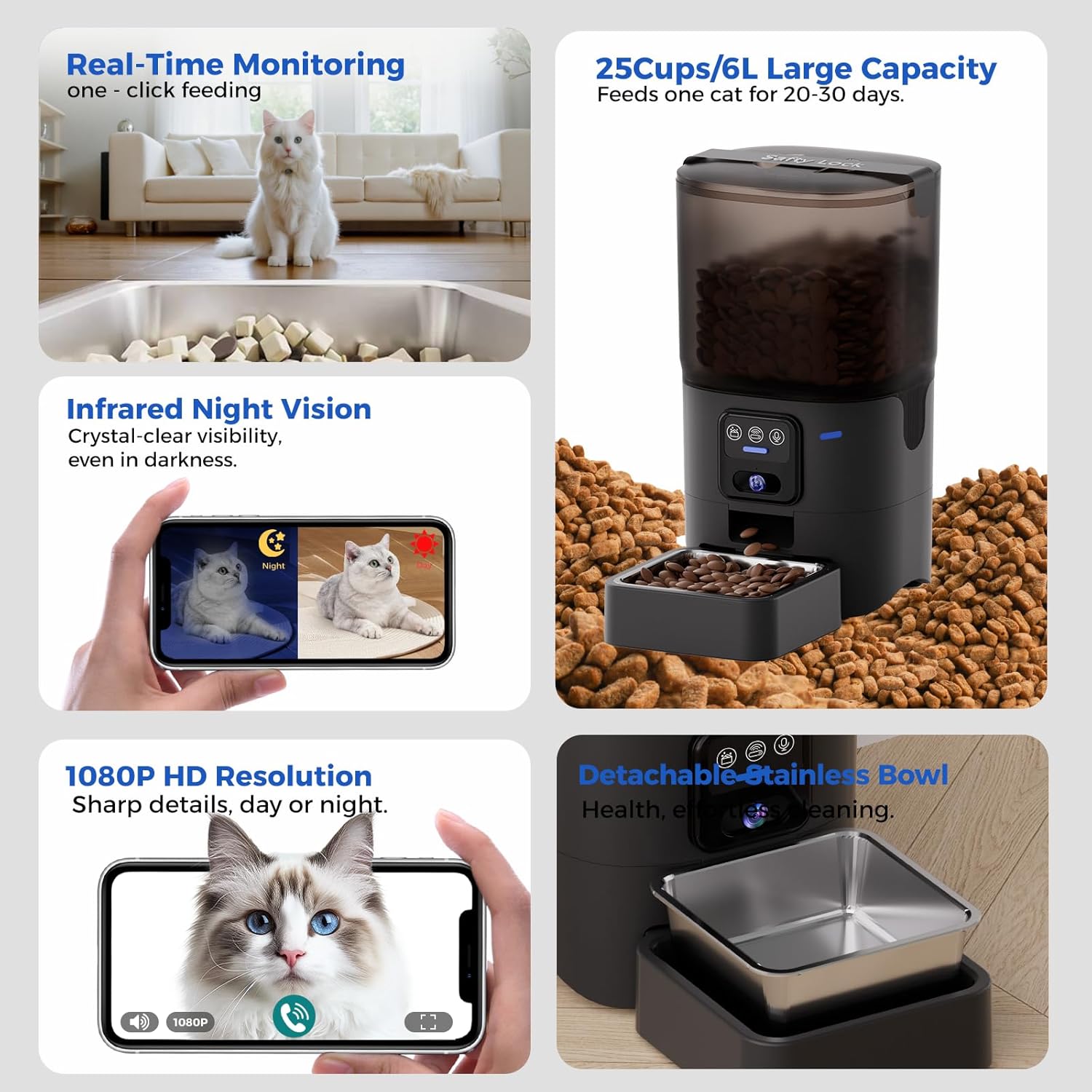
ภาพ: ภาพหลายแผงแสดง...asing the feeder's monitoring capabilities: real-time feeding view, infrared night vision comparison (day vs. night), and 1080P HD resolution for clear video calls with pets.
5.4 Scenario Mission
The "Scenario Mission" feature allows the feeder to adapt its schedule based on environmental changes. For example, if the weather becomes colder and your pet's food intake increases, the feeder can automatically adjust to dispense more food. (Note: In battery-only standby mode, the app is inaccessible, but the pre-programmed feeding plan will still execute normally.)

Image: An illustration depicting a user interacting with their pet via the PAPIFEED smart feeder's camera and two-way audio feature, showing a cat in a kitchen setting and a person on a laptop. A note indicates that the app is inaccessible in battery-only standby mode, but the feeding schedule will execute.
5.5 การรวม Alexa
The PAPIFEED feeder supports Amazon Alexa. You can use voice commands to dispense food, such as "Alexa, feed my cat a snack."
6. การบำรุงรักษา
6.1 การทำความสะอาด
Regular cleaning ensures a hygienic feeding environment for your pet.
- The food tank and stainless steel bowl are removable and washable.
- Wash these components with mild soap and water, then rinse thoroughly and dry completely before reassembling.
- ห้ามล้างตัวเครื่องหลัก เช็ดภายนอกตัวเครื่องหลักด้วยผ้าamp ผ้า.

Image: An image showing the detachable components of the feeder (food tank, stainless steel bowl, plastic bowl) being washed, with a clear indication that the main electronic unit is not washable.
6.2 การเก็บรักษาอาหาร
- ควรเปลี่ยนถุงดูดความชื้นเป็นประจำ (เช่น ทุกเดือน) เพื่อรักษาความสดของอาหาร
- Monitor the food level through the transparent tank and refill as needed.
6.3 Recommended Kibble Size and Type
To prevent jamming and ensure smooth dispensing, use dry kibble with a size between 0.2 inches (5mm) and 0.47 inches (12mm). The feeder is suitable for single-shaped dry kibble, freeze-dried food, and mixed-shaped dry kibble.

Image: This image illustrates the recommended kibble sizes (0.2"/5mm, 0.32"/8mm, 0.47"/12mm) and food types (single-shaped dry kibble, freeze-dried food, mixed-shaped dry kibble) to prevent jamming in the feeder.
7 การแก้ไขปัญหา
- เครื่องให้อาหารสัตว์ไม่เชื่อมต่อกับ Wi-Fi: Ensure your router supports 2.4GHz or 5GHz networks and that your phone's Bluetooth is enabled during pairing. Move the feeder closer to the router if connection is unstable.
- อาหารไม่พร้อมจำหน่าย: Check if the food tank is empty. Ensure kibble size is within the recommended range (0.2"-0.47" / 5-12mm) to prevent blockages. The feeder has a compartmentalized design and stirring sheet to minimize jamming.
- Battery backup not lasting: The 4 AA batteries are for emergency backup during power outages. They are not designed for prolonged use as the primary power source. Always connect the DC adapter for normal operation.
- Pet manually dispensing food: The feeder has a manual dispense button. Some intelligent pets may learn to press this button. Consider placement or monitoring if this becomes an issue.
- App inaccessible in battery-only mode: This is normal behavior. The app requires network connectivity to function. However, pre-set feeding schedules will still execute.
8. ข้อมูลจำเพาะ
| ชื่อรุ่น | FKWSQ-GJ |
| ยี่ห้อ | ปาปิฟีด |
| ความจุ | 6 ลิตร (ประมาณ 25 ถ้วย) |
| ความละเอียดของกล้อง | 1080P HD, Wide-Angle Lens, Infrared Night Vision |
| การเชื่อมต่อ | 2.4GHz/5GHz Wi-Fi, Bluetooth Assist Link |
| แหล่งจ่ายไฟ | DC 5V Adapter (Primary), 4 x AA Batteries (Backup) |
| วัสดุ | Polyester (main body), 304 Stainless Steel (bowl) |
| ขนาด (กxยxส) | 8.07 x 7.59 x 12.2 นิ้ว |
| น้ำหนักสินค้า | 3.65 ปอนด์ (1.66 กิโลกรัม) |
| ขนาดเม็ดอาหารที่แนะนำ | 0.2 - 0.47 นิ้ว (5 - 12 มม.) |
| สายพันธุ์เป้าหมาย | Cat (suitable for small and medium-sized pets) |
9. การรับประกันและการสนับสนุน
9.1 ข้อมูลการรับประกัน
The PAPIFEED Automatic Cat Feeder comes with a รับประกัน 1 ปี นับจากวันที่ซื้อ การรับประกันนี้ครอบคลุมข้อบกพร่องจากการผลิตภายใต้การใช้งานปกติ โปรดเก็บหลักฐานการซื้อไว้เพื่อขอรับสิทธิ์การรับประกัน
9.2 การสนับสนุนลูกค้า
For any questions, technical assistance, or warranty claims, please contact PAPIFEED customer support through the contact information provided with your product or via the "Smart Life" app. Our support team is available to assist you with any issues you may encounter.


