การแนะนำ
Thank you for choosing the MOZOTER SP9i Wireless Earbuds. These earbuds are designed to provide a comfortable and stable audio experience with advanced Bluetooth 5.3 technology, deep bass sound, and extended playtime. This manual will guide you through the setup, operation, and maintenance of your new earbuds to ensure optimal performance.
มีอะไรอยู่ในกล่อง
- MOZOTER SP9i Wireless Earbuds (Left and Right)
- เคสชาร์จไฟ
- สายชาร์จ USB-C
- จุกหูฟัง (ขนาด S, M, L)
- คู่มือการใช้งาน
สินค้าเกินview
The MOZOTER SP9i earbuds feature an over-ear hook design for secure fit and comfort. Each earbud is equipped with intuitive touch controls for easy management of audio and calls. The compact charging case provides additional battery life and convenient storage.

Image: The MOZOTER SP9i Wireless Earbuds resting in their open charging case, showcasing the over-ear hook design and the charging contacts.
ภาพ: รายละเอียด view of an earbud highlighting the integrated Bluetooth 5.3 technology for stable and efficient wireless connectivity.
การตั้งค่า
1. การชาร์จหูฟังและเคส
ก่อนใช้งานครั้งแรก ให้ชาร์จหูฟังและกล่องชาร์จให้เต็มก่อน เสียบสาย USB-C ที่ให้มาเข้ากับพอร์ตชาร์จบนกล่องและแหล่งจ่ายไฟ ไฟแสดงสถานะบนกล่องจะแสดงสถานะการชาร์จ
- เวลาในการชาร์จ: ประมาณ 1.5 ชั่วโมงสำหรับการชาร์จเต็ม
- เวลาเล่นเอียร์บัด: สูงสุด 12 ชั่วโมงต่อการชาร์จหนึ่งครั้ง
- เวลาเล่นทั้งหมดกับเคส: นานถึง 60 ชั่วโมง

Image: The charging case with earbuds inside, illustrating the 60-hour total playtime, 12-hour single charge, and 48-hour case capacity, along with the USB-C charging port.
2. การจับคู่กับอุปกรณ์ของคุณ
- ตรวจสอบให้แน่ใจว่าเคสชาร์จมีไฟและหูฟังอยู่ในนั้น
- เปิดกล่องชาร์จ หูฟังจะเปิดอัตโนมัติและเข้าสู่โหมดจับคู่
- บนอุปกรณ์ของคุณ (สมาร์ทโฟน แท็บเล็ต แล็ปท็อป) ให้เปิดใช้งาน Bluetooth
- ค้นหา อุปกรณ์บลูทูธที่มีอยู่และเลือก "เอสพี9ไอ" จากรายการ
- เมื่อเชื่อมต่อเสร็จแล้ว คุณจะได้ยินเสียงยืนยัน และไฟแสดงสถานะของหูฟังจะดับลงหรือกะพริบช้าๆ
เมื่อถอดหูฟังออกจากเคส หูฟังจะเชื่อมต่อกับอุปกรณ์ที่จับคู่ไว้ล่าสุดโดยอัตโนมัติ หากเปิดใช้งาน Bluetooth บนอุปกรณ์

Image: An illustration showing the MOZOTER SP9i earbuds in their open case, with a smartphone screen displaying a successful Bluetooth connection to "SP9i".
คำแนะนำการสวมใส่
For optimal sound quality and comfort, it is important to wear the earbuds correctly and choose the appropriate eartip size.
1. การเลือกจุกหูฟัง
The earbuds come with small (S), medium (M), and large (L) eartips. Experiment with different sizes to find the pair that provides the best seal and comfort for your ears. A good seal enhances bass response and passive noise cancellation.
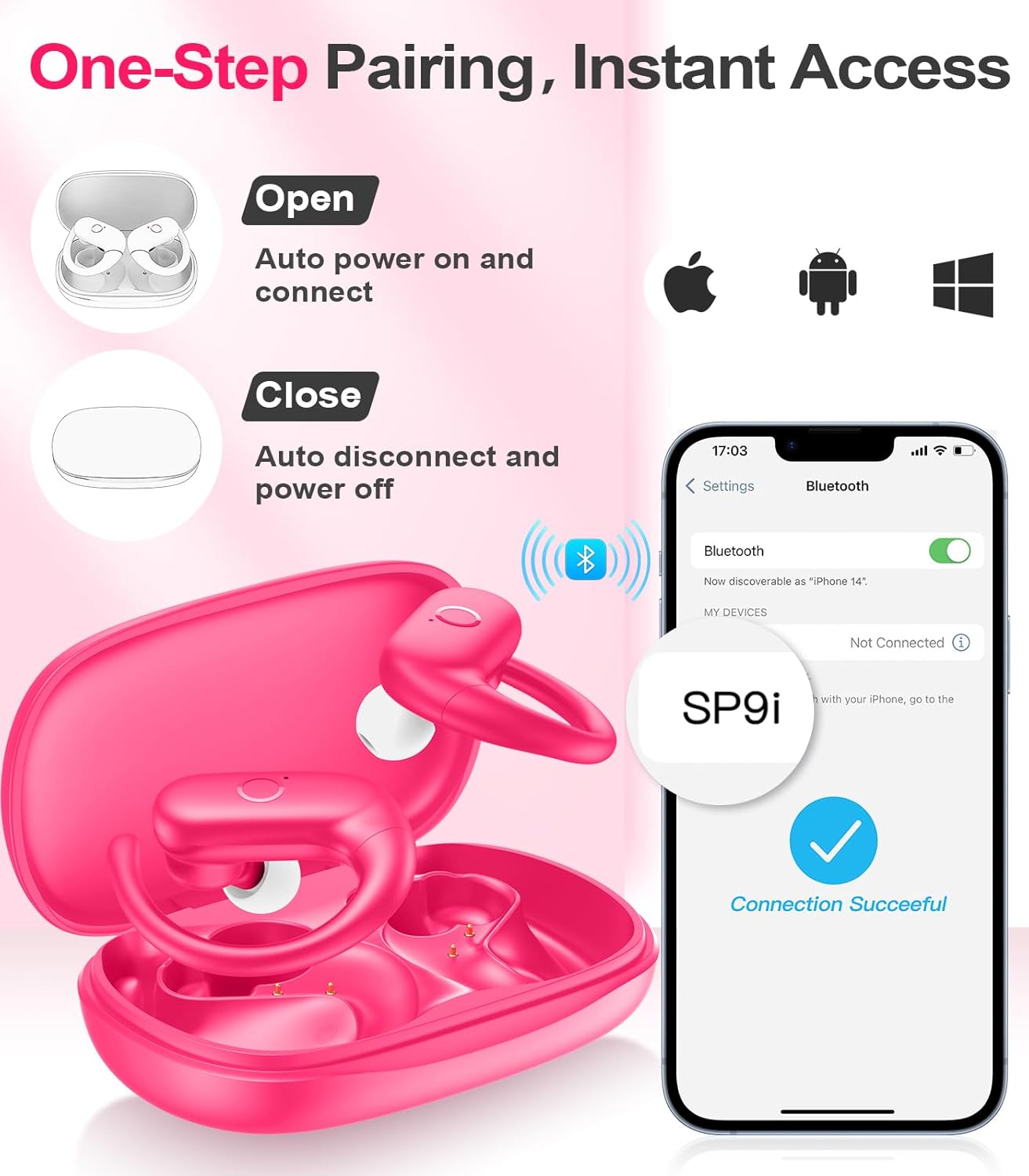
Image: A woman wearing an earbud, with an inset showing the three available eartip sizes (S, M, L) for a customized and comfortable fit.
2. การบรรลุความพอดีที่ปลอดภัย
- ขั้นตอนที่ 1: วางขอเกี่ยวหูไว้เหนือหูของคุณ
- ขั้นตอนที่ 2: ค่อยๆ ใส่เอียร์บัดเข้าไปในช่องหูของคุณ
- ขั้นตอนที่ 3: Rotate the earbud slightly to find a comfortable and secure angle. The flexible ear hooks ensure a stable fit, ideal for sports and active use.

Image: A three-step diagram illustrating the correct method to wear the MOZOTER SP9i earbuds, ensuring a secure and comfortable fit with the ear hook.

Image: A woman wearing the MOZOTER SP9i earbuds, demonstrating the ergonomic design that rests comfortably and securely on the ear.
คำแนะนำการใช้งาน
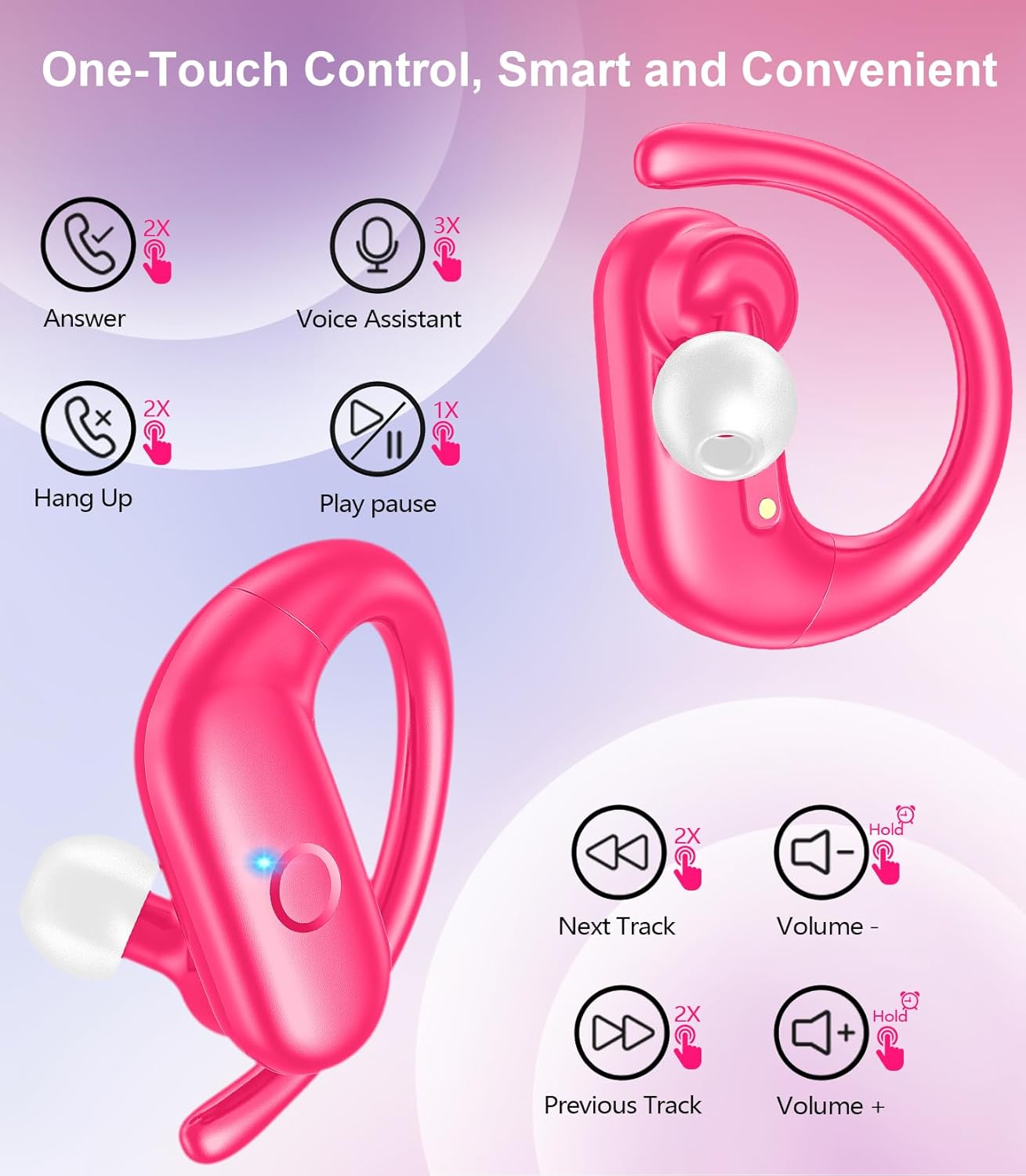
The MOZOTER SP9i earbuds feature intuitive touch controls on each earbud. The following table outlines the functions:
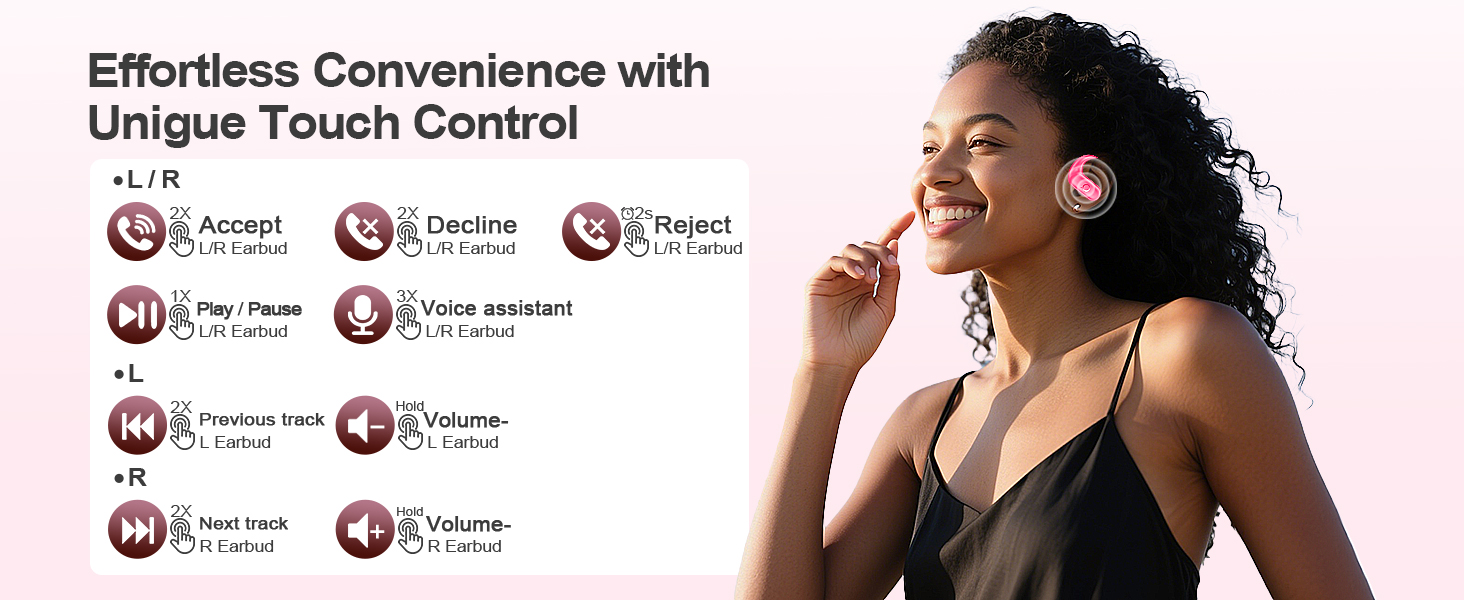
Image: A visual guide detailing the various touch control gestures for the MOZOTER SP9i earbuds, including call management, music playback, and volume adjustments.
| การกระทำ | ท่าทาง (หูฟังแบบ L/R) |
|---|---|
| รับสายโทรศัพท์ | Double-tap (2X) |
| วางสาย | Double-tap (2X) |
| ปฏิเสธการรับสาย | Triple-tap (3X) |
| เล่น/หยุดเพลง | Single-tap (1X) |
| เปิดใช้งานผู้ช่วยเสียง | Triple-tap (3X) |
| เพลงถัดไป | Double-tap (2X) on ขวา หูฟัง |
| เพลงก่อนหน้า | Double-tap (2X) on ซ้าย หูฟัง |
| เพิ่มระดับเสียง | เดี๋ยว ขวา หูฟัง |
| ลดระดับเสียง | เดี๋ยว ซ้าย หูฟัง |
การซ่อมบำรุง
การบำรุงรักษาอย่างถูกต้องจะช่วยให้หูฟังของคุณมีอายุการใช้งานยาวนานและมีประสิทธิภาพ
- การทำความสะอาด: Regularly clean the eartips and the charging contacts on both the earbuds and the case with a soft, dry, lint-free cloth. Avoid using harsh chemicals or abrasive materials.
- พื้นที่จัดเก็บ: เมื่อไม่ได้ใช้งาน ให้เก็บหูฟังไว้ในกล่องชาร์จเพื่อป้องกันฝุ่นและความเสียหาย
- การสัมผัสน้ำ: แม้ว่าหูฟังจะออกแบบมาสำหรับเล่นกีฬา แต่ควรหลีกเลี่ยงการจุ่มหูฟังลงในน้ำ เช็ดเหงื่อหรือความชื้นออกทันทีหลังใช้งาน
การแก้ไขปัญหา
If you encounter any issues with your MOZOTER SP9i earbuds, please refer to the following common solutions:
- หูฟังไม่จับคู่: Ensure both earbuds are charged and removed from the case. Turn off and on your device's Bluetooth. If issues persist, try resetting the earbuds (refer to manufacturer's webไซต์สำหรับคำแนะนำการรีเซ็ตเฉพาะหากไม่มีอยู่ในคู่มือ)
- มีหูฟังเพียงข้างเดียวที่ใช้งานได้: Place both earbuds back into the charging case, close the lid, wait a few seconds, then open the lid and remove them. This often resynchronizes them.
- คุณภาพเสียงไม่ดี: Ensure the eartips provide a good seal in your ear. Clean any debris from the earbud speakers. Check your device's volume and audio settings.
- ปัญหาการชาร์จ: ตรวจสอบให้แน่ใจว่าสายชาร์จเชื่อมต่อกับเคสและแหล่งจ่ายไฟอย่างแน่นหนา ทำความสะอาดจุดสัมผัสการชาร์จบนหูฟังและภายในเคส
- หูฟังหลุดออก: Experiment with different eartip sizes and adjust the ear hooks for a more secure fit as described in the Wearing Instructions section.
ข้อมูลจำเพาะ
| คุณสมบัติ | รายละเอียด |
|---|---|
| ชื่อรุ่น | เอสพี9ไอ |
| เทคโนโลยีการเชื่อมต่อ | ไร้สาย (บลูทูธ 5.3) |
| การควบคุมเสียงรบกวน | การยกเลิกเสียงรบกวนแบบพาสซีฟ |
| อิมพีแดนซ์ | 4 โอห์ม |
| น้ำหนักเอียร์บัด | หูฟังแต่ละข้างหนักประมาณ 8 กรัม |
| เวลาเล่นหูฟัง | นานถึง 12 ชั่วโมง |
| เวลาเล่นทั้งหมด (รวมเคส) | นานถึง 60 ชั่วโมง |
| พอร์ตชาร์จ | ยูเอสบี-ซี |
| ส่วนประกอบที่รวมอยู่ | หูฟัง, เคสชาร์จ, จุกหูฟัง, คู่มือผู้ใช้ |
การรับประกันและการสนับสนุน
MOZOTER products are designed and manufactured to the highest quality standards. For warranty information and customer support, please refer to the documentation included with your purchase or visit the official MOZOTER website. If you require further assistance, please contact our customer service team.


