1. บทนำ
This manual provides essential information for the proper setup, operation, and maintenance of your KOORUI G2721X 27-inch 1440p QHD Gaming Monitor. Please read this manual thoroughly before using the product to ensure optimal performance and safety. Keep this manual for future reference.

รูปที่ 1.1 : ด้านหน้า view of the KOORUI G2721X monitor, showcasinมีขอบจอที่บางเฉียบและขาตั้ง
2. เนื้อหาบรรจุภัณฑ์
Verify that all items are present in the package. If any items are missing or damaged, please contact your retailer or KOORUI customer support.
- KOORUI G2721X Monitor (x1)
- ฐานวางจอภาพ (1 ชิ้น)
- คู่มือการใช้งาน (x1)
- สาย DisplayPort (DP) (x1)
- อะแดปเตอร์ไฟ (x1)
3. สินค้าหมดview
3.1 คุณสมบัติหลัก
- แสดง: 27-inch QHD (2560x1440) resolution for crisp visuals.
- อัตราการรีเฟรช: Up to 260Hz (supports 240Hz) for smooth gameplay.
- เวลาตอบสนอง: 1ms (GTG) for minimal motion blur.
- ประเภทแผง: Fast IPS for vibrant colors and wide viewมุมการเอียง
- รองรับ HDR: HDR400 for enhanced contrast and brightness.
- การซิงโครไนซ์แบบปรับได้: Eliminates screen tearing and stuttering.
- ช่วงสี: 99% sRGB and 90% DCI-P3 for accurate color reproduction.
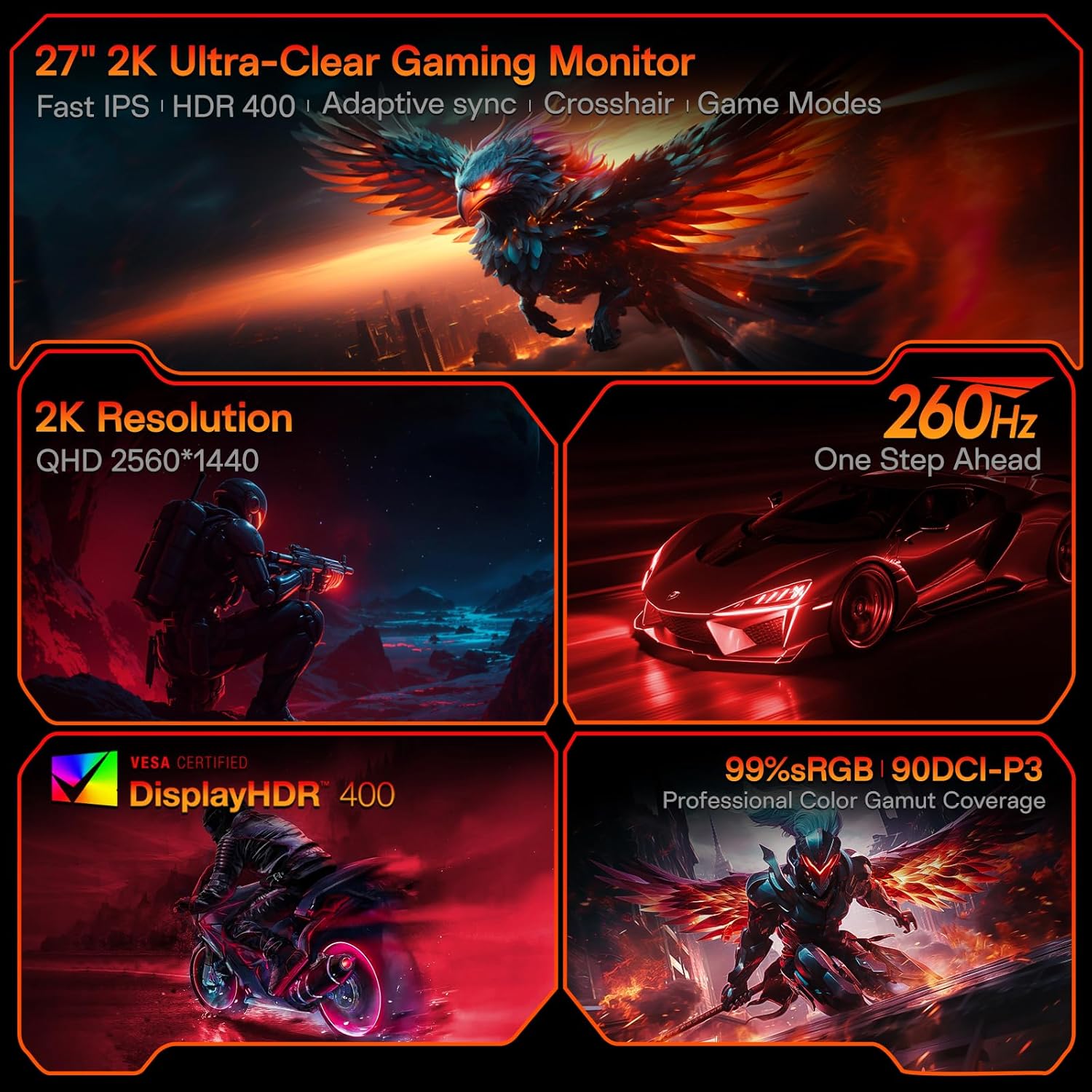
Figure 3.1: Visual representation of the monitor's core features.
3.2 พอร์ตและปุ่มควบคุม
The monitor features a variety of input and output ports for versatile connectivity, along with an intuitive control system.
- อินพุตวิดีโอ: Two HDMI 2.0 ports, one DisplayPort 1.4 port.
- เอาต์พุตเสียง: One 3.5mm audio jack.
- กำลังไฟเข้า: One DC power port.
- ควบคุม: A 5-way joystick located on the rear for On-Screen Display (OSD) navigation.
- ออกแบบ: Hawk-wing backplate with integrated cooling stripes for efficient heat dissipation.

รูปที่ 3.2: ด้านหลัง view of the monitor detailing port locations and physical adjustments.
4. การตั้งค่า
4.1 การติดตั้งขาตั้ง
- นำจอภาพและฐานออกจากบรรจุภัณฑ์อย่างระมัดระวัง
- Align the monitor stand with the slot on the back of the monitor.
- Gently push the stand into the slot until it clicks into place, indicating a secure connection.
- วางจอภาพที่ประกอบแล้วไว้บนพื้นผิวที่มั่นคงและเรียบ
4.2 การเชื่อมต่อสายเคเบิล
- Connect the provided DisplayPort (DP) cable from your computer's graphics card to the DP 1.4 port on the monitor. Alternatively, use an HDMI cable to connect to one of the HDMI 2.0 ports.
- Connect the power adapter to the DC power port on the monitor, then plug the other end into a power outlet.
- If using external speakers or headphones, connect them to the 3.5mm Audio Out port.
4.3 คู่มือวิดีโอ: การติดตั้งและคุณสมบัติ
Watch this video for a visual guide on installing the monitor stand and an overview คุณสมบัติของมัน
Video 4.1: A detailed demonstration of the KOORUI G2721X monitor's assembly and key functionalities. This video covers the physical setup, port connections, and highlights features such as the 260Hz refresh rate, QHD resolution, and Adaptive Sync technology.
5. คู่มือการใช้งาน
5.1 การนำทางบนหน้าจอ (OSD)
The monitor's settings can be adjusted using the 5-way joystick located on the back of the display. Press the joystick to open the OSD menu, then move it up/down/left/right to navigate and select options.
5.2 Motion Performance
The G2721X offers an ultra-smooth 260Hz refresh rate, crucial for competitive gaming. It also features 3-level Overdrive settings to optimize response time:
- ปกติ: เวลาตอบสนอง 5 มิลลิวินาที
- เร็ว: เวลาตอบสนอง 3 มิลลิวินาที
- สุดขีด: เวลาตอบสนอง 1 มิลลิวินาที
Adjust these settings via the OSD menu to find the optimal balance for your gaming experience.

Figure 5.1: Illustrates the visual difference in motion clarity between 260Hz and 120Hz refresh rates.
5.3 Color Performance
The monitor covers 99% sRGB and 90% DCI-P3 color gamuts, displaying 16.7 million colors (8-bit). This wide color range enhances in-game visuals and provides accurate color reproduction for various applications.

Figure 5.2: Demonstrates the monitor's extensive color capabilities.
5.4 การซิงค์แบบอะแดปทีฟ
Adaptive Sync technology synchronizes the monitor's refresh rate with your graphics card's frame rate, effectively eliminating screen tearing and stuttering during fast-paced action. Ensure Adaptive Sync is enabled in both the monitor's OSD and your graphics card's control panel for optimal performance.
5.5 รองรับ HDR400
With HDR400 support, the monitor delivers brighter colors, deeper blacks, and enhanced contrast, providing a more immersive visual experience in compatible content.
5.6 โหมดเกม
The G2721X includes dedicated game display modes to enhance your gaming experience:
- ครอสแฮร์: มีเส้นเล็งบนหน้าจอเพื่อเพิ่มความแม่นยำในการเล็ง
- ตัวจับเวลา: Displays an on-screen timer for managing game events.
- เฟรมต่อวินาที: Optimized settings for First-Person Shooter games.
- RCG: Optimized settings for Racing games.
- อาร์พีจี: Optimized settings for Role-Playing Games.

รูปที่ 5.3: อดีตamples of the monitor's dedicated game modes.
6. ข้อมูลจำเพาะ
| คุณสมบัติ | ข้อมูลจำเพาะ |
|---|---|
| หมายเลขรุ่น | G2721X |
| ขนาดหน้าจอ | 27 นิ้ว |
| ประเภทแผง | เกือบ IPS |
| ปณิธาน | 2560 x 1440 (QHD) |
| อัตราการรีเฟรช | 260Hz (รองรับ 240Hz) |
| เวลาตอบสนอง | 1ms (GTG) |
| ความสว่าง | 350 cd/m² (นิด) |
| รองรับ HDR | HDR400 |
| ช่วงสี | 99% sRGB, 90% DCI-P3 |
| ความลึกของสี | 16.7 ล้านสี (8 บิต) |
| ความหนาแน่นของพิกเซล | 109 พิกเซลต่อตารางนิ้ว |
| อัตราส่วนภาพ | 16:9 น. |
| การเชื่อมต่อ | 2x HDMI 2.0, 1x DisplayPort 1.4, 1x Audio Out, 1x DC Power |
| ความเข้ากันได้ของ VESA | 75x75มม. |
| การปรับความเอียง | -5° ถึง 20° |
| ขนาดสินค้า (กว้าง x ลึก x สูง) | 24 x 8.46 x 18.59 นิ้ว |
| น้ำหนักสินค้า | 10.83 ปอนด์ |
7. การบำรุงรักษา
การบำรุงรักษาอย่างถูกต้องจะช่วยให้จอภาพของคุณมีอายุการใช้งานยาวนานและมีประสิทธิภาพเหมาะสมที่สุด
- การทำความสะอาดหน้าจอ: ใช้ผ้านุ่มไม่เป็นขุยเช็ดเล็กน้อยampened with water or a specialized screen cleaner. Do not use alcohol-based cleaners or abrasive materials.
- การทำความสะอาด Casing: เช็ดจอภาพคasinเช็ดทำความสะอาดด้วยผ้าแห้งนุ่มๆ หลีกเลี่ยงการใช้ผงซักฟอกหรือสารละลายที่มีฤทธิ์กัดกร่อน
- การระบายอากาศ : Ensure the monitor's ventilation slots are clear and not obstructed to prevent overheating.
- หมดแรง: ควรปิดจอภาพและถอดปลั๊กออกจากเต้าเสียบไฟทุกครั้งก่อนทำความสะอาด หรือหากจะไม่ใช้งานเป็นเวลานาน
8 การแก้ไขปัญหา
หากคุณพบปัญหาเกี่ยวกับจอภาพของคุณ โปรดดูขั้นตอนการแก้ไขปัญหาทั่วไปต่อไปนี้:
- ไม่มีไฟฟ้า:
- ตรวจสอบให้แน่ใจว่าสายไฟเชื่อมต่อกับจอภาพและเต้าเสียบไฟอย่างแน่นหนา
- ตรวจสอบว่าปลั๊กไฟใช้งานได้ปกติหรือไม่ โดยลองเสียบอุปกรณ์อื่นเข้าไป
- ไม่มีสัญญาณ:
- Check that the video cable (DP or HDMI) is securely connected to both the monitor and your computer's graphics card.
- ตรวจสอบให้แน่ใจว่าได้เลือกแหล่งอินพุตที่ถูกต้องบนจอภาพผ่านเมนู OSD
- ลองทดสอบด้วยสายวิดีโอหรือพอร์ตอื่นดู หากทำได้
- หน้าจอกระพริบ:
- ตรวจสอบสายวิดีโอว่าชำรุดหรือมีการเชื่อมต่อหลวมหรือไม่
- ปรับอัตราการรีเฟรชในการตั้งค่าการแสดงผลของคอมพิวเตอร์ของคุณ
- Disable Adaptive Sync temporarily to see if the issue persists.
- ปัญหาด้านคุณภาพของภาพ (ภาพเบลอ สีผิดเพี้ยน):
- Ensure the monitor's resolution is set to its native 2560x1440 in your computer's display settings.
- รีเซ็ตจอภาพเป็นการตั้งค่าจากโรงงานผ่านเมนู OSD
- Adjust color settings (brightness, contrast, color temperature) in the OSD.
9. การรับประกันและการสนับสนุน
Your KOORUI G2721X monitor is backed by a 1-year panel warranty และ การรับประกันอุปกรณ์เสริม 3 ปี. Please note that terms and conditions apply to the warranty. For detailed warranty information or technical assistance, please refer to the official KOORUI webไซต์หรือติดต่อฝ่ายสนับสนุนลูกค้าโดยตรง
If you have any questions or require further assistance, please do not hesitate to reach out to KOORUI customer support.


