การแนะนำ
This manual provides essential information for the safe and efficient operation of your ZeroKor Portable Power Stations. This bundle includes a 120W portable battery with a 22W solar panel and a 65W outlet power bank, designed for versatile power needs both indoors and outdoors, supporting laptops, smart devices, and more.
ข้อมูลด้านความปลอดภัย
โปรดอ่านคำเตือนและคำแนะนำด้านความปลอดภัยทั้งหมดก่อนใช้ผลิตภัณฑ์นี้ เพื่อหลีกเลี่ยงการบาดเจ็บหรือความเสียหาย โปรดเก็บคู่มือนี้ไว้เพื่อใช้อ้างอิงในอนาคต
- อย่าถอดประกอบซ่อมแซมหรือดัดแปลงเครื่อง
- ห้ามนำอุปกรณ์ไปวางใกล้ไฟหรือบริเวณที่มีอุณหภูมิสูง
- Keep away from water, high humidity, and direct sunlight.
- ตรวจสอบให้แน่ใจว่ามีการระบายอากาศที่เหมาะสมในระหว่างการใช้งานและการชาร์จ
- Do not use if the unit is damaged or has been dropped.
- เก็บให้พ้นจากมือเด็ก
- กำจัดผลิตภัณฑ์ตามข้อบังคับท้องถิ่น
เนื้อหาแพ็คเกจ
ตรวจสอบว่ามีรายการทั้งหมดรวมอยู่ในแพ็คเกจของคุณ:
- ZeroKor 120W Portable Power Station
- ZeroKor 65W Portable Power Bank
- แผงเซลล์แสงอาทิตย์แบบพับได้ 22W
- AC Wall Adapter (for 120W unit)
- 12V Car Charging Cable (for 120W unit)
- 9V/3A Max USB-C Adapter (for 65W unit)
- คู่มือการใช้งาน (เอกสารนี้)

Image: The ZeroKor Portable Power Station bundle, showing the 120W power station, the 65W power bank, and the foldable solar panel.
สินค้าเกินview
ZeroKor 120W Portable Power Station
This unit is designed for higher power demands and features multiple output options.

ภาพ: ด้านบน view of the 120W Portable Power Station, highlighting its various ports and digital display.
- เอาต์พุต AC: Two 110V/120W MAX AC outlets.
- เอาต์พุต DC: One 12V~16.8V/6A MAX DC output.
- เอาต์พุต USB-A: One USB1 (5V/2A) and one QC USB2 (5V/3A, 9V/2A MAX).
- เอาท์พุต USB-C: One USB-C (5V/3A, 9V/2A MAX).
- ป้อนข้อมูล: Dedicated input port for charging.
- ไฟฉาย LED: Features reading mode and SOS mode for emergencies.
- แสดง: Digital display showing battery level and output status.
ZeroKor 65W Portable Power Bank
This compact unit is ideal for smaller devices and on-the-go power.
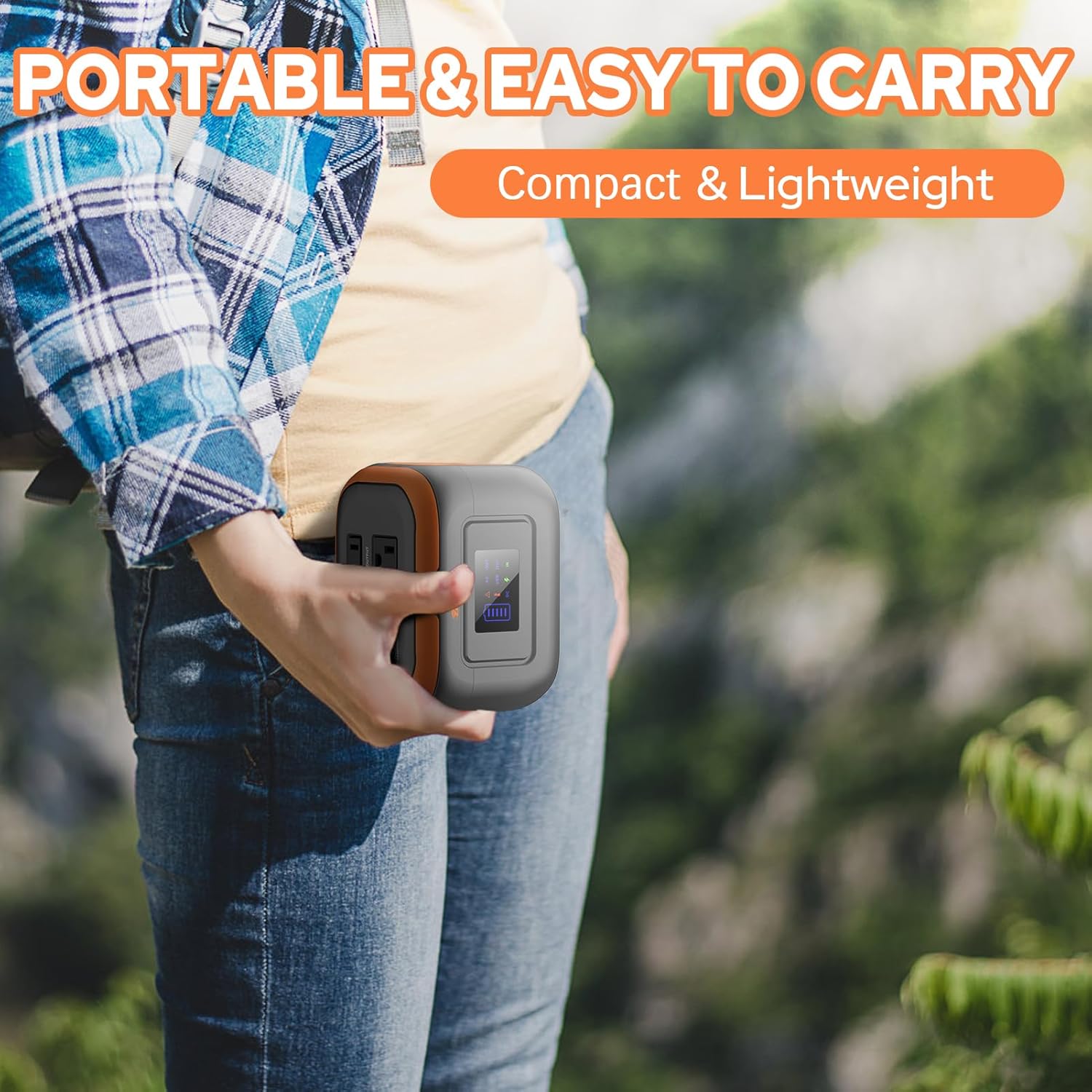
Image: A person holding the compact 65W Portable Power Bank, demonstrating its portability.
- เอาต์พุต AC: One 110V/65W MAX AC outlet.
- เอาต์พุต DC: One 9V~12.6V/10A MAX DC output.
- เอาท์พุต USB: One USB-2 port (5V/2.1A Max) and one quick charge USB-1 port (5V/3A, 9V/2A MAX).
- ไฟฉาย: Features reading mode and SOS mode.
Built-in Battery Management System (BMS)
Both ZeroKor portable power units feature an advanced BMS for enhanced safety and battery longevity.

Image: A diagram showing the Battery Management System (BMS) and its protective features, including short circuit, over-current, over-voltage, overload, overheating, and overcharge protection.
- ป้องกันไฟฟ้าลัดวงจร
- ระบบป้องกันกระแสไฟเกิน
- เกินปริมาณtagการป้องกันอี
- ป้องกันการโอเวอร์โหลด
- ระบบป้องกันความร้อนสูงเกินไป
- การป้องกันการชาร์จไฟเกิน
การตั้งค่า
การชาร์จเบื้องต้น
Before first use, fully charge your power station. There are three primary ways to recharge the 120W unit:
- เต้ารับไฟฟ้ากระแสสลับ: Connect the provided AC wall adapter to the input port of the 120W power station and plug it into a standard wall outlet.
- แผงโซล่าเซลล์: Connect the 22W foldable solar panel to the input port of the 120W power station. Place the solar panel in direct sunlight for optimal charging.
- ท่ารถ: Use the included 12V car charging cable to charge the 120W power station from your vehicle's car port.
The 65W power bank can be recharged via its USB-C input using the provided 9V/3A Max USB-C adapter.

Image: Illustration of the three charging methods for the power station: solar panel, AC wall adapter, and 12V car charging cable.
คำแนะนำการใช้งาน
การเปิด/ปิดเครื่อง
- To turn on the 120W power station, press and hold the main power button. The display will illuminate.
- To activate the AC output on the 120W unit, long press the DC button.
- To turn off, press and hold the main power button again.
Using Outputs
Connect your devices to the appropriate output ports (AC, DC, USB-A, USB-C). The power station is capable of powering various devices:

Image: A person charging a laptop with the 120W power station in an outdoor setting. Icons indicate the number of recharges for devices like laptops, cameras, smartphones, and drones.
บันทึก: If your devices need an air compressor to work, it is recommended to purchase a more powerful power station.
การชาร์จแบบผ่าน
Both power stations support pass-through charging, allowing you to charge the power station while simultaneously powering your devices.

Image: A visual representation of pass-through charging, showing the power station being recharged from a wall outlet while simultaneously providing power to a connected mobile device.
การใช้ไฟฉาย LED
The integrated LED flashlight on both units offers multiple modes:
- โหมดการอ่าน: Provides a steady light for illumination.
- โหมด SOS: Emits a flashing signal for emergency situations.
Video: A demonstration of the ZeroKor Portable Power Station, showcasing its various ports, the functionality of the LED flashlight, and its ability to power a small fan. This video highlights the product's versatility for campไอเอ็นจีและการใช้งานกลางแจ้ง
การซ่อมบำรุง
- การทำความสะอาด: ใช้ผ้านุ่มและแห้งเช็ดทำความสะอาดภายนอกตัวเครื่อง ห้ามใช้น้ำยาทำความสะอาดที่มีฤทธิ์กัดกร่อนหรือตัวทำละลาย
- พื้นที่จัดเก็บ: Store the power station in a cool, dry place away from direct sunlight and extreme temperatures. For long-term storage, it is recommended to charge the unit to 50-80% every 3-6 months to maintain battery health.
- การดูแลแบตเตอรี่ หลีกเลี่ยงการปล่อยแบตเตอรี่จนหมดบ่อยครั้งเพื่อยืดอายุการใช้งาน
การแก้ไขปัญหา
| ปัญหา | สาเหตุที่เป็นไปได้ | สารละลาย |
|---|---|---|
| เครื่องไม่เปิด | แบตเตอรี่เหลือน้อย; กดปุ่มเปิด/ปิดไม่ค้างไว้นานพอ | Charge the unit fully. Press and hold the power button for 3 seconds. |
| ไม่มีเอาต์พุตจากพอร์ต AC/DC/USB | Output not activated; Device draws too much power; Overload protection triggered. | Ensure the specific output (e.g., AC) is activated (long press DC button for 120W unit). Check device power requirements. Disconnect device, restart unit, try a lower-power device. |
| ชาร์จช้า | Using a low-power charger; Solar panel not in direct sunlight. | Use the original AC adapter. Ensure solar panel is fully exposed to direct sunlight and clean. |
| Unit gets warm during use | การทำงานปกติโดยเฉพาะภายใต้ภาระหนัก | Ensure adequate ventilation. If overheating protection triggers, the unit will shut down automatically. Allow it to cool before resuming use. |
Restricted Devices
The ZeroKor Portable Power Stations are designed for specific power outputs. Do not attempt to power devices that exceed the maximum wattage (120W for the larger unit, 65W for the smaller unit). Attempting to power high-wattage appliances can trigger overload protection or damage the unit.

Image: An illustration indicating types of high-power devices (e.g., coffee makers, induction cookers, hair dryers) that are restricted and should not be used with this power station due to their wattage exceeding 120W.
ข้อมูลจำเพาะ
ZeroKor 120W Portable Power Station
- ความจุแบตเตอรี่: 97 วัตต์ชั่วโมง
- เอาต์พุต AC: 2 x 110V/120W MAX
- เอาต์พุต DC: 1 x 12V~16.8V/6A MAX
- เอาต์พุต USB-A: 1 x 5V/2A, 1 x QC (5V/3A, 9V/2A MAX)
- เอาท์พุต USB-C: 1 x 5V/3A, 9V/2A MAX
- อินพุตการชาร์จ: AC wall adapter, 22W solar panel, 12V car port
- คุณสมบัติ: LED Flashlight (reading, SOS modes), BMS protection
ZeroKor 65W Portable Power Bank
- เอาต์พุต AC: 1 x 110V/65W MAX
- เอาต์พุต DC: 1 x 9V~12.6V/10A MAX
- เอาท์พุต USB: 1 x 5V/2.1A Max, 1 x QC (5V/3A, 9V/2A MAX)
- อินพุตการชาร์จ: USB-C (9V/3A Max adapter)
- คุณสมบัติ: Flashlight (reading, SOS modes), BMS protection
การรับประกันและการสนับสนุน
ZeroKor products are designed for reliability and performance. For detailed warranty information and customer support, please refer to the official ZeroKor webหรือติดต่อฝ่ายบริการลูกค้าโดยตรง
- Webเว็บไซต์: Visit the ZeroKor Store on Amazon
- บริการลูกค้า: Refer to your purchase documentation or the ZeroKor webเว็บไซต์สำหรับรายละเอียดการติดต่อ
โปรดเก็บหลักฐานการซื้อของคุณไว้เพื่อเรียกร้องการรับประกัน


