1. บทนำ
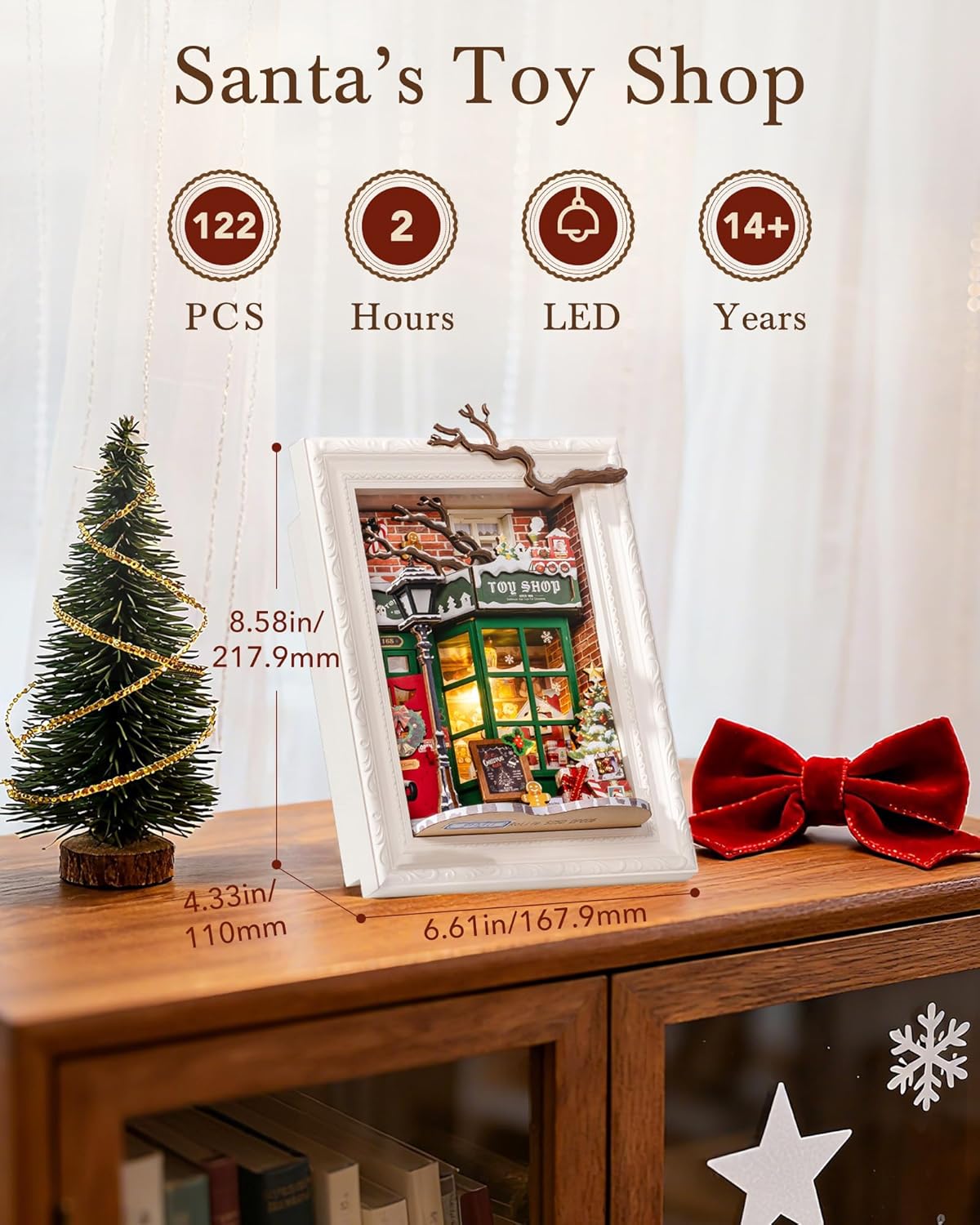
Welcome to the enchanting world of the ROBOTIME Santa's Toy Shop 3D Puzzle. This DIY miniature house kit offers a relaxing and rewarding building experience, culminating in a charming Christmas-themed photo frame model. Designed for individuals aged 14 and up, this kit allows you to create a festive decorative piece with intricate details and built-in LED lighting.
Please read this manual carefully before beginning assembly to ensure a smooth and enjoyable building process.
2. ข้อมูลด้านความปลอดภัย
This product contains small parts and is not suitable for children under 3 years due to choking hazards. Adult supervision is recommended during assembly, especially for younger builders within the recommended age range.
- Keep all components away from open flames or high heat sources.
- กำจัดวัสดุบรรจุภัณฑ์อย่างถูกต้อง
- Exercise caution when handling small tools (e.g., scissors, tweezers) that may be used during assembly.
3. เนื้อหาบรรจุภัณฑ์
Your ROBOTIME Santa's Toy Shop kit includes all necessary components for assembly. Please verify that all parts are present before starting.
- Pre-cut wooden sheets for structural components and decorative elements.
- Various paper-cutting parts for detailed decorations.
- ส่วนประกอบและสายไฟของไฟ LED
- Assembly tools (e.g., tweezers, double-sided tape).
- Detailed instruction manual with visual guides.
- Product Safety Instructions.
ภาพที่ 3.1: เกินview of the kit contents, including wooden sheets, instructions, and various small parts.
4. Setup & Assembly Instructions
The assembly process is designed to be beginner-friendly, primarily relying on visual instructions. No glue or painting is required for basic assembly, though external craft glue may be used for enhanced durability of smaller components.
4.1 การเตรียมตัว
- แกะส่วนประกอบ: Carefully remove all parts from the packaging. Organize them by type or according to the numbering in the instruction manual.
- Review คำแนะนำ: Familiarize yourself with the visual instruction booklet. Pay close attention to the icon illustrations and assembly sequence.
- เตรียมแบตเตอรี่: You will need 2 AAA/LR03/AM4 1.5V batteries for the LED lighting (not included). Install them when instructed.
- Optional: Additional Adhesive: While the kit includes double-sided tape, some users find that a small amount of craft glue (not included) can provide stronger adhesion for delicate or frequently handled pieces.
4.2 ขั้นตอนการประกอบ
Follow the step-by-step visual guide provided in your kit's instruction booklet. The general process involves:
- การก่อสร้างกรอบ: Begin by assembling the main frame of the miniature toy shop.
- รายละเอียดภายใน: Add the interior elements such as shelves, counters, and miniature toys.
- รายละเอียดภายนอก: Attach exterior features like the "TOY SHOP" sign, lamppost, and snowy ground elements.
- LED Lighting Installation: Integrate the LED light components as shown in the manual. Ensure correct polarity when connecting wires.
- รายละเอียดสุดท้าย: Place any remaining decorative items and ensure all connections are secure.

ภาพที่ 4.1: A builder carefully placing a small component using tweezers, demonstrating the intricate assembly process.

ภาพที่ 4.2: รายละเอียด view of some of the delicate designs and miniature elements that comprise the toy shop, such as the door wreath and tiny gift boxes.
5. คู่มือการใช้งาน
5.1 ไฟ LED
Once the assembly is complete and batteries are installed, locate the power switch for the LED lights. This switch is typically discreetly placed on the back or side of the model. Flip the switch to the 'ON' position to illuminate your miniature toy shop.
- ตรวจสอบให้แน่ใจว่าใส่แบตเตอรี่อย่างถูกต้องและมีขั้วที่เหมาะสม
- If lights do not turn on, check battery placement and replace batteries if necessary.
6. การบำรุงรักษา
6.1 การทำความสะอาด
To maintain the appearance of your miniature toy shop, gently dust it with a soft, dry cloth or a soft brush. Avoid using liquid cleaners or abrasive materials, as these may damage the wooden components or delicate decorations.
6.2 พื้นที่จัดเก็บ
When not on display, store the model in a cool, dry place away from direct sunlight and extreme temperatures. Keeping it in its original packaging or a protective box can help prevent dust accumulation and accidental damage.
7 การแก้ไขปัญหา
- ไฟ LED ไม่ทำงาน:
- Check if the batteries are inserted correctly with the positive (+) and negative (-) terminals aligned.
- Ensure the batteries are fresh. Replace them if they are old or depleted.
- Verify all wiring connections are secure and not loose.
- Pieces Not Staying Together:
- Ensure that pieces are fully inserted into their designated slots.
- If using the provided double-sided tape, ensure surfaces are clean and dry before application. Apply firm pressure for several seconds.
- For small or frequently stressed components, consider using a small amount of quick-drying craft glue (not included) for a more permanent bond.
- ชิ้นส่วนที่ขาดหายหรือเสียหาย:
- Carefully re-check all packaging materials. Small parts can sometimes be overlooked.
- Contact ROBOTIME customer support (see Section 9) with details of the missing or damaged part, including the part number from the manual.
8. ข้อมูลจำเพาะ
| คุณสมบัติ | รายละเอียด |
|---|---|
| ยี่ห้อ | โรโบไทม์ |
| หมายเลขรุ่น | RBT-DP006 |
| ขนาดสินค้า | 6.6 x 4 x 8.5 นิ้ว (16.8 x 10.2 x 21.6 ซม.) |
| น้ำหนักสินค้า | 2.01 ปอนด์ (0.91 กก.) |
| อายุที่แนะนำ | 14 ปีขึ้นไป |
| ระยะเวลาในการประกอบ (โดยประมาณ) | 2-5 hours (depending on individual pace) |
| แหล่งพลังงานสำหรับ LED | 2 x AAA/LR03/AM4 1.5V batteries (not included) |
9. การรับประกันและการสนับสนุน
9.1 การรับประกันสินค้า
ROBOTIME products are manufactured with quality and care. For specific warranty details regarding your Santa's Toy Shop 3D Puzzle, please refer to the warranty information included in your product packaging or visit the official ROBOTIME website. Typically, products are covered against manufacturing defects.
9.2 การสนับสนุนลูกค้า
If you encounter any issues during assembly, have questions about your product, or require assistance with missing/damaged parts, please contact ROBOTIME customer support. Contact information can usually be found on the product packaging or on the official ROBOTIME website. Please have your model number (RBT-DP006) and purchase details ready when contacting support.
หากต้องการข้อมูลเพิ่มเติม โปรดเยี่ยมชม ร้าน ROBOTIME บน Amazon.


