การแนะนำ
This manual provides comprehensive instructions for the setup, operation, and maintenance of your Trevi PJ 3030 Digital Projection Clock. Please read this manual carefully before using the device to ensure proper function and longevity.
สินค้าเกินview
The Trevi PJ 3030 is a versatile digital clock designed to display time, date, and temperature, with the added feature of time projection. It includes a backlit display for clear readability and a programmable alarm function.
ส่วนประกอบ
- จอแสดงผลแบบดิจิตอล
- เลนส์ฉายภาพ
- Control Buttons (AL, UP, DOWN, SET, MODE)
- ช่องใส่แบตเตอรี่
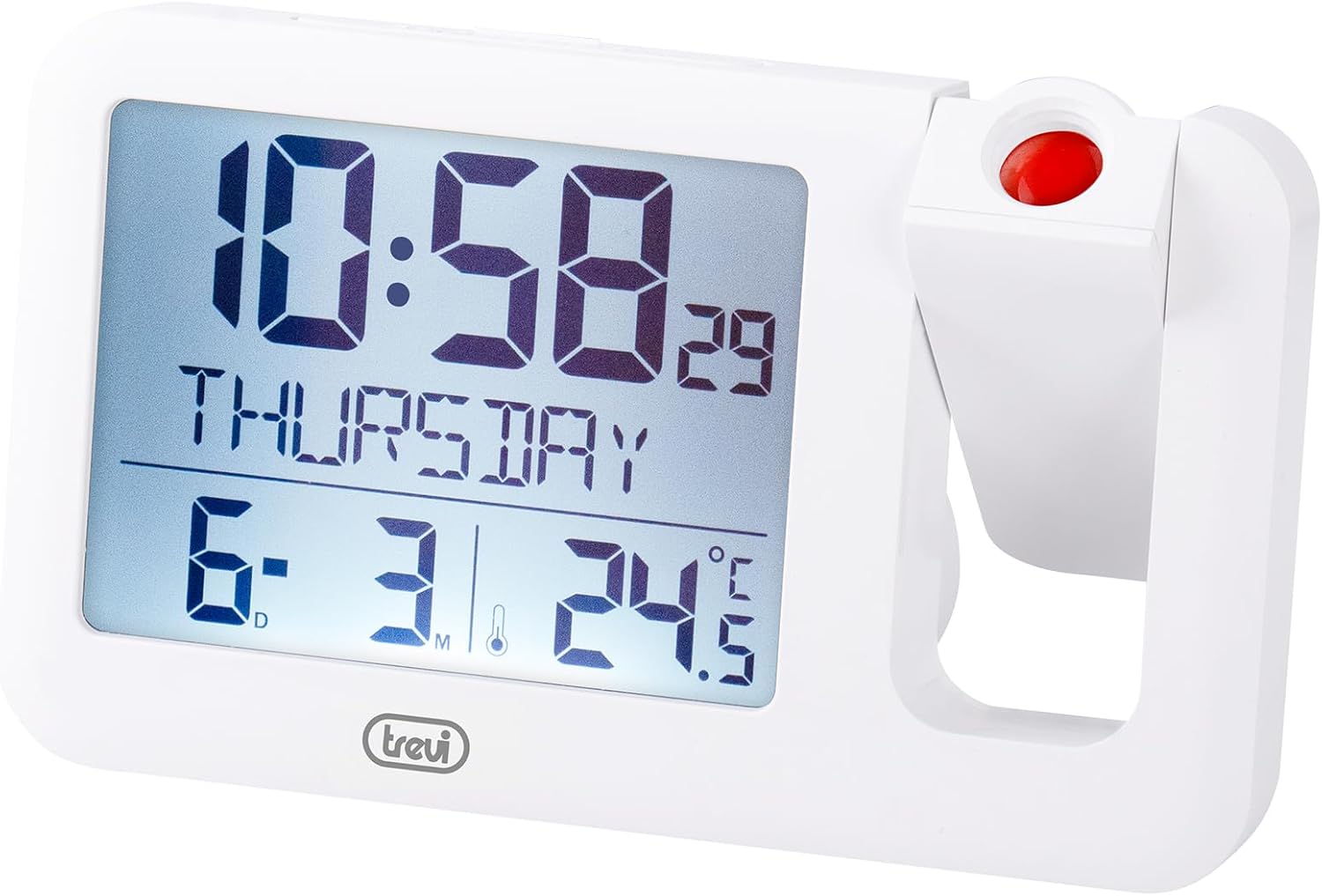
รูปที่ 1: ด้านหน้า view of the Trevi PJ 3030 Digital Projection Clock. The image shows the main digital display on the left, indicating time, day, date, and temperature. On the right, the adjustable projection lens is visible with a red button on top.
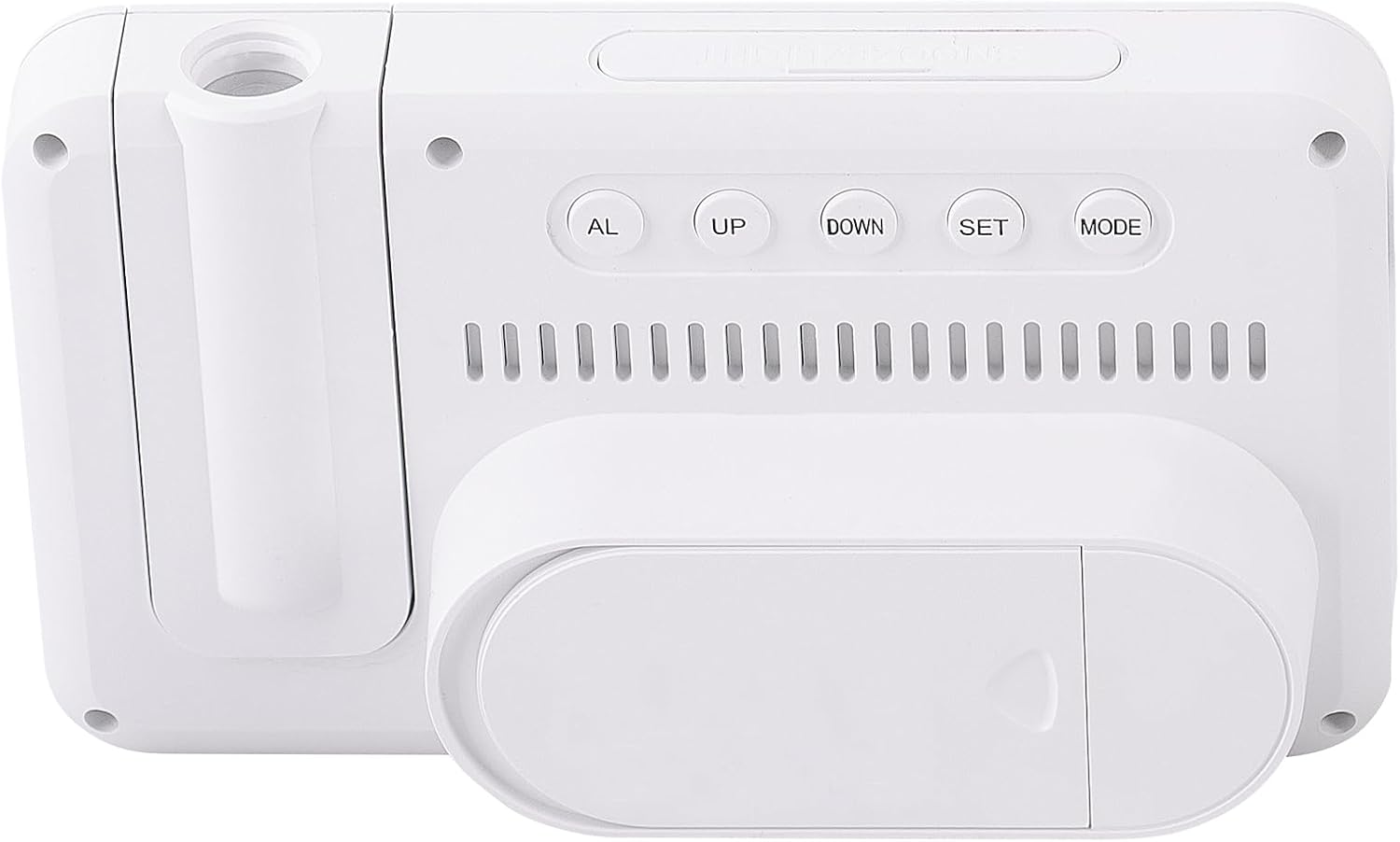
รูปที่ 2: กลับ view of the Trevi PJ 3030 Digital Projection Clock. This view highlights the control buttons: AL, UP, DOWN, SET, and MODE, arranged horizontally. Below the buttons, ventilation slots are visible, and at the bottom, the battery compartment cover is shown.
การตั้งค่า
การติดตั้งแบตเตอรี่
- ค้นหาช่องใส่แบตเตอรี่ที่ด้านหลังของอุปกรณ์ (ดูรูปที่ 2)
- เปิดฝาช่องใส่แบตเตอรี่
- ใส่แบตเตอรี่ AAA 3 ก้อน (ไม่รวมอยู่ในชุด) โดยให้ตรงกับเครื่องหมายขั้ว (+/-) ภายในช่องใส่แบตเตอรี่
- ปิดฝาช่องใส่แบตเตอรี่ให้แน่น
บันทึก: The device requires 3 AAA batteries for operation. Batteries are not included with the product.
คำแนะนำการใช้งาน
การตั้งเวลาและวันที่
- กดปุ่ม โหมด กดปุ่มซ้ำๆ จนกว่าหน้าจอแสดงเวลาจะเริ่มกะพริบ
- ใช้ UP or ลง ปุ่มเพื่อปรับชั่วโมง
- กด ชุด to confirm the hour and move to minute adjustment.
- ใช้ UP or ลง ปุ่มปรับนาที
- กด ชุด to confirm the minutes and move to year adjustment.
- ดำเนินการตามกระบวนการนี้ต่อไป โดยใช้ UP/ลง เพื่อปรับและ ชุด to confirm, for setting the year, month, and day.
- เมื่อตั้งค่าเสร็จเรียบร้อยแล้ว ให้กดปุ่ม โหมด เพื่อออกจากโหมดการตั้งค่า
การตั้งปลุก
- กดปุ่ม AL กดปุ่มเพื่อเข้าสู่โหมดตั้งค่านาฬิกาปลุก เวลาปลุกจะกะพริบ
- ใช้ UP or ลง ปุ่มเพื่อปรับชั่วโมงการปลุก
- กด ชุด to confirm the alarm hour and move to minute adjustment.
- ใช้ UP or ลง ปุ่มสำหรับปรับนาทีปลุก
- กด ชุด to confirm the alarm minutes.
- กด AL again to activate or deactivate the alarm. An alarm icon will appear on the display when activated.
การใช้คุณสมบัติการฉายภาพ
The Trevi PJ 3030 can project the time onto a ceiling or wall.
- Locate the projection lens on the right side of the clock (refer to Figure 1).
- Press the red button located on top of the projection lens to activate the projection.
- Adjust the angle of the projection lens manually to direct the time display to your desired surface.
- The projection will remain active for a short period and then turn off automatically to conserve battery power.
Changing Temperature Unit (°C / °F)
The clock displays temperature in Celsius (°C) or Fahrenheit (°F).
- ในโหมดแสดงเวลาปกติ ให้กดปุ่ม ลง ปุ่มสำหรับสลับระหว่างองศาเซลเซียสและองศาฟาเรนไฮต์
การซ่อมบำรุง
- Clean the clock's surface with a soft, dry cloth. Do not use abrasive cleaners or solvents.
- ควรเก็บอุปกรณ์ให้ห่างจากแสงแดดโดยตรง อุณหภูมิที่สูงจัด และความชื้นสูง
- หากไม่ได้ใช้งานนาฬิกาเป็นเวลานาน ควรถอดแบตเตอรี่ออกเพื่อป้องกันการรั่วไหล
การแก้ไขปัญหา
| ปัญหา | สาเหตุที่เป็นไปได้ | สารละลาย |
|---|---|---|
| จอแสดงผลว่างเปล่าหรือมืดลง | แบตเตอรี่ต่ำหรือหมด | เปลี่ยนแบตเตอรี่เป็นแบตเตอรี่ AAA ใหม่ ตรวจสอบให้แน่ใจว่าขั้วถูกต้อง |
| Projection is not visible or dim. | Projection feature not activated; insufficient ambient darkness; projection lens obstructed. | Press the red projection button. Ensure the room is dark enough. Clean the projection lens if necessary. |
| สัญญาณเตือนภัยไม่ดัง | สัญญาณเตือนไม่ทำงาน; ตั้งเวลาปลุกไม่ถูกต้อง | Ensure the alarm icon is visible on the display. Re-check alarm time settings. |
| แสดงเวลา/วันที่ไม่ถูกต้อง | Time/date not set correctly after battery change or initial setup. | ทำตามคำแนะนำในหัวข้อ "การตั้งเวลาและวันที่" เพื่อรีเซ็ต |
ข้อมูลจำเพาะ
- แบบอย่าง: Trevi PJ 3030
- ประเภทจอภาพ: ดิจิตอล, มีไฟแบ็คไลท์
- ฟังก์ชั่น: Time, Date, Day, Temperature (°C/°F), Alarm, Projection
- แหล่งพลังงาน: 3 x แบตเตอรี่ AAA (ไม่รวม)
- ขนาด : 14.9W x 9H centimetres
- น้ำหนัก: 0.2 กิโลกรัม
- วัสดุ: พลาสติก
- ใช้ในร่ม/กลางแจ้ง: ในร่ม
การรับประกันและการสนับสนุน
สำหรับข้อมูลการรับประกันและการบริการลูกค้า โปรดดูเอกสารที่แนบมาพร้อมกับสินค้าที่ซื้อ หรือเยี่ยมชมเว็บไซต์อย่างเป็นทางการของ Trevi webไซต์นี้ โปรดเก็บหลักฐานการซื้อไว้เพื่อใช้ยืนยันการรับประกัน


