1. บทนำ
This manual provides comprehensive instructions for the installation, setup, operation, and maintenance of your Ctronics 4K Outdoor Security Camera, model CTIPC-870. This camera is designed for outdoor surveillance, offering high-resolution video, advanced night vision capabilities, intelligent detection features, and flexible connectivity options.
2. ข้อมูลด้านความปลอดภัย
- Ensure the power supply used is compatible with the camera's voltagข้อกำหนด e (12 โวลต์)
- ห้ามให้กล้องสัมผัสกับอุณหภูมิที่สูงเกินขอบเขตการใช้งาน
- Avoid direct exposure of the lens to strong light sources for extended periods.
- Installation should be performed by qualified personnel if working at heights or with electrical connections.
- Keep the camera and its components away from children.
- อย่าพยายามถอดประกอบหรือดัดแปลงกล้อง เพราะจะทำให้การรับประกันเป็นโมฆะ
3. เนื้อหาบรรจุภัณฑ์
ตรวจสอบว่ามีรายการทั้งหมดอยู่ในแพ็คเกจ:
- Ctronics 4K Security Camera (CTIPC-870)
- อะแดปเตอร์แปลงไฟ
- สกรูยึดและปลั๊กผนัง
- ชุดกันน้ำสำหรับสายเคเบิลเครือข่าย
- คู่มือการใช้งาน (เอกสารนี้)
4. สินค้าหมดview
The Ctronics CTIPC-870 is a robust outdoor security camera featuring a dome shape and metal construction. It includes a high-resolution lens, infrared LEDs, and spotlights for enhanced night vision. An antenna is present for wireless connectivity.

ภาพที่ 4.1: ด้านหน้า view of the Ctronics CTIPC-870 camera, showing the lens, IR LEDs, and spotlights.
5. การติดตั้ง
The CTIPC-870 camera is designed for easy wall or ceiling mounting. Follow these general steps for installation:
- เลือกตำแหน่ง: เลือกสถานที่กลางแจ้งที่เหมาะสมซึ่งให้ผลลัพธ์ตามต้องการ viewมุมและอยู่ในระยะของเครือข่าย Wi-Fi ของคุณและแหล่งพลังงาน
- การติดตั้ง: Secure the metal mounting plate to the chosen surface using the provided screws and wall plugs. Ensure the surface is strong enough to support the camera's weight (approximately 5.06 pounds).
- ติดกล้อง: Hang the camera onto the secured mounting plate.
- การเชื่อมต่อไฟฟ้า: Connect the power adapter to the camera and a power outlet.
- สายเคเบิลเครือข่าย (ไม่จำเป็น): If using a wired connection, connect an Ethernet cable and use the waterproof kit to protect the connection.
6. การตั้งค่า
Setting up your Ctronics camera involves connecting it to your network and configuring it via the mobile application.
6.1. การดาวน์โหลดและติดตั้งแอป
Download the official "Ctronics Pro" app from your device's app store (iOS App Store or Google Play Store).

Image 6.1: Screenshots of the Ctronics Pro App and HIP2P Client interfaces on mobile and desktop devices.
6.2. Bluetooth Pairing (Quick Setup)
The camera supports quick setup via Bluetooth for initial network configuration.
- ตรวจสอบให้แน่ใจว่าได้เปิดใช้งาน Bluetooth บนสมาร์ทโฟนของคุณแล้ว
- Open the "Ctronics Pro" app and follow the on-screen prompts to add a new device.
- The app will detect the camera via Bluetooth, allowing for a streamlined Wi-Fi connection process.

Image 6.2: Visual representation of the Bluetooth networking process for quick camera setup.
6.3. การเชื่อมต่อ Wi-Fi
The camera supports dual-band Wi-Fi (2.4GHz and 5GHz) for flexible and stable connections.
- ไวไฟ 2.4GHz: Provides better coverage for larger spaces.
- ไวไฟ 5GHz: Offers higher speed connectivity for smooth performance.

Image 6.3: Diagram illustrating the camera's dual-band Wi-Fi capability (2.4GHz and 5GHz).
7. คู่มือการใช้งาน
7.1. 4K UHD Resolution and 30x Optical Zoom
The camera captures video in true 4K Ultra HD (3840x2160) resolution. The 30x optical zoom allows for clear magnification of distant objects without loss of detail.

Image 7.1: Comparison showing the clarity of 4K HD surveillance versus 5MP resolution.

ภาพที่ 7.2: อดีตample of 30x optical zoom, showing a distant car brought into clear focus.

Image 7.3: Visual demonstration of 30x zoom capabilities, showing progressive magnification from 1x to 30x.
7.2. การหมุน การเอียง และการซูม (PTZ)
The camera offers 355° pan and 90° tilt functionality, providing 360° visual coverage. Control these movements via the Ctronics Pro app.
7.3. โหมดการมองเห็นตอนกลางคืน
The CTIPC-870 features advanced night vision with two modes:
- กล้องมองกลางคืนอินฟราเรด (IR): Up to 180 meters in black and white.
- การมองเห็นตอนกลางคืนแบบสีเต็มรูปแบบ: Up to 80 meters, providing vivid color footage even in low light conditions, enhanced by 4 convex lenses.

Image 7.4: Close-up of the camera's advanced 5° convex lens design, enhancing night vision performance.

Image 7.5: Visual comparison of 180 meters IR night vision (black and white) and 80 meters full-color night vision.

Image 7.6: Comparison of night vision quality with the Sony IMX415 sensor versus other cameras.
7.4. AI Smart Detection and Auto Tracking
The camera utilizes AI to accurately identify humans, vehicles, and pets, reducing false alarms. When a person is detected, the camera can automatically track the subject with intelligent zoom.
- การตรวจจับ: Receive real-time alerts for specific events.
- ติดตามอัตโนมัติ: The camera follows detected subjects. After tracking, it can return to its original guard position.
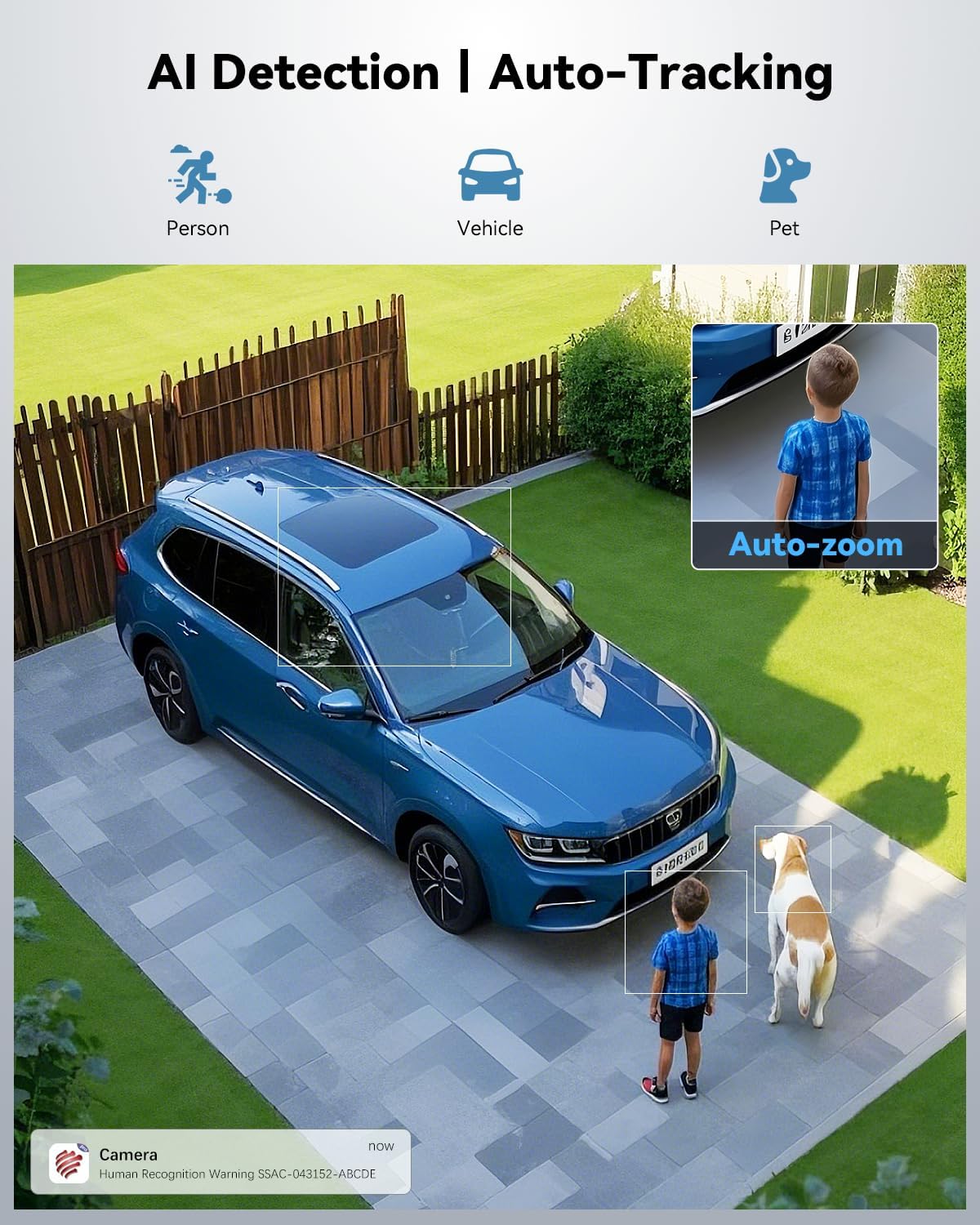
Image 7.7: Illustration of AI detection identifying a person, vehicle, and pet, with an auto-zoom feature on the detected person.

Image 7.8: Demonstration of the camera's auto-tracking capability with automatic zoom on a moving subject.
7.5. Presets and Patrol Lines
Configure up to 60 preset points and 2 patrol lines for automated surveillance of specific areas.

Image 7.9: Diagram showing 60 preset points and 2 patrol lines configured for 360-degree coverage of a property.

Image 7.10: Illustration highlighting the availability of 60 preset points and 2 patrol lines for surveillance.
7.6. Sound and Light Alerts
When an event is detected, the camera can trigger a custom voice alert, activate a spotlight, and send instant notifications to your app.

Image 7.11: Depiction of the camera's powerful sound and light alert system, including siren, custom alarm sounds, and spotlight activation.

ภาพที่ 7.12: จบแล้วview of the camera's warning system, featuring siren, spotlight, and customizable alarm sounds.
7.7. การปิดบังความเป็นส่วนตัว
Utilize the privacy masking feature to block out sensitive areas from recording, ensuring privacy in specific zones.

ภาพที่ 7.13: อดีตamples of user-defined video masks applied to different areas for effective privacy protection.
7.8. ตัวเลือกการจัดเก็บ
กล้องนี้มีโซลูชันการจัดเก็บข้อมูลที่ยืดหยุ่นสำหรับการบันทึกของคุณ:
- การ์ด MicroSD: รองรับหน่วยความจำสูงสุด 256GB (ไม่รวมอยู่ในชุด)
- การเก็บข้อมูลบนคลาวด์: Secure cloud storage with a 7-day free trial available.
- FTP/NVR: Compatible with FTP servers and Network Video Recorders for continuous 24/7 recording.

ภาพที่ 7.14: จบแล้วview of connectivity and storage options, including dual-band WiFi, NVR, TF card slot, and cloud storage.

ภาพที่ 7.15: รายละเอียด view of cloud storage options (with 7-day trial) and the camera's support for up to 256GB TF card storage.
8. การบำรุงรักษา
- การทำความสะอาด: ควรทำความสะอาดเลนส์กล้องเป็นประจำด้วยผ้าแห้งเนื้อนุ่ม เพื่อให้ได้ภาพที่คมชัด ห้ามใช้สารเคมีรุนแรง
- อัพเดตเฟิร์มแวร์: Check the Ctronics Pro app periodically for available firmware updates to ensure optimal performance and security.
- การตรวจสอบสายเคเบิล: Periodically inspect power and network cables for any signs of wear or damage, especially for outdoor installations.
9 การแก้ไขปัญหา
หากคุณพบปัญหาเกี่ยวกับกล้องของคุณ โปรดดูวิธีแก้ไขทั่วไปต่อไปนี้:
- ไม่มีไฟฟ้า: ตรวจสอบให้แน่ใจว่าได้เสียบอะแดปเตอร์แปลงไฟเข้ากับกล้องและเต้ารับไฟฟ้าที่ใช้งานได้สนิทแล้ว
- ไม่มีการเชื่อมต่อ Wi-Fi: Verify your Wi-Fi network is active and the camera is within range. Re-attempt Bluetooth pairing or manual Wi-Fi setup via the app. Ensure you are connecting to the correct 2.4GHz or 5GHz network.
- คุณภาพของภาพต่ำ: Clean the camera lens. Check for obstructions in the camera's field of view. Ensure sufficient lighting for optimal night vision performance.
- สัญญาณเตือนผิดพลาดบ่อยครั้ง: Adjust the AI detection sensitivity settings in the app. Define specific detection zones or privacy masks to exclude irrelevant areas.
- Auto Tracking Issues: Ensure the camera's PTZ mechanism is not obstructed. Verify that auto-tracking is enabled in the app settings.
- ปัญหาการเชื่อมต่อแอพ: Ensure your smartphone has a stable internet connection. Restart the app or your phone.
10. ข้อมูลจำเพาะ
| คุณสมบัติ | ข้อมูลจำเพาะ |
|---|---|
| ชื่อรุ่น | CTIPC-870 |
| การใช้งานภายใน/ภายนอกอาคาร | กลางแจ้ง |
| ความละเอียดในการจับภาพวิดีโอ | 3840x2160 (4K UHD) |
| ความละเอียดของภาพนิ่งที่มีประสิทธิภาพ | 8 MP |
| ซูมออปติคอล | 30 เท่า |
| มุมก้าน / เอียง | แพน 355°, เอียง 90° |
| IR Night Vision ช่วง | 180 เมตร |
| Color Night Vision Range | 80 เมตร |
| โปรโตคอลการเชื่อมต่อ | Wi-Fi (Dual-Band 2.4GHz/5GHz), Bluetooth |
| ตัวเลือกการจัดเก็บข้อมูล | MicroSD (up to 256GB), Cloud, FTP, NVR |
| การตรวจหา AI | Human, Vehicle, Pet |
| วัสดุ | โลหะ |
| ระดับความต้านทานต่อน้ำ | IP66 |
| แหล่งพลังงาน | เครื่องใช้ไฟฟ้าแบบมีสาย (12 โวลต์, 12 วัตต์) |
| ขนาดรายการ (ยาว x กว้าง x สูง) | 7.48 x 5.51 x 11.02 นิ้ว |
| น้ำหนักสินค้า | 5.06 ปอนด์ |
| ยูพีซี | 798394955586 |
11. การรับประกันและการสนับสนุน
Ctronics products are covered by a manufacturer's warranty. For specific warranty details, technical support, or service inquiries, please refer to the official Ctronics webหรือติดต่อฝ่ายสนับสนุนลูกค้าโดยตรง โปรดเก็บใบเสร็จรับเงินไว้เป็นหลักฐานการซื้อ


