1. บทนำ
This manual provides detailed instructions for the safe and efficient use of your Music Sound DRIFT Wireless In-Ear Earbuds. Please read this manual thoroughly before using the product and retain it for future reference.
2. เนื้อหาบรรจุภัณฑ์
ตรวจสอบว่ามีสินค้าทั้งหมดที่ระบุไว้ด้านล่างอยู่ในแพ็คเกจของคุณ:
- Music Sound DRIFT Wireless Earbuds (Left and Right)
- เคสชาร์จไฟ
- สายชาร์จ USB-C
- คู่มือการใช้งาน
- จุกหูฟังหลายขนาด (S, M, L)
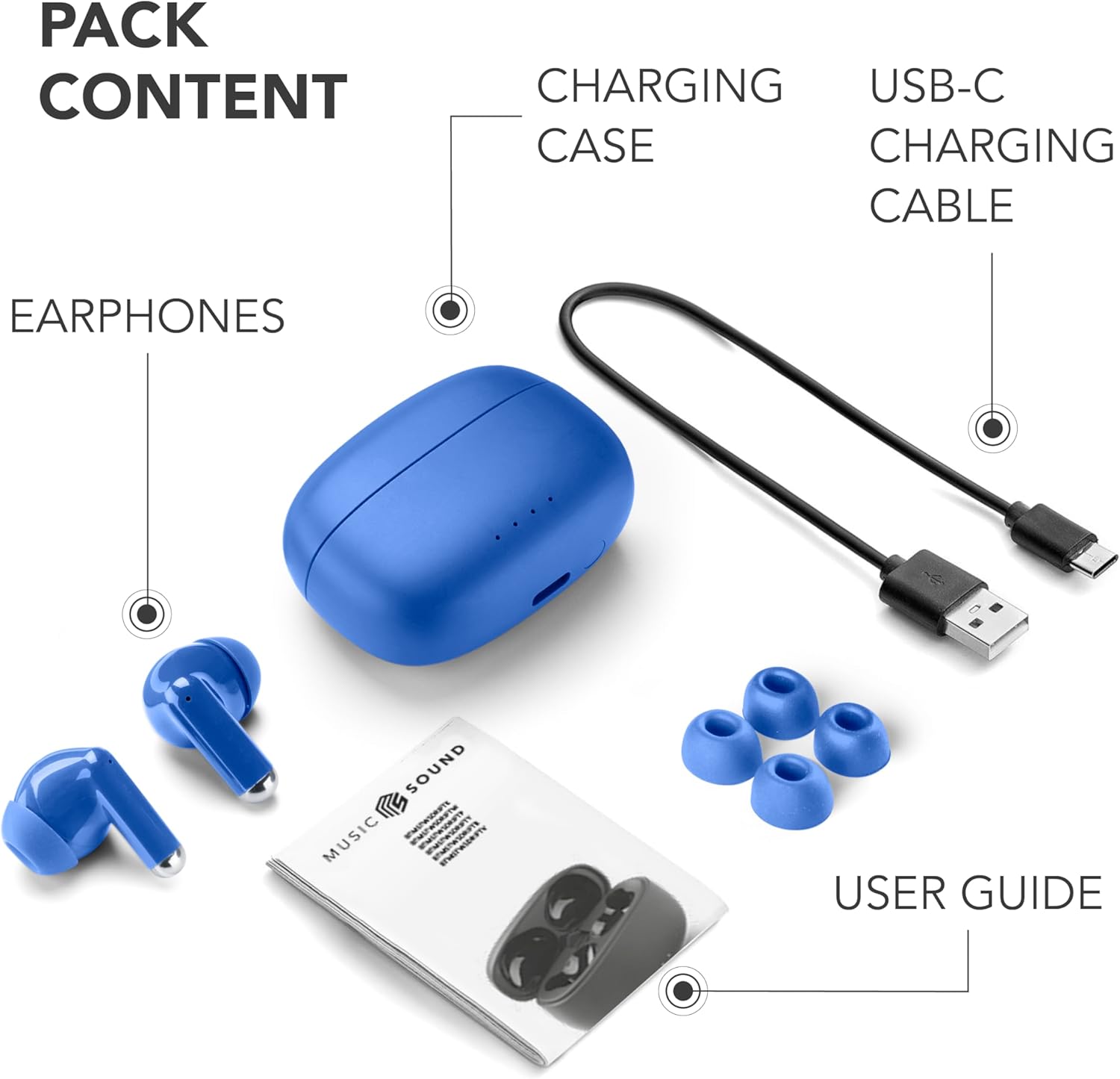
Image: Contents of the Music Sound DRIFT Earbuds package, including the earbuds, charging case, USB-C cable, user guide, and various ear tip sizes.
3. สินค้าหมดview
The Music Sound DRIFT earbuds feature an in-ear design for a secure fit and immersive audio. The compact charging case provides extended battery life and easy portability.

Image: The Music Sound DRIFT wireless earbuds resting in their open blue charging case, showcasing the sleek design and LED indicators on the case.
คุณสมบัติหลัก:
- การออกแบบแบบใส่ในหู: Ensures a comfortable and stable fit for extended listening.
- เคสชาร์จขนาดกะทัดรัด: Easy to carry, providing additional charges on the go.
- การเชื่อมต่อบลูทูธ: Wireless audio experience with auto-pairing functionality.
- ระบบควบคุมแบบสัมผัส: Manage music playback, calls, and voice assistant directly from the earbuds.
- เวลาเล่นที่ขยาย: แบตเตอรี่ใช้งานได้นานสูงสุด 22 ชั่วโมงพร้อมเคสชาร์จ

Image: Diagram illustrating the touch control areas on the earbuds for functions like calls, volume, and track navigation, along with the LED battery level indicator.
4. การตั้งค่า
4.1 การชาร์จเริ่มต้น
- ใส่หูฟังเอียร์บัดทั้งสองข้างลงในกล่องชาร์จ
- เชื่อมต่อสายชาร์จ USB-C เข้ากับพอร์ตชาร์จบนเคส และเชื่อมต่อปลายอีกด้านหนึ่งเข้ากับอะแดปเตอร์แปลงไฟ USB (ไม่ได้รวมอยู่ในชุด)
- The LED indicators on the case will illuminate to show charging status. A full charge typically takes approximately 2 hours.
- เมื่อชาร์จเต็มแล้ว ให้ถอดสายชาร์จออก
4.2 การจับคู่กับอุปกรณ์
- ตรวจสอบให้แน่ใจว่าได้ชาร์จเอียร์บัดแล้ว
- เปิดกล่องชาร์จ หูฟังจะเข้าสู่โหมดจับคู่โดยอัตโนมัติ และไฟแสดงสถานะจะกะพริบ
- เปิดใช้งาน Bluetooth บนอุปกรณ์ของคุณ (สมาร์ทโฟน แท็บเล็ต ฯลฯ)
- ค้นหา "Music Sound DRIFT" in the list of available Bluetooth devices.
- Select "Music Sound DRIFT" to connect. Once connected, the earbud indicator lights will stop flashing.
- เมื่อถอดหูฟังออกจากเคส หูฟังจะเชื่อมต่อกับอุปกรณ์ที่จับคู่ไว้ล่าสุดโดยอัตโนมัติ หากเปิดใช้งาน Bluetooth บนอุปกรณ์
5. คู่มือการใช้งาน
5.1 เปิด/ปิดเครื่อง
- เปิดเครื่อง: เปิดเคสชาร์จ หรือกดบริเวณควบคุมแบบสัมผัสบนหูฟังทั้งสองข้างค้างไว้ 3 วินาที
- หมดแรง: วางหูฟังกลับเข้าไปในกล่องชาร์จและปิดฝา หรือกดบริเวณควบคุมแบบสัมผัสบนหูฟังทั้งสองข้างค้างไว้ 5 วินาที
5.2 ระบบควบคุมแบบสัมผัส
The Music Sound DRIFT earbuds feature intuitive touch controls. Refer to the diagram below for common functions:
| การทำงาน | การกระทำ |
|---|---|
| เล่น/หยุดเพลง | แตะครั้งเดียวที่หูฟังเอียร์บัดข้างใดข้างหนึ่ง |
| รับสาย/วางสาย | แตะครั้งเดียวที่หูฟังเอียร์บัดข้างใดข้างหนึ่ง |
| ปฏิเสธการรับสาย | กดหูฟังเอียร์บัดข้างใดข้างหนึ่งค้างไว้ |
| เพลงถัดไป | แตะสองครั้งที่หูฟังด้านขวา |
| เพลงก่อนหน้า | แตะสองครั้งที่หูฟังด้านซ้าย |
| เปิดใช้งานผู้ช่วยเสียง | แตะสามครั้งที่หูฟังข้างใดข้างหนึ่ง |
5.3 การชาร์จหูฟังและเคส
The earbuds provide up to 5 hours of playback on a single charge, and the charging case extends the total playtime to 22 hours.

Image: Graphic illustrating the total playtime of 22 hours with the charging case and 5 hours on a single earbud charge.
- การชาร์จหูฟัง: Place them into the charging case. They will charge automatically.
- เคสชาร์จ: Connect the USB-C cable to the case and a power source. The LED indicators on the case show the charging status.
6. การบำรุงรักษา
6.1 การทำความสะอาด
- เช็ดหูฟังและกล่องชาร์จเบาๆ ด้วยผ้าแห้งนุ่มที่ไม่เป็นขุย
- ห้ามใช้สารทำความสะอาดที่มีฤทธิ์กัดกร่อน แอลกอฮอล์ หรือตัวทำละลายเคมี
- ตรวจสอบให้แน่ใจว่าหน้าสัมผัสการชาร์จบนทั้งหูฟังและเคสสะอาดและแห้ง
6.2 พื้นที่จัดเก็บ
- เมื่อไม่ได้ใช้งาน ให้เก็บหูฟังไว้ในกล่องชาร์จเพื่อปกป้องหูฟังและชาร์จไฟให้หูฟังอยู่เสมอ
- เก็บผลิตภัณฑ์ไว้ในที่แห้งและเย็น หลีกเลี่ยงอุณหภูมิที่สูงและแสงแดดโดยตรง
7 การแก้ไขปัญหา
| ปัญหา | สารละลาย |
|---|---|
| หูฟังเอียร์บัดไม่จับคู่ | Ensure earbuds are charged. Turn off and on Bluetooth on your device. Forget "Music Sound DRIFT" from your device's Bluetooth list and re-pair. |
| เอียร์บัดตัวเดียวเท่านั้นที่ใช้งานได้ | Place both earbuds back into the charging case, close the lid, then open it again. Ensure both earbuds are charged. |
| ไม่มีเสียง | Check device volume. Ensure earbuds are properly connected. Try re-pairing. |
| เคสชาร์จไม่ชาร์จ | Check USB-C cable connection and power adapter. Try a different cable or power source. |
8. ข้อมูลจำเพาะ
| คุณสมบัติ | รายละเอียด |
|---|---|
| ชื่อรุ่น | BTMSTWSDRIFTB |
| ยี่ห้อ | เสียงดนตรี |
| เทคโนโลยีการเชื่อมต่อ | ไร้สาย (บลูทูธ 5) |
| ฟอร์มแฟกเตอร์ | อินเอียร์ |
| วิธีการควบคุม | สัมผัส |
| เวลาเล่นทั้งหมด (รวมเคส) | นานถึง 22 ชั่วโมง |
| ระยะเวลาใช้งานหูฟัง (ต่อการชาร์จหนึ่งครั้ง) | นานถึง 5 ชั่วโมง |
| อินเตอร์เฟซการชาร์จ | ยูเอสบี-ซี |
| วัสดุ | พลาสติก |
| น้ำหนัก | 140 g (product) |
| สี | สีฟ้า |
9. การรับประกันและการสนับสนุน
For warranty information and customer support, please refer to the contact details provided on the product packaging or the official Music Sound webไซต์นี้ โปรดเก็บหลักฐานการซื้อไว้เพื่อใช้ยืนยันการรับประกัน


