1. บทนำ
The FiiO QX13 is a high-performance portable Digital-to-Analog Converter (DAC) and headphone amplifier designed to deliver exceptional audio quality. Featuring a flagship ESS ES9027PRO 8-channel DAC, powerful TI op-amps, and a vibrant color display, the QX13 enhances your listening experience across various devices.
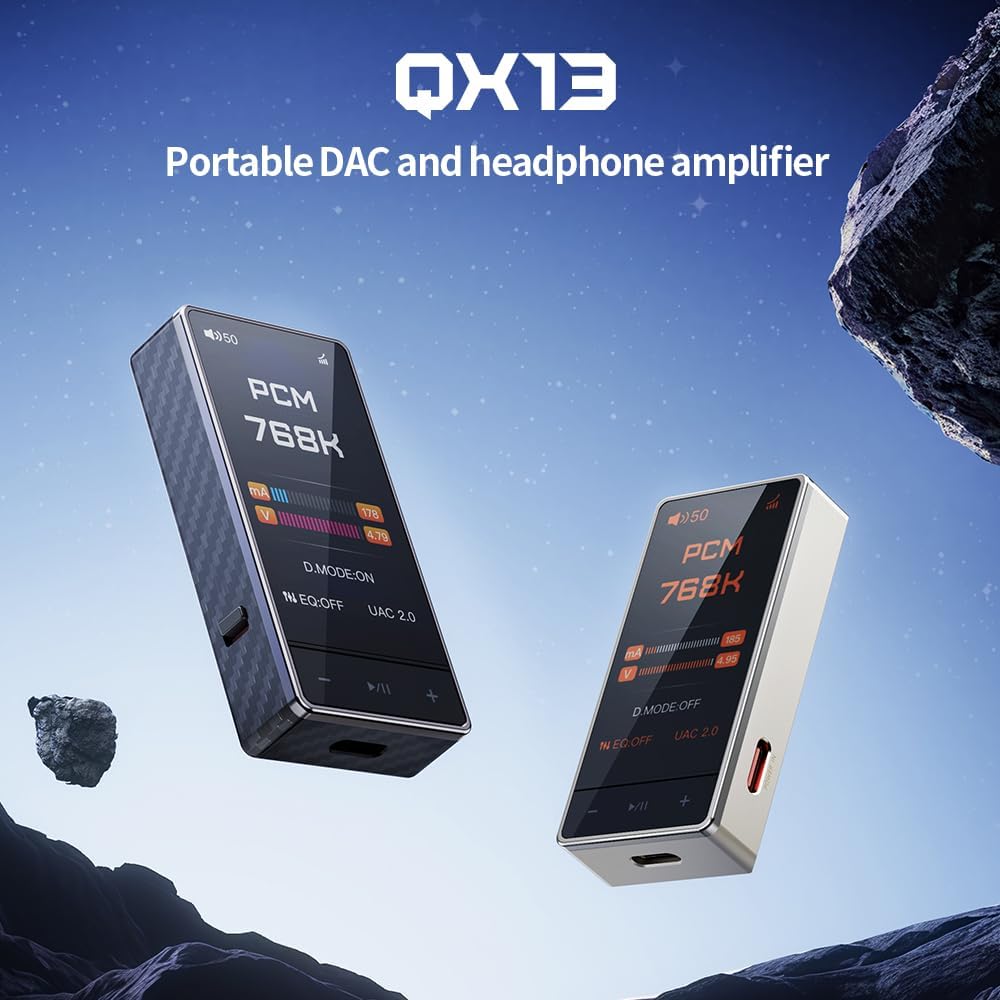
Figure 1: FiiO QX13 Portable DAC Amplifier in Titanium Gold and Black finishes. This image showcases the compact design of the device.
2. เนื้อหาบรรจุภัณฑ์
โปรดตรวจสอบให้แน่ใจว่ามีสินค้าทั้งหมดอยู่ในแพ็คเกจ:
- FiiO QX13 ตัวแปลงสัญญาณดิจิทัลเป็นอนาล็อกแบบพกพา Ampชีวิต
- สาย USB-C ถึง USB-C
- Magnetic leather case
- 8-strand decoding cable
- คู่มือการใช้งาน (เอกสารนี้)
3. อุปกรณ์โอเวอร์view
Familiarize yourself with the main components and features of your FiiO QX13.

รูปที่ 2 : ด้านหน้า view of the FiiO QX13, highlighting its 1.99-inch color display. The display shows "PCM 768K" indicating high-resolution audio playback.
คุณสมบัติหลัก:
- Flagship ESS ES9027PRO 8-Channel DAC: Utilizes a fully differential 8-channel parallel design for ultra-low distortion and studio-level signal accuracy.
- 1.99-Inch Large Color Display: Full-color touchscreen with Corning Gorilla Glass 3 for scratch resistance, supporting dynamic UI themes.
- ผลผลิตอันทรงพลัง: 6x TI High-Performance Op-Amps delivering 900mW per channel, capable of driving high-impedance headphones.
- Magnetic Ecosystem: Compatible with magnetic leather case and E-Stick Power Bank (sold separately) for enhanced portability and desktop setup.
- XMOS 16-Core XU316: Supports up to 768kHz/32bit PCM and DSD512 native decoding, with 10-band high-precision PEQ.
4. การตั้งค่า
4.1 การเชื่อมต่อกับอุปกรณ์ต้นทาง
The FiiO QX13 can be connected to various devices such as laptops, desktops, tablets, and smartphones.
- เชื่อมต่อสาย USB-C: Use the provided USB-C to USB-C cable to connect the QX13 to your source device's USB-C port.
- เชื่อมต่อหูฟัง: Plug your headphones into the appropriate audio output port (3.5mm or 4.4mm balanced) on the QX13.
- เปิดเครื่อง: The QX13 will typically power on automatically when connected to a powered source device.

Figure 3: The magnetic ecosystem allows for easy attachment to smartphones and compatibility with external power banks for extended use.
4.2 การติดตั้งไดรเวอร์ (Windows/Mac)
For optimal performance on Windows or Mac, it may be necessary to install specific drivers. Please visit the official FiiO website for the latest driver downloads and installation instructions for your operating system.
5. คู่มือการใช้งาน
5.1 การทำงานพื้นฐาน
- เปิด/ปิดเครื่อง: The device powers on automatically when connected. To power off, disconnect from the source or use the dedicated power button if available (refer to device specific controls).
- การควบคุมระดับเสียง: Adjust the volume using the physical buttons on the device or through the connected source device.
- แสดงการนำทาง: Use the touchscreen display to navigate through menus and settings.
5.2 Desktop Mode
The QX13 features a patented Desktop Mode for enhanced performance. When connected to an external dedicated power supply (e.g., E-Stick Power Bank), the device can deliver up to 900mW output power per channel.

Figure 4: Illustration of the Patented Desktop Mode, showing increased output power (900mW) compared to non-desktop mode (570mW) and power consumption reduction.
5.3 การตั้งค่าอีควอไลเซอร์ (EQ)
The QX13 supports a 10-band high-precision Parametric Equalizer (PEQ). EQ settings can be adjusted via the device's touchscreen or through the FiiO Control App (available for Android).
- Custom PEQ: Create and save personalized EQ profiles.
- Built-in Presets: Utilize pre-configured sound adjustments.
- การแบ่งปันออนไลน์: Access and share EQ settings with the FiiO community.

รูปที่ 5: เกินview of various features including 3.5mm output, UAC1.0 mode for gaming consoles, 60-step and 120-step volume adjustment, and support for the FiiO Control App.
6. การบำรุงรักษา
- การทำความสะอาด: ใช้ผ้านุ่มและแห้งเช็ดทำความสะอาดอุปกรณ์ หลีกเลี่ยงการใช้สารเคมีรุนแรงหรือวัสดุที่มีฤทธิ์กัดกร่อน
- พื้นที่จัดเก็บ: เก็บอุปกรณ์ไว้ในที่แห้งและเย็น หลีกเลี่ยงแสงแดดโดยตรงและอุณหภูมิที่สูงหรือต่ำเกินไป
- แหล่งพลังงาน: The FiiO QX13 is powered by the connected source device or an external power bank (sold separately). It does not contain an internal battery.
- อัพเดตเฟิร์มแวร์: Periodically check the official FiiO webเว็บไซต์สำหรับอัพเดตเฟิร์มแวร์เพื่อให้มั่นใจถึงประสิทธิภาพการทำงานที่เหมาะสมที่สุดและการเข้าถึงฟีเจอร์ใหม่ๆ
7 การแก้ไขปัญหา
| ปัญหา | สาเหตุที่เป็นไปได้ | สารละลาย |
|---|---|---|
| ไม่มีเสียงออก |
|
|
| เสียงบิดเบี้ยว |
|
|
| คอมพิวเตอร์ไม่รู้จักอุปกรณ์นี้ |
|
|
8. ข้อมูลจำเพาะ
| คุณสมบัติ | รายละเอียด |
|---|---|
| ชื่อรุ่น | คิวเอ็กซ์13 |
| เทคโนโลยีการเชื่อมต่อ | มีสาย |
| วัสดุ | คาร์บอนไฟเบอร์ |
| วิธีการควบคุม | สัมผัส |
| คุณสมบัติพิเศษ | Flagship ESS ES9027PRO 8-Channel DAC, 1.99-inch Color Display, 6x TI High-Performance Op-Amps, Magnetic Ecosystem, Carbon Fiber Body, 10-Band High-Precision PEQ |
| น้ำหนักสินค้า | 8.4 ออนซ์ |
| หมายเลขรุ่นสินค้า | คิวเอ็กซ์13 |
| วันที่พร้อมใช้งานครั้งแรก | 3 กรกฎาคม 2025 |
| สี | Titanium Gold (variant) |
| แจ็คหูฟัง | แจ็ค 3.5 มม. |
| อุปกรณ์ที่รองรับ | แล็ปท็อป เดสก์ท็อป แท็บเล็ต โทรศัพท์ ลำโพงอัจฉริยะ โทรทัศน์ ระบบเครื่องเสียงรถยนต์ โทรศัพท์มือถือ |
9. การรับประกันและการสนับสนุน
สำหรับข้อมูลการรับประกันและการสนับสนุนทางเทคนิค โปรดดูที่เว็บไซต์อย่างเป็นทางการของ FiiO webหรือติดต่อตัวแทนจำหน่ายในพื้นที่ของคุณ เก็บใบเสร็จรับเงินไว้เพื่อใช้ในการเคลมประกัน
แหล่งข้อมูลออนไลน์:
- FiiO อย่างเป็นทางการ Webเว็บไซต์: www.fiio.com
- Product Support Page: (Check FiiO website for specific QX13 support page)


