1. บทนำ
Thank you for choosing the KOMFOTTEU Disc Holder with Charging Station Vinyl Cabinet. This manual provides essential information for the safe assembly, operation, and maintenance of your new furniture. Please read these instructions carefully before assembly and retain them for future reference.
2. สินค้าหมดview
The KOMFOTTEU Disc Holder is a versatile storage solution designed for vinyl records, audio equipment, and other media. It features a wide countertop, multiple storage compartments, and an integrated charging station. Its design combines traditional and modern elements, making it suitable for various home environments.

ภาพที่ 2.1: ภาพรวม view of the KOMFOTTEU Disc Holder with Charging Station Vinyl Cabinet, showcasing การออกแบบและความสามารถในการจัดเก็บ
คุณสมบัติหลัก:
- โซลูชันการจัดเก็บ: Wide countertop, 2 raised sides, 3 open storage spaces, and a door cabinet for organizing records, magazines, or audio equipment.
- สถานีชาร์จแบบครบวงจร: Includes 2 power sockets (220-240V/10A) and 2 USB ports (5V, 2.4A) for charging multiple devices simultaneously. Features a hidden cable management hole.
- การออกแบบรายละเอียด: Decorative rattan door with a height-adjustable shelf (3 positions) inside the cabinet.
- ความเสถียรและความปลอดภัย: Constructed from thick material with 4 metal legs, non-slip foot pads, and an anti-toppling kit for enhanced stability and safety.
- การออกแบบที่หลากหลาย: Antique wood finish suitable for living rooms, dining rooms, or bedrooms.
3. ข้อมูลจำเพาะ
Refer to the table below for detailed product specifications.

Image 3.1: Diagram illustrating the dimensions of the KOMFOTTEU Disc Holder.
| คุณสมบัติ | รายละเอียด |
|---|---|
| หมายเลขรุ่น | SE00725MN-WJDE-KF |
| ขนาดรวม (ยาว x กว้าง x สูง) | 80 x 40 x 64.5 ซม. |
| Cabinet Size (L x W x H) | 30 x 38.5 x 40 ซม. |
| Each Open Compartment Size (L x W x H) | 14.5 x 38.5 x 40 ซม. |
| น้ำหนักสุทธิ | 17.5 กก. |
| วัสดุ | Metal, MDF, Engineered Wood |
| AC Outlets AC | 2 (220-240V/10A) |
| พอร์ต USB | 2 (5V, 2.4A) |
| สี | Black with Rattan Door |
4. คำแนะนำในการประกอบ
Your KOMFOTTEU Disc Holder requires assembly. Please follow the detailed instructions provided in the separate assembly manual included in your package. Ensure all components are present before beginning assembly.
ขั้นตอนการประชุมสมัชชาใหญ่:
- แกะ: นำชิ้นส่วนทั้งหมดออกจากบรรจุภัณฑ์อย่างระมัดระวัง และวางเรียงบนพื้นผิวที่สะอาดและนุ่ม เพื่อป้องกันรอยขีดข่วน
- ระบุส่วนประกอบ: Refer to the parts list in the assembly manual to identify all hardware and furniture pieces.
- ทำตามไดอะแกรม: Assemble the unit step-by-step according to the diagrams and instructions provided in the dedicated assembly manual.
- การเชื่อมต่อที่ปลอดภัย: Ensure all screws, bolts, and fasteners are tightened securely. Do not overtighten.
- Install Safety Features: Attach the anti-toppling kit to the wall as instructed to prevent accidental tipping.
5. คู่มือการใช้งาน (แท่นชาร์จ)
แท่นชาร์จในตัวช่วยให้คุณเข้าถึงแหล่งพลังงานได้อย่างสะดวกสบายสำหรับอุปกรณ์อิเล็กทรอนิกส์ของคุณ
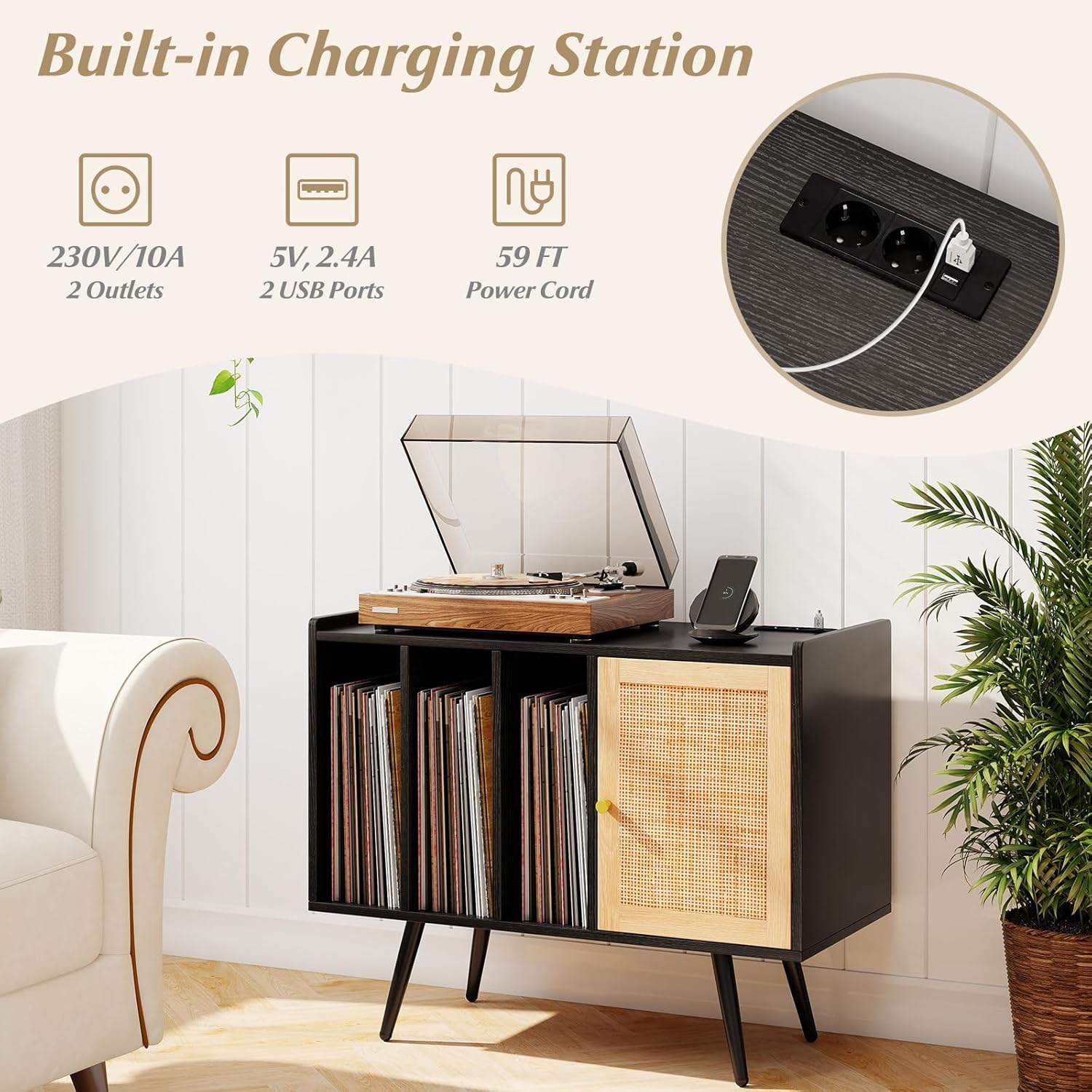
ภาพที่ 5.1: ภาพระยะใกล้ view of the built-in charging station, showing the AC outlets and USB ports.
การใช้สถานีชาร์จ:
- การเชื่อมต่อไฟฟ้า: Plug the power cord of the furniture into a standard wall outlet.
- เต้ารับไฟฟ้ากระแสสลับ: Use the two 220-240V/10A AC outlets to power devices such as turntables, lampหรือเครื่องใช้ไฟฟ้าขนาดเล็กอื่นๆ
- พอร์ต USB: Use the two 5V, 2.4A USB ports to charge smartphones, tablets, or other USB-powered devices.
- การจัดการสายเคเบิล: Utilize the hidden cable management hole to route power cords and USB cables, maintaining a tidy appearance.
Important: Do not overload the charging station. Ensure the total power consumption of connected devices does not exceed the specified limits.
6. การบำรุงรักษา
Proper care will extend the life and appearance of your furniture.
- การทำความสะอาด: เช็ดพื้นผิวด้วย d . ที่อ่อนนุ่มamp ผ้า หลีกเลี่ยงสารเคมีรุนแรงหรือน้ำยาทำความสะอาดที่มีฤทธิ์กัดกร่อน ซึ่งอาจทำให้พื้นผิวเสียหายได้
- การรั่วไหล: Clean up spills immediately to prevent staining or damage to the wood and rattan.
- ปัดฝุ่น: Regularly dust the unit with a dry, soft cloth.
- การดูแลรักษาหวาย: For the rattan door, gently wipe with a damp ผ้า หลีกเลี่ยงความชื้นที่มากเกินไป
- การตรวจสอบ: ตรวจสอบน็อตและสกรูทั้งหมดเป็นระยะ เพื่อให้แน่ใจว่ายังแน่นอยู่ หากจำเป็นให้ขันให้แน่นอีกครั้ง
7. ข้อมูลด้านความปลอดภัย
Adhere to these safety guidelines to prevent injury or damage.

Image 7.1: Illustration of the stability and safety features, including the anti-toppling kit, metal support legs, and non-slip foot pads.
- Anti-Toppling Kit: Always install the included anti-toppling kit to secure the furniture to the wall. This prevents accidental tipping, especially in households with children or pets.
- ความจุน้ำหนัก: Do not exceed the recommended weight capacity for the countertop and shelves. Distribute weight evenly.
- การจัดวาง: Place the furniture on a level, stable surface. Use the non-slip foot pads to protect floors and enhance stability.
- ความปลอดภัยทางไฟฟ้า: Ensure the power cord is not pinched or damaged. Do not use the charging station if it shows signs of damage. Keep liquids away from electrical outlets.
- เด็กและสัตว์เลี้ยง: Keep small parts and packaging materials away from children. Supervise children around the furniture, especially during assembly.
8 การแก้ไขปัญหา
If you encounter any issues, refer to these common solutions.
- หน่วยที่สั่นคลอน: Check that all screws and fasteners are securely tightened. Ensure the unit is on a level surface. Adjust foot pads if necessary.
- สถานีชาร์จใช้งานไม่ได้: Verify that the furniture's power cord is securely plugged into a functional wall outlet. Check if the devices you are trying to charge are properly connected and functional.
- ชิ้นส่วนที่เสียหาย: If any parts are damaged or missing upon arrival, do not proceed with assembly. Contact customer support for assistance.
9. การรับประกันและการสนับสนุน
For warranty information, replacement parts, or further assistance, please contact KOMFOTTEU customer support through your retailer or the official KOMFOTTEU website. Please have your model number (SE00725MN-WJDE-KF) and purchase information ready when contacting support.


