1. บทนำ
This manual provides essential information for the setup, operation, maintenance, and troubleshooting of your NIMO 17.3-inch FHD IPS Laptop, model Nimo N176. Please read this guide thoroughly to ensure proper use and to maximize the lifespan of your device.

Image 1.1: The NIMO 17.3-inch FHD IPS Laptop, model Nimo N176, showcasing its full display and keyboard.
2. เนื้อหาบรรจุภัณฑ์
ตรวจสอบว่ารายการทั้งหมดที่ระบุไว้ด้านล่างนี้รวมอยู่ในบรรจุภัณฑ์ผลิตภัณฑ์ของคุณแล้ว:
- 1 x Nimo N176 Laptop
- 1 x ที่ชาร์จเร็ว Type-C 65W PD
- 1 x คู่มือผู้ใช้ (เอกสารนี้)
- ระบบปฏิบัติการ Windows 11 Home (ติดตั้งมาแล้ว)
3. การตั้งค่า
3.1 การเปิดเครื่องครั้งแรก
- Unpack the laptop and charger from the box.
- Connect the Type-C 65W PD Fast Charger to the laptop's Type-C port and a power outlet.
- เปิดฝาแล็ปท็อป แล็ปท็อปอาจเปิดเครื่องโดยอัตโนมัติ หรือคุณอาจต้องกดปุ่มเปิด/ปิดที่อยู่บนแป้นพิมพ์
- ทำตามคำแนะนำบนหน้าจอเพื่อทำการตั้งค่า Windows 11 ครั้งแรกให้เสร็จสมบูรณ์ รวมถึงการเลือกภาษา ภูมิภาค การเชื่อมต่อเครือข่าย และการสร้างบัญชีผู้ใช้
3.2 Charging the Laptop
The NIMO laptop includes a Type-C 65W PD fast charger and a 6.56ft USB-C to USB-C cable. This charger supports Power Delivery (PD) for efficient charging.
- Connect the charger to the laptop's Type-C port.
- A full charge provides approximately 5 hours of average battery life.
- The charger can also be used to charge other compatible USB-C devices such as tablets and smartphones.

Image 3.2: The included Type-C 65W PD Fast Charger and USB-C cable, capable of charging the laptop and other compatible devices.
3.3 การตั้งค่าเครื่องอ่านลายนิ้วมือ
The laptop features a built-in fingerprint sensor on the touchpad for secure and quick login.
- ไปที่ การตั้งค่า Windows > บัญชี > ตัวเลือกการเข้าสู่ระบบ
- Locate the 'Fingerprint recognition (Windows Hello)' section.
- Follow the on-screen prompts to register your fingerprint. You may need to set up a PIN first.
- Once registered, you can use your fingerprint to unlock the laptop.

Image 3.3: Close-up of the touchpad showing the integrated fingerprint sensor for one-touch secure login.
4. คู่มือการใช้งาน
4.1 ไฟแบ็คไลท์คีย์บอร์ด
The NIMO N176 laptop is equipped with a backlit keyboard for improved visibility in low-light conditions.
- To toggle the backlight on/off or adjust its brightness, use the dedicated function keys (usually เอฟเอ็น + เอฟเอ็กซ์, where Fx is a specific function key with a backlight icon). Refer to the keyboard layout for the exact key combination.
Image 4.1: The backlit keyboard illuminated, demonstrating its utility for typing in dim environments.
4.2 Webcam Privacy Switch
For enhanced privacy, the laptop features a physical switch to disable the webลูกเบี้ยว.
- Locate the small physical switch next to the webcam lens at the top of the display.
- Slide the switch to cover the lens for privacy. Slide it back to uncover the lens and enable the webลูกเบี้ยว.

Image 4.2: The laptop's integrated webcam with its physical privacy switch, shown in both open and closed positions.
4.3 พอร์ตการเชื่อมต่อ
The Nimo N176 laptop offers various ports for connecting external devices:
- พอร์ต USB 2.0: 1 port, typically for peripherals like mice or keyboards.
- พอร์ต USB 3.0: 3 ports, for high-speed data transfer with compatible devices.
- Type-C Port (PD Charge Only): For power input using the provided charger.
- Type-C Port (Multifunction): Supports data transfer and potentially video output (check specific model capabilities).
- พอร์ต HDMI: สำหรับเชื่อมต่อกับจอแสดงผลภายนอกหรือโปรเจ็กเตอร์
- แจ็คหูฟัง: สำหรับเอาท์พุตเสียงไปยังหูฟังหรือลำโพงภายนอก
- ช่องเสียบการ์ด Micro SD: For expanding storage or transferring data from memory cards.
- สล็อตล็อคเคนซิงตัน: For physical security of the laptop.

Image 4.3: Diagram illustrating the various connectivity ports available on the NIMO N176 laptop, including USB, HDMI, and Type-C ports.
5. การบำรุงรักษา
5.1 อัปเกรด RAM และ SSD
The NIMO N176 laptop is designed to support user-upgradable RAM and SSD components.
- คำเตือน: Opening the laptop to perform upgrades may void your warranty if not done correctly or if damage occurs. Consult professional assistance if you are unsure.
- Ensure the laptop is powered off and disconnected from the charger before attempting any internal modifications.
- Refer to the detailed service manual (if available) or contact NIMO support for specific instructions on accessing and replacing RAM and SSD modules.
ภาพที่ 5.1: ภายใน view of the NIMO laptop, highlighting the locations of the RAM and SSD for potential upgrades.
5.2 การทำความสะอาดแล็ปท็อปของคุณ
Regular cleaning helps maintain the laptop's appearance and performance.
- หน้าจอ: ใช้ผ้านุ่มไม่เป็นขุยที่ออกแบบมาสำหรับอุปกรณ์อิเล็กทรอนิกส์โดยเฉพาะampล้างออกด้วยน้ำหรือน้ำยาทำความสะอาดหน้าจอเล็กน้อย หลีกเลี่ยงสารเคมีรุนแรง
- แป้นพิมพ์และตัวเครื่อง: ใช้ผ้าเนื้อนุ่ม สำหรับคราบฝังแน่น ให้เช็ดเบาๆampสามารถใช้ผ้าชุบน้ำสบู่เจือจางเช็ดทำความสะอาดได้ โดยระวังอย่าให้ของเหลวเข้าไปในช่องว่าง ส่วนการใช้ลมเป่าอัดจะช่วยกำจัดฝุ่นที่อยู่ระหว่างปุ่มต่างๆ ได้
- Always power off the laptop and disconnect it from power before cleaning.
6 การแก้ไขปัญหา
ส่วนนี้จะกล่าวถึงปัญหาทั่วไปที่คุณอาจพบเจอขณะใช้งานแล็ปท็อป NIMO N176 ของคุณ
- แล็ปท็อปไม่เปิดเครื่อง: Ensure the charger is properly connected and the power outlet is functional. Try a different outlet. If the battery is completely drained, it may take a few minutes of charging before the laptop responds.
- หน้าจอว่างเปล่า: Check if the laptop is powered on. Try connecting an external monitor to see if there's a display output. Adjust screen brightness using function keys.
- ปัญหาการเชื่อมต่อ Wi-Fi: ตรวจสอบให้แน่ใจว่าได้เปิดใช้งาน Wi-Fi ในการตั้งค่า Windows แล้ว รีสตาร์ทเราเตอร์และแล็ปท็อป ตรวจสอบไดรเวอร์เครือข่ายที่อัปเดตแล้ว
- ประสิทธิภาพช้า: Close unnecessary applications. Check for sufficient free space on the SSD. Run a virus scan. Consider upgrading RAM or SSD if performance remains consistently low.
- แป้นพิมพ์หรือทัชแพดไม่ตอบสนอง: Restart the laptop. Check for updated drivers in Device Manager. Ensure the touchpad hasn't been accidentally disabled via a function key.
For more complex issues or if the problem persists, please refer to the Warranty and Support section for contact information.
7. ข้อมูลจำเพาะ
Detailed technical specifications for the NIMO N176 laptop:
| คุณสมบัติ | ข้อมูลจำเพาะ |
|---|---|
| ยี่ห้อ | นีโม |
| ชื่อรุ่น | Nimo N176 |
| ขนาดหน้าจอ | 17.3 นิ้ว |
| ความละเอียดหน้าจอ | 1920 x 1080 พิกเซล (FHD IPS) |
| โปรเซสเซอร์ | Intel Pentium N100 (4 Cores, up to 3.4GHz) |
| แรม | 8GB DDR4 (3200 เมกะเฮิรตซ์) |
| ฮาร์ดไดรฟ์ | SSD ขนาด 512 GB (PCIe) |
| โคโปรเซสเซอร์กราฟิก | Integrated Graphics (Intel) |
| ระบบปฏิบัติการ | วินโดวส์ 11 โฮม |
| ประเภทไร้สาย | Wi-Fi 6 (802.11a/b/g/n/ac), Bluetooth 5.2 |
| พอร์ต USB | 1 x USB 2.0, 3 x USB 3.0 |
| พอร์ตอื่น ๆ | HDMI, Type-C (PD Charge Only), Type-C (Multifunction), Headphone Jack, Micro SD Slot |
| Webลูกเบี้ยว | ด้านหลัง 2 MP Webcam Resolution (Note: Front webcam is typically 720p HD) |
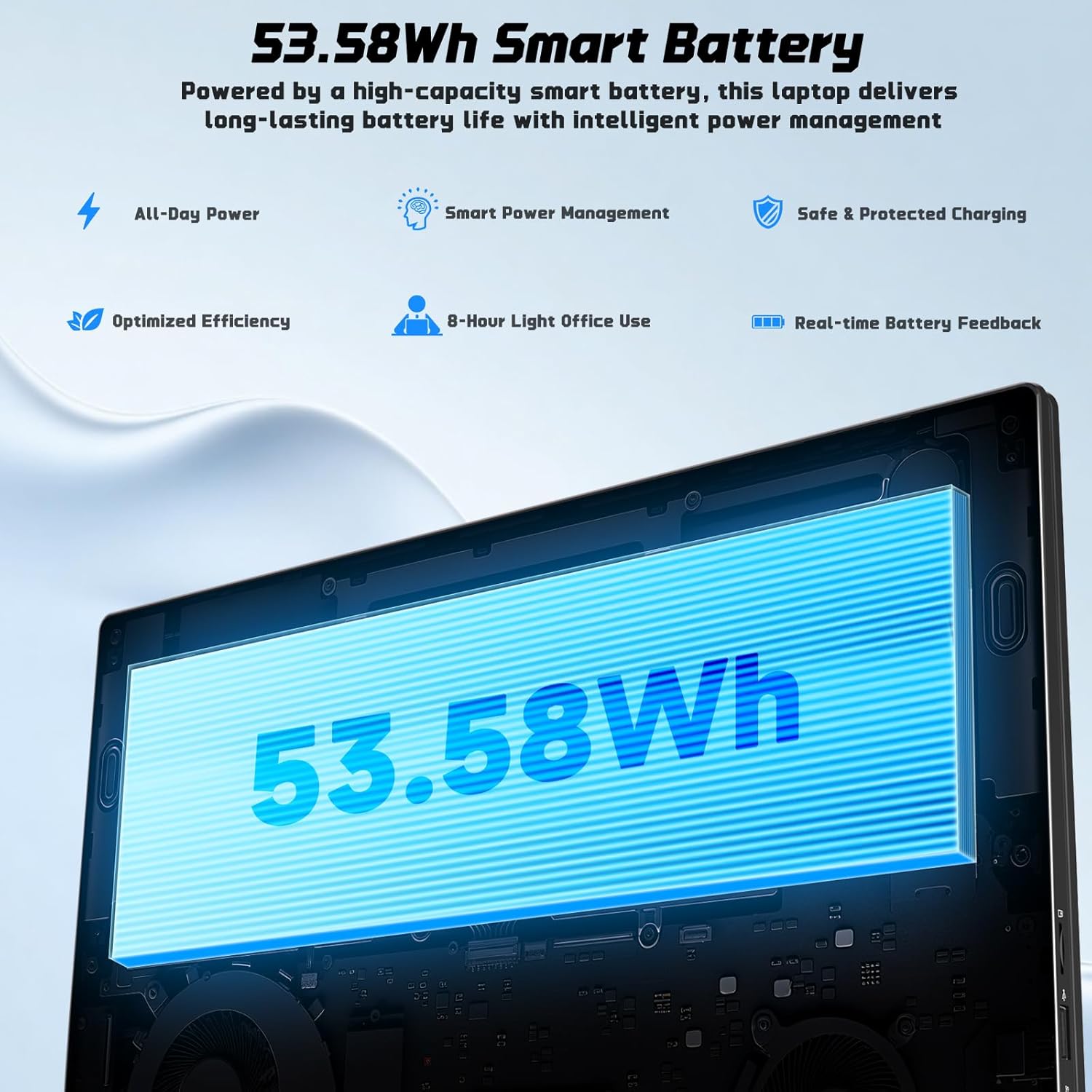
| อายุการใช้งานแบตเตอรี่ | Approx. 5 Hours (53.58Wh Lithium Polymer) |
| น้ำหนักสินค้า | 3.84 ปอนด์ |
| ขนาดสินค้า | 15.66 x 9.99 x 0.74 นิ้ว |
| คุณสมบัติพิเศษ | Backlit Keyboard, Fingerprint Reader, HD Audio, Memory Card Slot, Numeric Keypad |

Image 7.1: The NIMO laptop's 17.3-inch FHD IPS display, highlighting its visual clarity and anti-glare properties.

Image 7.2: Visual representation of the Intel N100 processor, indicating its performance capabilities.

Image 7.3: Diagram illustrating the 53.58Wh smart battery, emphasizing its capacity and power management features.
8. การรับประกันและการสนับสนุน
NIMO provides comprehensive support for your product.
- การรับประกันของผู้ผลิต: Your NIMO N176 laptop is covered by a 2-year manufacturer's warranty. This warranty covers defects in materials and workmanship under normal use.
- นโยบายการคืนสินค้า: A 90-day hassle-free return and exchange service is offered by NIMO Direct Inc.
- การสนับสนุนลูกค้า: For any concerns, technical assistance, or warranty claims, please contact NIMO's dedicated support team. Refer to the contact information provided on the NIMO official webไซต์หรือในเอกสารการซื้อของคุณ
Image 8.1: Visual representation of NIMO's after-sales service, including domestic assembly, 90-day returns, and 2-year support.


