1. บทนำ
Welcome to the Alphawolf LPad3A Android 15 Tablet user manual. This guide provides essential information for setting up, operating, maintaining, and troubleshooting your device. Please read it thoroughly to ensure optimal performance and longevity of your tablet.

Image: Alphawolf LPad3A Tablet highlighting its 11-inch display, Android 15 OS, 20GB RAM, 128GB storage, UNISOC T615 CPU, 8000mAh battery, 5MP+13MP cameras, 2.4G/5G WiFi, Widevine L1, Face Recognition, and GPS support.

Image: Visual representation of Android 15 features including enhanced privacy, optimized performance, upgraded user interface, improved multitasking, AI enhancements, and optimized battery life.
2. เนื้อหาบรรจุภัณฑ์
เมื่อเปิดบรรจุภัณฑ์ โปรดตรวจสอบว่าสินค้าทุกรายการที่ระบุไว้ด้านล่างครบถ้วนและอยู่ในสภาพดี
- Alphawolf LPad3A Tablet (x1)
- สาย USB Type-C (1 เส้น)
- Charging Adapter (x1)
- คู่มือผู้ใช้ (x1)

Image: Diagram showing the Alphawolf LPad3A tablet, Type-C cable, charging adapter, and user manual included in the package.
3. เค้าโครงอุปกรณ์
Familiarize yourself with the physical components and ports of your Alphawolf LPad3A tablet.
- แสดง: 11-inch FHD IPS screen.
- กล้องหลัง: ตั้งอยู่ที่แผงด้านหลัง
- กล้องหน้า: Located on the front bezel above the display.
- ปุ่มเปิด/ปิด: ใช้เพื่อเปิด/ปิดอุปกรณ์ หรือปลุก/พักหน้าจอ
- ปุ่มปรับระดับเสียง: ปรับระดับเสียงของอุปกรณ์
- พอร์ตชาร์จ Type-C: For charging the tablet and data transfer.
- แจ็คหูฟัง 3.5 มม.: สำหรับการเชื่อมต่อหูฟังแบบมีสาย
- ช่องใส่การ์ด: For inserting a MicroSD card to expand storage.
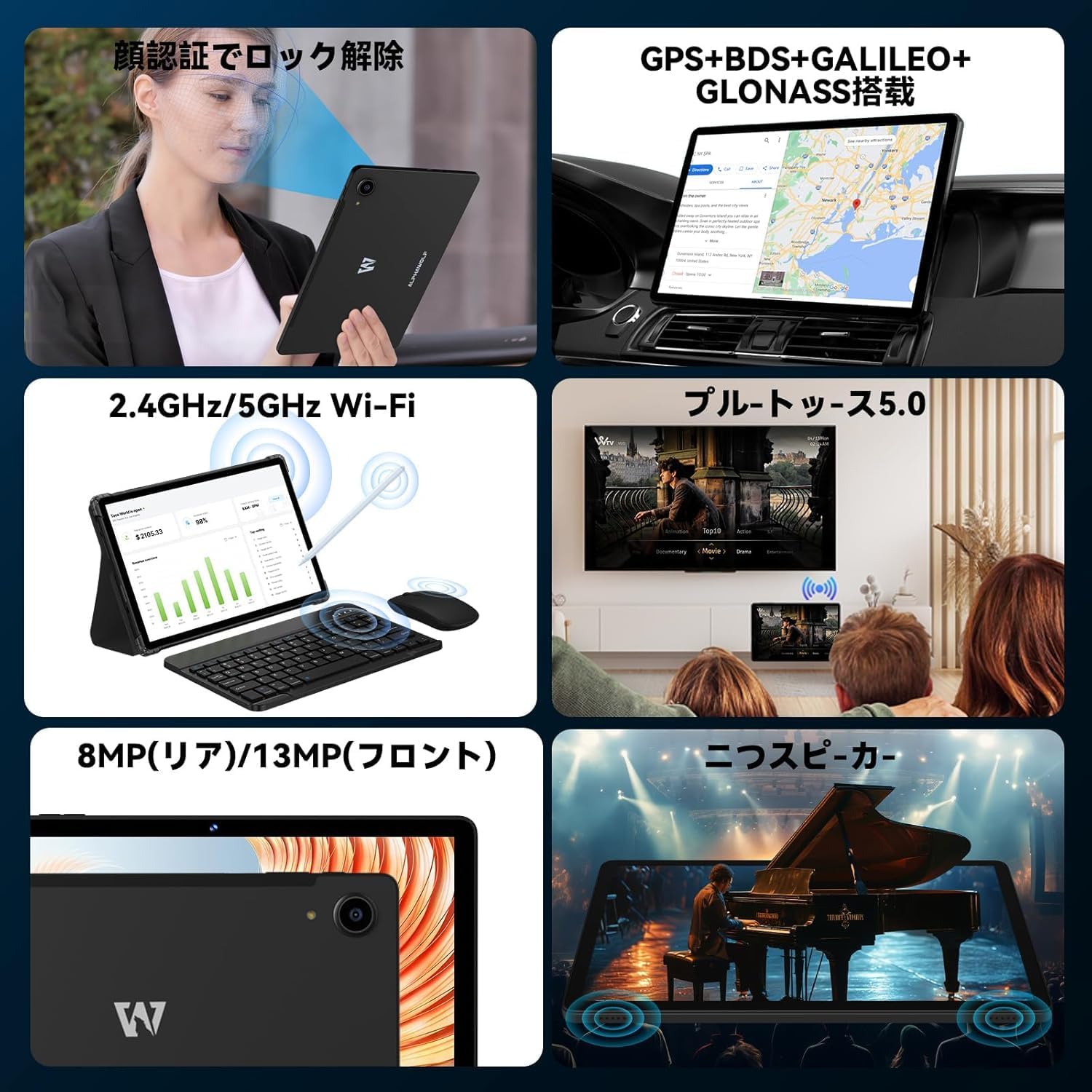
Image: A collage showing the tablet's features including face recognition, GPS, 2.4G/5G WiFi, Bluetooth 5.0, 8MP rear/13MP front cameras, and dual speakers.
4. การตั้งค่า
4.1 Initial System Update
Upon receiving your LPad3A tablet, it is highly recommended to perform a system update. This ensures you have the latest software and optimal performance.
- Current Build Number: L3A_V1.0_20250612
- ขั้นตอนการอัปเดต: ไปที่ การตั้งค่า → เกี่ยวกับแท็บเล็ต → การอัพเดทระบบ → ตรวจสอบการอัปเดต.
หมายเหตุสำคัญ: Performing this update will automatically restore factory settings. If you do not manually update, the tablet may automatically update when connected to the internet, leading to initialization. This automatic initialization occurs only once after the first update.

Image: A notice in Japanese regarding the recommended system update upon product arrival, specifying the build number and update steps.
4.2 เปิด/ปิดเครื่อง
- การเปิดเครื่อง: Press and hold the Power button until the Alphawolf logo appears.
- วิธีปิดเครื่อง: กดปุ่มเปิด/ปิดค้างไว้ จากนั้นเลือก 'ปิดเครื่อง' จากตัวเลือก
- ในการรีสตาร์ท: กดปุ่มเปิด/ปิดค้างไว้ จากนั้นเลือก 'เริ่มระบบใหม่' จากตัวเลือก
4.3 การเชื่อมต่อเครือข่าย (Wi-Fi)
Connect your tablet to a Wi-Fi network for internet access.
- ไปที่ การตั้งค่า → เครือข่ายและอินเตอร์เน็ต → ไวไฟ.
- สลับ Wi-Fi On.
- เลือกเครือข่ายที่คุณต้องการจากรายการ
- ป้อนรหัสผ่านหากได้รับแจ้ง จากนั้นแตะ เชื่อมต่อ.
4.4 Face Recognition Setup
Set up face recognition for convenient and secure unlocking.
- ไปที่ การตั้งค่า → ความปลอดภัยและความเป็นส่วนตัว → ปลดล็อคด้วยใบหน้า.
- ปฏิบัติตามคำแนะนำบนหน้าจอเพื่อลงทะเบียนใบหน้าของคุณ
5. คู่มือการใช้งาน
5.1 คุณสมบัติการแสดงผล
The LPad3A features an 11-inch FHD incell display with a resolution of 1920x1200 pixels, offering a wide viewing angle and vibrant colors. It supports Widevine L1 for high-definition streaming on platforms like Netflix, Amazon Prime Video, Disney+, and Hulu.

Image: The tablet display showing vibrant colors and high resolution, emphasizing its 10.95-inch FHD incell screen, 300+ Nits brightness, 1920x1200 resolution, and 16:10 aspect ratio.

Image: A visual demonstrating the 11-inch IPS wide viewing angle, 16:10 aspect ratio, and 1920x1200 high resolution of the tablet's display.
5.2 ประสิทธิภาพและการจัดเก็บ
The LPad3A is equipped with a high-performance UNISOC T615 octa-core processor, featuring two A75 cores and six A55 cores for efficient multitasking. It comes with 8GB of physical RAM, expandable virtually by an additional 12GB, totaling 20GB for smooth operation. Internal storage is 128GB, which can be expanded up to 2TB using a MicroSD card (sold separately).

Image: A graphic illustrating the UNISOC T615 octa-core processor, highlighting its A75 and A55 cores, 12nm process, and suitability for gaming.

Image: A visual showing the 20GB (8GB + 12GB virtual) RAM and 128GB internal storage, with an arrow indicating 2TB expandable storage via MicroSD card.

Image: A graphic demonstrating the storage capacity, indicating approximately 249,300 photos, 29,700 short videos, and 450,000 music files can be stored with 128GB ROM and 2TB expansion.
5.3 การใช้งานกล้อง
The tablet features a 13MP rear camera and a 5MP front camera, suitable for capturing moments and video calls.
- กล้องหลัง: 13 Megapixels for general photography.
- กล้องหน้า: 5 Megapixels for selfies and video conferencing.

Image: A close-up of the tablet's rear camera and examples of photos taken with the front camera, indicating 13MP back camera and 5MP front camera.
5.4 การจัดการแบตเตอรี่
The LPad3A is equipped with an 8000mAh large-capacity battery, providing extended usage time. It supports Type-C charging.
- การชาร์จ: Use the provided Type-C cable and charging adapter.
- อายุการใช้งานแบตเตอรี่: Offers up to 700-800 hours of standby time.

Image: A visual emphasizing the 8000mAh battery capacity and Type-C charging port, with a tablet displaying a charging animation.

Image: A graphic detailing the 8000mAh large capacity battery, Type-C charging, 5V/2A power, and 3.5mm audio jack.
5.5 การเชื่อมต่อ
The tablet supports various connectivity options for versatile use.
- ไวไฟ : Supports 2.4G and 5G Wi-Fi for fast and stable internet connections.
- Bluetooth 5.0: สำหรับเชื่อมต่ออุปกรณ์ไร้สาย เช่น หูฟังและคีย์บอร์ด
- จีพีเอส: Integrated GPS, BDS, GALILEO, and GLONASS for accurate navigation.
- การฉายภาพแบบไร้สาย: Allows mirroring your tablet screen to compatible displays.
- OTG (On-The-Go): Supports connecting USB devices such as flash drives or external keyboards.

Image: A collage illustrating split-screen functionality, 2.4G/5G WiFi connectivity, face recognition, and wireless projection to a TV.
5.6 Parental Controls (Google Kids Space)
The tablet is compatible with Google Kids Space, allowing parents to manage screen time, monitor app usage, remotely lock the device, and track its location for a safe digital environment for children.

Image: A child using the tablet with Google Kids Space interface, demonstrating parental control features for healthy child development.
6. การบำรุงรักษา
6.1 การทำความสะอาด
To keep your tablet clean and functional:
- ใช้ผ้านุ่มที่ไม่เป็นขุยเช็ดหน้าจอและตัวเครื่อง
- หลีกเลี่ยงการใช้สารเคมีที่รุนแรง น้ำยาทำความสะอาดที่มีฤทธิ์กัดกร่อน หรือสเปรย์แอโรซอล
- ตรวจสอบให้แน่ใจว่าอุปกรณ์ปิดอยู่และถอดปลั๊กออกก่อนทำความสะอาด
6.2 พื้นที่จัดเก็บ
When not in use, store your tablet in a cool, dry place away from direct sunlight and extreme temperatures. Avoid placing heavy objects on the tablet.
7 การแก้ไขปัญหา
7.1 ปัญหาทั่วไป
- แท็บเล็ตไม่เปิด: ตรวจสอบให้แน่ใจว่าแบตเตอรี่ชาร์จเต็มแล้ว เสียบที่ชาร์จและรอสักครู่ก่อนลองเปิดเครื่องอีกครั้ง
- หน้าจอไม่ตอบสนอง: Try restarting the tablet. If the issue persists, perform a factory reset (note: this will erase all data).
- ปัญหาการเชื่อมต่อ Wi-Fi: Check if other devices can connect to the Wi-Fi network. Restart your router and the tablet. Ensure the Wi-Fi password is correct.
- ประสิทธิภาพช้า: ปิดแอปพลิเคชันที่ทำงานอยู่เบื้องหลังโดยไม่จำเป็น ล้างแคชและไฟล์ชั่วคราว files. พิจารณาถอนการติดตั้งแอปพลิเคชันที่ไม่ได้ใช้งาน
7.2 ติดต่อฝ่ายสนับสนุน
If you encounter issues that cannot be resolved with the troubleshooting steps, please contact Alphawolf customer support.
- วิธีการติดต่อ: Via your Amazon account.
- ขั้นตอน: Go to "Your Amazon Account" → "Your Orders" → "Select the relevant order" → "Order Details" → "Seller" → "Ask a question".
8. ข้อมูลจำเพาะ
| ยี่ห้อ | Alphawolf |
| ชื่อรุ่น | LPad3A |
| ระบบปฏิบัติการ | แอนดรอยด์ 15 |
| ขนาดจอแสดงผล | 11 นิ้ว |
| ความละเอียดการแสดงผล | 1920 x 1200 พิกเซล (FHD IPS) |
| โปรเซสเซอร์ | UNISOC T615 หน่วยประมวลผลแปดคอร์ |
| แรม | 20GB (8GB หน่วยความจำจริง + 12GB หน่วยความจำเสมือน) |
| การจัดเก็บข้อมูลภายใน | 128GB |
| พื้นที่เก็บข้อมูลแบบขยายได้ | Up to 2TB via MicroSD card (sold separately) |
| ความจุของแบตเตอรี่ | 8000mAh |
| กล้องหน้า | 5MP |
| กล้องหลัง | 13MP |
| การเชื่อมต่อ | Wi-Fi (2.4G/5G), Bluetooth 5.0, GPS (GPS+BDS+GALILEO+GLONASS) |
| พอร์ต | พอร์ต Type-C, ช่องเสียบหูฟัง 3.5 มม. |
| ขนาด | 29.3 x 20 x 5.3 ซม. |
| น้ำหนัก | 950 กรัม |
9. การรับประกันและการสนับสนุน
Your Alphawolf LPad3A tablet comes with a 1-year quality warranty from the date of purchase. In case of initial defects or any issues during use, please contact our customer support.
- ครอบคลุมการรับประกัน: Free repair or exchange for product defects within one year.
- ศูนย์ซ่อม: A dedicated repair center is available in Tokyo for prompt after-sales service.


Image: Icons representing 24-hour support, Amazon FBA shipping, Japanese repair center with free repair, and 365-day free warranty.
