การแนะนำ
This manual provides essential information for setting up, operating, and maintaining your ARZOPA 16.1-inch Z1C Portable Monitor. Please read it thoroughly before use to ensure optimal performance and longevity of your device.
มีอะไรอยู่ในกล่อง
- 1 x ARZOPA 16.1" Portable Monitor
- สายเคเบิล USB-C ถึง USB-C 1 เส้น
- 1 x มินิสาย HDMI เป็น HDMI
- 1 x คู่มือผู้ใช้ (เอกสารนี้)

Figure 1: Included accessories with the ARZOPA Z1C Portable Monitor.
คุณสมบัติผลิตภัณฑ์
- 16.1" FHD 1080P Display: Experience clear picture quality with 1920x1080 resolution and 100% sRGB color gamut for vibrant visuals.
- Dual-Orientation & Stable Kickstand: Easily switch between horizontal and vertical display modes. The integrated 80° adjustable kickstand provides stable support on various surfaces.
- เข้ากันได้สากล: Connects instantly to laptops, PCs, Macs, smartphones (with full-function USB-C), Xbox/PS5/Switch consoles, and more via USB-C or HDMI.
- การออกแบบที่พกพาสะดวกเป็นพิเศษ: Weighing just 1.7lbs with a 0.3-inch slim profile, the monitor is designed for easy transport in backpacks or briefcases.

Figure 2: The ARZOPA Z1C Portable Monitor showcasing ความสามารถในการแสดงผลของมัน
การตั้งค่า
1. การแกะกล่องและการตรวจสอบเบื้องต้น
Carefully remove all components from the packaging. Inspect the monitor and accessories for any signs of damage. Retain the packaging for future transport or storage.
2. การเชื่อมต่อกับอุปกรณ์ของคุณ
The ARZOPA Z1C supports multiple connection methods:
- พอร์ต USB-C (ใช้งานได้ครบทุกฟังก์ชัน): Use the provided USB-C to USB-C cable to connect the monitor to a compatible laptop, smartphone, or tablet. This single cable can transmit both video signal and power.
- HDMI & USB-A: Use the provided Mini HDMI to HDMI cable for video signal and a USB-A to USB-C cable (not explicitly listed in "What's in the Box" but implied by "Rich Cables Boost Compatibility" image) for power if your device does not support full-function USB-C.

Figure 3: Connection options for the ARZOPA Z1C Portable Monitor.
Ensure your device's USB-C port supports video output (DisplayPort Alternate Mode) and power delivery for single-cable operation. If not, external power via USB-A is required.
Video 1: A user demonstrates connecting the ARZOPA portable monitor to a laptop via USB-C, highlighting its ease of use and slim design.
คำแนะนำการใช้งาน
1. เปิด/ปิดเครื่อง
The monitor will typically power on automatically when connected to a powered device. To manually power on/off or access the On-Screen Display (OSD) menu, use the buttons located on the side of the monitor.

รูปที่ 4: เกินview of the monitor's ports and control buttons.
2. โหมดการแสดงผล
Once connected, your operating system should detect the monitor. You can configure display modes (Duplicate, Extend, Second Screen Only) through your device's display settings.
- การวางแนวแนวนอน/แนวตั้ง: The monitor supports both landscape and portrait modes. Adjust the physical orientation and then change the display settings on your connected device accordingly.
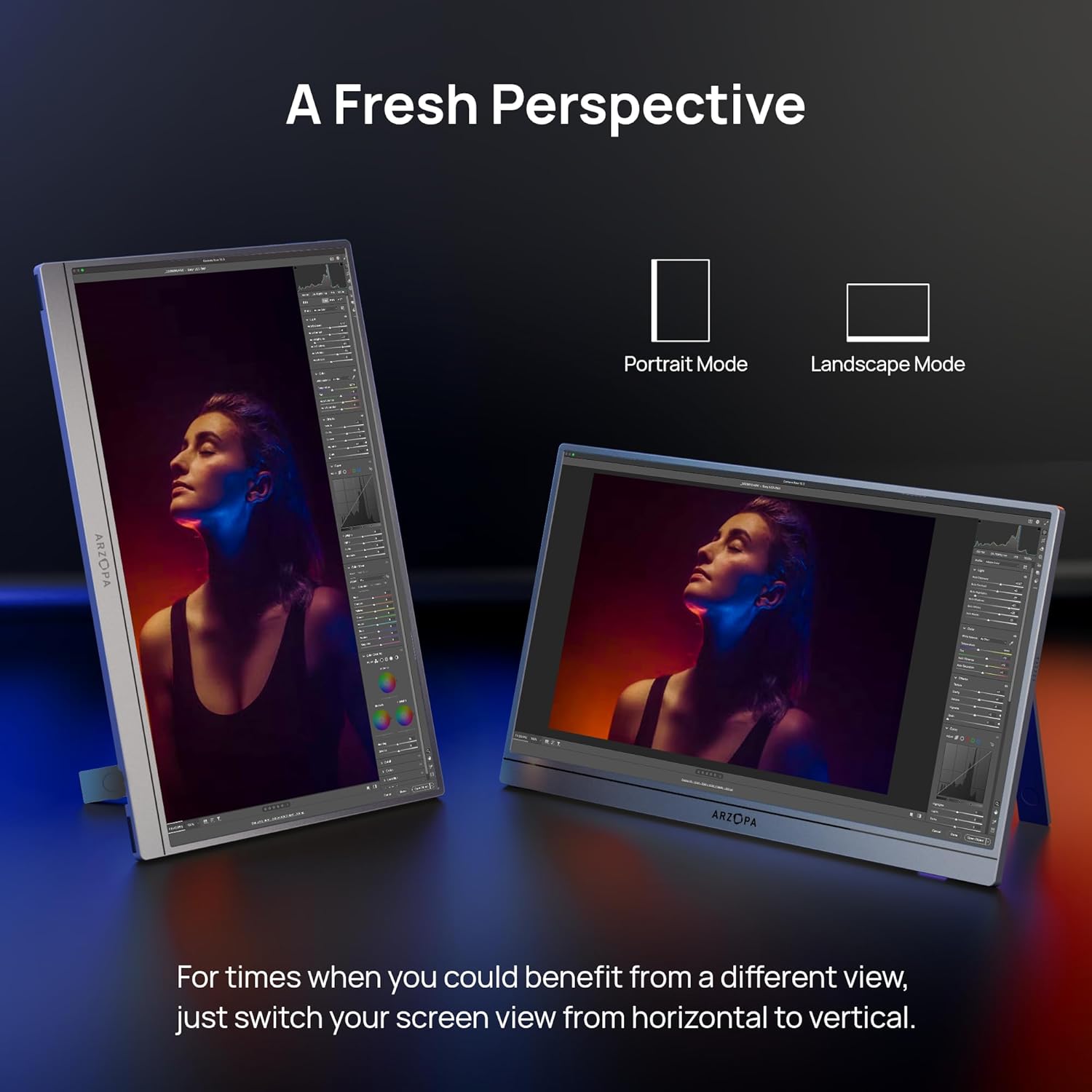
Figure 5: The ARZOPA Z1C monitor supports both portrait and landscape orientations.
3. เมนูการแสดงผลบนหน้าจอ (OSD)
Use the OSD menu button and adjustment controls to fine-tune settings such as brightness, contrast, color temperature, input source, and more.
การซ่อมบำรุง
- การทำความสะอาด: ใช้ผ้าเนื้อนุ่มที่ไม่เป็นขุยเช็ดหน้าจอและภายนอกเบาๆ หลีกเลี่ยงสารเคมีรุนแรงหรือวัสดุที่มีฤทธิ์กัดกร่อน
- พื้นที่จัดเก็บ: When not in use, store the monitor in a cool, dry place, ideally in its original packaging or a protective sleeve to prevent scratches.
- การจัดการ: Avoid applying excessive pressure to the screen or dropping the device.
การแก้ไขปัญหา
- ไม่มีสัญญาณ:
- Ensure cables are securely connected to both the monitor and the source device.
- Verify the input source selected on the monitor matches the connected port (e.g., USB-C, HDMI).
- Check if your device's USB-C port supports video output.
- หน้าจอกระพริบ:
- Ensure the monitor is receiving sufficient power. If using a single USB-C cable, try connecting an additional power source to the monitor's second USB-C port or using a dedicated power adapter.
- Reduce screen brightness if flickering persists.
- ไม่มีเสียง:
- ตรวจสอบการตั้งค่าระดับเสียงของจอภาพในเมนู OSD
- Verify your device's audio output is directed to the portable monitor.
ข้อมูลจำเพาะ
| ขนาดหน้าจอ | 16.1 นิ้ว |
| ปณิธาน | ความละเอียด Full HD 1080p (1920 x 1080 พิกเซล) |
| อัตราส่วนภาพ | 16:9 น. |
| พื้นผิวหน้าจอ | แมทต์ |
| น้ำหนักสินค้า | 1.7 ปอนด์ |
| ขนาดสินค้า | 14.37 x 11.02 x 0.39 นิ้ว |
| พอร์ต USB รวม | 2 (ยูเอสบี-ซี) |
| เล่มที่tage | 220 โวลต์ (อินพุต) |
| ผู้ผลิต | อาร์โซปา |
| หมายเลขรุ่น | Z1ซี |
การรับประกันและการสนับสนุน
ARZOPA offers 24-month after-service support. For any inquiries or issues, please contact the dedicated customer support team. This ensures prompt responses and hassle-free solutions from purchase to long-term use.
แผนการคุ้มครองเพิ่มเติมมีจำหน่าย:
- แผนคุ้มครอง 3 ปี
- แผนคุ้มครอง 4 ปี
- การปกป้องที่สมบูรณ์: แผนเดียวครอบคลุมการซื้อที่เข้าเงื่อนไขทั้งหมดในอดีตและอนาคต (เรียกเก็บเงินรายเดือน)
เอกสารที่เกี่ยวข้อง - Z1ซี
 |
คู่มือผู้ใช้จอภาพพกพา ARZOPA Z1C ขนาด 16.1 นิ้ว | จอแสดงผล IPS ความละเอียด FHD คู่มือผู้ใช้ฉบับทางการสำหรับจอภาพพกพา ARZOPA Z1C ขนาด 16.1 นิ้ว เรียนรู้วิธีการเชื่อมต่อ การตั้งค่า และการแก้ไขปัญหาจอแสดงผล IPS ความละเอียด FHD ของคุณ รวมถึงข้อมูลจำเพาะและข้อมูลการสนับสนุน |
 |
คู่มือผู้ใช้จอภาพพกพา ARZOPA A1 GAMUT SLIM ขนาด 14 นิ้ว คู่มือผู้ใช้สำหรับจอภาพพกพา ARZOPA A1 GAMUT SLIM ขนาด 14 นิ้ว อธิบายรายละเอียดวิธีการเชื่อมต่อกับแล็ปท็อป พีซี และโทรศัพท์มือถือ ฟังก์ชั่นเมนู OSD และข้อมูลจำเพาะของผลิตภัณฑ์ รวมถึงข้อมูลเกี่ยวกับการรีไซเคิลและความรับผิดชอบต่อสิ่งแวดล้อม |
 |
คู่มือผู้ใช้จอภาพแบบพกพา ARZOPA A1 15.6 นิ้ว คู่มือการใช้งานสำหรับจอภาพพกพา ARZOPA A1 ขนาด 15.6 นิ้ว โดยละเอียดเกี่ยวกับการตั้งค่า การเชื่อมต่อ คุณสมบัติ การแก้ไขปัญหา และข้อมูลการรีไซเคิล |
 |
คู่มือการใช้งานและคำแนะนำการตั้งค่าจอภาพพกพา ARZOPA Z1C ขนาด 16.1 นิ้ว คู่มือการใช้งานฉบับสมบูรณ์สำหรับจอภาพพกพา ARZOPA Z1C ขนาด 16.1 นิ้ว เรียนรู้เกี่ยวกับการตั้งค่า การเชื่อมต่อ คุณสมบัติ และการสนับสนุน รวมถึงคำแนะนำโดยละเอียดสำหรับการเชื่อมต่อกับแล็ปท็อป พีซี โทรศัพท์ และอุปกรณ์อื่นๆ |
 |
ARZOPA A1M 17.3-inch Portable Monitor User Guide Comprehensive user guide for the ARZOPA A1M 17.3-inch portable monitor, covering setup, device connection, features, and technical support. |
 |
คู่มือการใช้งานจอภาพพกพา ARZOPA A1S คู่มือฉบับสมบูรณ์สำหรับการเชื่อมต่อและใช้งานจอภาพพกพา ARZOPA A1S ขนาด 14.0 นิ้ว ความละเอียด Full HD กับอุปกรณ์ต่างๆ เช่น แล็ปท็อป พีซี และโทรศัพท์ ผ่านทางพอร์ต USB-C และ HDMI |