1. บทนำ
Thank you for choosing the PEICHENG Android 15.0 10-inch Tablet. This manual provides essential information for setting up, operating, and maintaining your device. Please read it thoroughly to ensure optimal performance and longevity of your tablet.
2. อะไรอยู่ในกล่อง
เมื่อแกะกล่องแล้วโปรดตรวจสอบว่ามีสิ่งของทั้งหมดที่ระบุไว้ด้านล่างนี้อยู่:
- PEICHENG Android 15.0 10-inch Tablet
- แป้นพิมพ์บลูทูธ
- เมาส์ไร้สาย
- ปากกาสไตลัส
- Foldable Protective Case
- สายชาร์จ USB
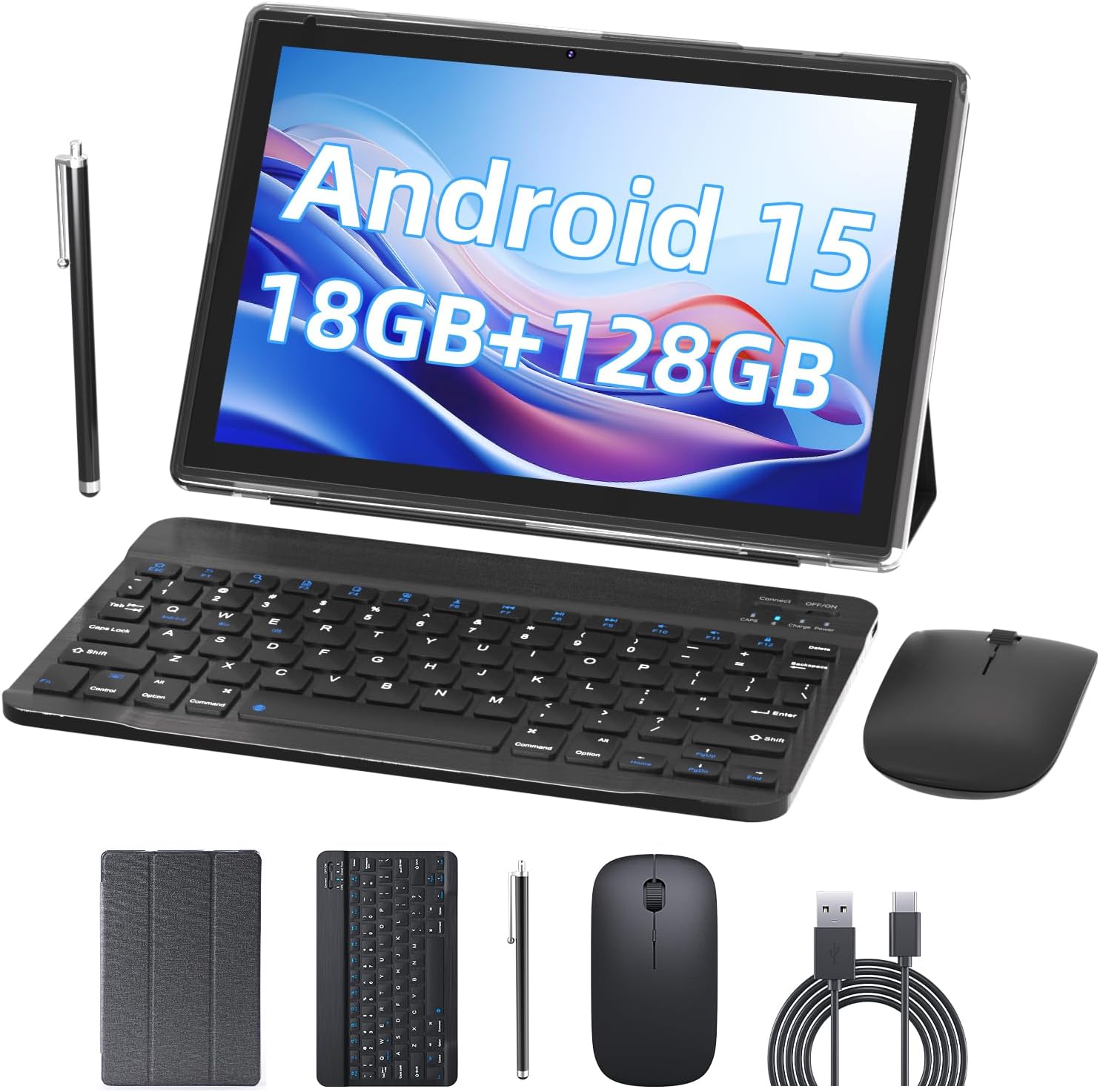
Image 2.1: Contents of the PEICHENG Tablet package, including the tablet, keyboard, mouse, stylus, case, and charging cable.
3. สินค้าหมดview
The PEICHENG 10-inch Tablet is designed for versatility and performance. It features a 10.1-inch IPS display, front and rear cameras, and various ports for connectivity. Familiarize yourself with the device's layout for ease of use.
3.1 ส่วนประกอบหลัก
- แสดง: 10.1-inch IPS touchscreen (1280x800 resolution).
- กล้องถ่ายรูป: 8MP Rear Camera, 2MP Front Camera.
- พอร์ต: USB-C port for charging and data transfer, MicroSD card slot.
- ปุ่ม: Power button, Volume Up/Down.
4. การตั้งค่า
4.1 การชาร์จเริ่มต้น
Before first use, fully charge your tablet using the provided USB charging cable and a compatible power adapter. The charging indicator will typically show progress and turn off when fully charged.
4.2 การเปิด/ปิดเครื่อง
- การเปิดเครื่อง: กดปุ่มเปิด/ปิดค้างไว้จนกว่าหน้าจอจะสว่างขึ้น
- วิธีปิดเครื่อง: กดปุ่มเปิด/ปิดค้างไว้ จากนั้นเลือก "ปิดเครื่อง" จากตัวเลือกบนหน้าจอ
4.3 การกำหนดค่าเริ่มต้น
Upon first startup, follow the on-screen prompts to:
- เลือกภาษาที่คุณต้องการ
- เชื่อมต่อกับเครือข่าย Wi-Fi
- ลงชื่อเข้าใช้ด้วยบัญชี Google ของคุณหรือสร้างบัญชีใหม่
- Set up security features (PIN, pattern, or password).

Image 4.1: The PEICHENG Tablet configured for use with its accessories, suitable for various tasks.
5. คู่มือการใช้งาน
ระบบปฏิบัติการ Android 15.0 5.1
Your tablet runs on the Android 15.0 operating system, offering a user-friendly interface and access to a vast ecosystem of applications via the Google Play Store.
5.2 การนำทางพื้นฐาน
- ปัด: Move your finger across the screen to scroll through content or switch between home screens.
- แตะ: แตะไอคอนหรือรายการหนึ่งครั้งเพื่อเปิดหรือเลือกรายการนั้น
- กดแบบยาว: Press and hold an item for additional options or to move it.
- บีบเพื่อซูม: ใช้สองนิ้วเพื่อซูมเข้าหรือออกจากรูปภาพและ web หน้า
5.3 การจัดการแอปพลิเคชัน
Download and install applications from the Google Play Store. To uninstall an app, long-press its icon and drag it to the 'Uninstall' option.
5.4 คุณสมบัติการแสดงผล
The 10.1-inch IPS display provides clear visuals. Utilize the 'Reading Mode' feature in the display settings to reduce harmful blue light, enhancing comfort during extended reading sessions.

Image 5.1: The tablet screen showcasing multiple applications and web content, demonstrating its multitasking capabilities.
6. อุปกรณ์เสริม
Your PEICHENG Tablet comes with a suite of accessories to enhance its functionality.
6.1 แป้นพิมพ์บลูทูธ
การจับคู่: Turn on the keyboard and enable Bluetooth on your tablet. ค้นหา available devices and select the keyboard to pair. Once connected, you can use it for typing, similar to a laptop.
เมาส์ไร้สาย 6.2 ตัว
การจับคู่: Similar to the keyboard, turn on the mouse and enable Bluetooth on your tablet. Pair the mouse through the Bluetooth settings. The mouse provides precise navigation and control.
6.3 ปากกาสไตลัส
The stylus allows for more precise input, drawing, and note-taking on the touchscreen. No pairing is required for basic functionality.
6.4 เคสป้องกัน
The foldable protective case safeguards your tablet from scratches and minor impacts. It also functions as a stand, allowing for comfortable viewมุมการพิมพ์และมุมเอียง

Image 6.1: The PEICHENG Tablet with its keyboard and mouse, demonstrating its capability as a portable workstation.
7. การจัดการแบตเตอรี่
The tablet is equipped with a 6000mAh battery, providing extended usage time.
7.1 การชาร์จ
Use the provided USB-C cable to charge the tablet. It is recommended to use a compatible charger to ensure efficient and safe charging.
7.2 Battery Life Tips
- ลดความสว่างหน้าจอ
- ปิด Wi-Fi และ Bluetooth เมื่อไม่ได้ใช้งาน
- ปิดแอปพลิเคชันที่ไม่ได้ใช้งานซึ่งทำงานอยู่เบื้องหลัง
- Enable power-saving modes in settings.

Image 7.1: Visual representation of the tablet's 6000mAh battery, highlighting its extended endurance.
8. การเชื่อมต่อ
8.1 ไวไฟ 6.0
The tablet supports 2.4GHz and 5GHz Wi-Fi 6.0, providing faster and more stable wireless connections. To connect, go to การตั้งค่า > เครือข่ายและอินเทอร์เน็ต > Wi-Fiเลือกเครือข่ายของคุณ แล้วป้อนรหัสผ่าน
8.2 บลูทู ธ 5.0
Bluetooth 5.0 allows for efficient connection to wireless accessories like headphones, speakers, and the included keyboard and mouse. Enable Bluetooth in การตั้งค่า > อุปกรณ์ที่เชื่อมต่อ > การตั้งค่าการเชื่อมต่อ > Bluetooth and pair your devices.
9. การขยายพื้นที่เก็บข้อมูล
The tablet comes with 128GB of internal storage and 18GB RAM (6GB physical + 12GB virtual). For additional storage, you can expand it up to 2TB using a MicroSD card (not included). Insert the MicroSD card into the designated slot on the tablet.

Image 9.1: The tablet's storage capabilities, highlighting its 18GB RAM, 128GB internal storage, and support for up to 2TB MicroSD expansion.
10. การใช้กล้อง
The tablet features an 8MP rear camera and a 2MP front camera. Open the Camera app to capture photos and videos. The front camera is ideal for video calls and selfies.
11. การบำรุงรักษา
11.1 การทำความสะอาด
Use a soft, lint-free cloth to clean the screen and body of the tablet. Avoid using harsh chemicals or abrasive materials. For stubborn smudges, a screen cleaner designed for electronics can be used sparingly.
11.2 การอัปเดตซอฟต์แวร์
ตรวจสอบและติดตั้งการอัปเดตซอฟต์แวร์เป็นประจำเพื่อให้แน่ใจว่าแท็บเล็ตของคุณมีฟีเจอร์ แพตช์ความปลอดภัย และการปรับปรุงประสิทธิภาพล่าสุด ไปที่ การตั้งค่า > ระบบ > อัปเดตระบบ.
12 การแก้ไขปัญหา
หากคุณประสบปัญหาเกี่ยวกับแท็บเล็ตของคุณ โปรดดูวิธีแก้ไขทั่วไปต่อไปนี้:
- อุปกรณ์ไม่เปิดเครื่อง: ตรวจสอบให้แน่ใจว่าแบตเตอรี่ชาร์จเต็มแล้ว เสียบที่ชาร์จและรอสักครู่ก่อนลองเปิดเครื่องอีกครั้ง
- หน้าจอไม่ตอบสนอง: Try restarting the tablet by holding the Power button for about 10-15 seconds.
- ปัญหาการเชื่อมต่อ Wi-Fi: รีสตาร์ทเราเตอร์ Wi-Fi และแท็บเล็ตของคุณ ลบการเชื่อมต่อเครือข่ายในตั้งค่าแท็บเล็ต แล้วเชื่อมต่อใหม่อีกครั้ง
- แอปขัดข้อง: ล้างแคชของแอปที่มีปัญหา (การตั้งค่า > แอป > [ชื่อแอป] > ที่เก็บข้อมูลและแคช > ล้างแคชหากปัญหายังคงอยู่ ให้ลองติดตั้งแอปใหม่อีกครั้ง
- ประสิทธิภาพช้า: Close unused apps, clear cache, and ensure sufficient storage space. Consider a factory reset as a last resort (การตั้งค่า > ระบบ > ตัวเลือกการรีเซ็ต > ลบข้อมูลทั้งหมด (รีเซ็ตเป็นค่าโรงงาน) - Note: This will delete all data on your tablet. Back up important fileก่อนอื่น).
13. ข้อมูลจำเพาะ
| คุณสมบัติ | ข้อมูลจำเพาะ |
|---|---|
| ยี่ห้อ | เป่ยเฉิง |
| ชื่อรุ่น | แท็บเล็ตขนาด 10.1 นิ้ว |
| ระบบปฏิบัติการ | แอนดรอยด์ 15.0 |
| ขนาดหน้าจอ | 10.1 นิ้ว |
| ความละเอียดหน้าจอสูงสุด | 1280x800 IPS |
| แรม | 18GB (6GB ทางกายภาพ + ขยาย 12GB) |
| การจัดเก็บข้อมูลภายใน | รอม 128GB |
| พื้นที่เก็บข้อมูลแบบขยายได้ | สูงสุด 2TB ผ่านการ์ด MicroSD |
| โปรเซสเซอร์ | 2.0GHz Quad-core |
| การเชื่อมต่อ Wi-Fi | 2.4G/5G Wi-Fi 6.0 |
| บลูทูธ | บลูทูธ 5.0 |
| กล้องหน้า | 2MP |
| กล้องหลัง | 8MP |
| ความจุของแบตเตอรี่ | 6000mAh |
| ขนาด (กxยxส) | 10.1 x 4.85 x 0.4 นิ้ว |
| น้ำหนักสินค้า | 2.66 ปอนด์ |
14. การรับประกันและการสนับสนุน
For warranty information and technical support, please refer to the documentation provided with your purchase or contact PEICHENG customer service. Keep your proof of purchase for warranty claims.


