1. สินค้าหมดview
The AOOEPU WiFi Extender Signal Booster is designed to expand your existing wireless network coverage, eliminate Wi-Fi dead zones, and provide stable, high-speed internet access throughout your home or outdoor areas. This dual-band device supports both 2.4GHz and 5GHz frequencies, ensuring broad compatibility with various devices.
คุณสมบัติหลัก:
- การเชื่อมต่อแบบดูอัลแบนด์: Operates on both 2.4GHz and 5GHz frequencies for versatile network extension.
- ขยายการครอบคลุม: Features four external antennas to penetrate walls and floors, extending Wi-Fi coverage up to 12880 sq. ft.
- ความเข้ากันได้สูง: Supports up to 105 devices, including phones, tablets, laptops, smart TVs, security cameras, and printers.
- ประสิทธิภาพความเร็วสูง: Boosts internet speeds up to 1200 Mbps, ideal for streaming, gaming, and video conferencing.
- การเชื่อมต่อที่เสถียร: Provides a super stable signal, even through thick walls and appliances, ensuring uninterrupted online activities.
- พอร์ตอีเธอร์เน็ต: Includes RJ45 Ethernet ports for reliable wired connections to devices like game consoles and smart TVs.
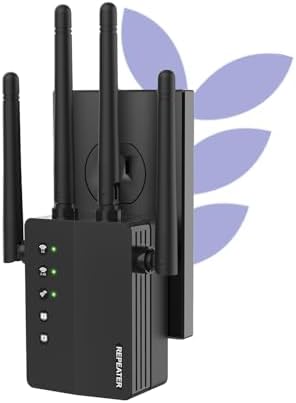
Figure 1: The AOOEPU WiFi Extender Signal Booster, a compact device with four external antennas, designed to plug directly into a standard wall outlet. Green indicator lights are visible, signifying active connections.
2. การตั้งค่าและการติดตั้ง
The AOOEPU WiFi Extender offers multiple modes for flexible network setup. Follow these steps for quick and easy installation.
2.1. การตั้งค่าอย่างรวดเร็วโดยใช้ปุ่ม WPS
- เปิดเครื่อง: Plug the WiFi Extender into a power outlet within the range of your existing main Wi-Fi router.
- กด WPS บน Extender: Locate and press the WPS button on the AOOEPU WiFi Extender. The WPS indicator light should start blinking.
- กด WPS บนเราเตอร์: ภายในสองนาที ให้กดปุ่ม WPS บนเราเตอร์ Wi-Fi หลักของคุณ
- การยืนยันการเชื่อมต่อ: Wait for the indicator lights on the extender to become solid, indicating a successful connection. The extender will automatically pair with your router.

Figure 2: Visual guide for the WPS (Wi-Fi Protected Setup) method, demonstrating how to quickly connect the extender to your existing router by pressing the WPS buttons on both devices.
2.2. การตั้งค่าด้วยตนเอง (Web เบราว์เซอร์)
- เปิดเครื่อง: Plug the WiFi Extender into a power outlet.
- เชื่อมต่อกับเครือข่าย Extender: On your computer or mobile device, connect to the extender's default Wi-Fi network (e.g., "AOOEPU_Extender" or similar, check the device label for the exact name). No password is required initially.
- เข้าสู่หน้าการตั้งค่า: เปิด web browser and enter the default IP address or web ที่อยู่ (เช่น 192.168.10.1 or repea.ter, refer to the manual for exact details).
- เข้าสู่ระบบ: Enter the default username and password (usually "admin" for both, check the device label).
- เลือกโหมด: Choose your desired operating mode (Repeater, AP, or Router).
- กำหนดค่าเครือข่าย: Follow the on-screen instructions to select your existing Wi-Fi network and enter its password. You can also set a new name and password for the extended network.
- ใช้การตั้งค่า: บันทึกการตั้งค่าและรอให้โปรแกรมขยายสัญญาณรีสตาร์ท
- เชื่อมต่อใหม่: Reconnect your devices to the newly configured extended Wi-Fi network.
3. โหมดการทำงาน
The AOOEPU WiFi Extender supports three primary operating modes to suit various networking needs:
- โหมดทวน: Extends the coverage of an existing wireless network. This is the most common mode for eliminating Wi-Fi dead zones.
- โหมด AP (Access Point): Transforms a wired network connection into a wireless one. Ideal for adding Wi-Fi capability to a wired-only router.
- โหมดเราเตอร์: Functions as a standalone router, creating a new private wireless network.

Figure 3: An illustration of the three distinct operating modes: AP Mode, Repeater Mode, and Router Mode, detailing their respective network configurations and applications.
4. การเชื่อมต่อและความเข้ากันได้
This WiFi Extender is designed for broad compatibility and robust connectivity, supporting a wide array of devices and providing stable connections for various activities.
4.1. ความเข้ากันได้ของอุปกรณ์
The extender can connect up to 105 devices simultaneously, ensuring all your smart devices, from entertainment systems to smart home gadgets, stay connected.

Figure 4: The extender's wide compatibility, illustrated with icons of common devices such as game consoles, cameras, computers, smartphones, and smart TVs, all capable of connecting to the extended network.
4.2. การใช้งานพอร์ตอีเธอร์เน็ต
The integrated RJ45 Ethernet ports allow for stable wired connections, which are ideal for devices requiring maximum speed and reliability, such as gaming consoles, desktop computers, and smart televisions.

รูปที่ 5: รายละเอียด view of the Ethernet ports on the extender, demonstrating how wired devices can be connected for enhanced stability and speed.
5 การแก้ไขปัญหา
If you encounter issues with your AOOEPU WiFi Extender, please refer to the following common troubleshooting steps:
- หลังจากตั้งค่าเสร็จแล้ว จะไม่สามารถเชื่อมต่ออินเทอร์เน็ตได้:
- Ensure the extender is within the effective range of your main router.
- ตรวจสอบว่ารหัสผ่าน Wi-Fi ที่ป้อนระหว่างการตั้งค่าถูกต้อง
- ลองรีสตาร์ทเราเตอร์หลักและตัวขยายสัญญาณของคุณอีกครั้ง
- Slow Speed on Extended Network:
- Relocate the extender closer to your main router to ensure a strong signal for the extender itself.
- ควรหลีกเลี่ยงการวางตัวขยายสัญญาณไว้ใกล้กับวัตถุโลหะขนาดใหญ่ ผนังคอนกรีต หรืออุปกรณ์อิเล็กทรอนิกส์อื่นๆ ที่อาจก่อให้เกิดการรบกวน
- ตรวจสอบให้แน่ใจว่าเราเตอร์หลักของคุณมีความเร็วเพียงพอ
- ไม่สามารถเข้าสู่หน้าการตั้งค่าได้:
- Ensure your device is connected to the extender's default Wi-Fi network (not your main router's network).
- ล้างแคชและคุกกี้ของเบราว์เซอร์ของคุณหรือลองใช้วิธีอื่น web เบราว์เซอร์
- ตรวจสอบที่อยู่ IP หรือ web address is entered correctly.
- การเชื่อมต่อไม่ต่อเนื่อง:
- Check for firmware updates for the extender on the AOOEPU official webเว็บไซต์.
- Ensure there are no physical obstructions or sources of interference between the extender and your devices.
- Consider resetting the extender to factory defaults and reconfiguring it.
6. ข้อมูลจำเพาะ
| คุณลักษณะ | รายละเอียด |
|---|---|
| ยี่ห้อ | อร๊ายยย |
| หมายเลขรุ่น | AOOEPU-0630-1 |
| ขนาดสินค้า | 7.48 x 3.74 x 2.4 นิ้ว |
| น้ำหนักสินค้า | 5.6 ออนซ์ |
| มาตรฐานการสื่อสารไร้สาย | 2.4 GHz Radio Frequency, 5 GHz Radio Frequency (Dual Band) |
| อัตราการถ่ายโอนข้อมูล | ความเร็วสูงสุด 1200 เมกะไบต์ต่อวินาที |
| ประเภทขั้วต่อ | พอร์ต Ethernet RJ45 |
| คุณสมบัติพิเศษ | 1-Tap Setup, 360 Degree Coverage, Directional Antenna, Firewall, WiFi Mesh (compatible) |
| พื้นที่ให้บริการ | สูงถึง 12880 ตร.ม. ฟุต |
| อุปกรณ์ที่รองรับสูงสุด | 105 อุปกรณ์ |
7. การบำรุงรักษา
To ensure optimal performance and longevity of your AOOEPU WiFi Extender, consider the following maintenance tips:
- การรีสตาร์ทปกติ: Periodically restart the extender (unplug and plug back in after 10 seconds) to clear its memory and refresh its connection.
- อัพเดตเฟิร์มแวร์: Check the official AOOEPU webตรวจสอบเว็บไซต์เพื่อดูการอัปเดตเฟิร์มแวร์ที่มีให้ใช้งาน การอัปเดตเฟิร์มแวร์อย่างสม่ำเสมอจะช่วยเพิ่มประสิทธิภาพ ความเสถียร และความปลอดภัย
- ตำแหน่งที่เหมาะสมที่สุด: Ensure the extender is placed in an open area, away from obstructions and sources of electromagnetic interference (e.g., microwaves, cordless phones, large metal objects).
- การทำความสะอาด: Gently wipe the exterior of the device with a soft, dry cloth to remove dust. Do not use liquid cleaners or aerosols.
- สภาพแวดล้อม : Operate the extender within recommended temperature and humidity ranges to prevent damage.
8. การรับประกันและการสนับสนุน
AOOEPU is committed to providing high-quality products and customer satisfaction. For detailed warranty information and technical support, please refer to the following resources:
- ข้อมูลการรับประกัน: Please refer to the warranty card included in your product packaging for specific terms and conditions. Standard warranty typically covers manufacturing defects for a period specified at purchase.
- การสนับสนุนด้านเทคนิค: For technical assistance, setup guidance, or troubleshooting beyond this manual, please visit the official AOOEPU support webเว็บไซต์หรือติดต่อฝ่ายบริการลูกค้าของพวกเขา
- แหล่งข้อมูลออนไลน์: Additional FAQs, video tutorials, and updated manuals may be available on the AOOEPU brand store or product page.
Note: Protection plans are available for purchase separately through Amazon, offering extended coverage beyond the manufacturer's warranty.


