1. บทนำ
The Brother HL-L1242W is a compact monochrome laser printer designed for efficient printing in home or small office environments. This manual provides essential information for setting up, operating, and maintaining your printer to ensure optimal performance.
คุณสมบัติที่สำคัญ ได้แก่:
- Compact design for small spaces.
- Print speeds up to 20 pages per minute.
- Versatile connectivity with Wi-Fi (5 GHz) and USB.
- Support for printing from PCs and mobile applications.
- ถาดป้อนกระดาษจุได้ 150 แผ่น
- Includes a starter toner cartridge for up to 450 pages.
2. การตั้งค่าเริ่มต้น
2.1 การแกะกล่องเครื่องพิมพ์
Carefully remove the printer from its packaging. Ensure all protective tapes and packing materials are removed from the exterior and interior of the printer.
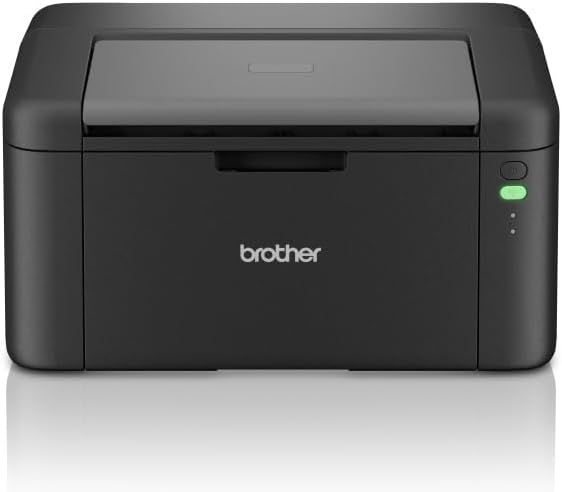
รูปที่ 1 : ด้านหน้า view of the Brother HL-L1242W printer, showing its compact design and control panel on the right side.
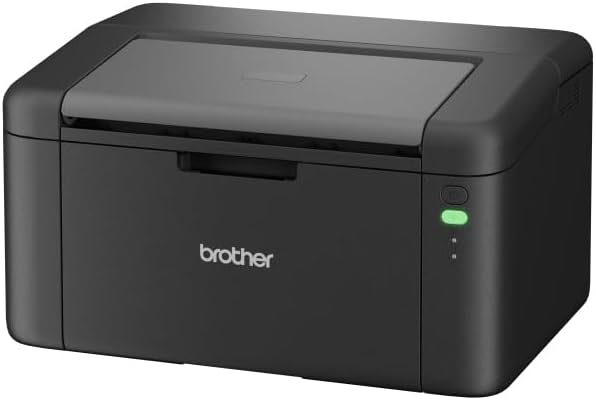
รูปที่ 2: ด้านหน้าทำมุม view of the Brother HL-L1242W printer, highlighting its sleek, black finish and output tray.
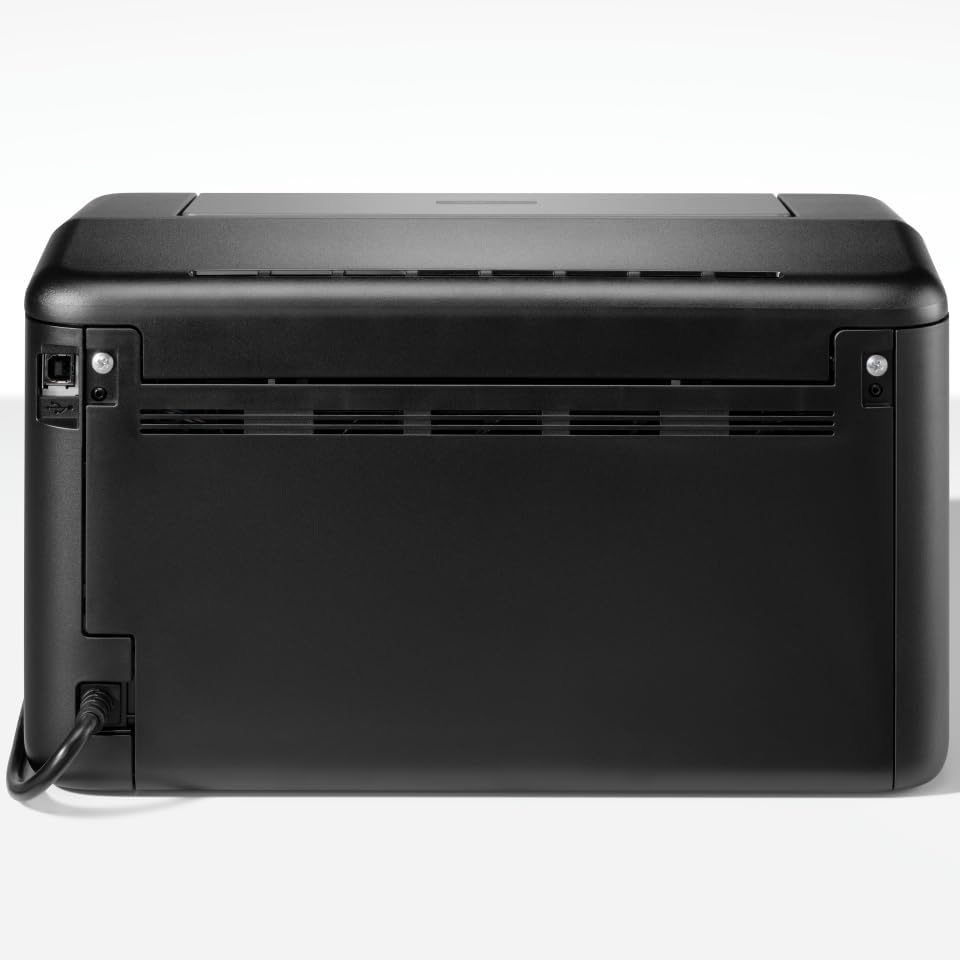
รูปที่ 3: ด้านหลัง view of the Brother HL-L1242W printer, displaying the power input and USB port.
2.2 การติดตั้งตลับหมึก
- Open the front cover of the printer to access the toner compartment.
- Locate the orange protective paper inside the compartment. This paper is attached to the toner support.
- Gently remove the toner support to detach the orange paper.
- Unpack the new toner cartridge from its sealed bag. Remove any orange plastic protective pieces from the toner cartridge.
- Insert the toner cartridge into the drum unit. Ensure it clicks into place.
- Slide the combined toner and drum unit back into the printer until it locks securely.
- ปิดฝาครอบด้านหน้า
2.3 การเชื่อมต่อสายไฟ
Connect the AC power cable to the printer and then to a power outlet. Press the power button to turn on the printer.
2.4 Connectivity and Driver Installation
Your Brother HL-L1242W printer supports both USB and Wi-Fi connectivity.
การเชื่อมต่อ USB:
- เชื่อมต่อเครื่องพิมพ์กับคอมพิวเตอร์ของคุณโดยใช้สาย USB (ไม่ได้รวมอยู่ในชุด)
- Install the printer drivers from the official Brother support webไซต์ ปฏิบัติตามคำแนะนำบนหน้าจอ
การเชื่อมต่อ Wi-Fi:
- Download the Brother iPrint&Scan app on your mobile device or visit the Brother support website for PC/Mac setup.
- Follow the instructions provided by the app or website to connect your printer to your wireless network. This process typically involves selecting your Wi-Fi network and entering the password.
- Ensure your printer and device are on the same network for successful wireless printing.
3. การดำเนินการ
3.1 กำลังโหลดกระดาษ
Open the paper tray and load up to 150 sheets of plain or recycled A4 paper. Adjust the paper guides to fit the paper size.

Figure 4: A user loading paper into the front paper tray of the Brother HL-L1242W printer.
3.2 การพิมพ์เอกสาร
Once the printer is connected and drivers are installed, you can print from your computer or mobile device.
- เปิดเอกสารหรือรูปภาพที่คุณต้องการพิมพ์
- Select the "Print" option from your application's menu (e.g., File > พิมพ์).
- Choose your Brother HL-L1242W printer from the list of available printers.
- ปรับการตั้งค่าการพิมพ์ตามต้องการ (เช่น จำนวนสำเนา ขนาดกระดาษ)
- คลิก "พิมพ์"
3.3 การพิมพ์สองด้าน (Duplex)
The HL-L1242W supports manual duplex printing.
- ในการตั้งค่าการพิมพ์ ให้เลือกตัวเลือกสำหรับการพิมพ์สองด้านแบบแมนนวล
- The printer will first print all odd-numbered pages.
- Once the first side is printed, a prompt will appear on your computer screen instructing you to reinsert the printed pages into the paper tray. Follow the on-screen instructions carefully regarding paper orientation.
- Confirm the reinsertion, and the printer will then print the even-numbered pages on the reverse side.
4. การบำรุงรักษา
4.1 การเปลี่ยนตลับหมึก
When the toner cartridge is low or empty, the printer's status indicator will alert you. Replace the toner cartridge with a genuine Brother TN-1150 toner cartridge for optimal print quality and printer longevity.
- ตรวจสอบให้แน่ใจว่าเครื่องพิมพ์เปิดอยู่
- เปิดฝาครอบด้านหน้า
- ถอดตลับหมึกและชุดดรัมเก่าออก
- Separate the old toner cartridge from the drum unit. Dispose of the old toner cartridge according to local regulations.
- Unpack the new toner cartridge and install it into the drum unit until it locks.
- Reinsert the toner and drum unit assembly into the printer.
- ปิดฝาครอบด้านหน้า
The included starter toner cartridge is rated for approximately 450 pages. Actual yield may vary based on usage.
4.2 การทำความสะอาดเครื่องพิมพ์
การทำความสะอาดอย่างสม่ำเสมอจะช่วยรักษาคุณภาพการพิมพ์และยืดอายุการใช้งานของเครื่องพิมพ์ของคุณ
- ภายนอก: เช็ดทำความสะอาดภายนอกเครื่องพิมพ์ด้วยผ้าเนื้อนุ่มที่ไม่เป็นขุย ห้ามใช้สารทำความสะอาดที่มีฤทธิ์กัดกร่อนหรือตัวทำละลาย
- ภายใน: Periodically open the front cover and gently wipe away any loose toner dust with a dry, lint-free cloth. Avoid touching the drum unit's surface directly.
5 การแก้ไขปัญหา
This section addresses common issues you might encounter with your Brother HL-L1242W printer.
5.1 เครื่องพิมพ์ไม่ตอบสนอง
- ตรวจสอบให้แน่ใจว่าเครื่องพิมพ์เปิดอยู่และเสียบสายไฟแน่นสนิทแล้ว
- Check USB cable connections if using a wired connection.
- For Wi-Fi, verify that the printer is connected to your network and that your computer/mobile device is on the same network. Restarting the printer and your router may resolve connectivity issues.
- Confirm that the correct printer driver is installed and selected on your computer.
5.2 คุณภาพการพิมพ์ไม่ดี
- ตรวจสอบระดับหมึก หากหมึกเหลือน้อยหรือหมด ให้เปลี่ยนตลับหมึก
- โปรดตรวจสอบให้แน่ใจว่าคุณใช้กระดาษที่เหมาะสมสำหรับการพิมพ์ด้วยเครื่องพิมพ์เลเซอร์
- Clean the drum unit and other internal components as described in the maintenance section.
5.3 กระดาษติด
- ปิดเครื่องพิมพ์และถอดปลั๊กออกจากเต้าเสียบไฟ
- Carefully open all covers and gently remove any jammed paper. Avoid tearing the paper, as small pieces can cause further issues.
- Ensure the paper is loaded correctly in the paper tray and that the paper guides are adjusted properly.
- ปิดฝาครอบทั้งหมด เสียบปลั๊กเครื่องพิมพ์ และเปิดเครื่องอีกครั้ง
สำหรับรายละเอียดการแก้ไขปัญหาเพิ่มเติม โปรดติดต่อฝ่ายสนับสนุนของ Brother webเว็บไซต์หรือติดต่อฝ่ายบริการลูกค้า
6. ข้อมูลจำเพาะ
| คุณสมบัติ | ข้อมูลจำเพาะ |
|---|---|
| ชื่อรุ่น | HL-L1242W |
| ประเภทเครื่องพิมพ์ | เลเซอร์ขาวดำ |
| ความเร็วในการพิมพ์สูงสุด (ขาวดำ) | สูงสุด 20 หน้าต่อนาที |
| ความละเอียดการพิมพ์สูงสุด | 2400 x 600 จุดต่อนิ้ว |
| การพิมพ์สองหน้า | คู่มือ |
| การเชื่อมต่อ | Wi-Fi (5 GHz), USB |
| ความจุกระดาษเข้า | สูงสุด 150 แผ่น |
| ขนาดสื่อสูงสุด | A4 (210 x 297 มม.) |
| ประเภทสื่อที่รองรับ | Plain paper, Recycled paper |
| การใช้พลังงาน | 380 Watts (printing) |
| ขนาด (D x W x H) | 23.8 ซม. x 34 ซม. x 18.9 ซม. |
| น้ำหนัก | 4764 กรัม |
| ส่วนประกอบที่รวมอยู่ | Brother HL-L1242W Printer, Starter Toner Cartridge(s), AC Power Cable, Warranty Card |
7. การรับประกันและการสนับสนุน
7.1 การรับประกันสินค้า
The Brother HL-L1242W printer comes with a standard manufacturer's warranty. Please refer to the warranty card included in your product packaging for specific terms, conditions, and duration of coverage.
7.2 การสนับสนุนลูกค้า
สำหรับความช่วยเหลือด้านเทคนิค การดาวน์โหลดไดรเวอร์ คำถามที่พบบ่อย และแหล่งข้อมูลสนับสนุนเพิ่มเติม โปรดเยี่ยมชมเว็บไซต์สนับสนุนอย่างเป็นทางการของ Brother website. You can also contact Brother customer service for personalized help.


