1. สินค้าหมดview
The FEELWORLD FW568 PRO is a compact and versatile 6-inch camera field monitor designed for professional videographers and photographers. It features a high-brightness 1200-nit display with 1920x1080 resolution, ensuring clear visibility even in bright sunlight. With support for 4K 60Hz HDMI input/output and advanced monitoring tools like 3D LUTs, waveform, and false color, this monitor enhances your shooting workflow and accuracy.

Image 1.1: The FEELWORLD FW568 PRO monitor, showcasing its compact design and included accessories like the F750 battery and carry case.
2. เนื้อหาบรรจุภัณฑ์
โปรดตรวจสอบว่าสินค้าทั้งหมดมีอยู่ในแพ็คเกจของคุณ:
- 1x FEELWORLD FW568 Pro Camera DSLR Video Monitor
- 1x F750 4400mAh Battery
- 1x กระเป๋าใส่อุปกรณ์พกพา
- 1x สาย HDMI มาตรฐาน
- สาย Micro HDMI 1 เส้น
- 1x ม่านบังแดด
- 1x Mini Hot Shoe Mount + Hex Wrench
- 1x อะแดปเตอร์ USB-A เป็น USB-C
- 1x Cable Management Tie
- 1x คู่มือผู้ใช้

Image 2.1: Visual representation of all items included in the FEELWORLD FW568 PRO package.
3. คุณสมบัติหลัก
- จอแสดงผลความสว่างสูง: 6-inch Full HD 1920x1080 IPS screen with 1200 nits brightness for clear viewing in outdoor conditions.
- กว้าง Viewอิงมุม: 160° ไอพีเอส viewing angle and 1000:1 contrast ratio for accurate color reproduction.
- 4K HDMI 2.0 Support: Compatible with 4K HDMI signals up to 60FPS for high-resolution video monitoring.
- เครื่องมือตรวจสอบระดับมืออาชีพ: Includes Waveform, Vector Scope, Histogram, Peaking Focus Assist, False Color, and more.
- รองรับ 3D LUT: Load up to 32 custom 3D LUTs via USB-C for real-time color grading preview.
- ปุ่มที่ปรับแต่งได้: Three custom function buttons for quick access to frequently used features.
- ตัวเลือกพลังงานที่หลากหลาย: Supports NP-F series batteries, DC 12V input, and 5V Type-C power.
- การออกแบบน้ำหนักเบา: Weighs approximately 204g (monitor only) for easy portability and gimbal compatibility.

Image 3.1: The monitor's 1200 nits high brightness screen, designed for visibility in sunlight.

Image 3.2: Details on the 6-inch IPS-FHD screen, highlighting its 1920x1080 resolution, lightweight design, and REC-709 color support.
4. คู่มือการติดตั้ง
4.1 การติดตั้งจอภาพ
- Attach the included Mini Hot Shoe Mount to your camera's hot shoe or a compatible rig.
- Secure the FW568 PRO monitor to the Mini Hot Shoe Mount using the 1/4-inch screw. Ensure it is tightened with the hex wrench for stability.
- Adjust the monitor's angle for optimal viewการไอเอ็นจี
4.2 การเชื่อมต่อกับกล้อง
- Connect one end of the HDMI cable (Standard or Micro HDMI, depending on your camera) to your camera's HDMI output port.
- เชื่อมต่อปลายอีกด้านหนึ่งของสาย HDMI เข้ากับ HDMI IN port on the FW568 PRO monitor.
- If you need to loop out the HDMI signal to another device, connect a second HDMI cable from the monitor's เอาต์พุต HDMI port to the desired device.
4.3 การเปิดเครื่อง
Refer to Section 7 for detailed power options. Once powered, press the power button to turn on the monitor.
วิดีโอ 4.1: จบแล้วview of the FEELWORLD FW568 PRO monitor's features and setup, demonstrating its high brightness and use with a camera rig.
5. คู่มือการใช้งาน
5.1 การนำทางในส่วนติดต่อผู้ใช้
The FW568 PRO features an updated user interface (UI) for intuitive navigation. Use the เมนู button to access the main menu and the arrow keys (V / A) to navigate through options. Press เมนู อีกครั้งหรือ EXIT to confirm selections or exit menus.

Image 5.1: The monitor's new user interface, showing menu options and various markers for professional monitoring.
5.2 Using Custom Buttons (F1, F2, F3)
The three custom buttons (F1, F2, F3) on the top of the monitor can be assigned to frequently used functions for quick access. To assign a function:
- ไปที่ ตัวเลือกผู้ใช้ เมนู.
- Select the desired custom button (F1, F2, or F3).
- Choose a function from the list (e.g., Waveform, False Color, Ratio Marker).
- Once assigned, a single press of the custom button will activate/deactivate the function.
6. Advanced Monitoring Functions
The FW568 PRO offers a suite of advanced tools to assist with exposure, focus, and color accuracy.
- รูปแบบของคลื่น: Displays the luminance and chrominance levels of your video signal, helping to ensure proper exposure.
- ขอบเขตเวกเตอร์: Visualizes the color information of your image, allowing for precise color balance adjustments.
- ฮิสโตแกรม: Shows the distribution of tones in your image, indicating exposure levels and potential clipping.
- ระบบช่วยเพิ่มสมาธิสูงสุด: Highlights sharp edges in your image, making it easier to achieve critical focus.
- สีเท็จ: Uses color overlays to represent different exposure levels, aiding in setting correct exposure.
- ลูท 3D: Allows you to load and preview custom Look Up Tables for real-time color grading and matching.

Image 6.1: Icons representing the various advanced monitoring functions available on the FW568 PRO, including 3D LUT, Waveform, Vector Scope, and False Color.

Image 6.2: Demonstrates the 3D LUT feature, showing how to load custom LUTs via the Type-C interface and preview their effect on the image.

Image 6.3: Illustrates the various waveform displays (Vectorscope, Brightness Histogram, YUV Parade, Y Parade) for precise technical monitoring of video and audio signals.

Image 6.4: Shows the effect of HDR monitoring (HDR OFF vs. HDR ON), demonstrating how it enhances detail in both lighter and darker areas of the image.
7. การเปิดใช้งานจอภาพ
The FW568 PRO offers flexible power solutions for various shooting environments:
- NP-F Battery Plate: The monitor includes a battery plate compatible with NP-F series batteries (e.g., F550, F750, F970). An F750 4400mAh battery is included in the package.
- อินพุต DC 12V: Use a compatible DC 12V power adapter (not included) for continuous power during studio or long-duration shoots.
- 5V Type-C Input: The monitor can also be powered via a 5V Type-C connection, offering additional flexibility.
The monitor also features a DC OUT 8.4V port, allowing you to power compatible cameras or accessories using an optional DC coupler.

Image 7.1: Illustrates the various power input options: NP-F battery plate, DC 12V input, and 5V Type-C input.

Image 7.2: Shows the DC 8.4V output interface, demonstrating how it can power a camera using an optional dummy battery adapter.
8. ตัวเลือกการติดตั้ง
The FW568 PRO is designed with flexible mounting options to integrate seamlessly into your camera rig:
- 1/4-inch Screw Holes: The monitor features 1/4-inch screw holes on the right side and bottom for versatile mounting with various accessories, including the Mini Hot Shoe Mount.
- ร่มกันแดด: The included sunshade can be easily attached to the monitor to reduce glare and improve screen visibility in bright outdoor conditions.
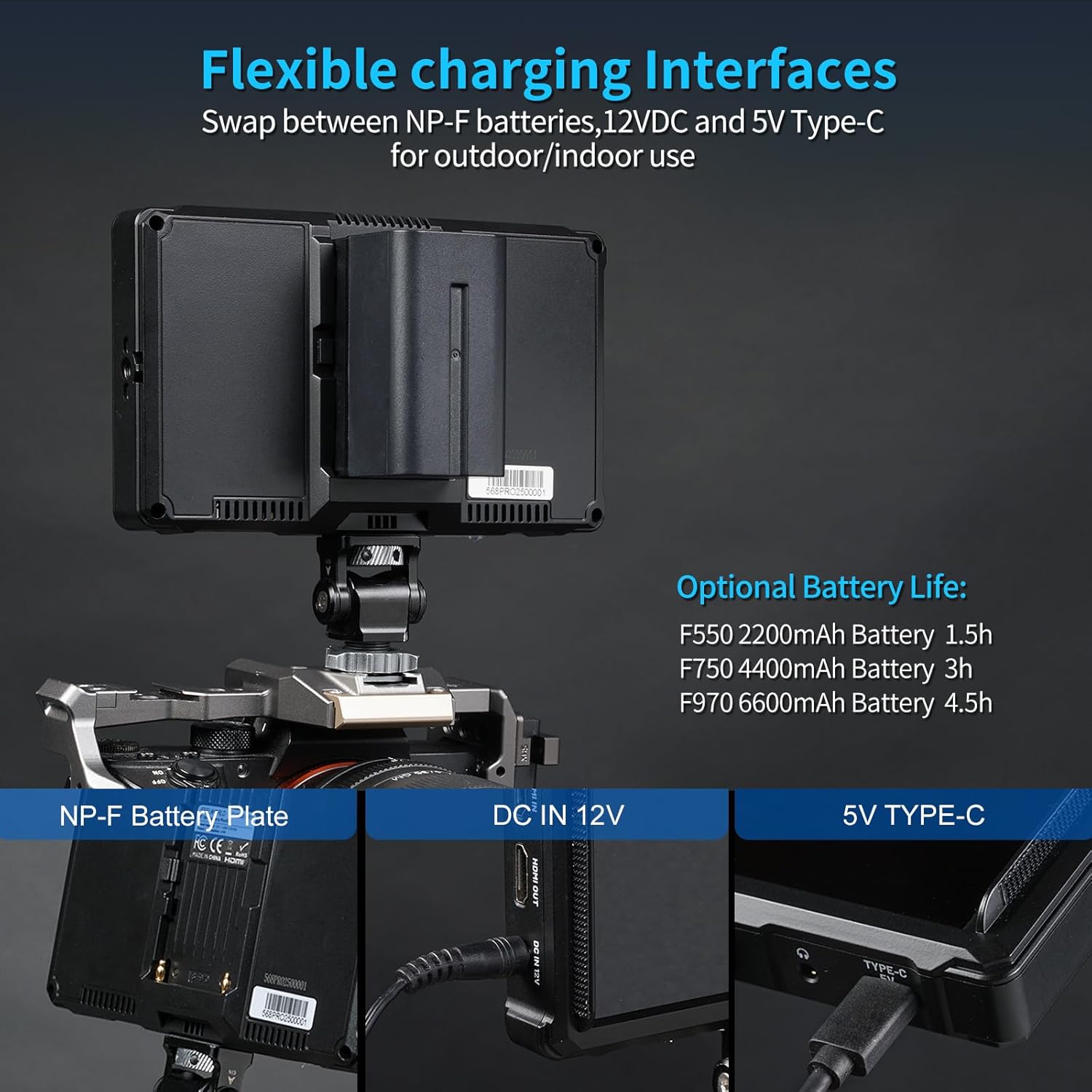
Image 8.1: The Mini Hot Shoe Mount attached to the monitor, illustrating its 180° viewing angle and 360° rotation capabilities.

Image 8.2: Demonstrates the attachment and function of the included sunshade for improved screen visibility in bright environments.
9. การบำรุงรักษา
To ensure the longevity and optimal performance of your FEELWORLD FW568 PRO monitor, follow these maintenance guidelines:
- การทำความสะอาด: Use a soft, dry cloth to clean the monitor's exterior. For the screen, use a microfiber cloth specifically designed for electronics and a gentle screen cleaning solution if necessary. Avoid harsh chemicals or abrasive materials.
- พื้นที่จัดเก็บ: When not in use, store the monitor in its included carry case to protect it from dust, scratches, and impacts. Keep it in a cool, dry place away from direct sunlight and extreme temperatures.
- การจัดการ: Handle the monitor with care. Avoid dropping it or subjecting it to strong vibrations, as this can damage internal components.
- การดูแลแบตเตอรี่ If using NP-F batteries, ensure they are charged regularly and stored properly when not in use to maintain battery health.
10 การแก้ไขปัญหา
If you encounter issues with your FW568 PRO monitor, refer to the following common troubleshooting steps:
- ไม่มีไฟฟ้า:
- Ensure the battery is fully charged and correctly inserted, or the DC/Type-C power source is properly connected.
- ตรวจสอบปุ่มเปิด/ปิดเพื่อให้ใช้งานได้อย่างถูกต้อง
- ไม่มีสัญญาณ:
- Verify that the HDMI cable is securely connected to both the camera's output and the monitor's HDMI IN ท่าเรือ.
- Confirm that your camera's HDMI output is active and configured correctly.
- ลองใช้สาย HDMI เส้นอื่นเพื่อตรวจสอบว่าปัญหาไม่ได้เกิดจากสายเคเบิล
- ภาพบิดเบี้ยว/สีผิดเพี้ยน:
- Check the monitor's display settings (color temperature, brightness, contrast).
- Ensure no monitoring tools like False Color or 3D LUTs are inadvertently activated if you desire a raw feed.
- Verify the camera's output settings match the monitor's capabilities.
- ปุ่มไม่ตอบสนอง:
- รีสตาร์ทจอภาพ
- ตรวจสอบให้แน่ใจว่าไม่มีเศษสิ่งสกปรกกีดขวางปุ่มกด
If problems persist, please contact FEELWORLD customer support for further assistance.
11. ข้อมูลจำเพาะ
Key technical specifications for the FEELWORLD FW568 PRO monitor:
| คุณสมบัติ | ข้อมูลจำเพาะ |
|---|---|
| หมายเลขรุ่น | X5L (FW568 PRO) |
| ขนาดหน้าจอ | 6 นิ้ว |
| ปณิธาน | 1920 x 1080 (ฟูลเอชดี) |
| ความสว่าง | 1200 นิต |
| อัตราส่วนคอนทราสต์ | 1000:1 น. |
| Viewอิงแองเกิล | 160° (IPS) |
| อินพุต/เอาต์พุต HDMI | 4K 60Hz HDMI 2.0 |
| กำลังไฟเข้า | NP-F Battery, DC 12V, 5V Type-C |
| กำลังขับ | กระแสตรง 8.4 โวลต์ |
| น้ำหนักต่อหน่วย | ประมาณ 204 กรัม (0.45 ปอนด์) |
| ขนาดแพ็คเกจ | 7.28 x 4.92 x 3.15 นิ้ว |

Image 11.1: Detailed dimensions of the FEELWORLD FW568 PRO monitor, including its thickness and weight.
12. การรับประกันและการสนับสนุน
For warranty information, technical support, or service inquiries regarding your FEELWORLD FW568 PRO monitor, please refer to the official FEELWORLD webหรือติดต่อฝ่ายบริการลูกค้าโดยตรง โปรดเก็บใบเสร็จรับเงินไว้เป็นหลักฐานการซื้อสำหรับการเรียกร้องการรับประกันใดๆ
Video 12.1: A comparative overview of the FEELWORLD FW568 PRO, highlighting its upgrades and features for creators.


