การแนะนำ
This manual provides detailed instructions for the assembly, operation, and maintenance of your MOTPK 53 Inch L Shaped Gaming Desk. Please read this manual thoroughly before assembly and use to ensure proper function and safety.
The MOTPK L Shaped Gaming Desk is designed to optimize your gaming or work setup with features such as integrated power outlets, customizable LED lighting, and versatile storage options. Its reversible design allows for flexible placement in various room configurations.
ข้อมูลด้านความปลอดภัยที่สำคัญ
Please read and understand all safety warnings before proceeding with assembly or use.
- ปฏิบัติตามคำแนะนำในการประกอบอย่างระมัดระวังเสมอ
- Use appropriate tools and ensure the work area is clear of obstructions.
- Keep hands and body parts away from moving parts during assembly.
- Always unplug and disconnect any power sources before assembly or disassembly.
- Ensure all connections are secure before applying power to the integrated outlets or LED lights.
- Do not overload the power outlets. Refer to specifications for maximum load.
เนื้อหาแพ็คเกจ
ก่อนเริ่มประกอบ โปรดตรวจสอบให้แน่ใจว่าชิ้นส่วนทั้งหมดครบถ้วนและไม่เสียหาย หากมีชิ้นส่วนใดขาดหายหรือเสียหาย โปรดติดต่อฝ่ายบริการลูกค้า
- Desk panels (L-shaped desktop, corner desktop, display shelf, CPU stand platform)
- ส่วนประกอบโครงโลหะ
- Integrated power strip (3 AC outlets, 2 USB ports, 6.5ft power cord)
- LED light strips with controller
- ที่เกี่ยวหูฟัง
- อุปกรณ์ประกอบ (สกรู น็อต สลักเกลียว ฯลฯ)
- เครื่องมือประกอบ (เช่น ประแจอัลเลน ไขควง)
- คู่มือการใช้งาน
การติดตั้งและการประกอบ
Assembly typically takes under 45 minutes. Follow the visual step-by-step instructions provided in the included guide. All necessary tools are provided.
- เตรียมพื้นที่: Clear a spacious, flat area for assembly. Lay out all components and hardware.
- ประกอบเฟรม: Connect the metal frame components according to the diagrams. Ensure all screws are finger-tightened initially.
- ติดตั้งแผงด้านข้างเดสก์ท็อป: Secure the L-shaped desktop and corner desktop panels to the assembled frame. Fully tighten all screws once panels are aligned.
- Install Display Shelf and CPU Stand: Attach the display storage shelf and the adjustable CPU stand platform. The CPU stand can be adjusted vertically to suit your needs.
- ติดตั้งปลั๊กไฟ: Secure the integrated power strip into its designated slot on the desktop.
- ติดตั้งไฟ LED: Adhere the LED light strips to the designated areas. Connect the controller and power cable.
- ติดตะขอเกี่ยวหูฟัง: Secure the headphone hook to the underside of the desk.
- การตรวจสอบขั้นสุดท้าย: Ensure all connections are secure and the desk is stable before placing any equipment on it.

ภาพ: โอเวอร์view of the MOTPK L Shaped Gaming Desk, showcasing its design with integrated LED lighting, power outlet, and storage features. The image also illustrates the reversible configuration option.

Image: A detailed diagram illustrating the dimensions of the MOTPK L Shaped Gaming Desk, including length, width, height, and the length of the power cord (6.5 feet).
คำแนะนำการใช้งาน
เต้ารับไฟฟ้าในตัว
The desk features a built-in power strip for convenient access to power.
- เต้ารับไฟฟ้ากระแสสลับ: 3 standard 125V/12A AC outlets for powering monitors, computers, and other devices.
- พอร์ต USB: 2 USB 5V/2A charging ports for mobile devices, controllers, and headsets.
- สายไฟ: The integrated 6.5-foot power cord connects the power strip to a wall outlet.

ภาพ: ภาพระยะใกล้ view of the integrated power outlet on the desk, showing three AC outlets and two USB charging ports, with a device plugged in.
ระบบไฟ LED
The desk is equipped with dual LED light strips to enhance your environment. Use the included controller to manage the lighting.
- เปิด/ปิดเครื่อง: กดปุ่มเปิด/ปิดบนตัวควบคุมเพื่อเปิดหรือปิดไฟ
- สีคงที่: Select from 10 vibrant static colors.
- เอฟเฟกต์ไดนามิก: Choose from 10 dynamic lighting effects.
- การปรับความสว่าง: Adjust the brightness level (6 levels available) to suit your preference.
- ฟังก์ชั่นหน่วยความจำ: The system retains your last selected settings when powered off and on.

Image: A visual representation of the two LED light strips and their controller, demonstrating various color options and lighting modes available for the desk.
Adjustable CPU Stand Platform
The multi-level corner board can be adjusted to accommodate your CPU tower or to provide additional desktop space.
- การปรับแต่ง: The platform can be smoothly adjusted up or down without tools.
- ฟังก์ชันการทำงาน: Use it to showcase your CPU tower or as an extra surface for accessories.
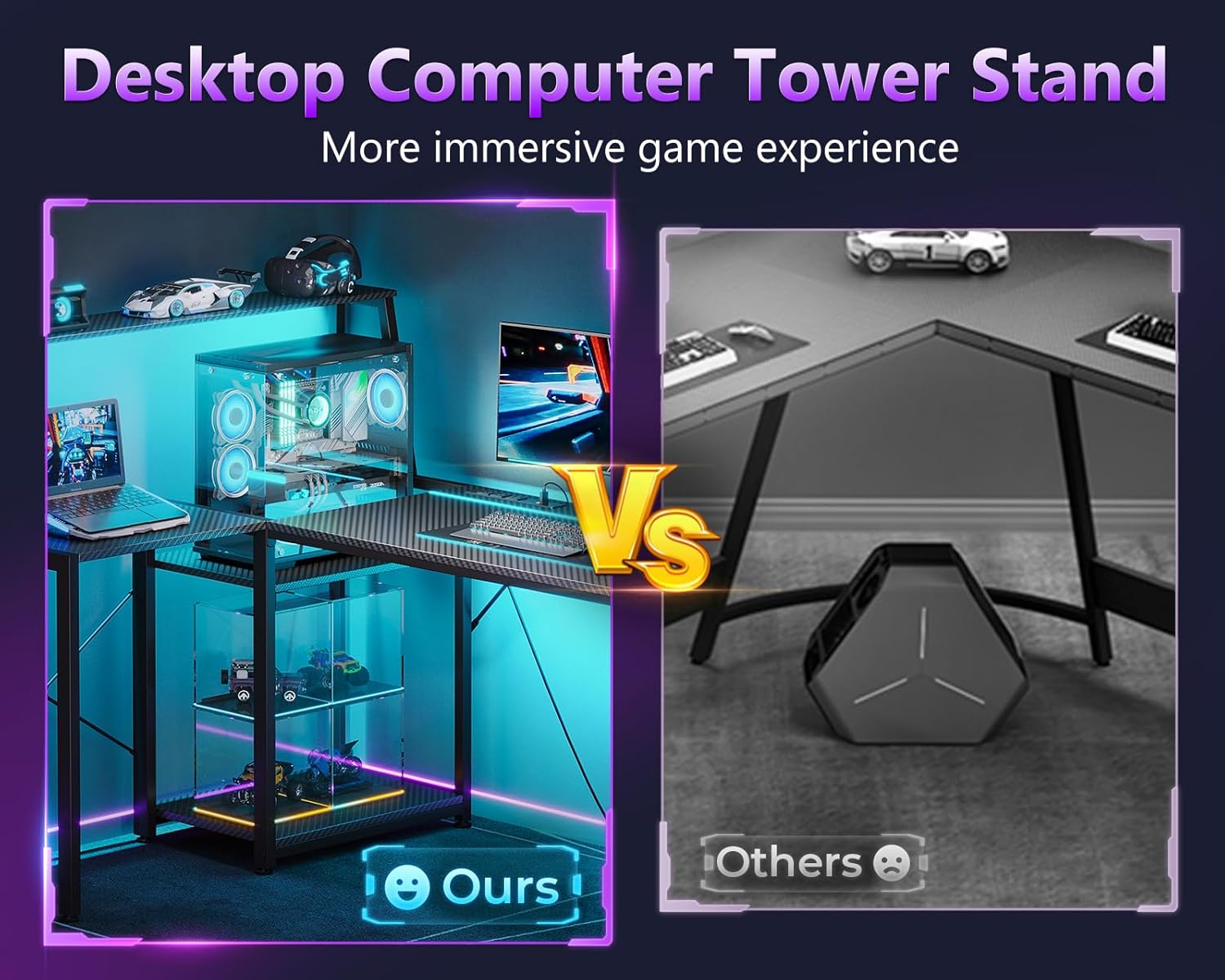
Image: A comparison showing the integrated desktop computer tower stand on the MOTPK desk versus a typical floor-standing CPU case, highlighting the space-saving and display benefits.
การซ่อมบำรุง
To ensure the longevity and appearance of your MOTPK Gaming Desk, follow these maintenance guidelines:
- การทำความสะอาด: เช็ดพื้นผิวคาร์บอนไฟเบอร์ด้วยผ้าเนื้อนุ่มและแห้งamp ผ้า หลีกเลี่ยงน้ำยาทำความสะอาดที่มีฤทธิ์กัดกร่อนหรือสารเคมีรุนแรงที่อาจทำลายพื้นผิวได้
- ปัดฝุ่น: ควรปัดฝุ่นโต๊ะและแถบไฟ LED เป็นประจำ เพื่อรักษาประสิทธิภาพและรูปลักษณ์ที่ดีที่สุด
- การรั่วไหลของของเหลว: Immediately wipe up any liquid spills to prevent damage to the desktop or electrical components.
- การจัดการสายเคเบิล: Periodically check and organize cables to prevent tangles and reduce strain on connections.
- การตรวจสอบฮาร์ดแวร์: ทุกๆ สองสามเดือน ควรตรวจสอบสกรูและน็อตทั้งหมดเพื่อให้แน่ใจว่ายังแน่นอยู่ หากจำเป็นให้ขันให้แน่นอีกครั้ง
การแก้ไขปัญหา
หากคุณพบปัญหาใดๆ เกี่ยวกับโต๊ะทำงาน โปรดดูขั้นตอนการแก้ไขปัญหาทั่วไปต่อไปนี้:
| ปัญหา | สาเหตุที่เป็นไปได้ | สารละลาย |
|---|---|---|
| โต๊ะโยกเยก | สกรูหลวมหรือพื้นไม่เรียบ | Ensure all assembly screws are fully tightened. Adjust leveling feet if present, or place shims under legs on uneven surfaces. |
| ไฟ LED ไม่ติด | Power connection issue, faulty controller, or damaged strip. | Check if the power cord for the LED lights is securely plugged into the power strip and the wall outlet. Ensure the controller is properly connected to the LED strips. Try pressing the power button on the controller. If issues persist, contact support. |
| เต้าเสียบไฟฟ้าไม่ทำงาน | Desk power cord unplugged, circuit breaker tripped, or faulty outlet. | Verify the desk's main power cord is securely plugged into a functional wall outlet. Check your home's circuit breaker. Test the wall outlet with another device. If the issue is isolated to the desk's power strip, contact support. |
| CPU stand platform not adjusting smoothly. | สิ่งกีดขวางหรือการวางแนวที่ไม่ถูกต้อง | Ensure no cables or objects are obstructing the adjustment mechanism. Check for proper alignment during assembly. |
ข้อมูลจำเพาะ
- ยี่ห้อ: MOTPK
- แบบอย่าง: โต๊ะเกมมิ่งรูปตัว L ขนาด 53 นิ้ว
- รูปร่าง: รูปตัว L
- ขนาดสินค้า (ลึก x กว้าง x สูง): ลึก 39.37 นิ้ว x กว้าง 52.76 นิ้ว x สูง 45.47 นิ้ว
- สี: Carbon Fiber Surface, Black
- สไตล์: ทันสมัย
- วัสดุฐาน: เหล็กอัลลอยด์
- ประเภทวัสดุด้านบน: ไม้แปรรูป
- เสร็จสิ้นประเภท: เคลือบผง
- คุณสมบัติพิเศษ: Reversible, Built-in Power Outlet, LED Lighting, Headphone Hook, Storage Shelves, Adjustable CPU Stand
- เต้ารับไฟฟ้า: 3 AC Outlets (125V/12A), 2 USB Ports (5V/2A), 6.5-Feet Power Cord
- ไฟ LED: 2 Strips, 10 Static Colors, 10 Dynamic Effects, 6 Brightness Levels, Memory Function
- การประกอบ: Required (Includes all assembly tools)
การรับประกันและการสนับสนุน
การรับประกันแบบจำกัด
This MOTPK product comes with a limited warranty. Please refer to the warranty card included in your package for specific terms and conditions. The warranty covers manufacturing defects under normal use.
การสนับสนุนลูกค้า
For any questions, concerns, or assistance with assembly or product functionality, please contact our dedicated support team. Our team typically responds within 24 hours via Amazon Messages.
You can reach us through the Amazon platform by navigating to your order history and selecting "Contact Seller" for your MOTPK desk purchase.


