การแนะนำ
This manual provides detailed instructions for the setup, operation, maintenance, and troubleshooting of your DIERYA DK68E 60% Mechanical Gaming Keyboard. Please read this manual thoroughly to ensure proper use and to maximize your keyboard's performance and longevity.
มีอะไรอยู่ในกล่อง
- คีย์บอร์ดเชิงกล DIERYA DK68E
- สาย USB-C ถึง USB-A
- ตัวดึงกุญแจ
- คู่มือการใช้งาน (เอกสารนี้)

Image: The DIERYA DK68E keyboard with its detachable USB-C cable.
การตั้งค่า
- แกะคีย์บอร์ดออก: ถอดคีย์บอร์ดและอุปกรณ์เสริมทั้งหมดออกจากบรรจุภัณฑ์อย่างระมัดระวัง
- เชื่อมต่อสาย USB: Insert the USB-C end of the provided cable into the port on the keyboard. Connect the USB-A end to an available USB port on your computer.
- การรับรู้เบื้องต้น: Your computer should automatically detect and install the necessary drivers for the keyboard. This process may take a few moments.
- การจัดวาง: Position the keyboard comfortably on your desk. The keyboard features two-stage adjustable feet for ergonomic typing angles.

Image: Illustration of the USB-C port on the keyboard and the USB-A connector for the computer.

Image: Detail of the keyboard's adjustable feet and anti-slip pads for customized tilt.
คำแนะนำการใช้งาน
ฟังก์ชันพื้นฐานของแป้นพิมพ์
The DIERYA DK68E is a 60% layout keyboard, meaning some keys are accessed via function (Fn) layer combinations. Refer to the keycaps for secondary functions, typically indicated on the front or side of the key.
การควบคุมไฟแบ็คไลท์ RGB
The keyboard features 16.8 million colors and 20 pre-set RGB lighting effects. These can be customized directly on the keyboard or through the webไดรเวอร์แบบ -based
- เปลี่ยนเอฟเฟกต์แสง: Use the designated Fn key combination (e.g., Fn + \) to cycle through pre-set effects.
- ปรับความสว่าง: Use Fn key combinations to increase or decrease backlight brightness.
- ปิดไฟแบ็คไลท์: A specific Fn key combination will typically toggle the backlight on/off.
Dedicated Volume Knob
The multi-functional knob located on the top right of the keyboard provides convenient media control:
- หมุน: ปรับระดับเสียงระบบ
- กด: ปุ่มสลับเล่น/หยุดชั่วคราวสำหรับสื่อต่างๆ
- กดค้างไว้: May mute/unmute audio (refer to specific keyboard documentation for exact function).

Image: The multi-function metal knob for volume and media control.
Web-based Driver (KeyFlow Webระบบปฏิบัติการ)
The DIERYA DK68E features a driver-free, web-based customization tool. This allows for advanced personalization without software installation, compatible with Windows, Mac, and Linux.
- เข้าถึง: เปิด web browser and navigate to the official DIERYA web driver portal (URL typically provided in a quick start guide or on the manufacturer's webเว็บไซต์).
- ฟังก์ชั่น: ภายใน web interface, you can perform:
- การรีแมปคีย์
- Complex macro recording
- Quick shortcuts assignment
- Per-key RGB personalization

Image: The KeyFlow WebOS interface for programming and RGB customization.
คุณสมบัติที่สำคัญมากกว่าview
- ดีไซน์แบบถอดเปลี่ยนได้ขณะใช้งาน: Supports both 3-pin and 5-pin mechanical switches, allowing for easy customization of typing feel and sound without soldering.
- โครงสร้างการติดตั้งแบบใช้ปะเก็น: Provides a flexible typing feel and contributes to a satisfying acoustic profile.
- สวิตช์เชิงเส้นแบบหล่อลื่นล่วงหน้า: Factory-lubricated for smooth and consistent keystrokes, rated for 50 million keystrokes.
- 5-Layer Sound-Dampโฟมฉีด: Reduces hollow sounds and minimizes noise for an enhanced typing experience.
- คีย์แคปแบบ Double-Shot: Constructed with double-shot injection molding to ensure legends never fade from wear.
- อัตราการสำรวจ 1000Hz: Ensures ultra-responsive gaming and typing with lightning-fast command execution.

ภาพ: เหนือview of the DIERYA DK68E's core features.
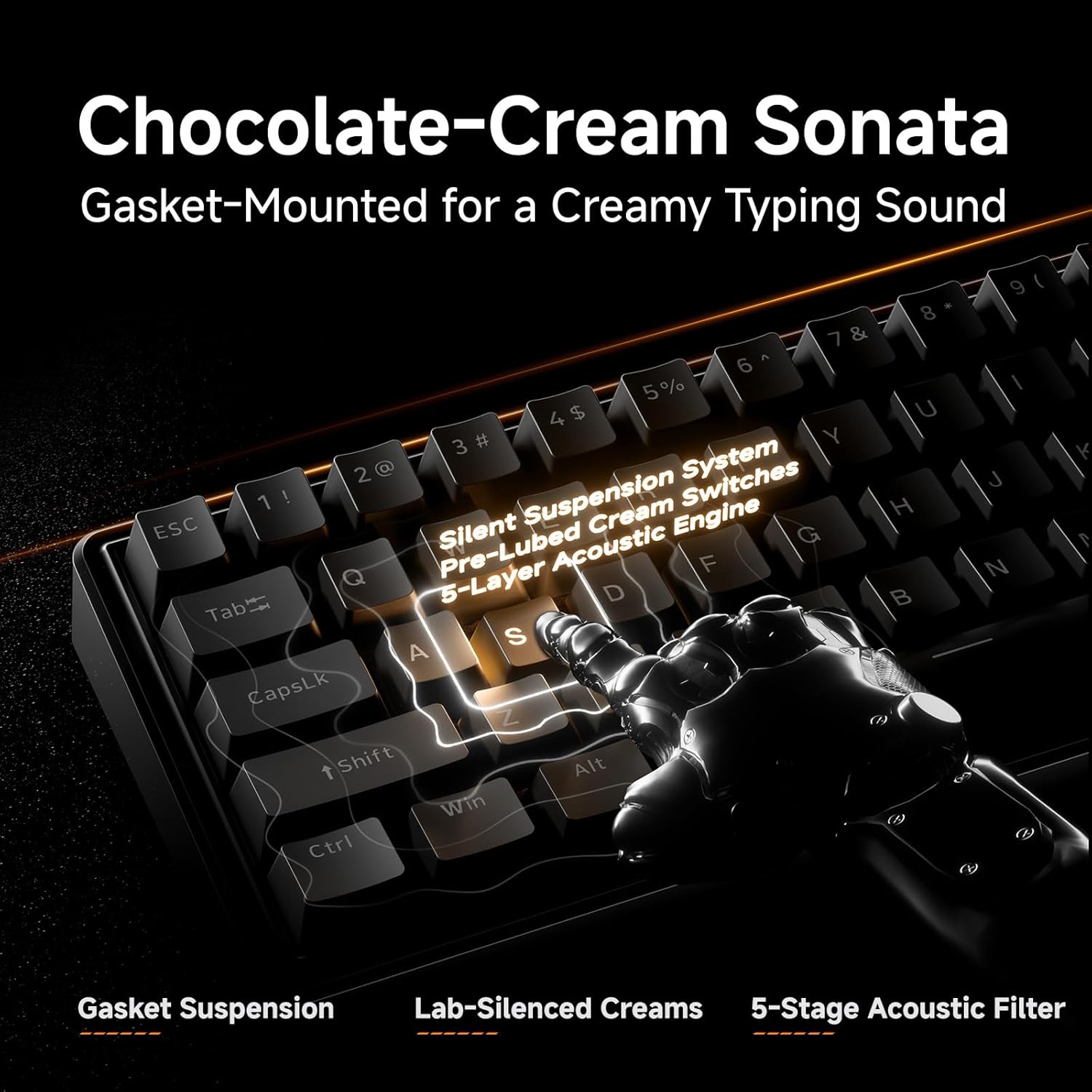
ภาพ: รายละเอียด view of the gasket-mounted design and internal dampชั้นต่างๆ

Image: Demonstration of the hot-swappable switch system.

Image: Examination of the durable double-shot keycaps.
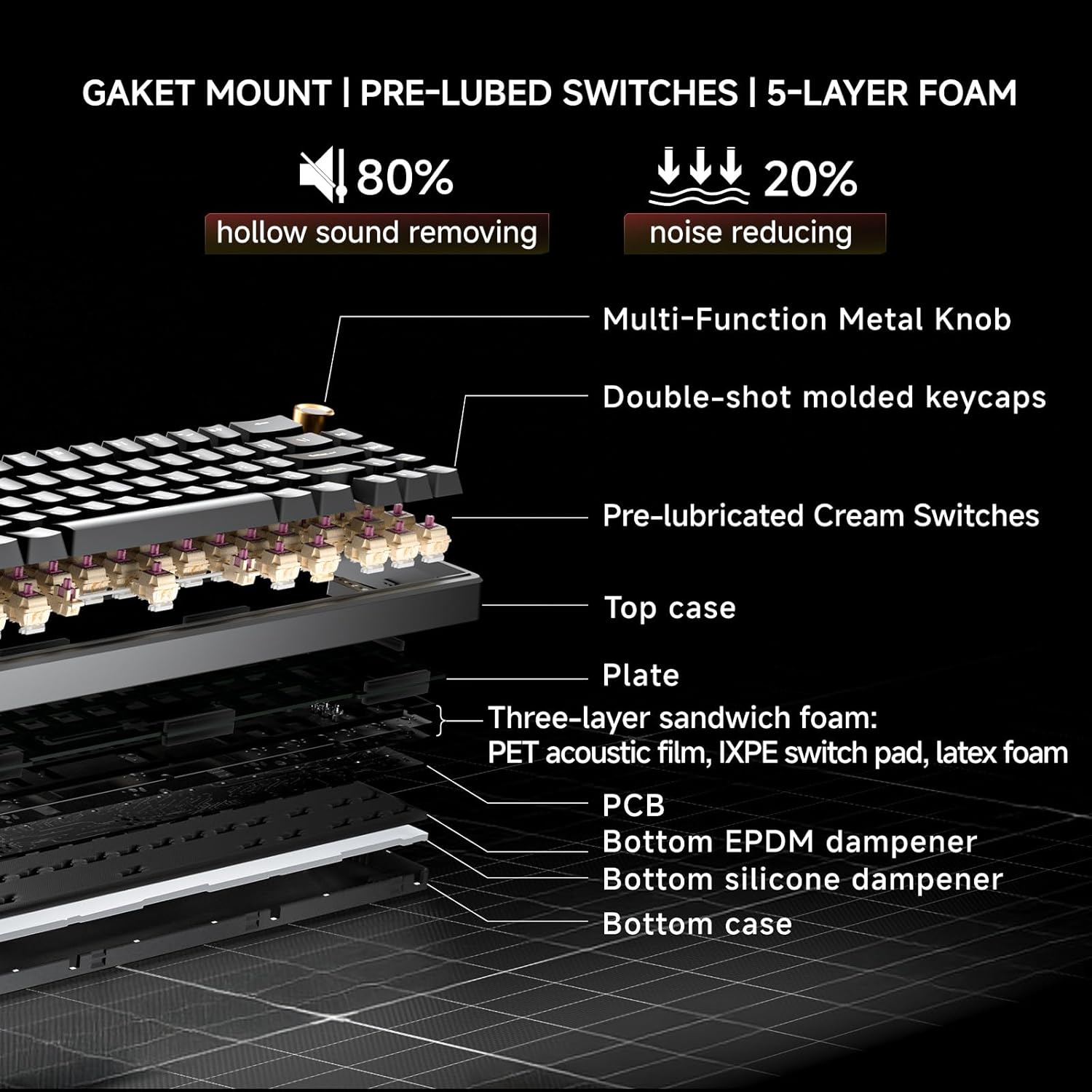
Image: Cross-section diagram detailing the gasket mount, pre-lubed switches, and 5-layer foam construction.
การซ่อมบำรุง
การทำความสะอาด
- การทำความสะอาดทั่วไป: Use a soft, dry cloth to wipe the keyboard surface. For dust between keycaps, use compressed air.
- การทำความสะอาดอย่างล้ำลึก (คีย์แคป): Use the provided keycap puller to carefully remove keycaps. Clean the keycaps with mild soap and water, then ensure they are completely dry before reattaching. Clean the exposed switch stems and plate with a brush or compressed air.
การเปลี่ยนสวิตช์ (ถอดเปลี่ยนได้ขณะทำงาน)
The DK68E's hot-swappable sockets allow for easy switch replacement without soldering.
- ถอด Keycap: Use the keycap puller to gently remove the keycap from the switch you wish to replace.
- ถอดสวิตช์: Use a switch puller (often integrated with the keycap puller) to grasp the top and bottom clips of the switch. Gently pull the switch straight up to remove it from the PCB.
- ใส่สวิตช์ใหม่: Align the pins of the new switch with the holes on the PCB. Ensure the pins are straight to avoid bending. Press the switch firmly until it clicks into place.
- ติดฝาครอบปุ่มกลับเข้าไป: วางปุ่มกดกลับเข้าไปบนแกนสวิตช์ใหม่
คำเตือน: Ensure the keyboard is unplugged before performing any maintenance involving switch or keycap removal to prevent accidental inputs or damage.
การแก้ไขปัญหา
- แป้นพิมพ์ไม่ตอบสนอง:
- ตรวจสอบให้แน่ใจว่าสาย USB เชื่อมต่อกับคีย์บอร์ดและคอมพิวเตอร์อย่างแน่นหนา
- ลองเชื่อมต่อคีย์บอร์ดกับพอร์ต USB อื่นบนคอมพิวเตอร์ของคุณ
- ทดสอบแป้นพิมพ์บนคอมพิวเตอร์เครื่องอื่นหากเป็นไปได้ เพื่อตัดปัญหาเฉพาะคอมพิวเตอร์ออกไป
- ไฟ RGB ไม่ทำงาน/แสดงผลผิดปกติ:
- Check the Fn key combinations for RGB control (e.g., brightness, mode change).
- เข้าถึง web-based driver to verify or reset RGB settings.
- คีย์ไม่ลงทะเบียนหรือพิมพ์ซ้ำ:
- For hot-swappable switches, carefully remove the keycap and then the switch. Reinsert the switch firmly to ensure proper contact with the PCB.
- ทำความสะอาดบริเวณรอบสวิตช์ที่ได้รับผลกระทบเพื่อกำจัดเศษสิ่งสกปรกออกไป
- Computer Wakes Up from Sleep When Keyboard is Connected:
- This can sometimes occur due to USB power settings. In your computer's Device Manager (Windows) or System Information (Mac), locate the USB Root Hubs or keyboard entry. In the power management tab, uncheck "Allow this device to wake the computer."
- Alternatively, unplug the keyboard's USB-C cable when putting the computer to sleep.
ข้อมูลจำเพาะ
| คุณสมบัติ | รายละเอียด |
|---|---|
| ชื่อรุ่น | ดีเค68อี |
| ยี่ห้อ | เดียร์ยา |
| คำอธิบายแป้นพิมพ์ | เกม, เครื่องกล |
| เค้าโครง | 60% (68 คีย์) |
| เทคโนโลยีการเชื่อมต่อ | Wired (USB-A, USB-C) |
| สวิตซ์ | Pre-Lubed Linear, Hot-Swappable (3-pin & 5-pin compatible) |
| รูปแบบการติดตั้ง | ปะเก็นยึด |
| Dampเอนดิ้ง | 5-Layer Sound-Dampโฟมอีนิง |
| ปุ่มกด | Double-Shot Molded |
| การแบ็คไลท์ | RGB (16.8 million colors, 20 pre-set effects) |
| ความสามารถในการตั้งโปรแกรมได้ | Web-based Driver (KeyFlow Webระบบปฏิบัติการ) |
| อัตราการสำรวจความคิดเห็น | 1000เฮิรตซ์ |
| อุปกรณ์ที่รองรับ | แล็ปท็อปพีซี |
| วัสดุ | พลาสติก |
| น้ำหนักสินค้า | 1.65 ปอนด์ |
| ขนาดแพ็คเกจ | 14.8 x 4.72 x 1.93 นิ้ว |
การรับประกันและการสนับสนุน
Warranty information for your DIERYA DK68E keyboard is typically included with your purchase documentation. Please refer to those materials for specific terms and conditions.
For further assistance, technical support, or to access the latest drivers and firmware updates, please visit the official DIERYA webคุณสามารถเยี่ยมชมเว็บไซต์หรือติดต่อฝ่ายบริการลูกค้าโดยตรงได้เช่นกัน ร้าน DIERYA บน Amazon สำหรับข้อมูลผลิตภัณฑ์และทรัพยากรสนับสนุน


