การแนะนำ
This manual provides essential information for setting up, operating, maintaining, and troubleshooting your NIMO 15.6" FHD IPS Student-Laptop-Computer. Please read this guide thoroughly to ensure optimal performance and longevity of your device.

The NIMO 15.6" FHD IPS Student-Laptop-Computer, featuring a vibrant display and sleek design.
สิ่งที่รวมอยู่
ตรวจสอบว่ามีสินค้าทั้งหมดอยู่ในบรรจุภัณฑ์:
- แล็ปท็อป Nimo N157 จำนวน 1 เครื่อง
- 1 x Type-C 65W GaN PD Fast Charger
- 1 x คู่มือผู้ใช้
- ระบบปฏิบัติการ Windows 11 Home (ติดตั้งมาแล้ว)
- รับประกัน 2 ปี, ข้อมูลการคืนสินค้า 90 วัน
คุณสมบัติหลัก
Your NIMO laptop is equipped with advanced features designed for productivity and convenience:
Vibrant FHD IPS Display
Experience stunning visuals on the 15.6" FHD IPS (1920x1080) Anti-Glare Display. With an 85% screen-to-body ratio and 16:9 aspect ratio, enjoy precise color accuracy and sharp detail for all your tasks.

The 15.6-inch FHD IPS display provides a bright and clear visual experience.
ประสิทธิภาพอันทรงพลัง
Equipped with a 13th Gen Intel N150 processor (up to 3.6GHz), 16GB DDR4 RAM, and a 512GB PCIe SSD, this laptop delivers lightning-fast performance, rapid startup times, and accelerated data transfer for seamless multitasking and storage.
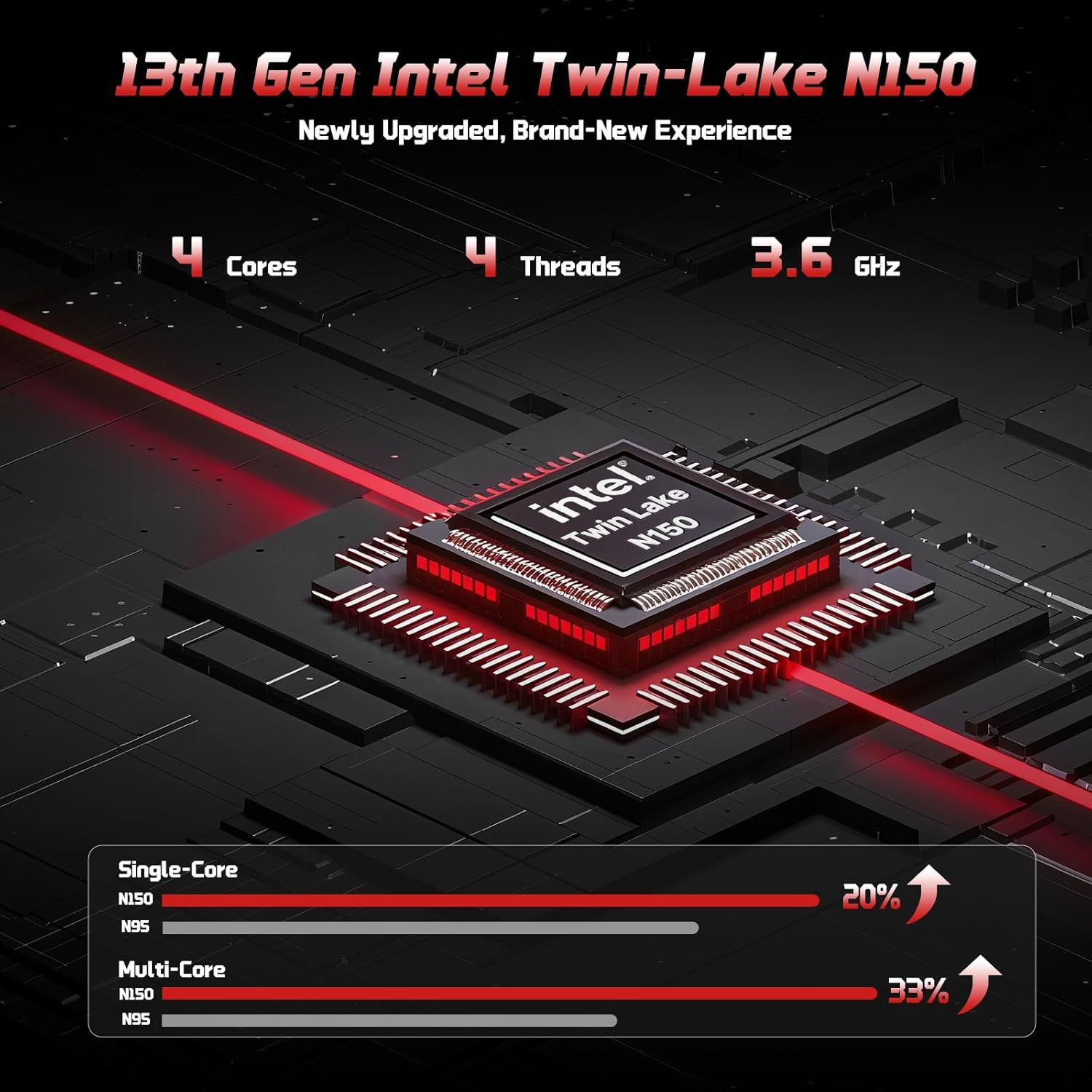
The 13th Gen Intel Twin-Lake N150 processor ensures efficient performance.

The laptop supports user-upgradable RAM and SSD for future expansion.
Fast Charging with GaN PD Charger
The included 65W GaN PD fast charger and 6.56ft USB-C to USB-C cable allow for quick power-ups. Charge for 15 minutes to get 2 hours of standby time. This versatile charger can also power your iPad, phone, and other compatible devices.

The 65W GaN PD charger provides fast and convenient charging for multiple devices.
Humanized Design & Security
Features a built-in fingerprint reader on the touchpad for secure, one-touch login. The backlit keyboard allows for easy typing in dim or dark environments, with adjustable brightness. The touchpad supports scroll and multi-touch gestures.

Secure fingerprint login and a comfortable backlit keyboard enhance usability.
การเชื่อมต่อที่ครอบคลุม
The laptop includes a variety of ports for all your peripheral needs, including USB 3.0, USB 2.0, HDMI, and multiple Type-C ports (one for PD Charge Only, one for Multifunction). It also features Wi-Fi 6 and Bluetooth 5.2 for robust wireless connections.

รายละเอียด view ของแล็ปท็อป ample ports for various connections.
ความเป็นส่วนตัว Webลูกเบี้ยว
A 720p HD camera with a physical privacy switch ensures your personal space is always secure. Easily slide the switch to cover the camera when not in use.

The physical privacy switch on the webcam provides enhanced security.
คู่มือการติดตั้ง
1. เปิดเครื่องครั้งแรก
- Unpack your NIMO laptop and all accessories.
- Connect the Type-C 65W GaN PD Fast Charger to the laptop's Type-C PD Charge Only port and plug it into a power outlet.
- เปิดฝาแล็ปท็อป แล็ปท็อปอาจเปิดเครื่องโดยอัตโนมัติ หรือคุณอาจต้องกดปุ่มเปิด/ปิดเครื่อง (ซึ่งอยู่ด้านบนขวาของแป้นพิมพ์)
- ปฏิบัติตามคำแนะนำบนหน้าจอเพื่อดำเนินการตั้งค่า Windows 11 Home ให้เสร็จสิ้น รวมถึงภาษา ภูมิภาค การเชื่อมต่อเครือข่าย และการสร้างบัญชีผู้ใช้
2. การเชื่อมต่ออุปกรณ์ต่อพ่วง
ใช้พอร์ตที่มีอยู่เพื่อเชื่อมต่ออุปกรณ์ภายนอก:
- อุปกรณ์ยูเอสบี: Connect USB drives, external keyboards, or mice to the USB 3.0 or USB 2.0 ports.
- จอแสดงผลภายนอก: Use an HDMI cable to connect to an external monitor or projector via the HDMI port.
- อุปกรณ์เสียง: Plug in headphones or external speakers into the 3.5mm headphone jack.
- การ์ด MicroSD: Insert a MicroSD card into the dedicated slot for expanded storage.
คำแนะนำการใช้งาน
การใช้คีย์บอร์ดและทัชแพด
- แป้นพิมพ์พร้อมไฟแบ็คไลท์: กด Fn+F10 (or the key with the keyboard backlight icon) to cycle through backlight brightness levels or turn it off.
- ปุ่มกดตัวเลข: The integrated numeric keypad provides convenient data entry.
- ทัชแพด: Supports standard Windows gestures, including two-finger scroll, pinch-to-zoom, and multi-finger taps for various functions.
การเข้าสู่ระบบด้วยลายนิ้วมือ
To set up fingerprint login for enhanced security:
- ไปที่การตั้งค่า Windows > บัญชี > ตัวเลือกการลงชื่อเข้าใช้
- Select "Fingerprint Recognition (Windows Hello)" and follow the on-screen prompts to register your fingerprint.
- Once registered, you can simply touch the fingerprint sensor on the touchpad to log in.
การตั้งค่าการแสดงผล
ปรับการตั้งค่าการแสดงผลให้เหมาะสมที่สุด viewการลง:
- ปณิธาน: Right-click on the desktop, select "Display settings", and choose "1920 x 1080" for the best resolution.
- ความสว่าง: ปรับความสว่างหน้าจอโดยใช้ปุ่มฟังก์ชัน (Fn + F5/F6) or through Display settings.
เสียงและวีดีโอ
- การควบคุมระดับเสียง: Use the function keys (Fn + F2/F3/F4) or the Windows volume mixer to adjust audio levels.
- Webความเป็นส่วนตัวของกล้อง: Slide the physical switch next to the webcam to cover or uncover the camera lens for privacy.
การซ่อมบำรุง
การทำความสะอาดแล็ปท็อปของคุณ
- ใช้ผ้านุ่มไม่เป็นขุยเช็ดเล็กน้อยampชุบน้ำหรือน้ำยาทำความสะอาดหน้าจอเพื่อเช็ดหน้าจอ
- สำหรับแป้นพิมพ์และตัวเครื่อง ให้ใช้ผ้านุ่มและแห้ง หลีกเลี่ยงสารเคมีรุนแรงหรือวัสดุที่มีฤทธิ์กัดกร่อน
- Periodically use compressed air to clear dust from the vents to ensure proper heat dissipation.
การดูแลแบตเตอรี่
To maximize your laptop's battery life and health:
- หลีกเลี่ยงการปล่อยแบตเตอรี่จนหมดบ่อยครั้ง
- เก็บแล็ปท็อปไว้ในที่แห้งและเย็นเมื่อไม่ได้ใช้งานเป็นเวลานาน
- Use the provided NIMO 65W GaN PD Fast Charger for optimal charging performance.

The laptop features smart battery optimization for extended lifespan and safe charging.
อัปเกรด RAM และ SSD
Your NIMO laptop supports detachable RAM and SSD, allowing for user upgrades. Consult a qualified technician or refer to detailed upgrade guides on the NIMO support website before attempting any internal component changes.
การแก้ไขปัญหาทั่วไป
If you encounter problems with your laptop, try the following solutions:
- ไม่มีไฟฟ้า: Ensure the charger is securely connected to both the laptop and a working power outlet. Try a different outlet. If the battery is completely drained, allow it to charge for at least 30 minutes before attempting to power on.
- ปัญหาการแสดงผล: หากหน้าจอว่างเปล่า ให้ลองกด Fn+F7 (or the display toggle key) to switch display outputs. Check external monitor connections if applicable.
- ประสิทธิภาพการทำงานช้า: Close unnecessary applications. Check for Windows updates. Ensure sufficient free space on the SSD. Restarting the laptop can often resolve temporary slowdowns.
- การเชื่อมต่อ Wi-Fi/บลูทูธ: Ensure Wi-Fi and Bluetooth are enabled in Windows settings. Restart your router/modem. Update network drivers if necessary.
- Keyboard/Touchpad Unresponsive: Restart the laptop. Check for driver updates in Device Manager.
If problems persist, please contact NIMO customer support for further assistance.
ข้อมูลจำเพาะทางเทคนิค
| คุณสมบัติ | ข้อมูลจำเพาะ |
|---|---|
| ยี่ห้อ | นีโม |
| ชื่อรุ่น | นิโม N157 |
| ขนาดหน้าจอ | 15.6 นิ้ว |
| ความละเอียดหน้าจอ | 1920 x 1080 พิกเซล (FHD IPS) |
| โปรเซสเซอร์ | 13th Gen Intel N150 (up to 3.6 GHz) |
| แรม | 16GB DDR4 (3200 เมกะเฮิรตซ์) |
| ฮาร์ดไดรฟ์ | 512GB PCIe SSD ความจุ |
| โคโปรเซสเซอร์กราฟิก | กราฟิกแบบรวม (Intel) |
| ระบบปฏิบัติการ | วินโดวส์ 11 โฮม |
| ประเภทไร้สาย | 802.11a/b/g/n/ac (Wi-Fi 6), บลูทูธ 5.2 |
| พอร์ต USB | 3 x USB 3.0, 1 x USB 2.0, 2 x Type-C (1 PD Charge Only, 1 Multifunction) |
| พอร์ต HDMI | ใช่ |
| อายุการใช้งานแบตเตอรี่โดยเฉลี่ย | 5 ชั่วโมง |
| น้ำหนักสินค้า | 3.8 ปอนด์ |
| ขนาดสินค้า | 14.07 x 8.98 x 0.76 นิ้ว |
| คุณสมบัติพิเศษ | Backlit Keyboard, Fingerprint Reader, HD Audio, Numeric Keypad, Privacy Webลูกเบี้ยว |
การรับประกันและการสนับสนุน
NIMO is committed to providing excellent customer service and support for your product.
การรับประกันของผู้ผลิต
Your NIMO laptop is covered by a comprehensive การรับประกันจากผู้ผลิต 2 ปี. This warranty ensures that your device is free from defects in materials and workmanship under normal use.

NIMO products are covered by a 2-year support period.
90-Day Hassle-Free Returns
NIMO offers a 90-day hassle-free return and exchange service. If you have any concerns or are not satisfied with your product within 90 days of purchase, you may return it for any reason.

You may return any NIMO product for any reason within 90 days of purchase.
การติดต่อฝ่ายสนับสนุน
Our dedicated support team is ready to assist you. If any concerns arise or you have product-related questions, you can contact us through our official website, email, or telephone. We strive to swiftly resolve issues or facilitate replacements.

Contact our professional after-sales team via phone and live chat.
NIMO Direct Inc. is a family-owned small business founded in New Castle DE. We are committed to providing affordable, high-quality, and innovative products, while also supporting US manufacturing and local employment.


